MacGyver Your Own Bulb Grip Stylus

A recent comment from LeAnn Trana asked about  the availability of a bulb grip stylus for one of her students with CP. I wondered about the same thing recently when considering adaptive stylus for individuals with mobility impairments. Although I found a variety of T – grip styluses available at http://www.etsy.com/shop/shapedad  and have used the chunky Cosmos and HHI styluses from Amazon which are good for individuals with limited grasping capabilities, I was unsuccessful with finding any bulb grip styluses available on the market. Bulb grips are great options for developing grasps and for those individuals who have tone issues.

So, how could you MacGyver a bulb grip stylus?

I start a search for possible components or devices to create a bulb grip stylus. Cheap was my biggest concern. Here is what I found and especially cheap if you need to MacGyver  a Bulb Gripped Stylus:

Components:

  • Aluminum foil tape ($6.98 from Menard’s; used for sealing ducts) Needed for capacitive connection and activation of touch with iPad/iPod/iPhone (capacitive properties uses electrical properties of human body for activating iDevices)

Tools:

  • Hack saw
  • Flat file for wood and metal

  • Scissors

Directions for assembling:

1. Cut/sawed off the paint brush tip on the bulb paint brush. File the cut edge so it is flat, straight and smooth.

2. The styluses I found have a small ridge at the end of it which makes it too big to slide into the open shaft of the bulb grip.
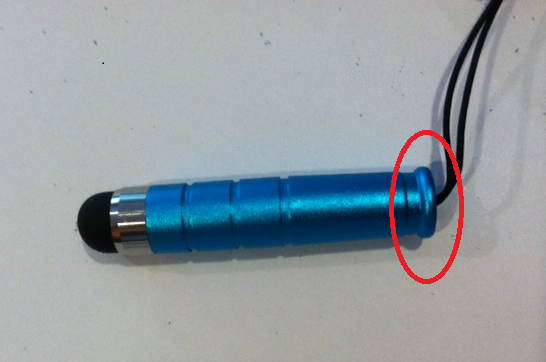
File the ridge at the end of the stylus to be the same width as the shaft of the stylus so it would fit in the shaft of the cut off bulb grip handle.
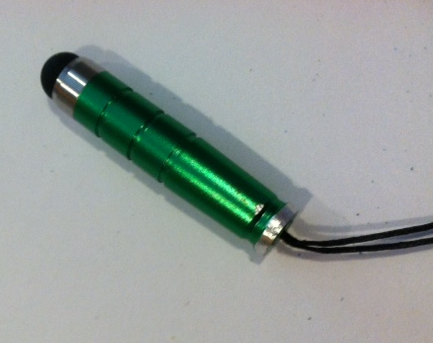
3. Inserted the stylus into the shaft of the bulb handle firmly (you could also put glue in to secure it but it does not  seem necessary).
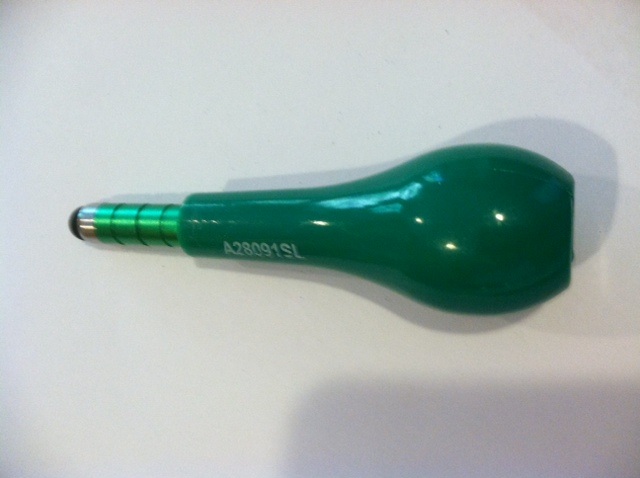
You can put tape on the handle and tuck the end of the tape into the shaft of the bulb grip before you insert the stylus as one way to connect the stylus with the aluminum foil tape and the handle.

4. Cut  3/8 – 1/2″ strips of the aluminum foil tape the length of the bulb grip handle. Keep the paper backing on for easy handling and cutting.

5. Remove the backing from the aluminum foil tape and attached it from the stylus up the handle to where the users hand would be gripping the bulb handle. There are a number of ways to attach the tape to the bulb handle. Just make sure your tape goes from the stylus to where the user will be holding the handle for the electrical connection to activate the capacitive iPad/iPod/iPhone – or the stylus won’t work! Here are a few pictures of the finished bulb grip stylus:
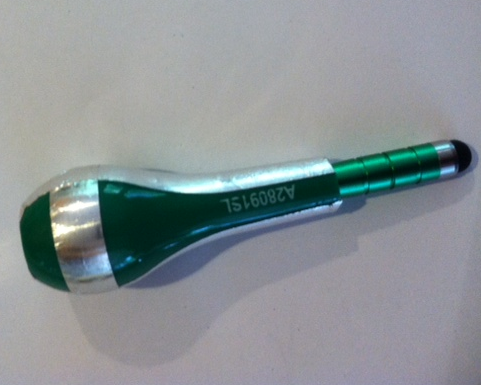
Your stylus is ready to use. You will find that when you are not touching the aluminum tape on the stylus will not activate your screen. Create whatever application of the aluminum tape from the stylus to the bulb handle you need or want to create the connection of where the user will be holding the stylus for connection to be made. I found if I smoothed the wrinkles of the tape out on the stylus it removed some of the sharp edges created by the foil tape.

After purchasing all the components and using equipment already owned. The cost each of these styluses were probably under $3.00. Maybe not exactly cosmetically ready for mass production (anyone know where to get ahold of aluminum handles??). But it works and looks tolerable.

If you know of any commercially made bulb grip styluses sold, please leave a comment. I think there would be more than LeAnn or myself interested!!

Carol
Posted in Accessories, iPad, iPhone, iPod, iPod/iPad Accessory, Mobility Impairment, Stylus | Tagged , , , , , , | 10 Comments

Ready to Print Update

Ready to Print app, a (iPad, 9.99) pre-writing app created by Diane Reid OTR,  has been upgraded to include lower case letters (Zaner Bloser style of letter formation). Features of the app, as described on the Ready to Print website,  make it great tool for all children learning to print or working on pre-writing skills:

  • It provides activities for pre-writing skills, not just tracing letters.
  • It’s designed with a progression of skills that work towards correct printing patterns.
  • It allows you to change size settings to match each child’s skill level.
  • It features a progression from larger hand movements to smaller, more refined movements.
  • It lets you choose which activity and level to begin on.
  • It allows setting up multiple user profiles, each with different settings.
  • It provides (optional) feedback measurements for speed and accuracy.

For more information about the app also visit the Ready to Print Website.

If you work with young children Ready to Print is a great addition to your OT iTool Kit.

Carol

Posted in App Reviews, Apps for OT's, Apps for Special Needs, AT for Handwriting, iPad, Occupational Therapy, Pre-writing | Tagged , , , , , | 2 Comments

“Text Neck” Syndrome and Mobile Device Use – Basic Ergonomic Tips #2

What is “Text Neck” Syndrome? 

Do you frequently use a handheld mobile device (smart phone, iPad, Android tablet) for emails/texting/Internet searching/gaming? Do you have symptoms of tightness across your shoulders, chronic head aches or soreness in your neck?

A syndrome called “Text Neck” coined by U.S. Chiropractor Dr. Dean L. Fishman, may be causing you to experience an overuse syndrome or a repetitive stress injury, where you have your head hung forward and down looking at your mobile electronic device for extended periods of time according to the article “Could you have Text Neck Syndrome“.

The article states ” if left untreated, a ‘text neck’ can lead to the inflammation of the neck muscles, ligaments and nerves, permanent arthritic damage, as well as increased curvature in the spine. Dr. Tan adds: “This is very prevalent in our new generation of young adults who are constantly “connected” to their mobile devices, even while walking.” (retrieved on 5/26/2012 fromhttp://sg.news.yahoo.com/blogs/fit-to-post-health/could-text-neck-syndrome-025025469.html )

Joe Conway, PT,  in his article entitled “Text Neck Syndrome”  also addresses this syndrome’s origins, symptoms and basic suggestions –  balancing use with physical activities away from computing devices.

With the pervasive availability and  use of handheld devices, what can you do to combat or avoid Text Neck Syndrome?

Using basic ergonomic principles that are tried and true for both young and old will help you avoid or reduce the possibilities of “Text Neck” Syndrome. Here are a few of those basic ergonomic principles:

  • Reduce awkward positioning (don’t crane your neck, be aware of good ergonomic positioning of your body in relation to the device)
  • Take frequent breaks when using any kind of computing device (desktop or handheld)
  • Be aware of lighting in your environment
  • Create a balance of computer (mobile or desktop) use and physical activity (away from the computer)

Here is a  great video that reviews basic ergonomic solutions that can be applied to mobile computing. Note the suggestions of balancing time, positioning and activities that are basic principles of ergonomics:

The video remind us of the practical solutions of doing things in moderation, using good body dynamics and positioning when approaching any type of task. Our body is not meant to stay in one position for a long time. It is meant to move. Balance and moderation is key in all that you do. If you have persistent pains and headaches make sure you seek medical help.

What other tools might help you with positioning and balancing time spent using mobile devices?

Timer apps

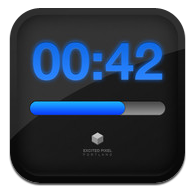
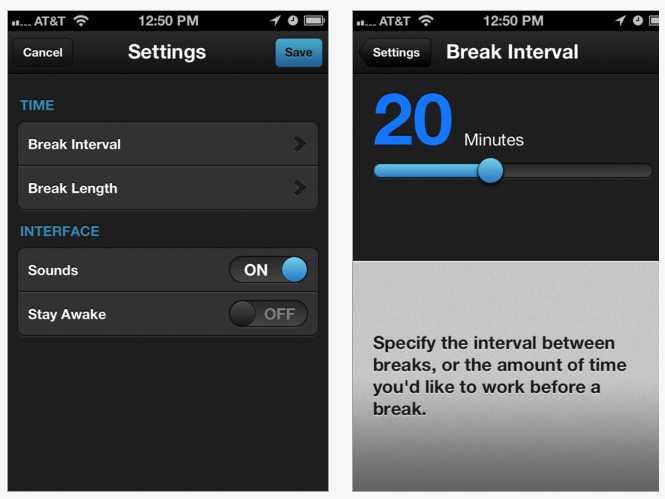
Use a timer app such as BreakTime app (2.99 for iPad and iPhone)to schedule reminders to take a short break or when it is time to change to another activity. We all know how addictive a game or time searching in cyberspace can be!

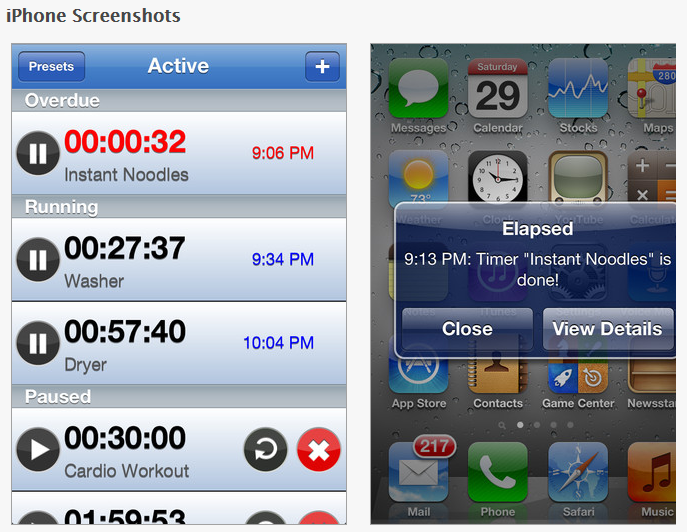
Elapsed Timer is a free timer that can set multiple alarms on iPhone/iPad.

Using timers with students also helps them anticipate that screen time is over. Here are some great choices of visual timer apps for iPad, iPod or iPhone:

Kiddie Countdown Timer – Suited to younger students, the Kiddie Countdown Timer has options of using stop sign like visuals in its timer. Available as a free app and also $.99 to remove the ads. This was previously reviewed –  a great find by my colleague, Gail (thank you!).

Time Timer – This app is the electronic version of the 3″ and 8″ Time Timers compatible with iPad, iPhone and iPod Touch (1.99). It has three modes of timers – 60 minute, custom and a clock mode.  Time timer also provides settings to allow it to be audible, visual or vibrate (on the iPhone).

This is another great timer with many features.

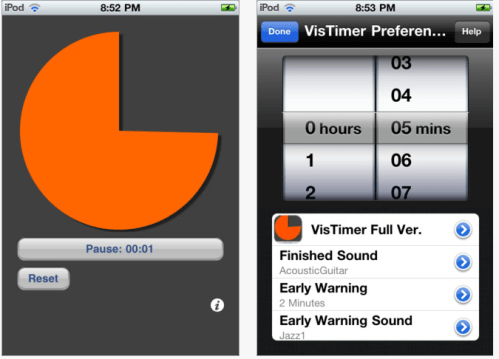
VisTimer – Available  free and for purchase (1.99) for iPod, iPhone and iPad this timer does not have as choices of timers but does allow choices of colors for the clock, different sounds for warning and completion and features lapsing time. Limitations with the free version is it can only time up to 5 minutes and lowest warning time is at 1 minute. I work with older students and this free clock works well for my current purposes. We have many Time Timer clocks that are also readily available for use if a longer period of time is needed.

Waitstrip – A different, linear concept of a visual timer is the Waitstrip app. Available for iPod, iPad and iPhone for $.99, it features a concrete visual representation of time, amount of steps to be completed, number of minutes to work, math problems to be completed using a series of dots as a visual guide.

Stands or Positioning Devices:

Devices for positioning mobile devices are numerous however achieving the recommended 15-20° of neck flexion when using an iPad can be tricky depending on whether you are sitting at a table or desk or sitting in a chair. Here are just a few positioning devices I found that could help with iPad positioning for older children and adults when working at a desk or sitting in a living room chair:

Lap Stand:

Rain Design Irest Stand for Ipad Hands Free Stand for Lap Couch – The iRest lap stand provides soft foam cushions and hinges to get that perfect viewing angle.  Remove the cushions and the iRest converts to a desktop stand.

Table top stands:

Joby Gorillamobile Ori for iPad (GM12-01AM) Multipositional Protective Lightweight Aluminum Case Silver

Satechi R1 Arm Hinge Holder Stand for iPad, iPad 2, ASUS Eee Pad Transformer, Motorola Xoom, Samsung Galaxy Tab, Galaxy 10.1, ViewSonic gTablet, BlackBerry Playbook, HTC Flyer

Here are some positioning solutions when working with children/students:

Arkon Portable Fold-Up Stand for Apple iPad, Galaxy Tab, BlackBerry Play Book
– Foldable stand for tablets.

Griffin A-Frame Tabletop Stand for iPad – Another folding, portable stand.Easels already available in your OT department also work great for positioning your iDevice.

For more information on ergonomic positioning and iPad use visit Ergonomics and iPad #1 .

More tools for your OT iTool Kit.

Carol

Posted in Accessibility, Accessories, App Reviews, Apps for OT's, Ergonomics, iPad, iPhone, iPod, iPod/iPad Accessory, Occupational Therapy | Tagged , , , , , , , , | 3 Comments

Sensory Apps

Are you familiar with the Autism Apps App –  a comprehensive list of apps used with and by people diagnosed with autism or other special needs?

Autism Apps is a free app with over 30 categories of curated apps providing information and links to reviews, videos and purchase of them. One of the categories listed in the Autism App is “Sensory”, providing suggestions of apps with visuals and auditory effects. Some of our favorite sensory apps our students have been used for a while that are listed are:

Here are new apps, unfamiliar to me that are listed in the “Sensory” category in the Autism App:

Falling Stars – This free iPad/iPhone app (created by Trident Gum) provides interesting visual and sound effects that are manipulated by the user. It has numerous choices and dynamics that may required a bit of problem solving by the use to achieve what might be interesting or pleasant sound and visual effects. Here are some clips of the app and a video demonstration to help understand the dynamics of the app:

 Dropophone app –  This free iPhone/iPad app creates minimalist melodies. Based on Lullatone’s album “Little Songs About Raindrops,” Dropophone allows you to make songs that sound like drips and drops falling on a tiny orchestra of instruments. Pressing the multi-colored raindrops triggers notes that loop every six seconds. Combine different colored drops and notes to compose your own rainy-day melodic backdrops. A metronome is also included to help you keep time.

These two reviewed sensory apps  require a more problem solving and manipulation than some of the other apps initially listed, but are some interesting additions for students needing variety in their choices of sensory apps.

Other sensory apps our students frquently use are:

I especially see students using Fluid app which provides sound of water and the visual of water running over stone. Simple but it provides some sensory effect that is appealing to them!

Sensory apps for your OT iTool Kit!

Carol

Posted in App Reviews, Apps for OT's, Apps for Special Needs, iPad, iPhone, iPod, Occupational Therapy, Sensory Apps, Sensory Apps for ASD, Special education, Special Needs | Tagged , , , , , , , | Leave a comment

Ergonomics and iPad Use #1

As iPad use expands for students and staff the need for accessories and equipment to support their use emerge. One of the areas needing rethinking with their expanded use is positioning and equipment to make them more efficient and safely used. Ergonomics needs to be considered with the increased time and use of iPads for intervention, creating curriculum activities, or for communication and administrative tasks.

Greg Cresswell, CPE from HumanTech  states in his post on Ergonomics and iPad Neck,  “The most popular musculoskeletal disorder showing up in the news these days is iPad neck. It is characterized by prolonged usage of tablet computers, which results in sustained, awkward neck postures that lead to pain.”

So what do we need to think about with the increased use of the iPad?  We need to consider ergonomic principles to avoid neck and shoulder pain or other physical challenges associated with poor positioning and over use. As an OT who has worked with adult clients and office ergonomics, these principles are familiar (for OT’s I am preaching to the choir, sorry!), but for those unfamiliar here is some basic info on office ergonomics applicable to the use of iPads:

Ergonomics is the study of designing equipment and devices that fit the human body, its movements, and its cognitive abilities. Ergonomics is employed to fulfill the two goals of health and productivity. It is relevant in the design of such things as safe furniture and easy-to-use interfaces to machines and equipment. Proper ergonomic design is necessary to prevent repetitive strain injuries, which can develop over time and can lead to long-term disability. Retrieved on 5/20/12 from http://en.wikipedia.org/wiki/Ergonomics.

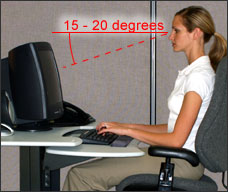
Currently most desktop computers we use have a 17-21″ monitor that stands upright on a stand that we view with (hopefully) our head in neutral position – as OT’s we know that is a balance of neck flexion and extension, or not having to bend our neck/head down or up too much. Here is a graphic of what good ergonomics look like when sitting at a desktop computer (retrieved on 5/20/12 from http://www.osha.gov/SLTC/etools/computerworkstations/positions.html ):

Placement of the monitor is recommended to be 15-20° below eye level as seen below:

Now, consider what your positioning is when you are using an iPad at a desk or holding it on our lap? I doubt that your body positioning is aligned like the person in the pictures above! Similar to positioning of laptop computers on a desk or your lap depending the size and height of the desk or laptop, positioning of iPad’s or other tablets (which are often even smaller than most laptops) is known to promote poor ergonomic positioning  resulting in musculoskeletal pains and strains with awkward positioning and prolonged use.

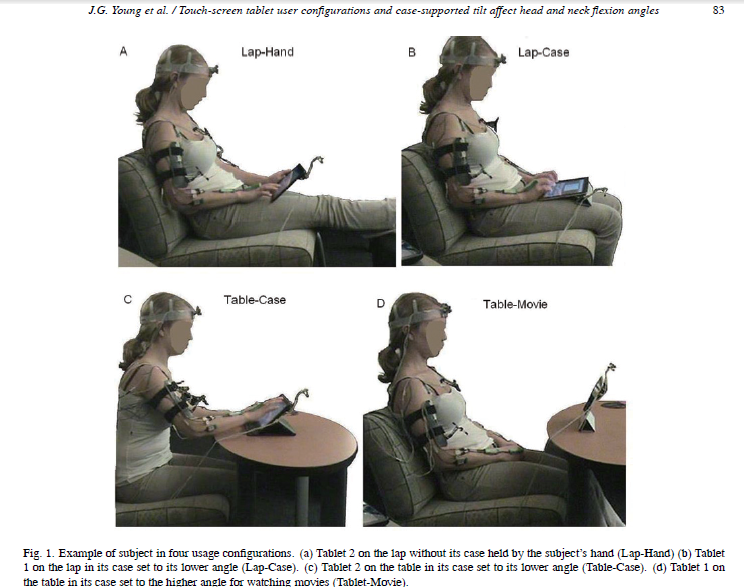
A study of mobile device use and ergonomic positioning  was performed by Microsoft Corporation and the Department of Health to determine how neck and head positioning varies when using two different mobile tablets and using them in different positions. Here are some pictures of the positions used in the study, which are quite typical when using the iPad.

Picture retrieved on 5/20/12 from http://iospress.metapress.com/content/x668002xv6211041/fulltext.pdf

Consider how different the above positions with mobile device use are from the recommended ergonomic positioning with computer usage shown in the first two pictures. Poor ergonomics!

Results of the study indicated that neck positioning when using mobile tablets put individuals at a at a greater risk for neck and shoulder discomfort that other computer forms. Positioning the tablets in an upright position improved the neck positioning but then compromised the positioning of their hands and arms due to its upright positioning. Recommendations were made to elevate the devices for better viewing angles however elevated screen positioning can have detrimental effects on individual’s hands when inputting information into the mobile device positioned upright.

So what are some ergonomic solutions?

  1. If you are using the iPad for several hours a day, consider a case with an easel or better yet a stand to position it upright to maintain your head/neck position in a neutral position. You may need to put the stand on something, a previously used computer monitor stand, books stacked or something to raise it so that your head position is like the person in the first picture.
  2. If you are word processing for extended periods, consider using a keyboard to help keep your hands in an appropriate position while maintaining the device in an upright position.
  3. A standard ergonomic recommendation is to move every 20-30 minutes. Your body is not built to stay working in one position for a prolonged time.  Take a quick mini break to shift your posture, do a work task away from your desk every 20 to 30 minutes so your body can move while being productive (get your mail, make a copy, deliver something, – no it does not mean take a coffee break).
  4. Look away from your screen every 20 minutes, look 20 feet away for 20 seconds. This is the 20-20-20 rule of ergonomics for your eyes, they need to move too and take a mini break! Consciously remembering to blinking your eyes also is also important. Working at the computer can contribute to dry eyes due to lack of blinking.
  5. When using a keyboard keep your arms to the side and elbow flexed/bent about 90°. Don’t reach forward to the keyboard, bring the keyboard toward your hands and arms.
  6. Sit in a comfortable upright position with hips approximately at 90° and feet on the floor.

There are many keyboards and stands that can be used with the iPad to assist with ergonomic positioning. Here are a few that I recommend:

Joby Gorillamobile Ori for iPad (GM12-01AM) Multipositional Protective Lightweight Aluminum Case Silver

Satechi R1 Arm Hinge Holder Stand for iPad, iPad 2, ASUS Eee Pad Transformer, Motorola Xoom, Samsung Galaxy Tab, Galaxy 10.1, ViewSonic gTablet, BlackBerry Playbook, HTC Flyer

Apple Wireless Keyboard MC184LL/B [NEWEST VERSION]

Logitech Tablet Keyboard for Android 3.0+ (920-003390)

So what about use of iPads by our students?

These same principles need to be applied to students using the iPad for prolonged periods of time (under the age of 8 they shouldn’t be using it more more than 2 hours as recommended by the AAP).  Although childrens bodies are flexible, teaching healthy habits of positioning and appropriate use early may save them pain and discomfort in years ahead. I don’t expect mobile technology use will decrease, so sooner than later would be wise!

Watch for more on Ergonomics and iPad Use!

References:
OSHA and Ergonomics –http://www.osha.gov/SLTC/etools/computerworkstations/positions.html
Mobile Device Study –http://iospress.metapress.com/content/x668002xv6211041/fulltext.pdf
iPad Ergonomics –
http://www.gottabemobile.com/2012/01/26/eveything-you-need-to-know-about-ipad-ergonomics/
iPad Neck – http://www.humantech.com/blog/ergonomics-and-ipad-neck/

Carol

Posted in Accessories, Ergonomics, iPad, iPad Management, iPod/iPad Accessory, Keyboard, Occupational Therapy | Tagged , , , , | 7 Comments

OT iTool Kit App List

OT iTool Kit App List 5-20-2012

Above is a categorized list of OT iTool Kit apps reviewed on OT’s with Apps. The categorized list provides active links to the iTunes App Store of app previously reviewed along with other iOS and Android apps that might be useful to OT’s, teachers or parents. Periodic updating is intended.

Carol

Posted in Adults with LD, App Reviews, Apps for OT's, Apps for Special Needs, Early Childhood, Elementary School, High School, iPad, iPhone, iPod, Middle School, Occupational Therapy, Post secondary | Tagged , , , , , , , | 4 Comments

This is a reposting of Sarah DeBellis’ post, Schools A to Z – the Essential Homework App. Although some of the features of this app might be geared to Aussie’s such as the references in the Assignments category, this can be a good reference app for students, parents or therapists. Enjoy Sarah’s review and this free app to help you reference terms and methods of math when you work with your students.

As an OT at school when working in the classroom with students I am often reaching for reference books such as Writers Express to figure out what a comparative adverb or adjective or other language terms. Although I still will continue to model where and how to find resources for students in the classroom, this app provides access to that information when those resources are not available or when students can’t read that information. Using the accessibility “speak” tool on my iPhone, allows the definitions read out loud to those students with a print disability. Modeling the “speak” feature on an iPod or iPad empowers students to access print independently. They certainly may still need some assistance with using that information, but initiating use of tools and resources shows self-determination – an apptitude our struggling students really need to be successful!

Carol

Sarah DeBellis's avatarOn Sarah's iPad

I have been remiss in not reviewing this  App earlier as it is a must for parents of school-aged children.  It has been on my iPad for some time now, and it has been in my “going to get to ” list, however I’ve dipped into it a lot lately, so I really need to share it with you.  School A to Z is a free App from the NSW Department of Education and Communities.  Their School A to Z website aims to:

create an online community with comprehensive homework and ‘school life’ support for parents that is easy to use, relevant and engaging.”

The school A to Z App gives parents access to some of the content on the site and will be a welcome resource for any family of school-aged children.

View original post 725 more words

Posted in App Reviews, Apps for OT's, Apps for Special Needs, iPad, iPhone, iPod, Learning Disability, Middle School, Reference, Special education | Tagged , , , , , , | Leave a comment

iLuv Drawing People App

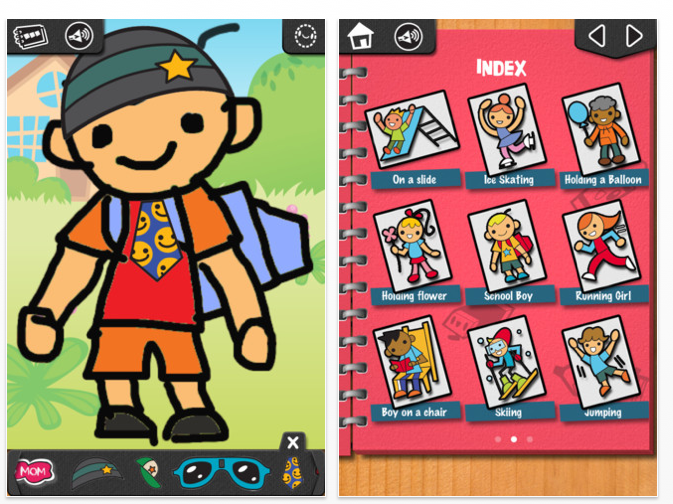
 iLuv Drawing People App is one of the three iLuv Drawing apps by Learn with Fun Apps. Free and available for iPhone and iPad, iLuv Drawing People app provides step by step drawing of people for individuals aged 4+ years. Twenty drawing are available to draw and add accessories when you are finished.

Here is a video of the app:

When done you can save your production to your photo album or  or drawing book.

Another great visual motor app for primary aged students for your OT iTool Kit!

Carol

Posted in App Reviews, Apps for OT's, Apps for Special Needs, Drawing, iPad, iPhone, iPod, Occupational Therapy, Visual Motor | Tagged , , , , , | 1 Comment

Visual Figure Ground (I Spy) Apps for Your Students

A request from one of the teachers I work with for “I Spy” apps started the search for such apps with hidden pictures. As an OT I would categorized these apps as visual figure – ground apps requiring users to find hidden objects among others in pictures or backgrounds with competing visual information. Some students enjoy these apps and then there are those that stay away from them due to challenges with attention or visual perceptual challenges causing difficulty visually locating items in situations where there is a lot of visual information. Having available activities or pictures that are graded from easy to hard is important to provide to those that struggle so they can find success and work on strategies and skills to develop those skills.

I spy apps require individuals to have good visual scanning abilities, focused attention and persistence, visual memory, visual discrimination, visual matching and the ability to separate foreground from background information. These are tasks that I would believe in limited duration would be great on an iPad.

Here are a few different preschool to elementary visual figure ground/ “I Spy” apps that may provide a range of activities to use with your students:

Little Finder – A free Grasshopper app compatible with iPhone and iPad, (previously reviewed) works on basic visual discrimination skills at a level for kids and parents. Clue are provided in visual images and by audio. Like all other Grasshopper apps it is customizable. Don’t you just love those developers over at Innovative Mobile Apps? They produce great apps!

Little Things – Compatible with iPad/iPhone ( 2.99) presents objects within pictures to search and find. The full version provides 99 jigsaw puzzle to solve and thousands of items.

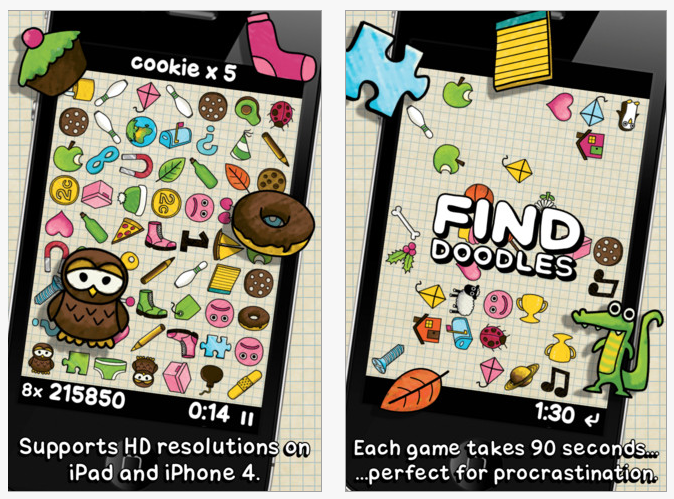
Doodle Find Lite – This is a competitive game app that only provides word cues for the items you are to find. It provides you with lapsing time to find the items and warns you when the game is about to end. Compatible with iPhone/iPad (free/1.99) this is a difficult app for non-readers and children who become anxious or upset if they are unable to finish a task.  Definitely is for higher functioning students who can read and handle a lapsing time. It does provide cues visually if there is a delay with your responses which is helpful.

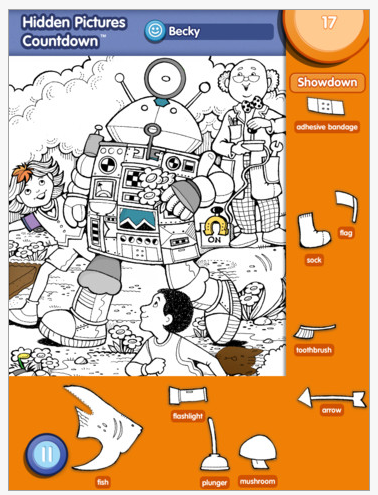
Highlights Apps – Remember the Highlight Magazine’s hidden picture search? Of course there is an app – Hidden Pictures Countdown for iPad only. It provides two free pictures with add in purchases of 1.99 for additional packs of pictures. This is just like the pictures that I did on hard copy when I was a kid however there are levels  more difficult pictures provided in the app. In this Hidden Pictures Countdown no clues are given. Here’s what the electronic iPad version looks like:

Bring back memories? There are other Highlights games out there but which are memory or puzzle like tasks more than visual figure ground tasks. Another developer also had a hidden picture app but the quality of the black and white graphics seemed to be blurry and I had some visual challenges with it. In the Hidden picture app by Highlights it did not allow zooming in and out which would be nice to help with the visual search, but not if it compromised the quality of the print.

Another cheap options is to head over to Highlightsteachers.com where they have a list of downloadable Hidden Picture Puzzles worksheets available for printing. Choose a worksheet and click on the link so it opens completely as a PDF file. When the worksheet is completely open go to the top right of the page and  click the link “Click on this link to print in black and white“.

The PDF came up on my iPad ready to print without the Preview watermark. Instead of printing do a screen shot on your iPad (remember Home + Power button – you will hear a click) and the picture will be added to your Photos. You will be able to use the photo in another app such as Doodle Buddy, Skitch or another drawing app that allows importing pictures (there are many!) for you and your student to work on. Use the provided drawing tools to circle the found pictures. A stylus and your iPad in an easeled position will help with accuracy (if fingers make it difficult) and positioning when working on the iPad.

Try them out. If you have experience with other visual figure ground apps please make a comment to share your preferences and experience. It helps us all!

More for your OT iTool Kit!

Carol

Posted in Activity Worksheets on Your iPad, App Reviews, Apps for OT's, Apps for Special Needs, Early Childhood, iPad, iPhone, iPod, Occupational Therapy, Special education, Special Needs, Visual Figure Ground, Visual Perception | Tagged , , , , , , , , | 5 Comments

Differentiation in the Classroom – Using an iPod Touch with Voice Recording Apps

Presenting information individually in front of the class is often a requirement of class assignments for elementary through high school students. Some of our special needs students struggle with this task, whether due to difficulty with reading, recalling, speech challenges or extreme shyness when standing before their peers. What method of differentiation can be considered for these students when required to individually present?

The Tool: Use of an Apple iPod touch 8GB (4th Generation) – Black – Current Version to record the presentation for playback to the class when presenting on an individual basis.

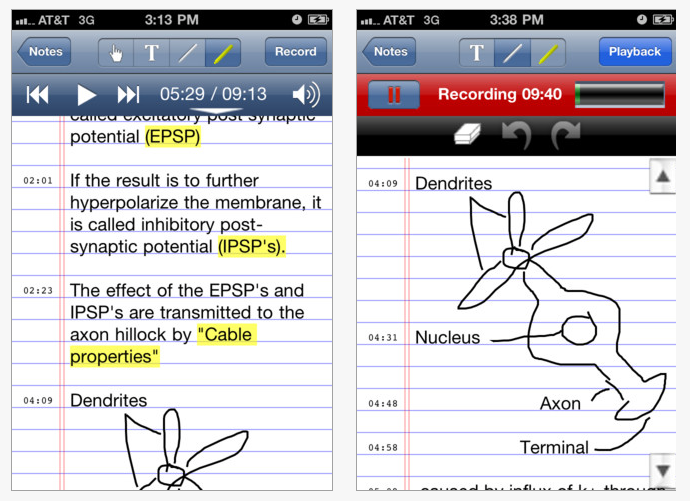
The App: Although a Voice Memo app is built into the iPod Touch which is very functional as a voice recorder, we chose AudioNote Lite  (free for iPod/iPhone and iPad and Android; full iDevice version 4.99) as an easy to use app that has a bit more flexibility with recording, playback and has a note taking tool also available within the app. Easy controls for the teacher and for the students was extremely important to get this easily done by the student.

Controls of the app are easy. It is easy to record, add to the recorded note even after closing it, simple to play back and also easy to rename a note for the student to identify which note to play (rather than dates and numbers which I find difficult to navigate and recall). Recording small chunks of information, adding on to a recording and reviewing small recordings allows students who struggle with producing content to compose by short chunks of information. Although editing is limited, recording by small chunks of info allow deleting and starting again without losing the entire recorded session. The lite version of AudioNote provides up to 10 minutes of recording in one session with a total of 2 hours recording, more than adequate for most of our student presentations.

Here are some clips of the iPod version of AudioNote Lite :

With minimal instruction the student with help of the paraprofessional was able to record and edit their presentation using AudioNote Lite in preparation of the required assignment. Practice with the device for playback was performed by the student(s) to ready them for presentation to the class.

Other Needs:

1. Speakers: Volume of the voice memos was limited on the iPod Touch for projecting to a whole classroom, resulting in the need for amplification for the presentation. Portable speakers that could be easily managed by the students were trialed for use with the presentation. Here is an inexpensive portable speaker successfully used with the presentation and some other choices found available:

The X-Mini II Capsule Speaker (Black) ($21.00) was available for use, providing adequate volume to the classroom when volume of the iPod and Mini X was increased. No batteries, requires charging with USB cord to your computer. Available in different colors.

The student(s) were able to handle the controls of the iPod Touch and offer adequate sound with a small inconspicuous speaker to present their assignment in front of the class.

Other inexpensive portable speakers I have found that are similar and cheap:

ECOMGEAR(TM) Mini Portable Hamburg Audio Speaker Portable Rechargeable Speaker For For MP3 MP4 Player iPhone 4S – A similar small, portable speaker for under $15.00. Available in different colors, charges with USB cord to your computer.
Grandmax Teeny Tweakers Portable Mini Boom Speakers for iPod / Mp3 Players & Laptops (Black) Under $15, this speaker provides good volume to project in a classroom with an iPod Touch. No sound control on the unit but does amplify sound from iPod Touch for projection in a room. Also available in different colors. Charges using USB cord to your computer.

(I actually found the above speaker yesterday at a local Staples store scouring the electronics on sale – was under $6- a bargain! I decided to trial it and found it to have ample sound projection from my iPod Touch/iPhone for presenting in a classroom! Lucky find!).

2. Microphone: Use of a microphone for improved recording quality. We used available  Apple Earphones with Remote and Mic (NEWEST VERSION)[Retail Packaging] ($25)
which worked well to improve the recording quality.

We were fortunate to have a few of these ear bud microphones available. They are a bit expensive but can be used with all other iDevices for better quality recording. I am cautious about ordering cheap knock off due to prior experience with a cheap set that did not work well. Research on recommended microphones for tasks on the iPod/iPhone/iPad often suggest using these. They did make a difference to the quality of the recording and presentation making it worth using or purchasing if needed.

This was a successful method of differentiating and supporting students when classroom requirements include presenting individually to the class. Would there be other differentiated methods of presenting? Of course, but this has been a practiced skill to the students and paraprofessional that was doable, resulting in the student independently presenting their work to the class with a “cool” device already available.

Although you may not be involved with such projects with your students you may be the go to person for how to modify assignments or presentation methods for your special needs students. Many OT’s also wear an AT hat and are consulted for solutions such as this or may have such equipment to borrow for single assignments. I am always happy staff asks about possible tools, equipment or methods as it widens the opening of the inclusionary doors to classroom participation and success for our students!

More ideas for differentiation or access for your students with special needs – would this be in your OT iTool Kit?

Carol

Posted in App Reviews, Apps for OT's, Apps for Special Needs, Differentiation, High School, iPad, iPhone, iPod, iPod/iPad Accessory, Middle School, Note Taking App, Presentation Tools, Special education, Special Needs, Voice Recorder | Tagged , , , , , , , , , | 1 Comment