Dear Otto: Are there any Good Keyboarding Apps?

Scooped from Ask A Teacher.com  

Dear Otto is an occasional column where I answer questions I get from readers about teaching tech. If you have a question, please complete the form below and I’ll answer it here. For your privacy, …

Carol Leynse Harpold‘s insight:

Jacqui Murray, of Dear Otto, provides some suggestions for iPad keyboarding programs. She also provides some info about students keyboarding rate on iPads versus standard keyboards. Interesting how what we thought we knew continues to change as the technology does.

Carol

As Scooped on http://www.scoop.it/t/ot-mtool-kit


Posted in iPad, Keyboarding | 2 Comments

It’s April – National OT Month!

OT month pic It’s April and time to celebrate National Occupational Therapy Month!

To celebrate Occupational Therapy Month, here is a curated list of free or reduced apps that might be a worth considering for your OT mTool Kit (taking advantage of the apps offered from other current events – for a limited time!):

Timer+ Touch iconTimer+ Touch app (free, regularly 1.99 – reportedly not free in UK ) for iPhone/iPad – Visual timer with hours, minute, second colors. Runs in the background when working with other apps. Great therapy tool.

Choiceworks Calendar iconChoiceworks Calendar for iPad (.99 regularly 4.99) provides visual/ picture schedule and calendar features. Speaks calendar, set timer,  set recurring reminders and more with the visual and audio features.

Choiceworks iconChoiceworks for iPhone/iPad (2.99, regularly 6.99) provides visual schedule tools, timer and view options to support individual needing visual supports.


Bug Games iconBug Games for iPad – (.99 regularly 1.99) provides letter recognition, dot to dot and visual motor activities for preschool to early primary grades.


Busy Shapes iconBusy Shapes – a Game Center game for iPhone/iPad (1.99, regularly 2.99) provides visual discrimination activities for kids and appropriately presented for adults also.

Slide and Spin icon first appsSlide and Spin  for iPhone/iPad (free, regularly .99) from My First Apps. Provides activities to develop turning, sliding, spinning and pushing buttons.


ASD Tools icon ASD Tool for iPhone/iPad (free, regularly 1.99) provides basic visual schedule with steps or first then options, timer and reward system.


More for your OT mTool Kit!

Carol


Posted in Occupational Therapy, Visual Supports | Tagged , , , , , | 5 Comments

Mod Math App – Free Math Worksheet App

Mod Math icon

ModMath App

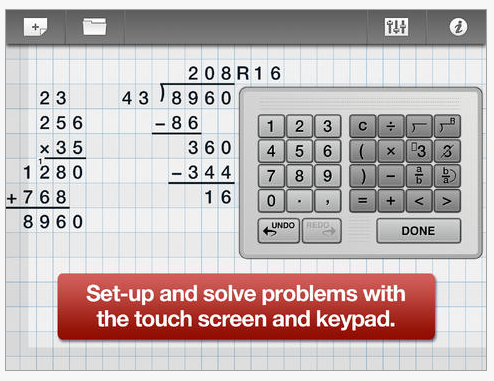
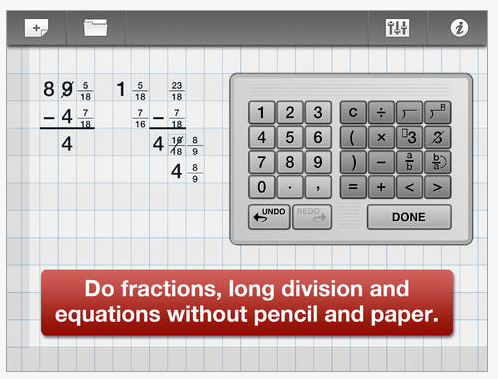
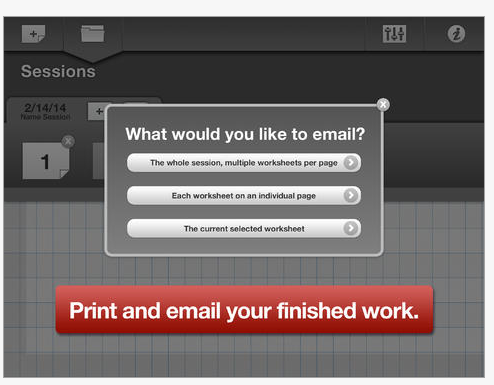
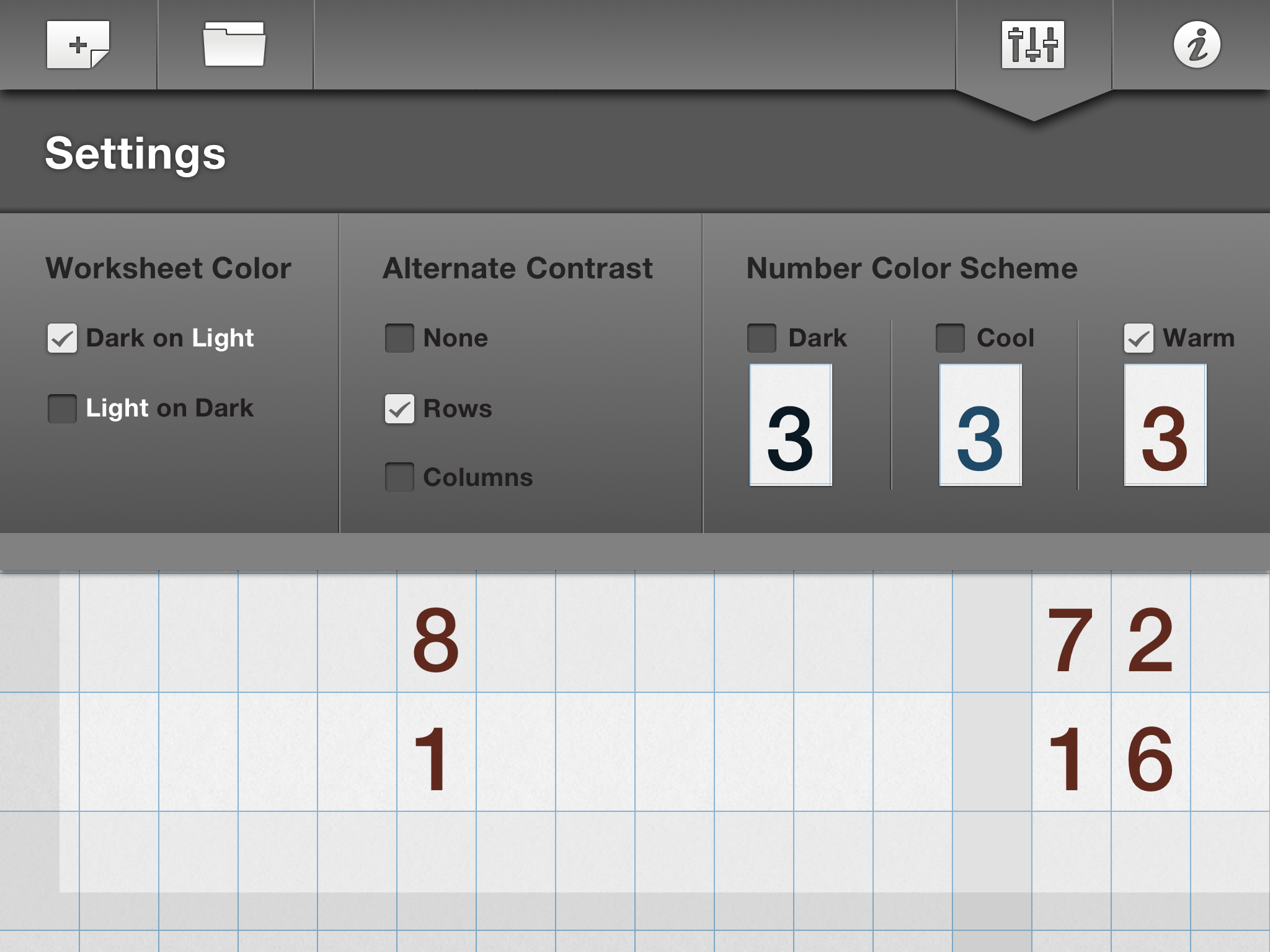
ModMath is a  new iPad app developed for individuals with dyslexia and dysgraphia to produce basic math problems.  And,  if that isn’t good enough the app is (currently) free! If you have searched for methods of producing math electronically, you might agree that options are limited. For the iPad, there are few math worksheet apps available that offer use of a division sign, align fractions and keep alignment with key input. ModMath app, on the other hand,  provides a worksheet format for producing addition, subtraction, multiplication and division problems along with tools to create fractions, equations, carryover symbol and division symbol with and without a remainder sign. Use of the app is easy and intuitive to use for students with little instruction needed (it does always help reading the information page!). The app also provides a grid to help with aligning and entering numbers and also automatically enters numbers in a left to right order.  Here are a few screen shots of the apps: with a description below of a few more of the features: Mod Math app pic1  Mod Math pic2 MathMod pic6a The app provides workflow options to print or email. Multiple or single pages can be sent or printed. The document is sent in a PDF file for ease of use. Mod Math pic5ModMath app has a few options in its Settings: Mod math pic7 ModMath is a great new app for primary to middle school aged students to produce basic electronic math problems. I trialed a Bluetooth keyboard (Amazon Bluetooth and RJ Cooper’s Big Blue-Tooth with the app to see if access using an alternative keyboard might be possible without success. I was able to use Voice over with the menu buttons,  number keyboard and work entered on the worksheet. I have not trialed use of a switch with the app however, I suspect that navigation on the worksheet may be a problem. Thank you to ModMath developers for creating this app and sharing it with students, teachers/therapists and parents for free. It is a great tool for students with dysgraphia who have an iPad and need to write out math problems. More for your Teaching / OT mTool Kit! Carol

Posted in iPad, Learning Disability, Math, Occupational Therapy, Special education, Writing | 2 Comments

iAutism – Apps Discounted or Free for World Autism Awareness Day

iAutism icon

Francesc Sistach at iAutism provides an outstanding categorized list of iOS apps discounted or free in observance of World Autism Awareness Day. Included in her list is a description and information on how long the price reduction is available. Many great iPad/iPod/iPhone apps are listed for those who support individuals with Autism, among other students or individuals with disabilities.

Free or Discounted apps – For World Autism Awareness Day 2014

Thank you to iAutism blogger for curating this well organized list!!

More for your OT m Tool Kit!

Carol

Posted in Apps for Special Needs, Augmentative Communication, Autism, Education, iADL's, iPad, iPhone, iPod, Life Skills, School Based Interventions, Social Story, Special education | Leave a comment

Autism Awareness Month Apps Discounted / Free – Smart Apps for Kids

Smart Apps for Kids [pic

For Autism Awareness Month, numerous developers offer their apps discounted or free. Smart Apps for Kids provides a list of 101 iPad, iPhone/iPod apps reduced or free in honor of Autism Awareness Month. Check out the apps at: http://www.smartappsforkids.com/2014/03/autism-awareness-month-1st-april-1.html

Carol

Posted in Autism, iPad, iPhone, iPod | Leave a comment

Mobile Devices as Cognitive Aids for People with Brain Injuries | RichmondMom.com

As scooped from Richmondmom.com‘s  post Mobile Devices as Cognitive Aids for People with Brain Injuries

Carol Leynse Harpold‘s insight:

Richmondmom.com writer, Fiona Bessey Bushnell, OT shares information and background about Tony Gentry’s work with cognitive aids for individuals with brain injuries. I have enjoyed following Tony’s innovative work with mobile devices for a while. He has been a forerunner of doing research on the use of handheld electronics to support individuals with cognitive disabilities. Ms. Bushnell summaries his work and provides some of his practical suggestions for the use of mobile devices.

Enjoy her post and check out more of Tony Gentry’s, PhD, OTR (Associate Professor of OT at VCU), publications on technology for individuals with cognitive challenges VCU’s Department of Occupational Therapy’s AT for Cognition Laboratory ( http://www.sahp.vcu.edu/occu/research/at_cognition.html ).


Carol

as scoop using Scoop.itOT mTool Kit

Posted in Activities of Daily Living, Cognitive Impairment, Life Skills, Mobile Device Use | Leave a comment

OT’s with Apps Manuscript Handwriting App Feature Match

pieces of puzzle w person

OT’s with Apps Manuscript Handwriting Feature Match

Ever search for an app with specific options or features , then at a later time wonder what the determining factor(s) were of your choice?

That has happened way too many times for me. As a result, I got a little smarter and from other* feature match examples, started creating the OT’s with Apps Feature Matches to help recall and help others determine apps for individual needs.  Although feature matching is only part of the decision making process, it is a way to help determine the app or a component of the tool selected.

At our OT’s with Apps Workshops, Erin Higgins, COTA/OTS and I review numerous apps and use feature matching as a guide. Just one of the OT’s with Apps feature matches on Manuscript Handwriting  help us and others  sift and winnow app features.

OT's with apps HW feature match pic1

The Manuscript Handwriting Feature Match is just one of many created with eight different apps reviewed according to 15 different features:

  • Device compatibility
  • Cost
  • Speaking features
  • Best practice features
  • Multiple use options
  • Data collection available
  • Practicing letters in or out of order
  • Error feedback
  • And more!

Here is a link to our most recent Manuscript Handwriting Feature Match:

OT’s with Apps Manuscript Handwriting Apps Feature Match

I hope this helps when searching for manuscript handwriting apps. For more handwriting app reviews not listed in the feature match, search “Handwriting” or “Letter Formation” in the blog search box or check out the reviews pertaining to Handwriting .

*References to feature match resources or examples:

Hope this helps, it helped us!

More for your OT mTool Kit!

Carol

Posted in Apps for OT's, AT for Handwriting, Early Childhood, Elementary School, Handwriting, iPad, Letter Formation, Occupational Therapy, Writing | Leave a comment

8 Great Handwriting Apps for OTs | CMS Direct Hire

As Scooped from CMS Direct Hire   8 Great Handwriting Apps for OT’s

We at CMS Direct Hire would like to share with you 8 great Occupational Therapy apps for improving your patients’ handwriting skills!

Carol Leynse Harpold‘s insight:

CMS Direct Hire shares 8 great handwriting/ pre-writing apps for OT’s. These are some of the many apps listed on OT’s with Apps list.

For more handwriting app options check out the featured list on OT’s with Apps Pinterest Apps for Handwriting found at : http://www.pinterest.com/csleynse/apps-for-handwriting/

Carol

From Scoopit: http://www.scoop.it/u/carol-leynse-harpold

Posted in App Reviews, Apps for OT's, AT for Handwriting, Early Childhood, Finger Isolation, Handwriting, iPad, Letter Formation, Occupational Therapy, Writing | Leave a comment

New Google Menu Tool – Add-Ons

Google Drive icon

Google Doc Add-ons Tool

Working as a OT and AT at a Google School requires searching for supports for struggling readers and writers in Google Chrome. Like other apps and software, change is frequent and exploring what those changes may mean for special needs students is a constant process.

One new change in Google Docs is a new addition to its menu – an Add-ons tool allowing some apps to be readily available from the menu bar when creating a document:

Google Add-on tool pic3

Although the choices of Add-on apps is limited at present (sure to change…), there are some very worthwhile free, trial / premium apps available for the Add-ons menu tool. Here are just a few of the Add-on apps available that might be appropriate for struggling writers:

 ProWriting Aid icon Pro Writing Aid (14 day trial/ 1 year 35.) available for Google Docs or Microsoft Word. Provides spelling, grammar, word overuse, plagiarism, style, consistency of word use in a document.

ProWriting aid google add ons

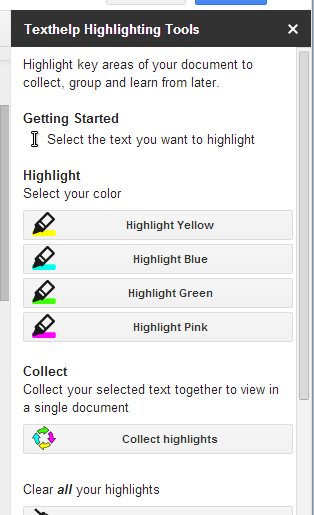
Texthelp highlighting tool iconTextHelp Study Tool app (currently free) provides the highlighting tools (yellow, blue, cyan, green) and the ability to collect highlighted text by position or color and create a new document. Highlighting tool opens to the right of the doc for easy access.

Texthelp highlighting tool pic2

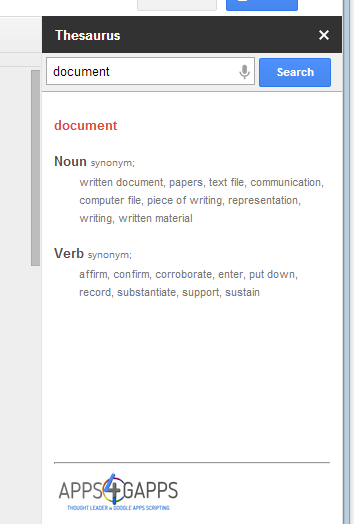
Thesaurus app for Google Doc Add-OnThesaurus app  – (free) provides a synonym tool for words selected in a document. Thesaurus tool opens to right of the doc for easy access while writing.
thesaurus for Google add ons

Easy Bib for Google iconEasyBib – (free for basic version) provides reference tools from within the doc with several choices of styles to choose from .

Easy Bib for Google add on

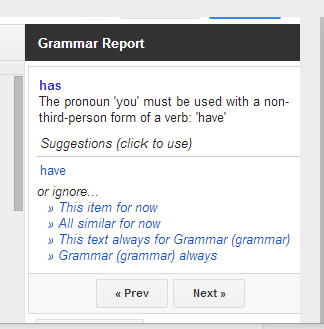
There are certainly more Add-ons apps available such as concept mapping tools (Lucid, Mind Meister) , audio note add-ons (Kaizena), other comments apps (Track Changes) and utility apps. Available Add-on apps are conveniently available for use, exploration and management from the Add-ons menu tool in Google Docs. One draw back I found is most of the add-on tools such as the Thesaurus results or grammar checking results can not be accessed using the text to speech tools I am using (AppWriter or TextHelp) with Google Doc, unlike Google’s Define and Research tools that can be easily read aloud using AppWriter or TextHelp.

What Google Add-ons have you found helpful for struggling writers?

More for your Google AT Tool Kit!

Carol

Posted in Adults with LD, Apps for OT's, Apps for Special Needs, Elementary School, Free apps, Google, Google Chrome, Google Docs, Graphic Organizer, Language Arts, Learning Disability, Post secondary, Productivity apps, Writing | 2 Comments

AppCrayon Stylus

A thank you to Dano for supplying participants at my recent OT’s with Apps @ School Workshop a complimentary Dano AppCrayon Stylus for Kids. This stylus had come recommended by another OT during a previous workshop (thank you Joan!), so I was happy to be able to trial and share its use.


The Dano AppCrayon Stylus for Kids is a chunky, somewhat light weight stylus with a tripod gripping surface making it easy to grasp and hold. Similar to those favorite tripod pencils that facilitate where to put fingers when grasping a pencil, AppCrayon provides an easy finger placement on the shaft.

DAno AppCrayon pic1

Along with the grip and weight of the stylus, one of the other important features is how interactive and accurate the tip is in different positions when drawing or writing. Some stylus due to size or shape can only be used when held in a vertical /upright position – not a position that facilitate a more mature grasp with extended fingers. The AppCrayon stylus has a  large, extended tip, allowing good contact with the tablet surface even when held and drawing at about a 25 degree angle from the screen. Although the tip is large, I was able to use it for more refined tasks as drawing at level 14 in iMazing app or to write using PhatPad app or MyScript Calculator app, both handwriting recognition apps with good contact and recognition.

I found the Dano AppCrayon Stylus for Kids a Stylus that I would recommend to fellow OT’s, teachers or parents to use. A suggestion and comment that always seems to arise is in interest in having replacement tips a possibility with styluses. Kids have an infinity to pull, pound, and sometimes orally explore the tip of a stylus resulting in damage to the tip! Replacement, or a solid tip would be an awesome addition to this stylus!

AppCrayon also provides a free AppCrayon app that provides images to color and share and handwriting practice components. The handwriting option provides line tracing guides, audio feedback, a palette to chose a letter to work on, an animated arrow showing direct of the next stroke for both upper and lower case letters. It is simple but effective with its Zaner Bloser method of letter formation.

AppCrayon app pic 1

Have you used this stylus? What is your preferred stylus for students at school?

More for your OT mTool Kit.

CArol

Posted in Accessories, iPad, iPod, iPod/iPad Accessory, Letter Formation, Stylus | Leave a comment