Another Stylus “To the Rescue”…

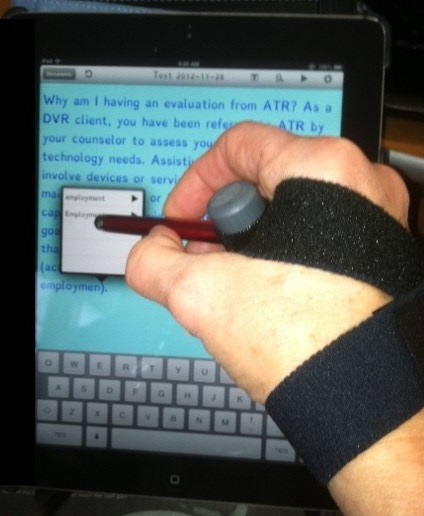
RJ cooper handpointer demo2RJ Cooper’s iPad/Tablet Pointer

Rehabgadgets2go’s recent post “Tip: Stylus Saves the Day” provided a stylus solution and other stylus options for individuals with a mobility impairment.  A stylus can be a make or break solution to accessing a tablet, or touch screen cell phone for individuals with mobility impairments as well as for the aging workforce whose finger dexterity may somewhat challenged.

Here is another stylus “to the rescue”, the iPad/Tablet HandPointer  ($29), produced by RJ Cooper  and supplied to me by Phil Dellegrazio, Manager of Environmental Control Solutions at Adaptive Technology Resources (Thanks Phil!) who needed a stylus for a client with quadriplegia. RJ cooper handpointer stylus pic
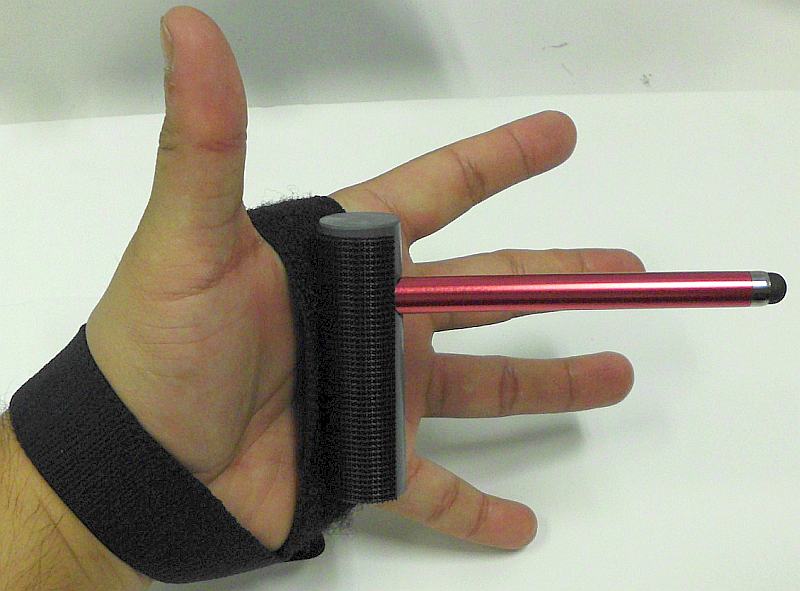
I found this stylus strap to be very comfortable and stable as it is made from elasticized loop velcro. The strap is well anchored with the cross over style method of application. Heavy duty velcro on the cylinder that the stylus is mounted in allows it to be solidly attached, adjusted in position and stable within your hand. The elasticized strap allows it to conform to the velcro on the cylinder base providing more stability to the stylus position.

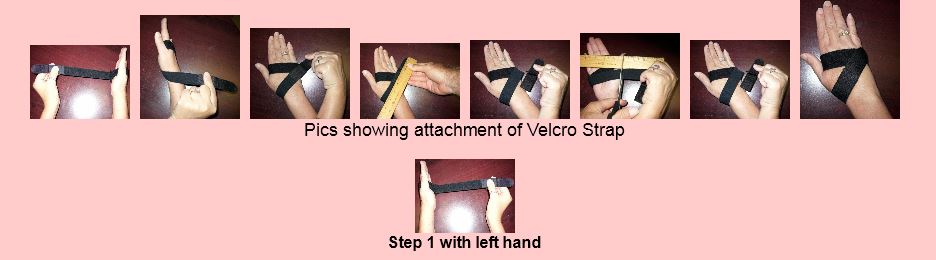
Below is RJ Cooper’s instruction of application of the strap. The strap can be easily cut to size as needed and can be used for left or right-handedness.
The iPad/Tablet Stylus from RJ Cooper is a good stylus option that is adaptable to individuals with mobility impairments.

Thanks to Phil at ATR for supplying me with this adaptive device for my AT or OT iTool Kit!
Carol

Posted in Accessibility, Accessories, iPod/iPad Accessory, Mobile Device Use, Mobility Impairment, Stylus | Tagged , , , , , , , | Leave a comment

6 Ways to Enhance Students Learning Using iMovie ~ Educational Technology and Mobile Learning

Educational Technology and Learning post, 6 Ways to Enhance Student Learning using iMovie provides ideas for using  this app for student learning.

As scooped on  Scoop.itOT mTool Kit

Carol Leynse Harpold‘s insight:

iMovie is an intuitive app for movie creating and editing. I recently used iMovie for video self modeling to combine and splice togther a video for a student. It was intuitive and easy to use – at least at a basic level.

Here are a few more ideas on using iMovie with your students. It also can be a great UDL method of expressing student knowledge or representing information to students using multimedia.

Carol

See on www.educatorstechnology.com

Posted in Education, iPad, Learning Disability, Multimedia, Universal Design for Learning | Tagged , , , , | Leave a comment

EyeSight – iTunes App Store | The Assistive Technology Daily

See on Scoop.itOT mTool Kit

Carol Leynse Harpold‘s insight:

EyeSight app for iPhone and iPad is a low vision solution for magnification and color enhancement!

Thank you to Assistive Technology Daily for providing this app! You folks are a wealth of information!

Carol

See on attraining.org

Posted in App Reviews, Apps for OT's, iPad, iPhone, iPod, Life Skills, Low Vision/ Blindness | Tagged , , , , , | Leave a comment

Tip: Stylus Saves the Day from Rehabgadgets2go

Post from Rehabgadgets2go about the stylus as a solution.
Carol

adl2go's avatarrehabgadgets2go

I recently had a client using TouchChat. We thought initially that there was an issue with his iPod because it would not register his taps to the screen – it was slow to respond or non-responsive. We tried using a stylus and had immediate success. The icons were quite small, and it turned out that when he was trying to select an icon, the app was not responding because he was actually touching two icons at the same time. The stylus saved the day, and at $15.00 was an affordable solution.

Ever wonder how the touch screen on your mobile device works? Touching the screen with your finger will work, but using the same finger with a regular glove on it will not work. The rubber end of a pencil will not work. If you can get your cat to cooperate, using a cat’s paw will also work (make…

View original post 566 more words

Posted in Accessibility, Accessories, Android, iPad, iPod/iPad Accessory, Mobility Impairment, Stylus | Tagged , , , , , , | Leave a comment

Geoboard App

20130217-074636.jpg

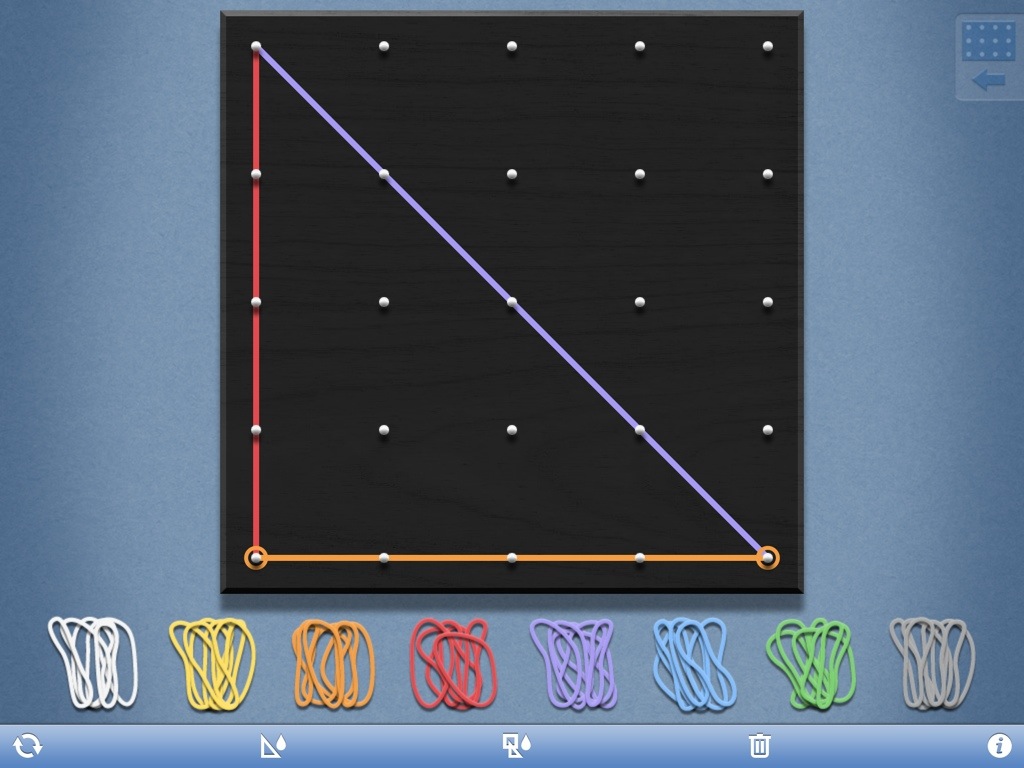
Geoboard app is a free iPad app providing an electronic method of producing geometrical designs on a 25 or 150 peg Geoboard. With 8 different colored bands, a wide variety of geometric models and levels of math instruction can be presented. Developed by Math Learning Center, it is described as ” a tool for exploring a variety of mathematical topics introduced in the elementary and middle grades. Learners stretch bands around the pegs to form line segments and polygons and make discoveries about perimeter, area, angles, congruence, fractions, and more.”

Sound familiar? Yes the same old Geoboard used for years only in an electronic format. Here is what it looks like:

20130216-125402.jpg

As an OT, my preference with Geoboards is the actual pegged board and rubber bands requiring haptic, graded fine motor control and bilateral skills along with visual perceptual abilities provided the possibilities of multiple layers of intervention. Use of an electronic Geoboard, however also has its advantages for learning mathematic principles or when just working on visual perceptual concepts. Presenting the Geoboard as an alternative to the real board certainly can be done easily when physical materials aren’t present or the electronic app is a motivator for engagement.

Try Geoboard app out and share how you might use it with your students.

Carol

Posted in App Reviews, Apps for OT's, Math, Visual Perception | Tagged , , | Leave a comment

Earl » Home

See on Scoop.itOT mTool Kit

Carol Leynse Harpold‘s insight:

Earl App for iPhone and iPad allows you to use your voice to open a newpaper and read  it to you. This app looks intriguing. Targeted to beable to read newspapers for individuals with significant visual challenges, it appears to require a subscription to read numerous newspapers.

I am looking forward to trying this out as an accessible means to news. Here is a link to Earl app website: http://www.earlspeech.com/ . Or click on the Scoop it link above for more information.

Anyone have experience with it?

Carol

See on www.earlspeech.com

Posted in Accessibility, App Reviews, Apps for OT's, Apps for Special Needs, iPad, iPhone, iPod, Low Vision/ Blindness, Reading | Tagged , , , , , , | Leave a comment

Our Favorite Apps – Georgia Tech’s Tool’s for Life App Database

Georgia Tech Tools for Life iconGeorgia Tech has for years been a resource for assistive technology training and research. They recently developed an online searchable data base of apps focused on “Living, Learning, Working and Playing” called Tools for Life. For those of us who are OT practitioners, if that doesn’t sound like apps for occupational behavior nothing does (add in a few more specific areas such as ADL, iADL, Sleep and Rest and Social Participation as areas of occupation defined by the 2008 OT Practice Framework)!

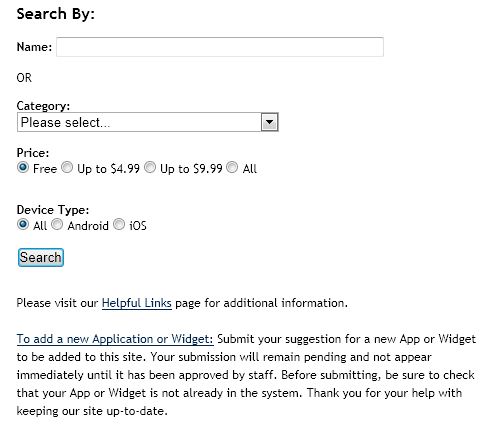
Georgia Tech’s website, Tools for Life provides a searchable database for apps by disabilities or multiple disabilities, price and device types. The apps have been used or tested by the team at Georgia tech as well as PT’s, OT’s, SLP, AT professionals, users or specialists in the field. You can also suggest apps or widgets that can be added to the database at their website.

Here is what the search engine looks like:

Georgia Tech Tools for Life search pic

This is a great way to help sift and winnow through apps that will support individuals with disabilities of any age.

Mark this resource in your favorites or Bookmarks to help you find apps according to those occupational activities as listed. It will be interesting to see if they develop an app for their searchable data base.

Don’t forget to check out their listing of Webinar Archives for audio and PDF’s on Tools for Life topics previously presented. There is great information available for free!

An OT mTool Kit aid!

Carol

Posted in Activities of Daily Living, Android, App Reviews, Apps for OT's, Apps for Special Needs, iPad, iPhone, iPod, Occupational Therapy | Tagged , , , , , , , , | Leave a comment

Power Up: Apps for Kids with Special Needs and Learning Differences | Common Sense Media

See on Scoop.itApps for Special Education

Power Up: Common Sense Media’s guide to nearly 100 great apps for kids ages 2-17 who have special needs and learning differences.

See on www.commonsensemedia.org

Posted in App Reviews, Apps for OT's, Apps for Special Needs, Education, Movement, Occupational Therapy, Organization, Self-regulation | Tagged , , , , , | Leave a comment

Study Smarter – Take Notes And Highlight Text Within iBooks [iOS Tips] | Cult of Mac

See on Scoop.itApps for Special Education

Ebooks are all the rage these days, and your iPad is a perfect device for reading them. Textbooks, too, are becoming de riguer for many students in college and even high school, as educators, schools, and publishers find a greater demand for electronic instructional materials.

But studying from a book requires interacting with the text at a greater level than just reading it, of course, as students need to keep track of specific passages, or comment on them as they relate to their learning or lecture notes. Most eReading apps, like Nook and Kindle, have these features as well, but iBooks definitely has the most well designed, so let’s take a look at how to use it to study with your electronic books.”

Carol Leynse Harpold‘s insight:

iBooks not only speaks the selection but it can also highlight text in different colors and create notes. Great way to provide the tools for using reading strategies to electronic text.

Creating ePub books in apps like Pages, Creative Book Builder allows you to create your own texts for students.

See on www.cultofmac.com

Posted in Adults with LD, App Reviews, Apps for Special Needs, Education, Elementary School, High School, iBooks, iOS, iPad, iPhone, Reading, School Based Interventions, Text to Speech | Tagged , , , , , | Leave a comment

Words Mine – A Tetris-like Word Game for iPad

See on Scoop.itOT mTool Kit

Words Mine is a free iPad app that combines elements of Tetris with spelling games. The challenge of Words Mine is to spell words quickly before the screen fills up with blocks. Each block contains…

Carol Leynse Harpold‘s insight:

I am rather old school and not a gamer, but Tetris was always a fav of mine. As a spelling game this might not be a real easy game for our students with spelling challenges but it might be a good way to work on memory, chunking sounds and letters as a strategy for copying information  from paper to paper and board/ overhead to paper. Provide them with a list of frequently used words to spell in the apps requiring the chunking and memory sequencing strategy.

Teaching chunking strategies with this app to beat their time and score could be a motivating activity that could carry over to classroom achievement. I have a few students who would benefit from this!

Word Mine is available for iOS (use link above) or for Android .

Free is always great!

Carol

See on ipadapps4school.com

Posted in App Reviews, Apps for OT's, Apps for Special Needs, Education, Game, iPad, iPhone, iPod, Spelling | Tagged , , , , , | Leave a comment