Titan Note – A New Note Taking Tool

Looking for a new type of note taking tool that will record, translate to text and share it ?

The Titan Note may be your answer!

Titan Note

The Titan Note is a new digital recording, audio to text conversion and summarizing tech tool.  Promising these new note taking features and a host of other tools, the Titan Note provides new note taking possibilities for individuals with disabilities.

Until this new tool, we have had a variety of digital recording tools which synchronizes audio recording with written or typed text using handheld, computer based or mobile device tools. Certainly, handheld recorders or apps also support note taking efforts, however few translated audio recordings to text (Livescribe 3 pen is the only one that I am familiar with). I see this tool being a game changer for many individuals with motor, learning or  sensory challenges, who have difficulty with writing or typing process. It is exciting to have a new assistive option to support note taking tasks in education or in the workplace as appropriate or allowed.  I can’t wait until September, the estimated shipping timeframe!

So, what is this and how does this work? Check out how it works and additional features…

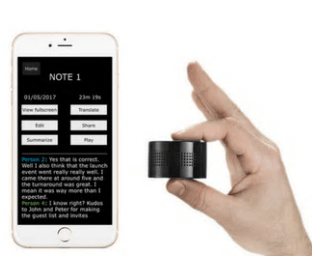
Small and compact, weighing 3.5 ounces and approximately 2 x 1.25 inches,  this handy device can not only take notes, reported summarizes and shares notes.  Companion apps for iOS and Android provide the note taking features. The Titan Note also does some other nifty things as provides music and charges phones and tables through its USB port. Here are features of the Titan Note:

Titan note features image

If the Titan Note did half of the above listed tasks I would be happy!

The Titan Note can be pre-ordered from their website at Titan Note.net https://titannote.net/Indiegogo campaign currently is offering an $75 Titan Note Special purchase of the device with projected delivery in September 2017. Full price is listed as $150.

I can’t wait until September for my Titan Note and hope it will provide a new AT option to clients served!

H/T to Rick Z and folks on QIAT list serv for sharing this out!

More for your OT or AT eTool Kit!

Carol

Posted in Accessibility, Adults, Adults with LD, Android, Apps for OT's, Assistive Technology, Digital Recording, iOS, iPad, iPhone, Learning Disability, Low Vision/ Blindness, Mobile Device Use, Mobility Impairment, Note Taking, Note Taking App, Post secondary, Voice Recorder, Writing | 6 Comments

Google Quick Tip – Voice Typing in Google Slides!

Voice Typing in Speaker Notes is now available in Google Slides, however, it can only be used in the speaker notes area. A work around for using this feature for writing content for the slide is easy. Create  your text using the Voice Typing in the speaker notes and copy and paste to the slide. Of course, you would have thought of that!

Where’s the Voice Typing? You will find it under the Tool menu – Voice type speaker notes – similar to the Voice typing in Google Docs.

Voice typing slides

Other tool options when writing include use of  text to speech if you have Read & Write for Chrome to review your voice recognition text for accuracy. Other helpful tools available from the Tools menu include spell check, personal dictionary and Explore feature.

Great tools for our students who struggle with writing.

Carol


Posted in Assistive Technology, AT for Handwriting, Google Chrome, Voice Recognition, Writing | 2 Comments

Reminder, Alarm and Voice Reminders, Remind Me App

checklist-2077023_1920

Research on use of visual schedules and checklists has been found to improve independence in completing work tasks and self-care skills for individuals with autism and cognitive disabilities (Koyama, Wang 2011). Use of visual schedules on PDA have also shown significant benefits to individuals with autism.  Identifying appropriate visual schedule apps and the appropriate device require evaluation of the specific needs of the user, supports and environment. Numerous visual schedule apps are available for mobile devices, each requiring match of the app features, user skills, task, environment and available and/or appropriate device for the tasks being completed.

A wide variety of apps including many visual schedule apps currently exist for both iOS and Android devices. Despite having trialed and recommended visual apps for clients, a recent evaluation required additional options for a visual schedule/visual checklist apps. This client who has been using a paper copy checklist but also benefited from  text and images. At appeared that identifying a basic checklist app with images, text and audio recording capabilities would be best and slightly  different from previously used app for   other clients with an intellectual disability. The iOS native Notes app was trialed using the checklist/radio button options with images imported, however use of Speak Selection seemed to be a bit tedious to employ. Audio recording options within the checklist was also desired, but not available in the Notes app. Although many other choices of schedule apps exist, a visual checklist appeared to be a best a best option for the client.

Results of my search for a basic checklist style of visual schedule found Reminder, Alarm and Voice Reminders, Remind Me App developed by Sergio Licea. As the developer of Aida Reminder app, previously successfully used with a different client, I was somewhat familiar with the features of the Reminder app and comfortable with a developer who has continually updated his developed apps. Presented with many visuals and also methods of output, this app for $1.99 as an in-app purchase (for no ads) and no subscription fee or login, was a strong choice for trial.

Trial of the free version found this app matching a majority of the features needed for this client and task. Here are the main reasons and features for the app choice:

  1. The app has recently been updated by the developer allowing it to work on the most current iOS operating systems.
  2. The app will work on iPhone and iPad, depending on the best device for ease of use of the client and environment.
  3. The app is easy to use and features rich for the needs of an individual with an intellectual impairment.
  4. The app also manages customized images, text, audio and symbols.
  5. Its layout is easy to view in a linear manner.
  6. It has check boxes, just like a standard paper check off list
  7. Alarms, notifications, repeated or reoccurring alarms by time, day, week can be set.

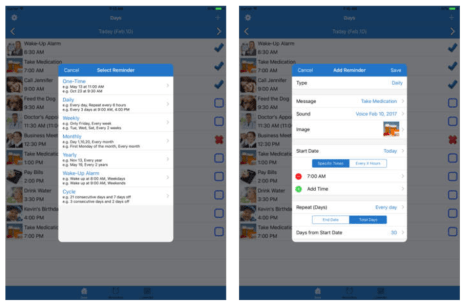
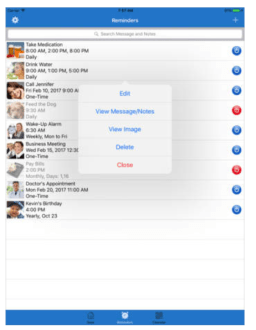
Here are some images showing the features of the Reminder, Alarm and Voice Reminders, Remind Me App :
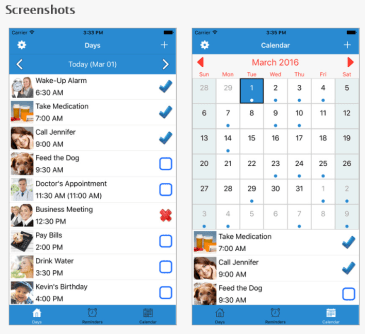
Remind app with voice recorder, images, text pic

iPhone app image

Remind Remind Me app pic2

Remind Remind Me app pic3

The checklist can be viewed individually or from a calendar view during use. Reminders can be turned off temporarily from an editing screen as seen in the bottom image. Editing options allow images and audio to be saved for reuse. A basic symbol library is also available within the apps image library providing a fast method of set up of picture tasks. Using a mobile device with a camera however provides an easy method of customization of the pictured tasks for the user.

One limitation is the app can not be created or editing via cloud based service. It can be backed up by email however, to manage the content if the device malfunctions.

I found this app to meet the needs of the client evaluated. As aforementioned, I believe this app is quite easy to use, however will take some set up time for a job coach, teacher, therapist or parent to develop the scheduled tasks with images, pictures and audio. Once set up however, it should be pretty easy to apply to a work situation with a fairly consistent task routine.

I will be adding this to my OT mToolkit, feature match and apps lists (hopefully soon). What are your favorite visual schedule apps?

More for your OT mToolkit!

References:

Koyama, Takanori, and Hui-Ting Wang. “Use of Activity Schedule to Promote Independent Performance of Individuals with Autism and Other Intellectual Disabilities: A Review.” Research in Developmental Disabilities 32.6 (2011): 2235-242. Web.

Rani, Nurdalilah Mohd, Rafeah Legino, and Muhamad Fairus Kamaruzaman. “A Theoretical Study on the Influence of Visual Schedule towards Children with Autism Independent Life and Its Chances through Mobile Technology.” Recent Advances in Education and Educational Technology (n.d.): n. pag. Recent Advances in Education and Educational Technology. Web. 19 Mar. 2017. <http://www.wseas.us/e-library/conferences/2015/Malaysia/EDU/EDU-16.pdf&gt;.                          

Carol

Posted in App Reviews, Apps for Special Needs, Assistive Technology, Autism, Cognitive Impairment, Customizable app, Executive Function, iOS, iPad, iPhone, iPod, Organization, Visual Communication, Visual Supports | Tagged , , | Leave a comment

15 Easy Ways to Make Your Commute More Productive

It’s easy to think of commuting as a total waste of time. When you’re standing on the train platform or waiting at a traffic light, every minute that ticks by can seem like a minute los…

Source: 15 Easy Ways to Make Your Commute More Productive

Reblogged from Steve Johnson’s website post, 15 Easy Ways to Make Your Commute More Productive , there are productivity apps and tips for everyone, even if you don’t commute. On days when I am evaluating AT needs for clients, I can spend hours in the car. Although I find it takes some organization before the trip to access these resources safely by voice, it can make the time productive while stuck in the car. Steve shares familiar and new apps that can aid with productivity.

Thank you to Steve Johnson for these productivity tips.

Carol

Posted in Accessibility, Android, Assistive Technology, iOS, Organization | Leave a comment

Amazon Echo as an Accessibility Support — The Website of Luis Perez

 Luis Perez describes the features and function of the Amazon Echo and Dot as an accessibility support. Read his post Amazon Echo as an Accessibility Support for a thorough review on features he uses for access on the Amazon Dot and Amazon Echo devices using voice recognition and how he uses the Amazon Dot with Proloquo AAC app with a mobile device.

Amazon describes the Echo as a hands-free, voice-controlled device that uses Alexa (Amazon’s answer to Siri, Cortana and other voice assistants) to play music, control smart home devices, provide information, read the news, set alarms, and more. I had been wanting to try the Echo since its launch, but I was just not willing to pay the $180 for […]

via Amazon Echo as an Accessibility Support — The Website of Luis Perez

The AT community is fortunate for Luis’ website which shares his expertise. Thank you again to Luis for his expertise!

Carol

Posted in Accessibility, Adults, Android, Apps for OT's, Assistive Technology, Environmental Control, iADL's, iOS, iPad, iPhone, Mobile Device Use, Mobility Impairment, Voice Recognition | Leave a comment

Read to Me in Book Creator 5 — The Website of Luis Perez

Luis Perez shares a new feature of Book Creator 5  for iPad (4.99) that provides a “read to me” for stories created. This is a great new feature of the popular Book Creator app for iPad. Read more on Luis’s website via Read to Me in Book Creator 5 — The Website of Luis Perez

Book Creator for iPad recently added a new Read to Me text to speech feature that allows learners to hear their books read aloud within the app (without having to transfer the book to iBooks first). The feature also supports accessibility in two other ways: all embedded media can be played automatically. This

via Read to Me in Book Creator 5 — The Website of Luis Perez

Luis Perez provides expert information on accessibility on his Website of Luis Perez. If you are seeking accessibility information, make sure you peruse his up to date information shared on his website.

Thank you to Luis for sharing his expertise with the AT community!

Carol


Posted in Accessibility, Apps for OT's, Apps for Special Needs, Assistive Technology, Early Childhood, Emergent Literacy, iPad, Reading, Text to Speech | Leave a comment

C-Pen Reader Scanning Pen with Text to Speech

c-pen-pic

C-Pen Reader Pen

Scanning pens with text to speech and dictionary support have been around for quite sometime. The first pens I used were the Quicktionary Pens probably about 10 years ago as a handheld reading tool. Although they scanned and read text aloud, they worked best for individuals with good fine motor control and patience for scanning hard copy text,  listening to the line of print scanned as well as scanning  single words and definitions for individuals with reading challenges. Starting the scan at the right place, scanning a line of text and stopping the scan to capture a whole line took practice, patience and the right size print. Having trialed them with a number of clients, a few really liked them, but they required persistence with use.

The Wizcom pen, more recently purchased, I found to be an improved scanning pen, however it continued to require accuracy with placement of the scanning head and alignment of the pen with line scanned for accurate recognition. Limitations with size of text and accuracy of recognition was improved but still required patience with use.

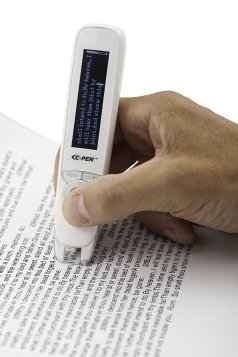
The C-Pen Reader Pen is a new scanning pen developed by Scanning Pens LTD now available in the US. A recent purchase of the pen found it easy to use, fast and accurate. Trial on a variety of font sizes from dense 10 point textbook print to newspaper ads to worksheet print at 12-15 point found it accurate with all print trial. A light turns on when scanning assisting with guiding the user with text being scanned. Placement for starting and stopping a scan captured all of the print without missed words or letters. Only when I tried to scan very fast with less control did inaccuracies result. I was also able to scan line after line quite quickly, resulting in it reading one line at a time in succession. Controls on the pen also allows the user to move the cursor to prior lines of text to review and use text to speech to read additional lines of scanned text.

Below is a short video of use of the C-Pen Reader  showing its ease of use and features:

Information from the C-Pen Reader website provides device specifications:

  • OLED 256*64
    CPU 600MHz
    Memory – 4GB (OS 1G, User 3G)
    Earphone 3.5mm
    Battery 1,200mAh
    Scan Font Size Range 6.5 – 22 pt
    Electronic Dictionaries – Collin English 30th Anniversary Dictionary 10th Edition (156,120 words) & Oxford Spanish>English>Spanish Dictionary
    Certifications CE RoHS FCC
    Size Dimensions: 135*33*19mm Weight: 50g
  • USB – USB 2.0 High speed / Micro USB
    Extracted Content – Extracted text saved as a .txt file
    File System – FAT\FAT32\NTFS
    Menu Languages – English

The C-Pen Reader Pen comes with a micro USB charging cord, earbuds and a case. It is small, making it easily portable for use in a variety of environments. Although targeted for individuals with sight, it can be used on text that has been highlighted (worked on yellow, pink and orange highlighted text accurately using highlighting pens) by individuals with low vision.

My initial trials found this pen to be highly accurate scanning and reading medical (OT textbook) and news correctly with text to speech output. Fast and easy to use, I would again consider recommending use of this new model C-Pen Reading pen for spot reading for individuals with decoding challenges.

The pen is available at  Amazon.com for $262.50 + 10.00 shipping. Although a bit pricey, its accuracy and ease of use makes it a portable reading assistive tool for individuals with learning disabilities.

The C-Pen also comes in a C-Pen Exam Reader pen, with the same scanning and text to speech tools but without the dictionary and file saving option also for $262.50.

Have you used the C-Pen Reading pen? What has your experience been with its use?

More for your OT mTool Kit!

Carol


Posted in Adults, Adults with LD, Assistive Technology, Learning Disability, OCR, Post secondary, Print Disabled, Reading, Text to Speech, Voice Recorder | Leave a comment

The Easy Push — IntelliWheels — The Assistive Technology Daily

Easy Push Wheelchair Pushing a standard manual wheelchair can be tough, but with the IntelliWheels Easy Push, pushing instantly becomes twice as easy. The IntelliWheels Easy Push uses simple gears in each wheel to make it significantly easier to push forwards, backwards, around corners, and over any surface. No Motors or Batteries You will never…

As reposted via The Easy Push — IntelliWheels — The Assistive Technology Daily

H/T to Assistive Technology Daily for keeping us informed on all things AT!

Carol


Posted in Mobility Impairment | Leave a comment

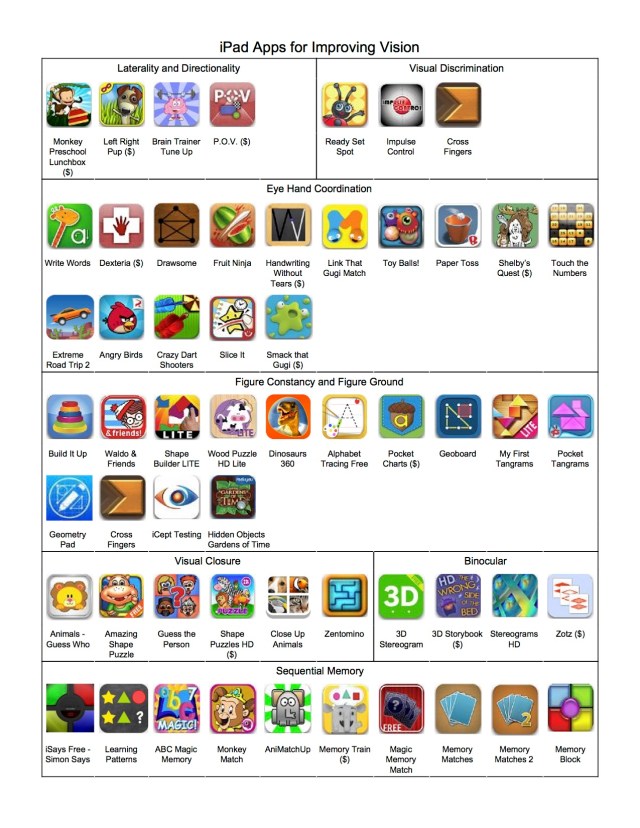
iPad Apps for Improving Vision

Thanks to the VisionHelp Blog, I am reposting a recent iPad Apps for Improving Vision list, posted by Dr. Leonard Press from a list serve via Dr. James Henning. Wow, many familiar apps and many new apps.
H/T to both Dr. Press for sharing this on his The VisionHelp Blog (https://visionhelp.wordpress.com/2016/10/07/ipad-apps-for-improving-vision/ )!
Carol

Leonard J. Press, O.D., FAAO, FCOVD's avatarThe VisionHelp Blog

Not sure of the origin of this iPad app compilation for vision therapy, but plucked it off the VT-OD list serve via Dr. James Henning.  It is well organized, and hopefully you can make out the print size.  😉

fullipadapplistpage2vtipad

View original post

Posted in Apps for OT's, Apps for Special Needs, iOS, iPad, Vision, Visual Motor, Visual Perception | Leave a comment

IndieGo Device Converts Any Wheelchair Into a Power Chair

Indiego image of open source wheelchair conversion

via indieGo Device Converts Any Wheelchair Into a Power Chair — The Mighty

Megan Zahneis, author at The Mighty, writes about an indieGo project involving equipment that can conversion any wheelchair into a power chair. This project is creating an open source power add on which converts any wheelchair to a power chair.

The initiative is  being developed and funded with the  Center for Discovery, Hurleyville Maker Lab and a grant from Google Impact Challenge: Disabilities.  shared on The Mighty Blog or on the Center for Discovery website.

Another cool new innovation supporting the needs of individuals with disabilities. It is proposed to be available in 2017.

So many wonderful innovations!

Carol

Posted in Accessibility, Adaptive Music, Google, Mobility Impairment, Special Needs | Leave a comment