Sarah provideas thoughtful and experienced review of a spelling, drawing apps and practical application to students.
Carol

Sarah DeBellis's avatarOn Sarah's iPad

My children started their school year a month or so ago and the homework is coming home. Our teachers are flexible, so along with the traditional paper and pencil activities, they also allow students the option of online activities or computer or tablet Apps. In this post I’m going to highlight a couple of my favourite spelling and sight words apps, and how you can be sneaky and get your children to do more than they think they are doing.

Dedicated Spelling Apps

I have a lot of spelling apps, but the ones that I use for homework are ones that allow me to use the same spelling lists my children bring home. Most of these work the same way:

  1. Enter a name for your list – I usually use the child’s name, term and week, e.g. Penelope T3Wk2)
  2. Type in the word – try not to add spaces…

View original post 1,001 more words

Posted in Uncategorized | Leave a comment

Power Up: Apps for Kids with Special Needs and Learning Differences | Common Sense Media

See on Scoop.itApps for Special Education

Power Up: Common Sense Media’s guide to nearly 100 great apps for kids ages 2-17 who have special needs and learning differences.

See on www.commonsensemedia.org

Posted in App Reviews, Apps for OT's, Apps for Special Needs, Education, Movement, Occupational Therapy, Organization, Self-regulation | Tagged , , , , , | Leave a comment

100+ Google Tricks for Teachers

See on Scoop.itApps for Special Education

From super-effective search tricks to Google tools specifically for education to tricks and tips for using Gmail, Google Docs, and Google Calendar, these tricks will surely save you some precious time.

See on www.teachhub.com

Posted in Uncategorized | Leave a comment

Study Smarter – Take Notes And Highlight Text Within iBooks [iOS Tips] | Cult of Mac

See on Scoop.itApps for Special Education

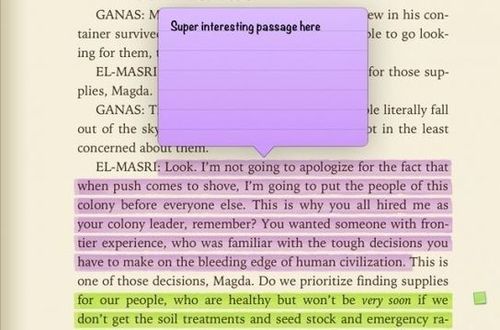
Ebooks are all the rage these days, and your iPad is a perfect device for reading them. Textbooks, too, are becoming de riguer for many students in college and even high school, as educators, schools, and publishers find a greater demand for electronic instructional materials.

But studying from a book requires interacting with the text at a greater level than just reading it, of course, as students need to keep track of specific passages, or comment on them as they relate to their learning or lecture notes. Most eReading apps, like Nook and Kindle, have these features as well, but iBooks definitely has the most well designed, so let’s take a look at how to use it to study with your electronic books.”

Carol Leynse Harpold‘s insight:

iBooks not only speaks the selection but it can also highlight text in different colors and create notes. Great way to provide the tools for using reading strategies to electronic text.

Creating ePub books in apps like Pages, Creative Book Builder allows you to create your own texts for students.

See on www.cultofmac.com

Posted in Adults with LD, App Reviews, Apps for Special Needs, Education, Elementary School, High School, iBooks, iOS, iPad, iPhone, Reading, School Based Interventions, Text to Speech | Tagged , , , , , | Leave a comment

Words Mine – A Tetris-like Word Game for iPad

See on Scoop.itOT mTool Kit

Words Mine is a free iPad app that combines elements of Tetris with spelling games. The challenge of Words Mine is to spell words quickly before the screen fills up with blocks. Each block contains…

Carol Leynse Harpold‘s insight:

I am rather old school and not a gamer, but Tetris was always a fav of mine. As a spelling game this might not be a real easy game for our students with spelling challenges but it might be a good way to work on memory, chunking sounds and letters as a strategy for copying information  from paper to paper and board/ overhead to paper. Provide them with a list of frequently used words to spell in the apps requiring the chunking and memory sequencing strategy.

Teaching chunking strategies with this app to beat their time and score could be a motivating activity that could carry over to classroom achievement. I have a few students who would benefit from this!

Word Mine is available for iOS (use link above) or for Android .

Free is always great!

Carol

See on ipadapps4school.com

Posted in App Reviews, Apps for OT's, Apps for Special Needs, Education, Game, iPad, iPhone, iPod, Spelling | Tagged , , , , , | Leave a comment

Siri Speaks to Me – iPads in Education

See on Scoop.itOT mTool Kit

Siri (voice recognition software on the iPhone) has made my life easier and most importantly it has increased my productivity.
 
How?

Carol Leynse Harpold‘s insight:

Tim Mickan provides insight on use of Siri, a feature readily available in iPad 3"s.

See on ipadeducators.ning.com

Posted in Uncategorized | Leave a comment

Free Technology for Teachers: Find Great Public Domain Images on Pixabay

See on Scoop.itOT mTool Kit

Carol Leynse Harpold‘s insight:

Richard Byrne shares Pixabay website for finding public domain images. Using public domain pictures for copyright compliance is important but sometimes a challenge when Google images are so easy to locate and provides a plethora of images at the click of a key. Pixabay is one more source to help keep us legal with our choice of images when creating or posting electronic works.


Carol 

See on www.freetech4teachers.com

Posted in Uncategorized | 2 Comments

Random Name Selector App

Random Name Selector icon

Random Name Selector app for iPhone/iPad (free and Pro 1.99) is by the developers at Walsall Academy (developer of Too Noisy and more). They seem to know the needs of the classroom providing some great classroom management tools!

Random Name Selector app provides a method of randomly drawing student names when engaging in group activities. Here is an image of the app:

Random Name Selector pic1

The Random Name Selector app is a useful tool for anyone working with large or small groups of students or adults for that matter! I would also guess that by creating a group with activities or tasks could generate another fair method of choosing tasks. Those weekly classroom chores can be generated using the app just to change thing up a bit! What you can’t do with an app!

Thank you to Mrs. Koene for cluing me in on this great classroom mTool! Check out Walsall Academy website for more of their classroom management apps!

Carol

Posted in App Reviews, Apps for OT's, Free apps, Game, iPhone, iPod, Occupational Therapy, School Based Interventions | 3 Comments

Ergonomics and “Texting Thumbs”

texting thumb

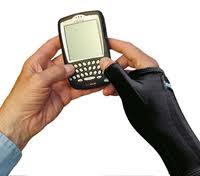
Virginia Hixson’s article on Ergonomics for Text Messaging  previously posted provides information on research and ergonomic solutions for discomfort associated with Repetitive Strain Injury (RSI) and one specific RSI injury called De Quervain’s Tenosynovitis  . RSI and De Quervain’s has been increasingly identified with discomfort associated with excessive text messaging on handheld devices  in adults, teens and children (Partin, C, ND; Ashurst, Turco, Lieb, 2010; Narain, 2006). I found it described in numerous ways including Blackberry Thumb, Nintendo Thumb/Nintendonitis, Teenage Texting Tendonitis (Sadler, 2012) or Texting Thumb (Amadio. n.d.; ).

So what exactly are the symptoms and causes RSI or De Quervain’s Tenosynovitis related to use of mobile devices? Here is some basic information I found on Mayo Clinic website:

Symptoms of De Quervain’s tenosynovitis according to Mayo Clinic include:

  • Pain near the base of your thumb
  • Swelling near the base of your thumb
  • Difficulty moving your thumb and wrist when you’re doing activities that involve grasping or pinching
  • A “sticking” or “stop-and-go” sensation in your thumb when trying to move it

If the condition goes too long without treatment, the pain may spread farther into your thumb, back into your forearm or both. Pinching, grasping and other movements of your thumb and wrist aggravate the pain.

Other symptoms identified with RSI with texting can include (Partin, C., n.d.):

  • Stiffness
  • Cramping
  • Numbness
  • Fatigue
  • Swelling
  • Symptoms can start intermittantly and worsen with activity

Causes:

Chronic overuse of your wrist is commonly associated with de Quervain’s tenosynovitis.

When you grip, grasp, clench, pinch or wring anything in your hand, you use two major tendons in your wrist and lower thumb. These tendons normally glide unhampered through the small tunnel that connects them to the base of the thumb. If you repeat a particular motion day after day, it may irritate the sheath around the two tendons, causing thickening that restricts the movement of the tendons. Other causes of de Quervain’s tenosynovitis include:

  • Direct injury to your wrist or tendon; scar tissue can restrict movement of the tendons
  • Inflammatory arthritis, such as rheumatoid arthritis

Habitual texting certainly can contribute to the condition and also has been found in texting teens (Sadler, 2012)

Interventions

Virginia Hixson’s article has a number of ergonomic suggestions in her article Ergonomics for Text Messaging.  Massachusetts Institute of Technology also provides four keys to RSI intervention  listed below with additional online interventions included for “text thumb” or Blackberry Thumb” including Mayo Clinic’s Life Style and Home Remedies. Suggestions of handheld apps are included in Techniques for possible hands free or key input reduction.

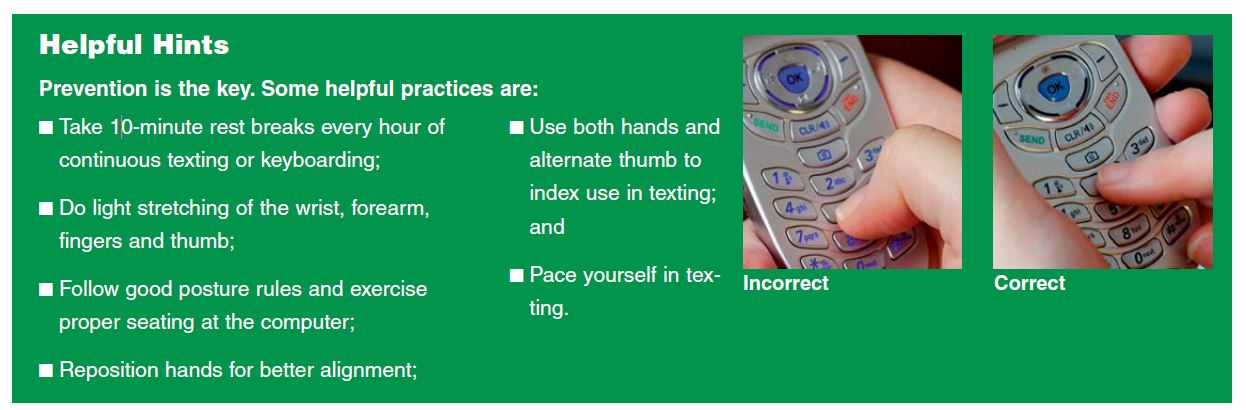
  1. Position – Watch your hand position when you text
  • Keep your wrists in neutral when texting
  • Rest your arms on a table or surface whenever possible to reduce the need to bend your neck for long periods of time
  • Don’t hunch over when texting as it also has been shown to contribute to neck, shoulder and back problems (University of Gothenburg, 2009)
  • Wear a brace or splint if suggested by your doctor.

2. Pacing  – Limit the amount and length of time you text

  • Reduce the time you spend texting
  • Take a break if you are texting for a long time
  • If you are doing a lot of texting use a keyboard you can attach to your handheld device

3. Technique – Being mindful of how you are texting can be helpful

  • Position your hands for better alignment with wrists held at neutral position.
  • Avoid moving your hands and wrists the same way repeatedly, vary your activity
  • Use of a stylus might also offer a different position and movement when texting
  • Take special note of any activity that causes pain, swelling or numbness in your thumb and wrist, try to avoid it, and share that information with your doctor.
  • Utilize apps available for voice recognition, abbreviation expansion or word completion to reduce key input associated with texting:

4. Exercise – There are recommended gentle stretching exercises to help relieve the symptoms of text thumb. Consult a physician if the symptoms increase.

Summary

There is a lot of information on the web on the subject. Here is one additional article from Advance for PT: “Texting and Hand Health” : http://physical-therapy.advanceweb.com/Features/Articles/Texting-and-Hand-Health.aspx

An increase in RSI has been found in children, teens and adults due to texting. Be mindful of ergonomics when using handheld devices no matter what the age to reduce long term effects of overuse and poor positioning!

Note: The above information is not a substitute for evaluation or treatment from a physician. Consult your physician for prolonged pain or discomfort .

Resources:

Ashurst, Turco, Lieb, 2010., “Tenosynovitis Caused by Texting: An Emerging Disease”. J Am Osteopath Assoc May 1, 2010 vol. 110 no. 5 294-296

Relief-for-texting-thumb. Jefferson Hospital, Aug. 2012. Web. 23 Feb. 2013. <http://www.jeffersonhospital.org/keep-in-touch/august-2012-issue/relief-for-texting-thumb&gt;.

Mayo Clinic. Mayo Clinic, n.d. Web. 23 Feb. 2013. http://www.mayoclinic.com/health/de-quervains-tenosynovitis/DS00692.

Muse, Trish.  How to Relieve Blackberry Thumb. N.p., n.d. Web. 23 Feb. 2013. http://www.monkeysee.com/play/7441-how-to-relieve-blackberry-thumb.

McEvoy, Cheryl. “Texting and Hand Health.” Advance for Physical Therapists. Advance, 10 July 2010. Web. 23 Feb. 2013. <http://physical-therapy.advanceweb.com/Features/Articles/Texting-and-Hand-Health.aspx&gt;.

Narain, Jaya. “Eight-year-old Text Queen Has Repetitive Strain Injury.” Daily Mail.com. Daily Mail, 8 June 2006. Web. 23 Feb. 2013. <http://www.dailymail.co.uk/news/article-389800/Eight-year-old-text-queen-repetitive-strain-injury.html&gt;.

Partin, Christine. (n.d.): n. pag. “Thumb Hurt? Wrist Sore? Hands Tired? Text Messaging May Be to Blame”,. Miami Valley Hospital. Web. 23 Feb. 2013. http://www.miamivalleyhospital.org/uploadedFiles/mvh/Health_Information/v26i1_text.pdf.

“Potential Risks of Computer Games and Text Messaging.” RSI.org. N.p., n.d. Web. 23 Feb. 2013. http://www.rsi.org.uk/pdf/games_and_texting.pdf.

“RSI: What You Absolutely Need to Know.” MIT, n.d. Web. 23 Feb. 2013. http://web.mit.edu/atic/www/rsi/needtoknow.html.

Sadler, Jane. “Teenage Texting Tendonitis.” Health Blog. Dallas News, 12 June 2012. Web. 23 Feb. 2013. <http://healthblog.dallasnews.com/2012/08/win-50000-dollars-and-you-may-get-teenage-texting-tendonitis-as-a-bonus.html/&gt;.

“Virgin Mobile SafeText.” Textercises.” Virgin Mobile, n.d. Web. 23 Feb. 2013. <http://www.practisesafetext.com/&gt;.

University of Gothenburg (2009, June 24). How To Text Message And Avoid Sore Thumbs, Neck And Hands. ScienceDaily. Retrieved February 23, 2013, from http://www.sciencedaily.com­ /releases/2009/06/090623150131.htm

Carol

Posted in Activities of Daily Living, Android, Apps for OT's, Ergonomics, Finger Isolation, iPhone, iPod, Mobile Device Use, Occupational Therapy, Rehabilitation, Voice Recorder | Tagged , , , , , | 2 Comments

More Noise Regulation Apps

Review of the TooNoisey app generated a few comments about possible use in classrooms along with additional apps that may help with noise regulation issues. Kim Wiggins shared a few more apps she has used for noise regulation issues:

Quiet Please iconQuiet, Please! for iPhone and iPad (.99) and Android (free) is an interactive adventure game that requires interactive problem solving to manage annoying situations (… After an annoying day at school, you just want some peace and quiet. But everything at home is so noisy! – Sound familiar with your SPD kids?).  Sounds like a fun app to explore!

The Quiet Game iconThe Quiet Game for iPhone and iPad (free) and Android (free) features a game to stay quiet at home, in the car or at school.  Here is a video of the Android app:

Thank you to Kim Wiggins for sharing these apps which are appropriate for many environments : home, auto and classroom!

More for your school, home or OT mTool Kit!
Carol

Posted in Android, App Reviews, Apps for OT's, Apps for Special Needs, Autism, Emotions, Free apps, Game Apps for Special Needs, iPad, iPhone, iPod, Occupational Therapy, Self-regulation, Special Needs | Tagged , , , , , , , | Leave a comment