Skill Game – A Visual Motor and Spatial Reasoning Challenge

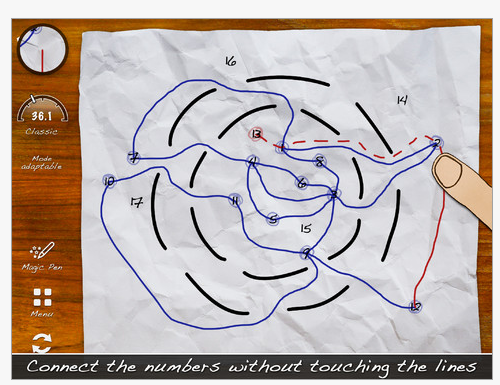
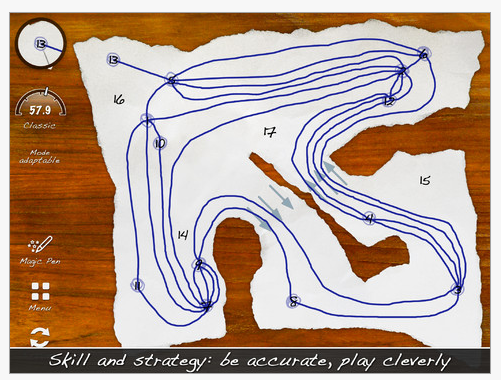
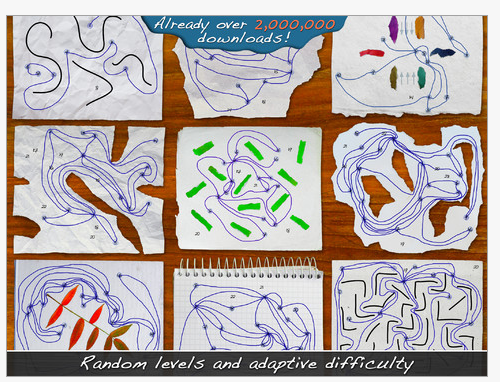
Skill Game app, by Good Apps is a Game Center app listed as “Free for a short time”. Designed for iPhone and iPad, this is an electronic visual motor – pencil paper kind of activity requiring problem solving, fine motor and visual  spatial reasoning skills. Here are some images of Skill Game app and the rules to understand it a bit better:

Appropriate for older elementary students through adult, Skill Game app provides great opportunities to work on visual motor control, motor planning and spatial reasoning.  Here is a short video on the app:

Although you can use a finger to play in this app, a stylus would help with accuracy when drawing. One of the styluses from Stylus R Us’  , the Adonit ADJF Jot Flip Stylus  or iFaraday’s SALT styluses provide accuracy and allow the player to see the screen. When using a finger, your hand covers the screen limiting the ability to view all of the points.

This looks like an interesting app gone free for older students or adults that need work on visual motor and spatial reasoning skills.

Catch it while it still is free to add to your OT iTool Kit! Have fun!

Carol

Carol

Posted in App Rubric, Apps for OT's, iPad, iPhone, iPod, Occupational Therapy, Visual Motor | Tagged , , , , , , | 9 Comments

Back to School – Visual Timer Apps

Getting ready to go back to school?

Here is a free back to school app that provides visual communication for parents or teachers needing to provide structure to their child or students day.

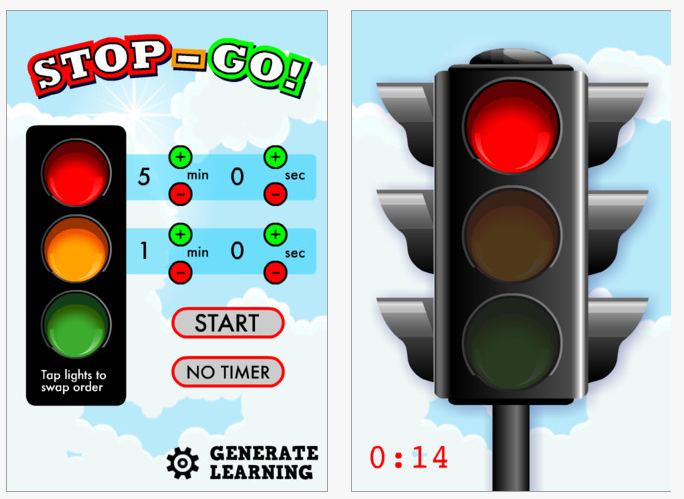
Stop Go! (free) for iPhone and iPad is a stop sign app providing a visual timer you can set from 5 seconds up to 99 minutes and 55 seconds. You can also set the time that the warning chime will go off.  No options for choice of sounds are available. Used to provide visual warning for when activities will stop, this app provides both the stop sign and count down time on the screen.

This is a simple app but highly valuable as a behavioral aid to help children anticipate when a change in activities and schedules will occur using a standard stop sign concept.

Whether used as a warning when the TV or iPad needs to be turned off or when it is time to brush teeth before bed time. Visual timers can reduce the struggles of verbal reminders when activities are to end for children and students.

Need other settings or features in a visual timer? Check these app out:

More apps for your OT iTool Kit!

Carol


Posted in Android, App Reviews, Apps for OT's, Apps for Special Needs, iPad, iPhone, iPod, Occupational Therapy, Visual Communication | Tagged , , , , , , | Leave a comment

Need a Sensitive Stylus?

Are you in need of a stylus that is sensitive and easy to handle for one of your students or clients?

I have searched and purchased a number of styluses with an OT perspective in terms of the needs of users with atypical prehension, movement, sensation and tone.  As OT’s we are always looking for ways to improve grasp patterns, compensate for challenges with movement or tone or provide sensory motor input using different positioning, grips, handles, weight or textures to facilitate improved use of tools to access or perform a task. Like pens or pencils, the size, shape, weight and gripping surface of a tool can all make a difference for individuals with mobility, cognitive or sensory challenges. So it goes with styluses.

Considering styluses for children or clients, I have been searching for different size and shapes of grips on styluses. I have found chunky styluses (such as the Cosmo or Cosmonaut), some that were heavier providing increased sensory feedback and also MacGyvered handles for styluses to enlarge the grasping surface or sensory awareness for the user.

Some styluses were heavier, providing increased sensory feedback for with reduced sensory awareness.

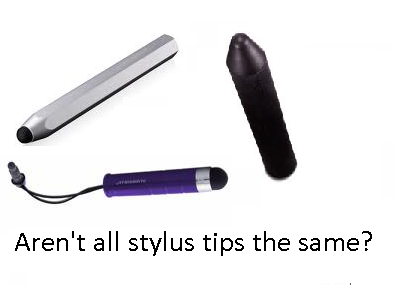
What I have overlooked (and may be related to the type of clients I more frequently service) are qualitities of styluses for individuals who require some of the opposite characteristics, that of light touch, light weight, ease of handling and accuracy. Aren’t all stylus tips the same  with exception to the size of the tip?

A comment posted by Ciara Campbell and subsequent emails mentioned the success she had with her stylus from Stylus R Us. Some search and contact with Mr. Stylus peaked my interest in his stylus science resulting in purchase of a Big Screen Jr stylus from Stylus R Us. This brought about a whole new appreciation regarding the sensitivity of conduction or touch capable of his styluses.

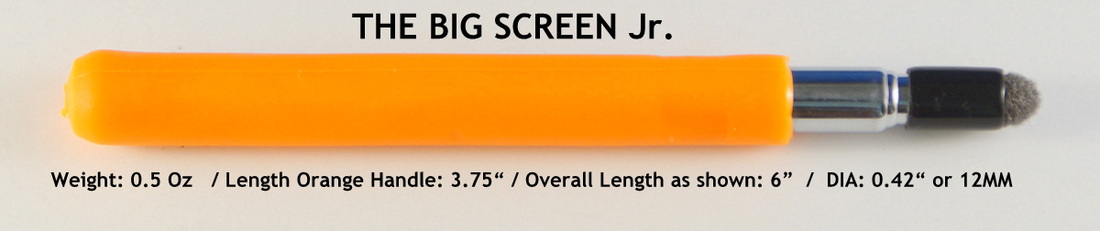
Having received my new Big Screen Jr. stylus featuring a .42″ handle and telescoping shaft, I found the handle comfortable and large, jus a little smaller than a Crayola large marker. What was amazing was the sensitivity of the stylus.

Mr. Stylus shared with me how sensitive the stylus was but seeing and using was believing.  With barely a touch of the surface of the iPad screen (not even touching) to activate an icon, menu or keyboard key the device accurately responded. It also did not skip or miss when writing or drawing, a source of frustration with use of standard styluses previously purchased.  I realized that not all styluses tip sensitivities or conduction are created equal.

Another quality of this highly sensitive tip was the ability to hold the stylus like  a real writing tool, not straight up but at an angle allowing connectivity of the side of the stylus tip. This allowed me to write with a mature pencil grasp, rather than having to hold it immaturely in an upright position like many of my other styluses (holding a Stylus R Us stylus in a mature manner is recommended by Mr. Stylus). This is something we are always trying to achieve but sometimes it is not capable with a standard styluses.

Retrieved on 8/7/2012 from: http://beststylus.com/how-to-judge-any-stylus.html

This is a bonus when using a stylus on a mobile device and working on handwriting and development of mature grasp patterns!

So what’s the big deal? My standard stylus works for me, why would I purchase a more expensive stylus that is more conductive? Here are a few reasons that come to mind from a therapeutic intervention point of view:

  • For use with individuals who have graded control but movement and activation of the screen is limited and effortful
  • For use with individuals who do not have proximal or large muscle movements but have remaining distal control such as:

Arthritis

Arthrogryposis

Muscular Dystrophy

Myopathies

Some spinal cord injuries

  • You are developing  handwriting skills and facilitating a mature pencil grasp and finger extension

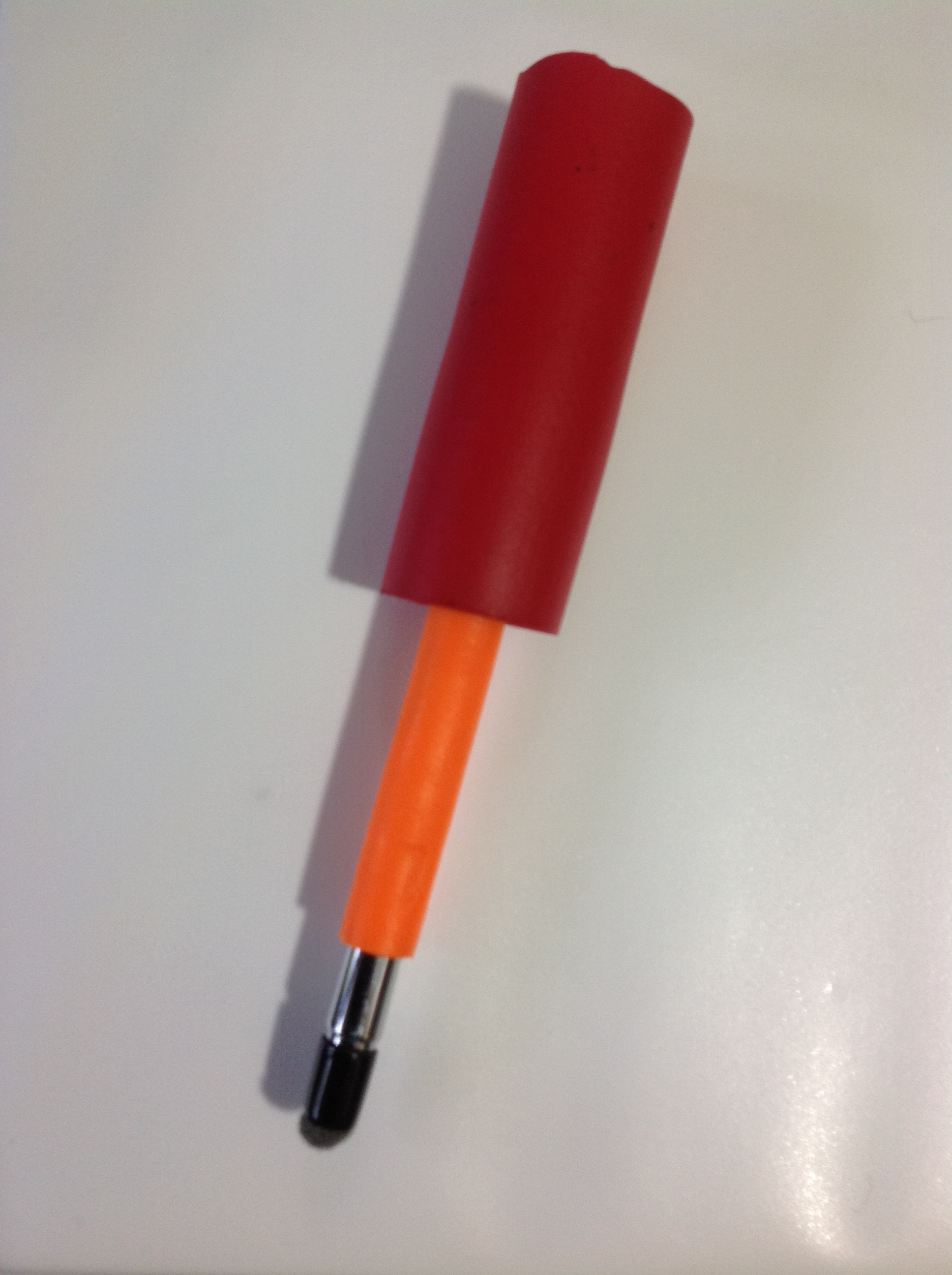
Another bonus is that I was able to attach a standard large grip handle on The Big Screen Jr. which still allowed the stylus to have the conductivity needed to work very well on the iPad screen (Huh? – wow!). You may not want to use this grip on a stylus but the trial proposes that other grippers may be able to be used on one of the Stylus R Us stylus and still work accurately. Not the case will many other styluses.

Stylus R Us  makes many varieties of stylus with different handles/shafts but with all with the same sensitive stylus tip.

Would I purchased this for all of my students or clients?  It depends, if I had a student/client who had weakness and good control and wanted a needed accurate and efficient method of input, I would definitely recommend one of Stylus R Us styluses. If I worked with students on handwriting on my mobile device and wanted to facilitate a more mature grasp, the Stylus R Us stylus tips allow better positioning and accuracy when writing or drawing. For individuals with poor graded motor control this may not be the best choice of styluses.

As always the right tool for the task fit to individual needs of the user (and good clinical judgment).

Carol

Posted in Accessories, Handwriting, iPad, iPod/iPad Accessory, Occupational Therapy, Stylus | Tagged , , , , | 10 Comments

Organization & Time Management Android Apps for High School and College Students

The previous post “Organization and Time Management  Apps for High School and College Students” on OT’s with Apps brought a comment from a visitor indicating the lack of  suggested apps for Android users. As an iDevice user who is also in charge of managing iDevices in the school I work at, I would be guilty of being iOS biased. I do try to be aware of apps for Android however it is difficult to stay on top the breath of iOS and Droid apps! I do apologize for the lack of review for Android devices.

Coincidentally I have recently been perusing Android apps resources to find apps for individuals with learning disabilities. My searches have frequently found more apps that are  developed for both the iOS and the Android platform – good news when trying to identifying preferred for individuals with disabilities. Although it still appears that iOS apps and review sources out number Android, I did find some good reviews, familiar and noteworthy Android apps for learning and organization!

Here are some Android apps for High School/Secondary and Post Secondary Students for  time management and organizational planning. Review sources are listed at the end of the blog.

Class and Homework Planning/Management
My Homework – (free) This Android app is made by the same developer as My Homework app  for iOS. For syncing between devices, a 1.99 yearly in app charge for sharing information between devices at myHomework.com.

My Homework app provides tools to list class days and time and enter homework into classes with due date and a level of priority (low, medium, high). Assignments can be reviewed as “All”, “Priority” and “Type”  with due date and time. Long term homework assignments can also be entered to break them down into smaller chunks. A simple calendar is provided that shows that there is an event scheduled by date that when the date is selected will display more event information.

Although due dates are entered, no audio or vibrating alarms are options in the app. The app allows checking off the homework when completed and removal of completed assignments. This takes some time to set up and enter assignments. Color coding by block schedule is available.

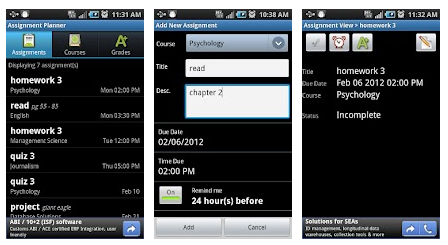
Assignment Planner Free – (Pro 1.29) Class and assignment planner for Android features the ability to set up classes and then adding assignments to each class. Classes can be entered by days and then set up to be repeating and are presented in a list with days of the week and times of the class. Other information by class can also be entered including instructors name, location and contact information.

Assignments are presented in a  calendar but listed by date and time showing class and assignment. Alarms can be set for assignments by hours or minutes prior to the due date set. Assignments can be checked off when complete and scores entered (X/out of = XX%) to track grades. Although no color coding is available in the app, the lists clearly present assignments in a descending order for easy viewing and assistance with prioritization at least by date. The format allows easy editing of information within the app. There is no prioritization method within the app.

This app is good, however I would like to see color coding provided by course for ease of identifying assignments by course. I would also like to see a monthly calendar allowing a big picture view of assignments to help with long-term projects assigned. The Pro version removes ads but which are very inconspicuous in the lite app. I found Assignment Planner to have an easy to use format and no sign in or membership required.

To Do Lists

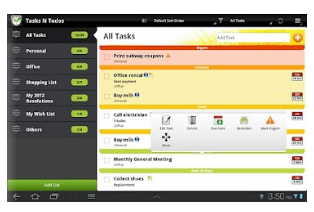
Tasks N ToDo – Lite (Tasks N Todos Pro) is an Android app that provides many features for a do to list app. This app has a very nice interface that is easy to use and read with color coding available of different subjects. Lists of tasks can be separated into different task subjects, such as work, personal, organizations for easy of categorizing events.

Manage your to-do list effortlessly using Tasks N ToDo’s – the to-do list app for Android that syncs automatically with Google Tasks. Setting due dates, notes, reminders for your to-do list are all easily accomplished with its interface. Syncing can occur between Android tablet and smart phone. This app has many tools to help list, prioritize, remind and share events and lists between devices. This app has good reviews and was a favorite of mine from the trials performed.

Calendars

Calendars are many and most tablet and smartphones come with a OES (original equipment supplier) calendar app. Recently I informally surveyed the a group of techies on their personal preference for Android device calendars and the response was almost unanimously the OES calendar. Use of Google Calendar was also a preference by the group.

Most calendars come with the ability to create events and schedules, schedule reminders and some color coding the scheduled items. Google in particular allows color coding of events, setting reminders by days and hours and allows viewing schedules by day, week and month. Those features that are recommended for time management and prioritization when looking for an app include:

  • Entering events and schedules
  • Entering schedules by day, hour and repeated days of the week (such as classes)
  • Setting alarms by minutes, hours or days
  • Viewing a schedule by day, week and month for reminders of short-term goals or assignments as well as long-term projects
  • Color coding events such as classes, personal versus work or school tasks
  • Ability to edit and show completion of tasks (checking off tasks is so rewarding!)
  • A web-based app can allow the ability of other support people to view, edit or enter tasks into a students schedule

Trialing apps that all ready exist may be well worth the time. Other options for calendar apps include using web-based apps such as Google Calendar or email or student management calendars supplied by the school. Look for features important to the student to foster greater independence in organizational skills. Teaching stakeholders, such as parents, peer tutors or coaches how to use the apps can also provide carryover and practice of tools and organizational skill development.

Reviews of Android App ‘s for High School and College Students

Here are a few Android app review links that list droid apps for secondary and post secondary students:

Back to School Essential Apps for College Students – http://www.msnbc.msn.com/id/48189836/ns/technology_and_science-back_to_school/t/essential-android-apps-college-students/

Best Android Apps for College and University Students –http://www.androidauthority.com/best-android-apps-college-university-students-81569/

Android Apps for Students –  http://www.squidoo.com/android-apps-for-students

Do you have any suggestions for organizational apps for students with organizational challenges for Android? This review only scratches the surface. If you have any recommendations please share.

Carol

Posted in Android, App Rubric, Autism, Learning Disability, Occupational Therapy, Organization | Tagged , , , , , , , | 5 Comments

Splashtop 2 Remote

Are you looking for a app that can display the contents of your computer and contents of your interactive whiteboard?

Of course there is an app for that …

Splashtop 2 Remote app, currently $.99 (typically $9.99), compatible with iPad only, connects your computer desktop remotely to your iPad. Installing the app on your mobile device and downloading software on your computer creates the connectivity that will allow you to operate your desktop remotely from your iPad.

Why would I want to do that? Here’s some suggestions:
  • Interact with software activity that is not an app (Intellitools, PixWriter, etc.) on your computer
  • Use you iPad as the interface for the activity or software projected on your screen, practice writing, practice a skill on the iPad wirelessly
  • Provides touch screen access to the computer using a iPad by students
  • Play or watch flash media, not compatible with the iPad iOS system (but can be streamed from a computer to your iPad)
  • Interact with Internet websites on your iPad remotely
  • Brings a single computer program to the user allowing easier access than touching a interactive whiteboard

Here is a video of how it works:

Splashtop app will work with iPad 2 and 3. Splashtop is the recommended app for use with Smartboard Technology.


Carol

Posted in App Reviews, Apps for OT's, Apps for Special Needs, iPad, iPad Management | Tagged , | Leave a comment

Must See Apps List… Really!

Samuel Sennott shared this resource on the QIAT list serv – and it is a must see app and equipment listing on Pinterest!

Created by Lauren S. Enders, SLP/ Augmentative Communication Specialists / Assistive Technology Consultant, her app list seems to have something for everybody. This is just a partial snapshot of her Pinterest website  at http://pinterest.com/lasenders/ :

Lauren Enders provides apps specific to speech and language, therapy in general, curriculum subjects, special needs, age groups, adaptive equipment and more.

Visual and categorized, this app list is like eye candy for those of us looking for resources for clients or students we service.

Thank you to Lauren S. Enders for compiling this extensive list! I can’t imagine the hours it took her to do this. And thanks to Samuel Sennott for making us aware of it on QIAT.

Enjoy!

Carol

Posted in Accessories, App Reviews, Apps for Special Needs, Augmentative Communication, Early Childhood, Elementary School, iPad, iPhone, iPod, iPod/iPad Accessory, Occupational Therapy, Primary Grades, Special education, Special Needs | Tagged , , , , , | 7 Comments

iOS Apps List for Middle/High School & Adults with Learning Disabilities

Looking for iOS apps for adults or middle school through post secondary students with  learning disabilities? Check out this app list out.

Create with  middle/high, post secondary students and adults in mind, this list includes basic apps to support individuals with learning disabilities. With deployment of iPad to students with learning disabilities at school and working with post secondary students creating a go to list of app has been a goal for a while. Although there are thousands of possible apps that could be listed, here are a few apps by categories I would recommend to support academics, organization, dictionary or reference work use for struggling readers and writers.

iOS Apps

Concept Mapping Apps
Tools 4 Students App providing wide variety of concept mapping templates for writing,   summarizing, pros vs. cons, timelines, KWL, word meaning and more .99 iPad
Popplet Concept mapping app; Easy to use Free/ 4.99 iPhone/iPad
Idea Sketch Concept mapping app; Draw diagram, convert  to text outline Free iPhone/iPad
Dictionary/ Reference Apps
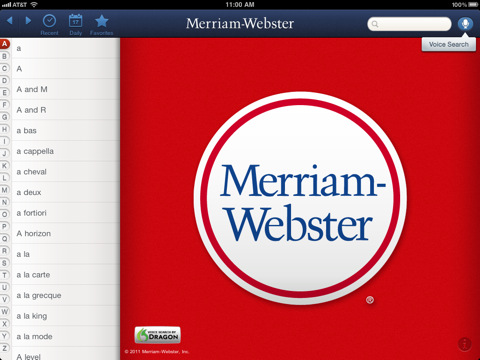
Merriam Webster   Dictionary Dictionary with voice recognition search capabilities. Requires Wi-Fi   for voice recognition; Create personal word lists Free/ iPhone/iPad
Dictionary.com Dictionary with voice recognition search capabilities; Requires Wi-Fi Free iPhone/iPad
Wikipanion Companion app with Wikipedia; requires Wi-Fi for search Free iPhone/iPad
American Wordspeller Phonetic based spell checker 4.99 iPhone/iPad
File Management Apps
Dropbox Cloud storage and management of   documents, audio, video files; interfaces with many apps and services Free iPhone/iPad
GoodReader for iPad PDF Reader managing Microsoft Office files, images, audio and video;   Edit documents in app 4.99 iPad
Evernote Create, store text, photos and audio notes; sync to any computer Free iPhone/iPad
Math Apps
 Khan Academy App featuring Khan Academy videos on math, science, history and more subjects Free iPhone/iPad
 Soulver
Notepad calculator; Multi-function calculator  with different keyboard layouts (numbers,   letters) 2.99 iPhone/iPad
Note Taking Apps
Notability – Note taking binder app; Import images, files, create notes, fill forms; Export files by email, print, save to Dropbox, iCloud; Tools include drawing, highlighting, more .99 iPad
AudioNote – Notepad and Voice Recorder Voice recorder app with recording capabilities; Rename files Free/4.99 iPhone/iPad
OCR/ Scanning Apps
Prizmo Document scanning app with OCR capabilities, text to speech, translation and   editing capabilities. Best used with iPhone or iPad 3 camera 9.99 iPhone/iPad
TextGrabber + Translator Scanning app with OCR capabilities; translation, best when used with iPhone or iPad 3 cameras 2.99 iPhone/iPad
Organization Apps
iStudiez Pro School based organizational app with calendar, class schedule,   teacher contacts and class management system; Good for high school and   college students 2.99 iPhone/iPad
VoCal XL Audio calendar with persistent reminding capabilities 5.99 iPhone/iPad
Awesome Note Organizer with calendar, note taking by topic/subject, to do list,   reminders; links with iOS Calendar 3.99 iPhone/iPad
 iCal Apple system calendar app; Create multiple calendars, color coding, set   reminders, repeat schedules Free iPhone/iPad
 ToDo Manage tasks with audio alerts, subtasks and checklists; syncs with iCal and Outlook 4.99 iPhone/iPad
Reading Apps
Read2Go Bookshare.org app with text to speech, highlighting and reflowing of   text; easy download of Daisy, NIMAS files to members 19.99 iPhone/iPad
ClaroSpeak Upload txt docs for use with Text to Speech,   highlighting, font, background, highlight customizing; Reflows text on the screen 5.99 iPhone/iPad
iBooks Apple’s book management system; ePub, PDF, purchased iTunes books; use Speak Text for basic text to speech ; create notes, highlight info Free iPhone/iPad
SoundGecko Convert text articles online to MP3 Free iPhone/iPad
Voice Dream   Reader Text to speech app imports content from other sources to read aloud   (PDF, web pages, PPT, doc) 2.99 iPhone/iPad
AudioBooks Listen to books and all types of reading material. Free iPhone/iPad
Writing Apps
AppWriter US Word processing app with word prediction, text to speech. Manages documents, PDF file formats; syncs with Google docs, Dropbox; print, email 19.99 iPad
Dragon Dictation Simplistic voice recognition app; requires Wi-Fi to transcribe speech to  text Free iPhone/iPad
Type on PDF Form filling app allows adjustable fill in the blank fields; With   iPad 3 provides voice recognition capabilities to complete forms. 9.99 iPhone/iPad
Typ – O HD Provides word   prediction and spelling error assistance 14.99 iPad

Lists like these are always a work in progress – check back for revisions!

Here is a  downloadable PDF of the OTs w Apps Basic App list for LD 7-28-2012.

More for your OT iTool Kit if you work with adolescents and adults with learning disabilities. If you have app suggestions for basic apps for LD, please share.

Carol

Posted in Adults with LD, App Reviews, iPad, iPhone, iPod, Learning Disability, Math, Middle School, Note Taking, Note Taking App, Occupational Therapy, OCR, Reading, Scanning, Text to Speech, Word Prediction, Writing | Tagged , , , , , , , , , , , | 2 Comments

AppWriter – A Multi-Purpose App for Individuals with Learning Disabilities

Are you in need of an app that provides:

  • Text to speech
  • Word prediction
  • Word highlighting
  • File management
  • Dyslexie font (a specialized font for dyslexics)

AppWriter may be your answer!

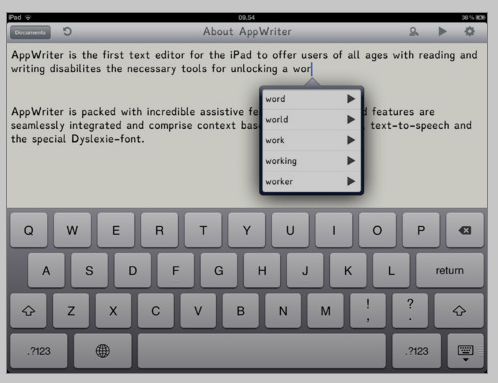
AppWriter US for iPad (19.99)  is a text editing app that has multiple features for individuals with learning disabilities.

Word prediction tools provides word completion and word prediction that is context based and alphabetically presented. The word prediction word bank allows reading the word aloud before selecting the word for insertion.

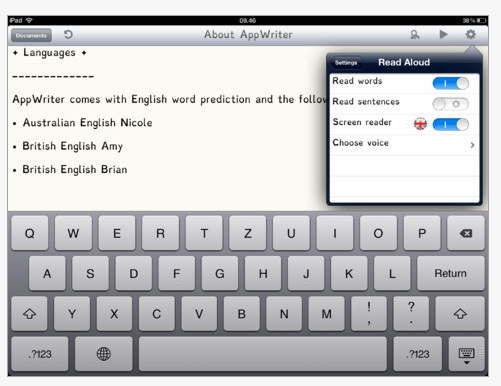
Text to speech features offers three different voices (only female) which can read the word or sentences when word processing or reading text. Screen reading within the app is also a choice. One drawback, reported by Chiara, a user, was the reading speed setting were limited with the highest rate reportedly slow.

File management allow you to save within the app, email, copy, or share with Dropbox or Google Docs.

The app uses a font called Dyslexie making it easier for people with dyslexia to distinguish  individual letters and reducing the number of reading errors.

AppWriter US provides a writing environment with word prediction support and a basic text reader when documents are copied and pasted into the app. Easy to navigate, save and import and export documents for use within the app, this is a multi-purpose app for struggling readers and writer on the iPad. When used on an iPad 3 the combination of voice recognition available in the standard keyboard, word prediction and text to speech provides some great supports.

This app is well designed and features tools that support struggling readers and writer on the iPad. This app is definitely in my OT iTool Kit!

Carol

Posted in Adults with LD, App Rubric, Apps for OT's, Apps for Special Needs, iPad, Learning Disability, Occupational Therapy, Special education, Text to Speech, Word Prediction, Writing | Tagged , , , , , , , | 7 Comments

Shoe Tying 1 app from Accelerations Educational Software

A big thanks to Karl Smith at Accelerations Educational Software for his generosity in supplying me with the app Shoe Tying 1, allowing review and trial of the app first hand!

If you are not familiar with Accelerations Educational Software they are the creator of Discrete Trial Trainer and Activity Trainer software. They are developing their training modules into apps for iDevices and in the future Android as mobile solutions for instruction. Shoe Tying 1 comes from their explicit training materials rolled into this app. Here is more about the app, the multiple method of instruction it supplies and the extensive supporting materials that accompany the app.

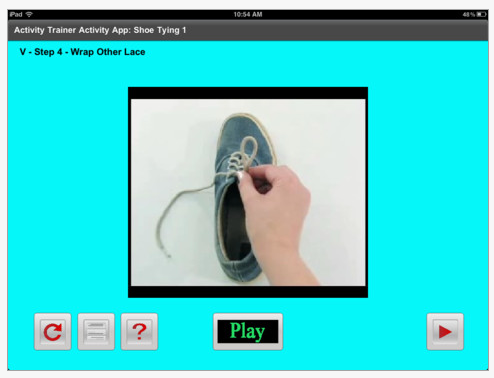
 Shoe Tying 1 – Activity App ($4.99) for iPhone/iPad provides explicit instruction of shoe tying single loop method (off foot) in a variety of multi-media presentations including video, images, text and audio as options for instruction for the user. The presentation menus provide a listing of the 7 steps to shoe tying with choices of presentation, by V – video, I  – image,  A – Audio, T-Text or any combination of those modes allowing support as uniquely needed for the user.

Note the “V” in the upper left corner of the image above indicating this is a video of the task. Play and forward buttons allow easy access to the video and moving to the next step.

The above image show the transition to presenting in video (V) and the image (VI) of the task. Controls for the video are provided.

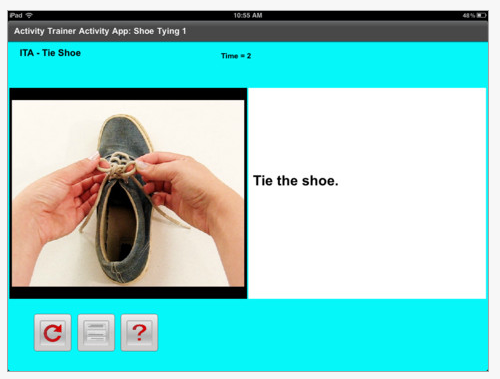
Presentation of this subskill is provided in image (I), audio (A) and text (T) as listed at top left.

Controls within the app are at the bottom and straight forward allowing a repeat of the instruction, listing of the instruction menu or help (?). Below is a listing of the app instruction menu for shoe tying sequences available. Note of what you see is organized by video (V), video and image (VI) and image and audio (IA). Well organized and easy to scroll through.

Instructions and scope and sequence of the app is offered upon opening the app. An overview , explanation of using the app, teaching guide, activity info and why video modeling works information.  Accelerated Educational Software provides extensive supports within the app with links to their website which hosts downloadable materials on all aspects of this app. One of the many great resources I find valuable are the images of the step of shoe tying used in the app that can be downloaded and printed.

Although this may not be needed since the images are all in the app, however we know that it is always prudent to have back up resources should your electronics fail (oh, I know that never happens!).

Here is a link to resources associated with the Shoe Tying 1 app that I think can be valuable instructional materials off-line in and of itself!

http://aesapps.com/activity-app/shoetying1/

Shoe Tying 1 app provides the task analysis of shoe tying taught in carefully thought out increments with a variety of presentation mode to support individual user needs.  For students needing instruction provided in small increments or who would benefit from video modeling of the skill, this app will provide with all you need and more. It provides instruction of the single loop method only (not the Bunny Ear method). The app also provides a graded mode of skill instruction that offers the opportunity to fade supports as the user acquires skills of the task.

I have thought about videoing the shoe tying sequence with recorded audio for use on the iPad, but rethinking paying $4.99 for this well-developed app, I would be money ahead purchasing this app. From my experience with using videos and image instruction with students, this app provides the explicit instruction in a universal design for learning mode any where I might need it. How much better can it get?

Now for those who have reviewed this blog post to the very end – a free code for Shoe Tying 1 app from Karl Smith at Accelerated Educational Software – first come first serve…

Here is the Shoe Tying 1 app Promo Code for you to give away…   4LP39RX4JH3H    (Please, if you redeem the code would you be so kind to post a comment “Redeemed” so that others are aware that the code has expired? We will all be happy to know that – Thank You)

Thanks to Karl Smith at AES for  providing the codes to the Shoe Tying 1 app I am really excited to have it to use with my students. AES also has some exciting app developments in the works apps for iOS and Android so stay tuned whats happening on their website.

Professionally, would love to see a nose blowing app! Seriously, as a OT I get frequent requests for help with that skill! Anyone have any good resources? I have found some but not in video format or explicit!

Happy shoe tying instruction!

Carol

Posted in Activities of Daily Living, App Reviews, Apps for OT's, Apps for Special Needs, Clinic Based Interventions, iPad, iPhone, Occupational Therapy, School Based Interventions, Special education, Special Needs, Video Modeling | Tagged , , , , , , , , | 7 Comments

From the Voice of Experience – A Stylus Recommendation

Ciara Campbell shared this valuable comment yesterday on a stylus recommendation and also agreed to let me to share it in a post …

“I’m 32 have spastic quadriplegic cerebral palsy, I got an iPad 2 about a month ago. My fine motor function is affected, but I do have the ability to hold a pencil, drive my powerchair, button a shirt etc. I have been using a telescoping stylus from Stylus R Us  called the Big Screen Jr. It’s great, it requires no pressure to use. It has also been used successfully by a student with severe cerebral palsy who wears a hand splint and has no fine motor function.”

Here is a bit more about Ciara’s recommended stylus, the Big Screen Jr.

A telescoping stylus, very light weight with a nice handle. Sells for $39.99 on Stylus R Us (SRU) website. They feature many more styluses on their website.

Thanks to Ciara for sharing!

Carol

Posted in Accessibility, iPad, iPhone, iPod, iPod/iPad Accessory, Stylus | Tagged , , , , , | Leave a comment