AAC Apps for Android | AppsForAAC

See on Scoop.itApps for Special Education

Patrick Black on QIAT list serv recently supplied this AAC Apps for Android resource developed by Will Wade, OT from the Ace Centre in Oxford, GB. Will Wades lists not only provides AAC apps but also some supports for dyslexic or learning disabilities. A comparison tool is provided in the Full List tab that appears updated. The About tab provides a Android and iOS list by category. I found the information regarding mobile 112 interesting and definitely worth checking out!

If you are looking for Android apps for communication or LD support, this would be a wiki to peruse.

See on appsforaac.net

Carol
//

Posted in Android, App Reviews, Apps for Special Needs, Augmentative Communication, Learning Disability | Tagged , , , , | 2 Comments

How Memory Works & Ways to Improve Your Memory – Are There Apps for That?

This infographic, “How Memory Works” reminds us of the stages of memory for learning to occur. As OT’s, teachers, therapists, or parents, a good working memory is necessary for learning to occur and for recall of  all of our day to day tasks for us function.

(Infographic source: http://www.onlinecolleges.net/2012/01/09/memory-works/ )

So how can you apply memory strategies in your work with students, clients or for yourself with day to day tasks? Are their apps that can help apply those strategies?

The three stages of memory mentioned in the infographic are also commonly defined as³ ( Muskingum College Learning Data Base ):

(1) Sensory memory (encoding)  holds memory for about 20-30 seconds. One of the single most important components is attention³. Providing information in a novel or new way to learn can help maintain some individuals attention so that learning can occur. Sensory memory/learning involves using all senses, touch, vision, hearing, smelling, moving and handling objects in a variety of ways. Using all of your senses¹ is standardly recommended, providing more sensory channels to be used to involve more parts of your brain.

We also know that some of our students may have strong preferences with how information is being presented. It is obvious for some individuals with easily observed sensory losses or motor impairment what compensatory methods need to be used to present and allow sensory memory to occur, but some less obvious disabilities such as individuals with autism learning or central processing disorder may require specific modes for sensory memory to occur.

(2) Short term memory (retrieval) holds information temporarily and requires repetition,  practice and review to help information to be received, recalled and learning to occur. Along with skill and drill practice and review other methods to help with recall and learning include, draw it, write it, sing/chant it, rehearse it, review the information across different days.  Skill and drill practice is not particularly popular these days, however flash cards that provide visuals, auditory, color coding and methods of categorizing information can help information be stored.

(3) Long term memory (storage) creating permanent storage of memories. Using the information to categorize/organize³, restating, summarizing comparing, analyzing or creating a presentation or project of the information helps with understanding and generating meaning of the topic. Tapping into interests, learning mode preference³ and prior knowledge can support storage into long-term memory. Health³ is also a factor that needs to be considered. This includes mental health³ that may include anxiety or stress factors, lack of sleep that may affect sensory memory and attention which affects learning potential.

What strategies and apps might support memory strategies of the different stages?  There are many (understatement – a plethora) memory strategies focused on learning as well as for functional living skills. Here are just a few recommended strategies and some apps that might support use of those strategies :

1. Encoding or sensory memory – Use multi-sensory modes of learning. Visual strategies can be good for many students in the classroom, especially known to support students with autism or those with memory challenges. Present information in words and or with text to those who need information available in a concrete manner. Auditory information is transient, here then gone, and  difficult for those with auditory processing challenges or weak memory.  For individuals with mental health, attention/concentration issues understanding that they need help with calming or de-stressing before learning can occur is extremely important. If stressed, overwhelmed, inattentive learning can’t occur.

Strategies and apps:

  • Allow individuals to move to an area where they can concentrate or calm themselves. Apps such as mediation or relaxation apps, music apps or select music that is known to calm the individual can help them be ready to learn a task. Such apps might include Mindful Mediations, Relaxation Melodies .
  • Music or radio station apps like Pandora, iTunes music or Yahoo Radio  can be helpful for environmental sound to calm and help with concentration. Music provided individually, as each person has a personal preference for music (and which I have found can change from day to day depending on mood and preference).
  • Research on using white noise indicated that it had a positive effect on individuals with AdHD. Apps such as White Noise +, SimplyNoise on iPods and MP3 players could help individuals with concentration challenges.
  • Sensory apps can also help to calm or de-escalate behaviors.  Such apps as Pocket Pond, Fluidity, have been observed to help with behaviors.
  • Self regulation apps such as  eCBT Calm app, SOSH app,  Autism  Five Point Scale app can help by providing step by step methods and customized strategies to assist individuals in self regulation.
  • Providing information in multi-sensory modes using any of the multitude of multi-media resources and apps. There are many apps or web 2.0 available on a mobile device providing sound, images/videos  such as CNN News, Qwiki app or tapping into Discovery Learning wealth of resources.
  • Multi-media providing background knowledge in a manner that provides impact, interest and meaning are available. You can find videos or create your own using resources such as Qwiki app,  You – Tube or Teacher Tube videos, Explain Everything app.
  • Look for apps that provide novelty and variety of modes of interaction or mediums. As a OT Letter School or Touch and Write for handwriting as an example are highly engaging app providing many different mediums that motivate the student to practice the task just one more time with out it becoming tedious.

2. Storage or short-term memory requires repetition and practice of the information to reinforce memory and learning to occur.

Strategies and apps:

  • Flash cards – As old fashion and rote learning as these are there are just some things you need to memorize such as math facts, spelling, vocabulary words to be efficient. Blue Study, A+ Pro flash card provide a method of make your own using pictures, text and audio as multi-sensory modes of learning that help with recall.
  • Use multi media apps for restating the information in your own words, draw the concepts out using slide shows or record your thoughts or explanations using audio recording.  Apps such as Educreations, Show Me, ScreenChomp, Blurb Mobile can help create meaning using multi-media.
  • Use camera and video on iDevices,  Android or your camera or Flip camera  to take images and movies of tasks for review, demonstration and recall.  Using text with the video and audio also provides a multi-sensory memory mode of learning. Video modeling and video self modeling (4) has strong research base for improving learning for individuals with autism and developmental delays.
  • Variety is helpful to keep learning novel.  Choose a couple of apps if possible that reinforce the same skill but in a different mode. Certainly balancing use of electronic learning,  hands on learning and demonstration  is important for everyone.

3. Retrieval or long-term – Recalling stored information may require repetition, review or  creating/recreating meaning of the subject or task. Review the information over days not just cramming the night before can help with recall. Practicing the task, incorporating it routinely in your day,  if a day to day task, can help it become a habit or more automated skill.

In the article 9 Strategies to Improve Memory¹  recommends using cognitive supports to “economize your brain use” such as agendas, calendars, and other tools to aid retrieval or access of information that you can’t or won’t remember over time.

Strategies and apps:

  • Use multi-media and video resources or video to create and make meaning of the information gathered. Use a  video camera, My Story Book Maker or other story telling apps or video creation apps readily available.
  • Create concept maps to organize, categorize and make meaning of information. Apps like Popplet, Idea Sketch are just a few of the many concept mapping apps available.
  • Cognitive support systems  ( 9 Strategies to Improve Memory) , suggests using organization tools such as appointment books, agendas and reference tools to help with recall of daily information that we don’t need to memorize (phone #, addresses, schedules, events, etc.)  use iCal, Todo, VoCal, It’s Done! apps as cognitive supports

Here is an outstanding app resource for teachers to find apps for memory and learning:

  • Appitic website, a directory of apps created by Apple Distinguished Educators. Look for their  recommended apps listed under Blooms Taxonomy or Multiple Intelligence categories . ”How
    There certainly are many more apps and strategies that can be used for learning or functional, day to day tasks to help with memory. I hope there were a few here that will help you with your student, client or your memory challenges!

References:

¹ 9 Strategies to Improve Memory, retrieved on 8-18-2012 from : http://www.health.harvard.edu/healthbeat/HEALTHbeat_052908.htm

²Strategies to Improve Memory and Retention,  retrieved on 8-18-2012 from : http://www.pepperdine.edu/disabilityservices/students/tips/memstrat.htm

³ Learning Strategies Data Base, retrieved on 8-18-2012 from: http://www.muskingum.edu/~cal/database/general/memory.html#Background

 4 A Meta Analysis of Video Modeling and Video Self Modeling Interventions for Children and Adolescents with ASD retrieved on 8-20-2012 from : http://nichcy.org/research/summaries/abstract72

Researched Based Strategies to Ignite Student Memory and Learning with RAD Teaching, retrieved on 8-19-2012 from : http://www.dpi.state.nd.us/title1/present/1007willis.pdf

http://www.onlinecolleges.net/2012/01/09/memory-works/

Carol

Posted in Adults with LD, iPad, iPhone, iPod, Memory, Special education | Tagged , , | Leave a comment

My Story – Book Maker for Kids – Gone Free

My Story Book Maker app, typically 1.99, is now free for a limited time. Although I have not had a chance to use this app, it is hard to resist a free story telling or book making app. My Story Book Maker allows drawing, taking and importing pictures, inserting text and audio and with  an unlimited number of books. Stories created can be emailed or transferred to iBooks for additional publishing options.

Story telling/book making apps provide so many ways to create classroom content for students and by students. Kids can create a story and record it and be an author – how powerful.  Teachers or therapists can create all kinds of stories, modified curriculum text books, vocabulary books, dictionaries, alphabet activities, produce your own letter formation book when your student has successfully learned a new letter group (is your handwriting ready for publishing? – what an incentive!). Storytelling can be used for  creative stories, stories of events, situations, social stories or rules, sensory strategies, how to tie your shoe with images – the list is endless!  How great to have a student’s iPad filled with stories and books individualized to their IEP or curriculum.

For one of our students last year we created stories for his social studies and science curriculum on his iPad. Adding sound, pictures and text at his level provided him with a modified book on the topics of some curriculum content.  Other topics were supplied to him in converted  videos,  apps and hands on activities as appropriate. It was one more tool and method of modifying the curriculum content to his level, provide exposure to vocabulary and engagement within his classroom.

Certainly there are many more storytelling apps but not all are free! Back to school savings!

Check out My Story Book Making app out before it goes back up in price to see if it will go into your OT iTool Kit!

Carol

Posted in App Reviews, Apps for OT's, Apps for Special Needs, Book, eBook Creating, iPad, Occupational Therapy, Story Telling | Tagged , , , , , | 2 Comments

New Access App from Panther Technology

Panther Technology has created a new access app for individuals with mobility challenges called Panther Connect.

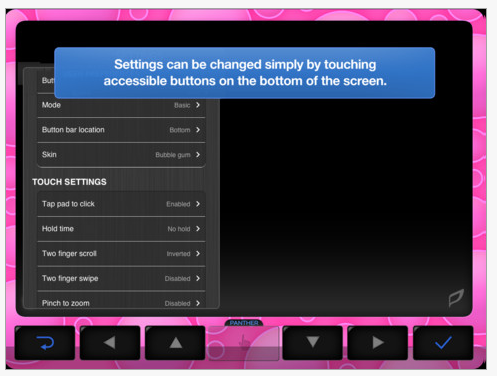
Panther Connect app compatible with iPad is currently on sale (50%) for 29.99 for a limit time (thru August 17?). This app provides alternative direct access to the iPad for individuals with mobility challenges. iTunes describes its key features as:
– Five Innovative Access Modes
– Baseline Technology for consistent access
– Editing Capability
– Control iTunes

I am anxious to see how Panther Connect app works. Will this assist with such tasks as zooming (requires two fingers) or performing other tasks not easily performed by individuals with significant mobility impairment but who can direct access the touch screen?

Panther Connect app appears to be developing other adaptive access app for the iPad that will support reading, writing, math and games and also bundles of their apps for individuals with Autism and CP. Check out their website for more information. If you are in the market for an access app, it might be a good time to buy!

Carol

Posted in Accessibility, App Reviews, Apps for OT's, Apps for Special Needs, Computer Utilities, iPad, iPad Management, Mobility Impairment, Occupational Therapy, Special Needs | Tagged , , , , , | Leave a comment

Getting Your OT iTool Kit Ready for School #1

It’s that time again, whether you are a therapist, teacher or parent it’s time to start thinking about getting ready to head back to school. So, what are some of the things you’ll need for your OT iTool Kit??

Here’s just a few for starters:

1. One of the first things that I think of when deploying devices that have to be mobile and have parts such as cords, ear buds and chargers revolve around keeping all the stuff together and reducing the snarly mess of cords that ear buds can create – ooh, I hate that!

Cord organizers to the rescue. Here are just a few cord organizer you can buy and a life saving trick to know:

AppleCore Cable Organizer – Comes in three sizes that can handle ear bud cords, charging cords or standard appliance cords. They typically come in multi-packs, although my love at first sight experience found them sold singly.  Applecores keep my cords and my blood pressure in check.Gear Tie – I also found these cord organizers/ties at Amazon. They hold firmly and were inexpensive. I do suspect these cord ties could easily be misplaced – but they work!

Here is a life saving cord trick as found on Lauren Enders Pinterest and originally posted on B-Laude-de. This should probably be a part of life skills curriculum! Cool, eh? Works too!

Life hack: Anti-chaos-cable

2. Second thing needed would be a place to keep all of the cords, ear buds, charger, cleaning clothes, styluses or other small accessories. In my cheap, penny-pinching mindset, I headed to the Dollar Tree to find pencil cases to keep all the small stuff for the iPads (and other equipment) together. Not fancy but doable, I purchased these $1.00 pencil pouches with two zippered pockets.  This has worked great for not only the iPad but use them for Echo Pens and ear buds, Sansa MP3 players, iPods  and ear buds or styluses. Works great!

3. Third is a cleaning cloth. Found at The Dollar Tree, Target, Menards for around 1.00/piece, these microfiber clothes are washable and work great to get those smuggy finger prints off your tablet screen. Cleaners are also available for iDevices, such as Anti bacterial cleaners  from Zagg ZAGGFOAM  or Klear Screen iKlear  for under $10.00 for a bottle.

These items are for both iDevices and Android and will help you get your OT iTool Kit and you ready for school.

Carol

Posted in Accessories, Android, iPad, iPhone, iPod, iPod/iPad Accessory | Tagged , , , , , | Leave a comment

My Brain on Apps

This infographic reaffirms how difficult it can be to “sift and winnow” apps when there are more than 67,000 educational iPad apps. Finding the right one to support individuals with special needs can be a challenge and take time!

Courtesy of: AvatarGeneration

Here are some suggestions to “sift and winnow for apps:

App review websites that cover the age or topic/curriculum areas that you are searching for provide a good starting place for content specific apps. There are many app review websites and here are a few of my go to resources:

  • Appitic – Apple Educators website with apps categorized by Bloom’s Taxonomy, Topic, Preschool, Multiple Intelligence, NETS, SPED, Tools, Teachers and more. Expert advise and reviews of the curated apps.
  • AppAble – Link to their blogspot with listing of daily free apps and app reviews.
  • Bridging Apps – (formerly SNAPPS4SN website)Website developed by Easter Seals allows searching by parent, therapist, teacher, doctor, institution for apps to support individuals with disability.
  • A4cwsn (Apps for Children with Special Needs) – Website providing categorized lists of apps with reviews and some videos
  • Edudemic’s searchable app data base for all educational needs and subjects.
  • AppAdvice – General app review website. Provides apps categorized by topics.

There are also more and more apps created by website that provide app reviews. Here are just a few I use:

KinderTown app – Reviews apps for ages 3-7 years. KinderTown website provides great review information. Their educational blog has practical app and hands on lesson ideas.

Autism Apps – App with apps for autism categorized and searchable.

AppAdvice app  (1.99) – From AppAdvice website which provides an app guide, app reviews. App Applists, App Guides, AppNews in categories. Extensive lists both in app and on the website.

Checking on apps in iTunes can also provide more information on the app and its worth of even downloading:

  • What are the ratings of the apps?
  • How many people have rated it and what are their comments? Just a quick review can be helpful. Three stars or under – you might want to check more before downloading.
  • Has the app be updated lately. If not recently supported or updated, I think twice about downloading it.
  • Check out other apps at the bottom of iTunes app screen to see what others have bought. You might want to take a look at those apps if they are a similar topic area (watch out this can go on forever, right?).
  • In the App Store turn on Genius located at the bottom menu. iTunes Genius will supply you with suggestions of other apps that you have recently down loaded.

Use an app rubric to think about the quality and the application of the app you are considering purchasing or downloading.

Jeanette Van Houten’s iEvaluate App Rubric  and worksheet: http://www.otap-oregon.org/Documents/iapp%20evaluation%20Rubric.pdf

Evaluation Rubric for iPod Apps from Learning in Hand, created by Harry Walker –http://learninginhand.com/blog/evaluation-rubric-for-educational-apps.html

I also find looking at what the possibilities of what you can do with finished products, such as publishing books, documents multimedia on the iPad are almost as important as the app. What are the Wi-Fi capabilities? Where can you send/move it to? Do you have email, print capabilities? Does the app have email, print or cloud based storage to share or store?

Finding the right app to match IEP needs can take time, but can be mobile learning and achievement for your student.

What are your favorite review sites? Where go Android users go to find app reviews?

Carol

Posted in App Reviews, App Rubric, Apps for Special Needs, iOS, iPad, iPhone, iPod, Occupational Therapy, Special education, Special Needs | Tagged , , , , , | 1 Comment

Another Recommended Stylus From an Experienced Therapist

Jamie Klund-Kujawski, MS OTR in her comment shared …

“Another great stylus. SK TOUCHPENCIL1 ”

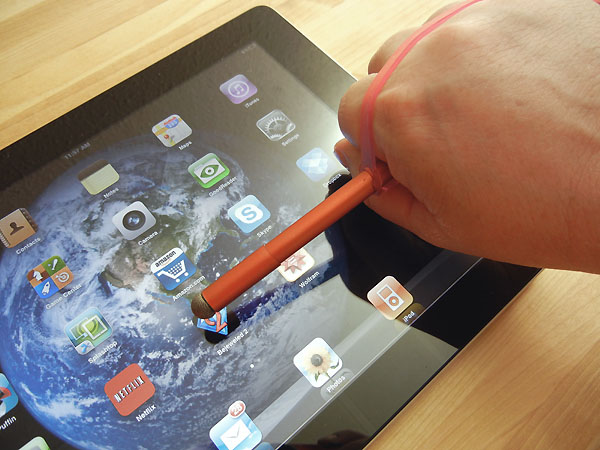
“This stylus is made of electro conductive rubber, is soft with no metal, chunky pencil shape makes it easy for small hands to hold, works with both capacitive or resistive touch screens. Sold at Amazon for $12.00! I have used it with my therapy kids for 6 month now, and it works with a head pointer as well.” (Jamie Klund- Kujawski, MS, OTR)

It appears as though it is now $8.00 at Amazon – SK TOUCHPENCIL1.

Thank you Jamie for your recommendation!
Carol

Posted in Accessories, Occupational Therapy, School Based Interventions, Stylus | Tagged , , , , , | 2 Comments

More Stylus Recommendations – From Experienced Voices

Thank you to these OTR’s who shared their experience and stylus recommendations.

Erin diChiara MA OTR, ATP recommended the following styluses and stick:

iFaraday SALT ($20.00) – Developed for people with hand or wrist injuries, may also be used by anyone who holds the pen at an angle of less than 45 degrees.
Features…

  • Extrememly light touch (approx 1 gram to activate touch).
  • Tip diameter greater than the barrel, permitting very shallow grip angles.
  • Symetrical tip shape; any part of the tip acts as the active surface.
  • Extended barrel length (7″) permits full grip with hand outside field of view.
  • Protective sleeve at tip protects barrel contacting touch screen.

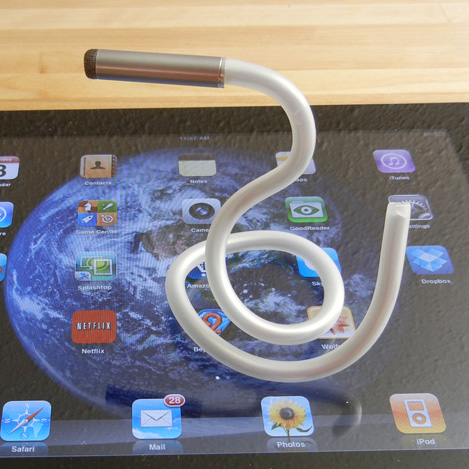
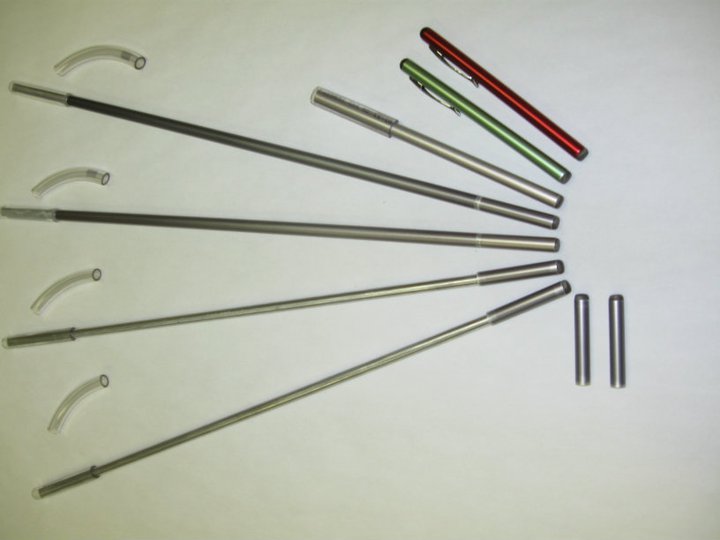
iFaraday Caduceus ($20.00) accommodates a wide variety of disabilities. Developed for hand and wrist impairments, it can also serve as a mouth stick. The shaft is bendable yet strong, enabling it to be custom fitted for gripping or attaching. People who otherwise cannot use capacitive touch screens may be enabled by this stylus. (Patent Pending.)
Features…

  • Lightweight
  • Bendable
  • Replaceable Tip
  • Soft plastic barrel sleeve

iBility Stick – Produced in various standard lengths in straight and bendable shafts. The longer iBilitySticks (15″ or 16″) have replaceable tips. The shorter handhelds (standard 6″) are one-piece. All have removable/replaceable vinyl upper sleeves for a soft, reduced-slip characteristic for biting or hand-held or cuff-held options. Made primarily for touch screen use.

Kami Bible, OTR recommended the Adonit Jot Pro Stylus . “I have been using the Adonit Jot Pro with students at school. I really like that it is heavier and feels more pen-like. It has a disc tip that is very precise and allows you to hold the stylus at an angle that is more suitable for writing. The tip does seem a little fragile, so I have not used it with any students that I couldn’t trust to use it as directed.”
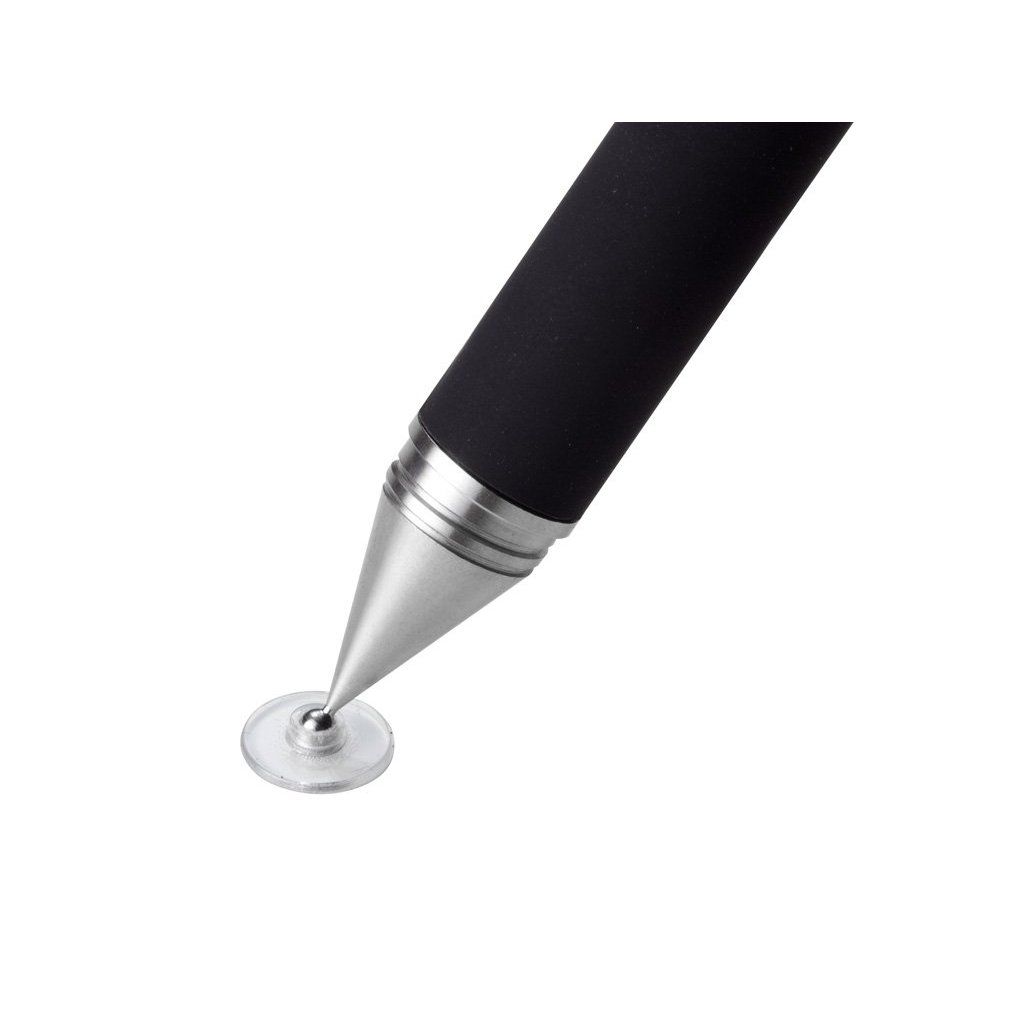
With the popularity of tablet and explosion of apps and uses, finding an appropriate tool for access and production is important. What kind of stylus do you recommend?

Thank you Erin and Kami!

Carol

Posted in Accessories, iPad, iPhone, iPod, iPod/iPad Accessory, Occupational Therapy, Stylus | Tagged , , , , , , | 2 Comments

Visual Multiplication Table App

I may not do a lot with teaching math in my job, but this app I will share with a number of my special education teachers as another tool to help special needs students understand multiplication.

Visual Multiplication Table app for iPad only is currently free. One of her many educational math apps, Esa Helttula provides visual and interactive methods of understanding multiplication in her Visual Multiplication Table app.

The app provides four different ways to work with a multiplication table:

– Table: Explore the multiplication tables.
– Groups: See the multiplications as visualizations.
– Multiples: See how each number has an unlimited number of multiples.
– Solve:  Scramble and solve the multiplication table. I could image this as an alternative, inclusion lesson for students being exposed to multiplication. This might be a method a student with a physical disability who can not physically manipulate objects can engage in multiplication concepts.

Help for how the app works is easily accessible with the ? at the bottom left if you are not quite sure what to do. The app is easy to navigate and easy to engage in.

One of the wonderful things about apps on an iDevice is its low scale presence in a classroom. As an inclusionary method, students can remain at their desk and engage in a content appropriate activity with minimal start-up time!  Certainly there are other manipulative ways to present multiplication concepts that may be important for a kinesthetic learner. For a special education teacher moving from class to class, apps on an iPad become a wonderful eTool Kit for all kinds of educational needs (eBag of Tricks?) and in almost any environment.

Here is a video of the app:

Currently free, check out Visual Multiplication Table app and consider if this will become an eTool in your iTool Kit or eBag of Tricks! If you won’t be using it, pass it on to a teacher who might! If you like this app, Esa Helttula also has a variety of educational math apps on her website, idevbooks.com   you might want explore.

More for your eTool or iTool Kit!

Carol

Posted in App Reviews, Apps for OT's, Apps for Special Needs, iPad, Math, Occupational Therapy, Special education, Special Needs | Tagged , , , , , | 1 Comment

Everyday Grooves App – Musical Prompts for Routines and Schedules

Everyday Grooves app for iPhone and iPad is a free app from the Fred Rogers Center at St Vincent College. The app provides musical prompts that help to establish routines and structure in the everyday lives of parents and young children for daily events such as reading, brushing teeth, and getting dressed.

Using Everyday Grooves is simple – the app helps users set up musical prompts throughout the day to help children transition to new activities. When the music starts, turn the volume up so your child can hear and sing along. Or, just play the songs when it is convenient for you!

Each piece is an original song in the style of popular music on the radio, and lyrically walks families through suggested steps for the routine. There are 12 routines with a different song for each self care activity:
Wake Up!
Brush Your Teeth!
Get Dressed
Get Ready, Let’s Go
Let’s Read!
Love You!
Clean Up
Say Goodbye
I’m Thankful
Let’s Eat!
Bath Time!
Let’s Rest

The songs tempo are appropriate for the task such as the Let’s Rest (bed time prompt) providing a calm, sweet song. The songs appear to be professional quality. The app does not provide customization other than setting times or alarms to the 12 self-care activities.

A fellow OT works with a student, who after trialing many, many approaches, found his best receptive abilities were achieved by singing to him. Singing gained his attention, improved transitions and receptive language (sound familiar?- yes we have all had students we sang to in a therapy room!). I thought of her and the student immediately after working with this app which communicates in his best receptive mode! Teaching to their strengths is one of those things we preach, but sometimes we still can miss application! I am anxious to share Everyday Groove app with her to trial when school starts!

Although this app is not customizable other than scheduled alarm times, it provided me a model to think differently about creating social stories or visual communication using voice out put  – whether speaking or singing! Using story telling apps such as Tapikeo, Pictello, Story Buddy 2 with audio recording or visual scheduling apps such as First Then Visual Schedule with audio recording capabilities could provide the opportunity to sing a visual schedules or social stories –  as long as you can sing (wouldn’t this be a great high school vocal group project?)!

I really enjoyed this app, especially how it made me think about the student needs and skills. Focusing on student’s abilities not their disability is important and sometimes you just have to think out of the box to deliver that! Kudos to St. Vincent College for this free app

This will definitely be in my OT iTool Kit – I have a couple of students in mind to trial this apps with, then I may need to find someone who can sing!

Carol

Posted in Activities of Daily Living, App Reviews, Apps for OT's, Apps for Special Needs, iPad, iPhone, iPod, Occupational Therapy, Visual Communication | Tagged , , , , , , | 5 Comments