OT’s with Apps Manuscript Handwriting App Feature Match

pieces of puzzle w person

OT’s with Apps Manuscript Handwriting Feature Match

Ever search for an app with specific options or features , then at a later time wonder what the determining factor(s) were of your choice?

That has happened way too many times for me. As a result, I got a little smarter and from other* feature match examples, started creating the OT’s with Apps Feature Matches to help recall and help others determine apps for individual needs.  Although feature matching is only part of the decision making process, it is a way to help determine the app or a component of the tool selected.

At our OT’s with Apps Workshops, Erin Higgins, COTA/OTS and I review numerous apps and use feature matching as a guide. Just one of the OT’s with Apps feature matches on Manuscript Handwriting  help us and others  sift and winnow app features.

OT's with apps HW feature match pic1

The Manuscript Handwriting Feature Match is just one of many created with eight different apps reviewed according to 15 different features:

  • Device compatibility
  • Cost
  • Speaking features
  • Best practice features
  • Multiple use options
  • Data collection available
  • Practicing letters in or out of order
  • Error feedback
  • And more!

Here is a link to our most recent Manuscript Handwriting Feature Match:

OT’s with Apps Manuscript Handwriting Apps Feature Match

I hope this helps when searching for manuscript handwriting apps. For more handwriting app reviews not listed in the feature match, search “Handwriting” or “Letter Formation” in the blog search box or check out the reviews pertaining to Handwriting .

*References to feature match resources or examples:

Hope this helps, it helped us!

More for your OT mTool Kit!

Carol

Posted in Apps for OT's, AT for Handwriting, Early Childhood, Elementary School, Handwriting, iPad, Letter Formation, Occupational Therapy, Writing | Leave a comment

AppWriter App for iPad (and a Few Free Codes)

AppWriter icon

AppWriter app

One of my favorite apps for iOS and Google Chrome for basic reading and writing (also available now for Android , 24.99, but have not used) is AppWriter app (29.99) from LingApps. AppWriter  app features text to speech, word prediction, scanning options and a variety of options for presentation of fonts, background colors and editing word prediction (in iOS).

AppWriter pic1

The app provides solid tools across mobile platforms and Google Chrome. LingApps also provides great customer service (they tolerate a lot of silly questions, believe me.) in my experience for all of their products.

LingApps  generously provided promo apps for the OT’s with Apps @ School Workshops. I have a few extra promo codes supplied by Ling Apps for AppWriter app for iPad to share on a first come first serve basis. Please be polite and make a comment to this post if you redeemed the app, it saves frustration to those attempting to redeem a used code!

9TT4RYRJ7PAJ

7L6PK4N76WHW

EYJ67EKPMKME

FL6KYPJNEXRL

The codes need to be redeemed by 4/1/2014. If you like the app, please provide a positive review in iTunes for Ling App.

Enjoy more for your OT mTool Kit!

Carol

OT’s with Apps Blog

otswithapps@gmail.com

OT @ Work LLC

Posted in Uncategorized | 16 Comments

8 Great Handwriting Apps for OTs | CMS Direct Hire

As Scooped from CMS Direct Hire   8 Great Handwriting Apps for OT’s

We at CMS Direct Hire would like to share with you 8 great Occupational Therapy apps for improving your patients’ handwriting skills!

Carol Leynse Harpold‘s insight:

CMS Direct Hire shares 8 great handwriting/ pre-writing apps for OT’s. These are some of the many apps listed on OT’s with Apps list.

For more handwriting app options check out the featured list on OT’s with Apps Pinterest Apps for Handwriting found at : http://www.pinterest.com/csleynse/apps-for-handwriting/

Carol

From Scoopit: http://www.scoop.it/u/carol-leynse-harpold

Posted in App Reviews, Apps for OT's, AT for Handwriting, Early Childhood, Finger Isolation, Handwriting, iPad, Letter Formation, Occupational Therapy, Writing | Leave a comment

New Google Menu Tool – Add-Ons

Google Drive icon

Google Doc Add-ons Tool

Working as a OT and AT at a Google School requires searching for supports for struggling readers and writers in Google Chrome. Like other apps and software, change is frequent and exploring what those changes may mean for special needs students is a constant process.

One new change in Google Docs is a new addition to its menu – an Add-ons tool allowing some apps to be readily available from the menu bar when creating a document:

Google Add-on tool pic3

Although the choices of Add-on apps is limited at present (sure to change…), there are some very worthwhile free, trial / premium apps available for the Add-ons menu tool. Here are just a few of the Add-on apps available that might be appropriate for struggling writers:

 ProWriting Aid icon Pro Writing Aid (14 day trial/ 1 year 35.) available for Google Docs or Microsoft Word. Provides spelling, grammar, word overuse, plagiarism, style, consistency of word use in a document.

ProWriting aid google add ons

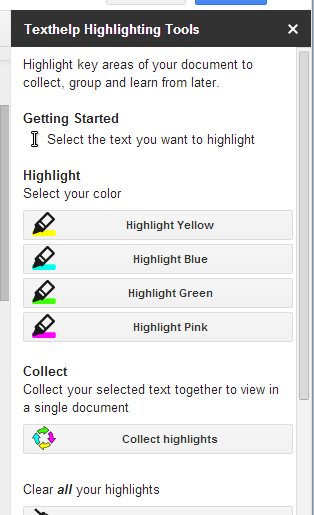
Texthelp highlighting tool iconTextHelp Study Tool app (currently free) provides the highlighting tools (yellow, blue, cyan, green) and the ability to collect highlighted text by position or color and create a new document. Highlighting tool opens to the right of the doc for easy access.

Texthelp highlighting tool pic2

Thesaurus app for Google Doc Add-OnThesaurus app  – (free) provides a synonym tool for words selected in a document. Thesaurus tool opens to right of the doc for easy access while writing.

thesaurus for Google add ons

Easy Bib for Google iconEasyBib – (free for basic version) provides reference tools from within the doc with several choices of styles to choose from .

Easy Bib for Google add on

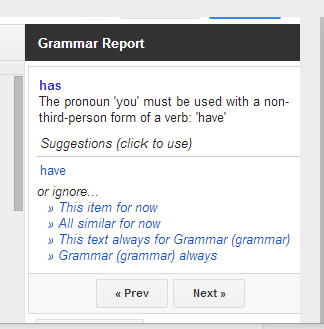
There are certainly more Add-ons apps available such as concept mapping tools (Lucid, Mind Meister) , audio note add-ons (Kaizena), other comments apps (Track Changes) and utility apps. Available Add-on apps are conveniently available for use, exploration and management from the Add-ons menu tool in Google Docs. One draw back I found is most of the add-on tools such as the Thesaurus results or grammar checking results can not be accessed using the text to speech tools I am using (AppWriter or TextHelp) with Google Doc, unlike Google’s Define and Research tools that can be easily read aloud using AppWriter or TextHelp.

What Google Add-ons have you found helpful for struggling writers?

More for your Google AT Tool Kit!

Carol

Posted in Adults with LD, Apps for OT's, Apps for Special Needs, Elementary School, Free apps, Google, Google Chrome, Google Docs, Graphic Organizer, Language Arts, Learning Disability, Post secondary, Productivity apps, Writing | 2 Comments

AppCrayon Stylus

A thank you to Dano for supplying participants at my recent OT’s with Apps @ School Workshop a complimentary Dano AppCrayon Stylus for Kids. This stylus had come recommended by another OT during a previous workshop (thank you Joan!), so I was happy to be able to trial and share its use.

The Dano AppCrayon Stylus for Kids is a chunky, somewhat light weight stylus with a tripod gripping surface making it easy to grasp and hold. Similar to those favorite tripod pencils that facilitate where to put fingers when grasping a pencil, AppCrayon provides an easy finger placement on the shaft.

DAno AppCrayon pic1

Along with the grip and weight of the stylus, one of the other important features is how interactive and accurate the tip is in different positions when drawing or writing. Some stylus due to size or shape can only be used when held in a vertical /upright position – not a position that facilitate a more mature grasp with extended fingers. The AppCrayon stylus has a  large, extended tip, allowing good contact with the tablet surface even when held and drawing at about a 25 degree angle from the screen. Although the tip is large, I was able to use it for more refined tasks as drawing at level 14 in iMazing app or to write using PhatPad app or MyScript Calculator app, both handwriting recognition apps with good contact and recognition.

I found the Dano AppCrayon Stylus for Kids a Stylus that I would recommend to fellow OT’s, teachers or parents to use. A suggestion and comment that always seems to arise is in interest in having replacement tips a possibility with styluses. Kids have an infinity to pull, pound, and sometimes orally explore the tip of a stylus resulting in damage to the tip! Replacement, or a solid tip would be an awesome addition to this stylus!

AppCrayon also provides a free AppCrayon app that provides images to color and share and handwriting practice components. The handwriting option provides line tracing guides, audio feedback, a palette to chose a letter to work on, an animated arrow showing direct of the next stroke for both upper and lower case letters. It is simple but effective with its Zaner Bloser method of letter formation.

AppCrayon app pic 1

Have you used this stylus? What is your preferred stylus for students at school?

More for your OT mTool Kit.

CArol

Posted in Accessories, iPad, iPod, iPod/iPad Accessory, Letter Formation, Stylus | Leave a comment

iPad and Android Keyboarding Apps and Resources

Keyboarding Apps and Resources for the iPad

KEyboarding on iPad

Questions of keyboarding training using the iPad on occasion arise. Listed below are keyboarding instruction apps for the iPad and Android tablet. At the bottom of the list are a few web-based keyboarding instruction sites that will work on the iPad ( do not require flash) for keyboarding practice. Consider using a standard Bluetooth QWERTY keyboard when practicing 10 finger keyboarding skills for training on standard keyboard layout and ergonomic positioning.

Keyboarding Apps

Tap Typing

TapTyping icon

iPhone/ iPad Typing app – Reinforces touch typing for speed and accuracy Free/ in app purchase
Typing Tutor

Typing Tutor Droid app icon

Android Typing app – Reinforces touch typing for speed and accuracy free
Type It!

Type It! app icon

Android Typing app – Reinforces touch typing for speed and accuracy free
GhostType

Ghost type icon

iPad Typing app with graduated lessons. No audio feedback 4.99
Typing Fingers

Typing Fingers app icon

iPad 10 finger typing instruction with 32 lessons. Typing practice and game mode included in each lesson. External keyboard recommended Free  / .99 for ad removal
Keyboarding Fun LiteKeyboard fun lite app icon
iPad Keyboarding awareness app. Speaks each letter typed out loud. Provides visual cues of key on key row visual model. free /4.99
Typing Fun – Lite

Typing Fun app icon

iPad Basic keyboarding awareness app providing visual cues and verbal reinforcement of letters typed free / 5.99  
Keyboard Explore

Keyboard Explore icon

iPad Explore keyboard. Tap a key and a letter, image and letter is named. Upper and lower case choice of letters is provided. free  
Type A Word

Type a word icon

iPhone / iPad Typing app with options of font type, speed (normal/slow) type (plain, reverse, random), languages, wind speed (rate of typing). Word typing practice. Does not offer instruction to typing technique/rows. free / .99  

Online Key-boarding Practice Compatible with use of  iPad

Typing Web.com

Typing Web icon

iPad Web site can be used with iPad with Internet connection to type in this keyboarding program Free / online  
PowerTyping.comPower Typing icon
iPad Develop and practice step by step web based typing lessons Free / online  

What keyboarding programs have you used?? Share!

More for your OT mTool Kit.

Carol

Posted in Android, Customizable app, iPad, Keyboarding | 3 Comments

Thank You – to Generous Vendors, Developers and Workshop Participants

Thank you pic w OT workshop

A big thank-you to the following vendors and developers who generously provided more than $70 in promo codes and styluses to each of the participants attending the OT’s with Apps at School Workshop  on March 7-8, 2014. The apps and equipment allowed participants hands on experience with the apps and equipment to help with determining appropriate tools and apps for students or clients serviced.

Free codes of some of our favorite apps and equipment were generously provided by:

It was a great time to learn, share apps and ideas of use of mobile technology in OT practice! Thank you to all the participants and the hosts at Adaptive Technology Resources in Grafton, Wisconsin.

Erin and Carol – OT’s with Apps at School Presenters

Interested in a workshop? Please let us know (otswithapps@gmail.com)!

Carol

Posted in Uncategorized | 4 Comments

Miss Sue’s Keyboarding Fun – OT-Care

Miss Sue's Keyboarding Fun pic

Are you looking for specialized or customizable keyboard instruction using the iPad for students with physical or cognitive/learning disabilities?

Miss Sue’s Keyboarding Fun© provides several keyboarding app choices with options to customize the sounds, colors, picture supports, word lists and layout within the app. Her apps span training skills from basic keyboard and letter awareness, spelling reinforcement of high frequency words and beginning keyboard awareness and practice. Significant customization of the words, pictures, layout, colors and speech are offered within the apps allowing creation of individual activities for users.

Keyboard Explore iconKeyboard Explore app (iPad; free ) – When a key on the keyboard is pressed, a fun picture is shown and a sound for the letter is spoken.

.

Type a word iconType A Word  app (full and lite version for iPad; 2.99 ) – Allows creation of spelling words for students to type. Each letter must be matched for successful completion. Full version includes data collection and customizable key colors.

Keyboard fun lite app iconKeyboard Fun app – (iPad; 4.99 ) – Encourages identification of key placement by matching keys to pictures. Keys on each line is displayed. Data collection and key coloring provided in app.

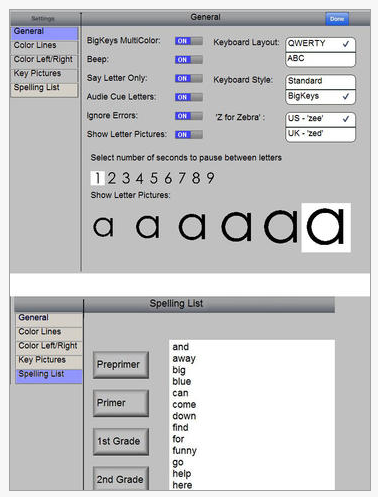
Typing Fun app icon Typing Fun app (iPad; lite/Full 5.99) – Learn keyboard then type out words. Add Dolch or other word lists to customize for a user. Color keyboard to match specialized keyboards. Images of the Typing Fun app customization features:

Typing fun app pic 1  Typing fun pic2

If you are in need of keyboarding apps with customizable features, Miss Sue’s Keyboarding apps provides wonderful options. Computer based software is also available from Miss Sue’s Keyboarding website at OT-Care.com  along with lesson plans and other keyboarding resources for individuals with disabilities.

Miss Sue’s app can customized with colored keys for the iPad using the following wireless keyboards:

Big Bluetooth from RJ Cooper (199. ): Provides additional keyboard options that allow use of function keys.

Big Bluetooth keyboard w tablet stand

Big Blu Kinderboard with Bluetooth (Chester Creek; 72.) :
Big Blu keyboard pic2
Great options for customizing access for individuals with disabilities with these apps and input methods.

More for your OT mTool Kit!

Carol

Posted in Accessibility, Accessories, Apps for OT's, Apps for Special Needs, Customizable app, iPad, Keyboard, Keyboarding, Occupational Therapy, Writing | Leave a comment

Cutie Mini Monsters App Gone Free

Cutie Monsters icon pic

Cutie Mini Monsters App

Looking for a new puzzle app to offer your students?
Cutie Mini Monster App,  geared to children under 5 years has gone free (regularly 2.99).

Cutie Monsters pic1

An inset puzzle app with an interactive counting book for numbers 1-10 offers basic number identification and puzzle assembly with 2 to 6 puzzle pieces. The app visually is appealing and offers a cute child-like voice when it reads or responses with  interaction. Assembling puzzles provides correction when puzzle pieces are put in the wrong place by popping back from their original unassembled location, but users can also move from one puzzle screen to another without completing the puzzle.


The only option available is the ability to turn sound (background music plays as soon as the app loads) on and off.

Cutie Mini Monsters is a cute puzzle app with a focus on numbers for young children. It is a worthwhile app for free but has limited content and options for a paid app. Visually appealing and well presented for young learners it may be worth downloading for new, novel puzzle app for kids.

More for you OT mTool Kit.

Carol


Posted in Uncategorized | Leave a comment

Technology Use in Occupational Therapy Survey Invite

Hello,

My name is Eileen Cody and I am an occupational therapy student from Elizabethtown College and am in the process of completing an Honors in the Discipline research project. I have been in contact with Carol and she has agreed to help me further with my interest.

My primary research question is as follows :

  • Within the field of neurorehabilitation within occupational therapy, how is technology being used during the intervention process?

Secondary research questions are as follows:

  • What areas are therapists using the applications and smart technology in?

  • Where do therapists see a need for the future use of applications and smart technology in treatment?

As a visitor to this blog I am asking for your help by completing the survey embedded in the link below. If you wish to participate please complete the survey by 3/20/14.

https://www.surveymonkey.com/s/JVQFGNP

Thank you in advance for your help.

If you have any questions, comments or concerns please contact Eileen Cody at 315 – 491 – 8803 or at codye@etown.edu or Dr. Angela Salvadia at salvadiaa@etown.edu.

Questions or concerns about your rights as a research participant should be directed to Elizabethtown College Institutional Review Board at (717) 361-3740 or the IRB submission coordinator at farishs@etown.edu.

Posted in Uncategorized | Leave a comment