The Future Of Technology

The Future of Technology isn’t Mobile, It’s Contextual

(as posted on Scoop.itOT mTool Kit)

You’re walking home alone on a quiet street. You hear footsteps approaching quickly from behind. It’s nighttime. Your senses scramble to help your brain figure out what to do. You listen for signs of threat or glance backward.

Carol Leynse Harpold‘s insight:

This isn’t your average review of apps or application, but the idea of contextual data peaks my interest with what is up and coming in the computing industry. Considering what contextual data could do, this might provide the type of scaffolds for individuals with disabilities who may have difficulty with high order thinking skills.

Read on to consider what some possibilities might be!

Carol

See on http://www.fastcodesign.com/1672531/the-future-of-technology-isnt-mobile-its-contextual

Posted in Mobile Device Use, Occupational Therapy | Tagged | 2 Comments

More Free Friday Apps for May 24, 2013

Time + Touch icon

Visual timer apps are a staple in my mTool kit. Here are a couple that are free today:

Time + Touch icon  Timer + Touch HD (iPad). This app changes orientation on the iPad  (which is annoying when it doesn’t like the one I use!).

Timer icon  Timer app (iPhone/iPad) – Your standard egg timer app.

Visual timers are good for many situations and age groups (how often do you set a timer for yourself? It work!).  Check them out – free is good (unless you already have too many apps!).

Carol

Posted in Visual Communication | Tagged , , , , | Leave a comment

Free App Friday Deals

There are many Free App Friday apps to check out today. With an early start (and no immediate reports to write this morning) here are a few apps I thought would be great in a teacher’s, OT’s or parents iTool Kit for young students (yes mostly iDevice apps…):

Montessori blocks  Montessori Blocks  (iPad) – a color and number pattern match game.

https://itunes.apple.com/us/app/id587180496?mt=8 Patterns by EdNinja (iPad) – Complete patterns and learn early math skills.

Color Dots icon  Color Dots by Ellie’s Games (iPhone/iPad) – A visual tracking activity of capturing colored dots.

Little ABC Writer HD icon  Little ABC Writer HD  (iPad)- Practice drawing letters out of sequence.

Check out these apps and share if you have or will use these in your mTool Kit!

Carol


Posted in Apps for OT's, Apps for Special Needs, AT for Handwriting, Early Childhood, Education, Elementary School, Emergent Literacy, Fine Motor Development, Finger Isolation, iPad, iPhone, iPod, Math, Occupational Therapy | Tagged , , , , , , , , , , | Leave a comment

Voice Dream Reader App

Voice Dream Reader icon

Voice Dream Reader is a robust reading app with text to speech capabilities for PDF, web-based text, Word documents, ePub books both on-line and offline for the iPad and iPhone (9.99). A Voice Dream Reader lite version is available which reads a couple of lines at a time but is fully featured.
Created by Winston Chen while living for a year on a small island in the Arctic Circle, Voice Dream Reader App has continued to evolve according to users needs and requests. Winston Chen has been a responsive developer committed to improving his app to needs of his users.

When Voice Dream Reader app first debuted, providing him a few suggestions found him responsive and eager to improve his app based on special needs users with print disabilities. His committment of improving this app for those with learning challenges has been remarkable with continual improvements made in his app allowing additional formats and features to make this app versatile for those with a print disability.

Features of the app include:

62 different voices and languages

Loading and Managing Reading Material

  • Text extraction from PDF files
  • Text extraction from eBooks in DRM-free ePub format
  • Text extraction from plain text, MS Word, MS PowerPoint, Apple Pages, RTF and HTML files
  • Dropbox and Google Drive integration
  • Experimental Evernote integration
  • Load files using iTunes via USB or WiFi
  • Bookshare integration
  • Gutenberg integration for over 40,000 free eBooks
  • Pocket and Instapaper integration
  • Built-in Web Browser to extract text from Web pages
  • Copy-paste via clipboard
  • Text Editor
  • Language translation via Google Translate through in-app purchases
  • Folders for organizing content
  • Export full text to clipboard, printer, email, and other apps
  • Export highlighted text and notes to clipboard, printer, email, and other apps
  • Open the original Web page in Safari if possible
  • Share what you’re listening with friends on Twitter, Facebook, SMS, or email (iOS 6+)

Listening to Text

  • Play-Pause with remote control enabled
  • Remembers where you stopped in each book or article
  • Shows elapsed time and remaining time
  • Sleep timer
  • Previous and next book or article
  • 30-second rewind and fast forward
  • Full sentence rewind and fast forward
  • Change reading speed on the fly. 50-500 words per minute
  • Change TTS voice on the fly
  • Remembers the voice used for each book or article
  • Playlist for listening to multiple articles back to backs
  • Continues reading when you exit the app or lock the screen

Visual Interaction with Text

  • Blazing fast vertical scrolling
  • Synchronized word and line highlighting
  • Full screen mode to hide the controls
  • Focused Reading Mode with reduced text area and auto-scrolling
  • Full-text search
  • Table of content for ePub and DAISY books
  • Page numbers for PDF documents and DAISY books
  • Bookmarking
  • Highlighting and note taking
  • Customizable font and font size
  • Includes OpenDyslexia font
  • Preset light and dark color theme, plus a fully customizable color theme
  • Built-in dictionary

Voice Dream REader pic5

Winston’s development of Voice Dream Reader started with his journey to Rødøy, a small granite island jutting from the Norwegian Sea north of the Arctic Circle. He and his wife took a mid-life retirement year on this remote island. As a software developer, he developed Voice Dream Reader app, providing text to speech capabilities. He continues to develop the app as he returns from his retirement to his work life in Boston. Seeing the (Northern) Light: A Temporary Arctic Retirement on NPR provides the account of Winston’s sabbatical and app development’s. It’s an inspiring story of this developer who continues to listen and improve this app for individuals with special needs.

For more information visit Voice Dream Reader’s website or down load his Voice Dream Reader Lite to trial. This is a flexible app for individuals needing text to speech capabilities for a variety of formats and with many helpful features.

A great app for your teaching, OT, rehab mTool Kit!

Carol

Posted in Adults with LD, App Reviews, Apps for OT's, Apps for Special Needs, iPad, iPhone, iPod, Learning Disability, Occupational Therapy, Reading, Special education, Special Education Teacher, Special Needs, Text to Speech, Writing | Tagged , , , , , , , , , | Leave a comment

Another “Get Moving App” from Your Therapy Resource

Another “Get Moving ” app featured at  yourtherapysource.blogspot.com

(As scooped on  Scoop.itOT mTool Kit )

Carol Leynse Harpold‘s insight:

Your Therapy Resource provides another “Get Moving” for fostering physical movement for your students.

Check it out!

Carol

See on yourtherapysource.blogspot.com

Posted in Movement Apps | Tagged | Leave a comment

AudioNote Notepad – Voice Recorder App on Sale

AudioNote Notepad -Voice Recorder icon

AudioNote Notepad-Voice Recorder app

AudioNote – Notepad and Voice Recorder app for iPhone/ iPad and AudioNote Notepad Android (4.99) , provides an amazing combination of audio recording and note taking that is synchronized in one app. Currently on sale for iOS (as of 5/18/2013) for 2.99 (from 4.99). This iOS app which works very similar to the desktop version of Livescribe Desktop note files created with the Echo Pen . Trial of the Android app was not performed.

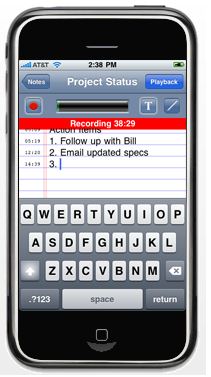
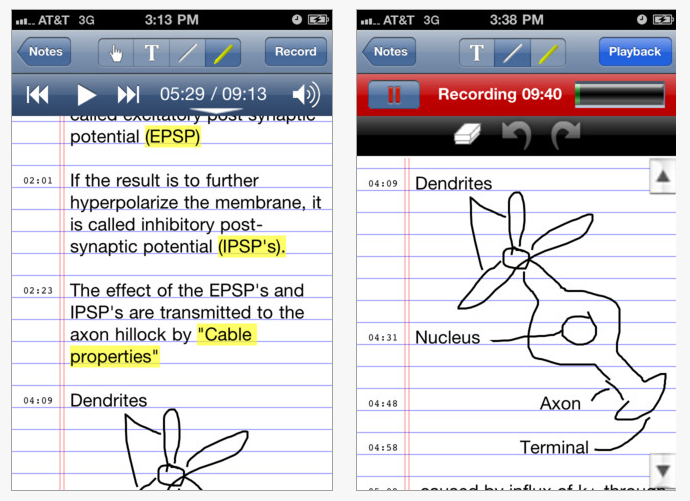
Here is a view of the features of the AudioNote Notepad app for the iPhone:
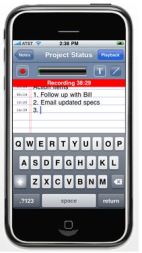
AudioNote Notepad - Voice Recorder iPhone picNote taking while recording is easy to do using the keyboard or pencil tool to draw or write. Highlighting and drawing tool bar is available. You can easily listen and edit within the app. A send/email icon is easily available within the note to forward the email as a PDF file (without audio) or as an AudioNote with voice recording.
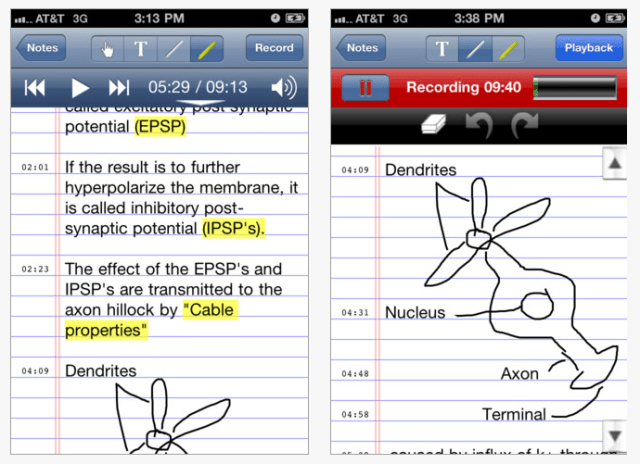
AudioNote lite pic1   The app on the iPad provides the same options with additional features to organize separate recorded notes. The notes are easy to name upon creating or after completed for organization an.d later review by title
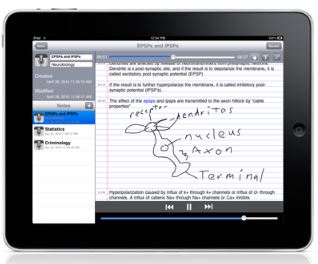
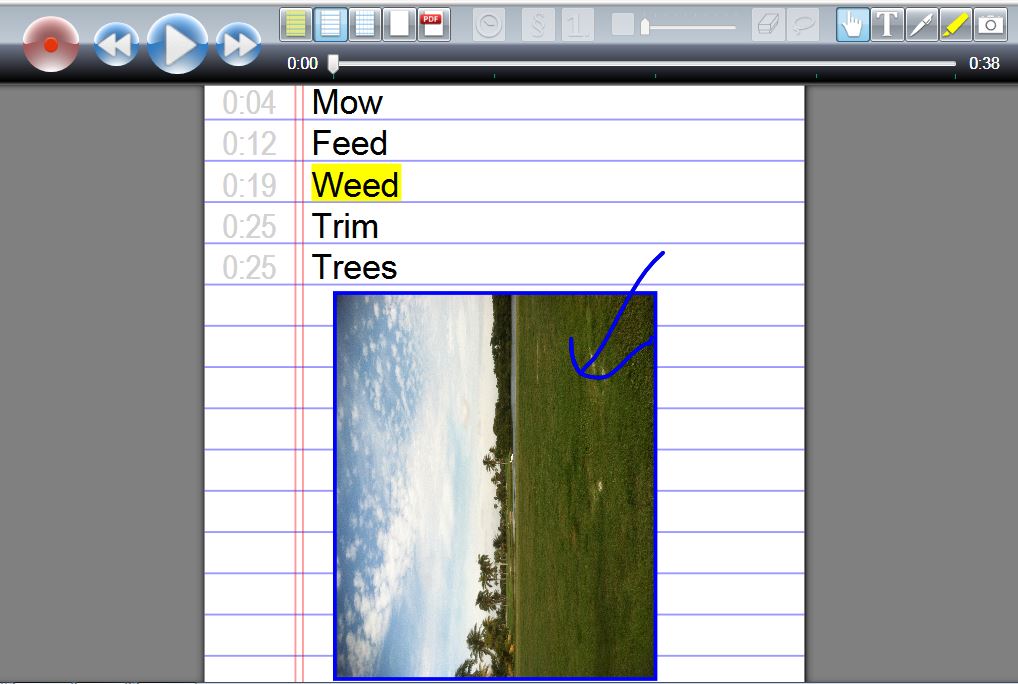
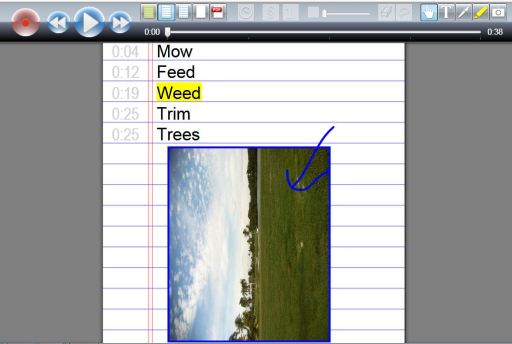
AudioNote Notepad - Voice Recorder ipad picA desktop component, AudioNote for Windows or MAC computers  is available for free online.  The desktop version below allows you to review of the notes and the audio recording on PC or MAC computers. Importing pictures or camera shots is also an option within the mobile device software, making it possible to take notes, record audio and also take a screen shot of diagrams or illustrations presented on the board or from a website within your notes. An option of importing PDF files is also available.
AudioNote Notepad - Voice recorder pic2 w pic audio VR

The desktop versions and instructions for use are available at Luminant Software.com and was easy to use after emailing, downloading to my computer. This software is easy to use and can provide Universal Design for Learning opportunities for students or anyone needing multi-modal method of learning or access.

AudioNote Notepad – Voice Recorder app provides easy access or production of notes for individuals with writing or reading challenges using voice recording, pictures, drawing or word processing.

This is in my AT and OT mTool Kit as a great option students and adults with learning challenges.

More for your teaching, AT, OT mobile Tool Kit!

Carol

Posted in Adults with LD, Android, App Reviews, Apps for OT's, Apps for Special Needs, iPad, iPhone, Note Taking, Note Taking App, Occupational Therapy, Voice Recorder | Tagged , , , , , , , , | 1 Comment

AppWriter Cloud – Private Edition

AppWriter icon

AppWriter Cloud for Google Docs has been out for a few months within the Chrome Store for educational institutions. LingApps, developer of AppWriter Cloud currently has a private edition for Google Chrome available through their LingApps website at a cost of USD 19.99. A visit to their website offers a month trial for free!

appwriter_cloud2

What features does AppWriter Cloud provide?

  • Word prediction, providing context based word suggestions
  • Text to speech with highlighting
  • Voice and rate choices

AppWriter Cloud is one of the only Google word prediction apps that I am aware of for Google Docs. Trial of AppWriter Cloud provided support for students needing word prediction to support their writing tasks.

Interested in more information? Visit the LingApps website for costs and more details on their Appwriter Cloud apps for Google Chrome for schools and the Private Edition.  Also check out their iPad app AppWriter with OCR scanning capabilities, word prediction and text to speech. Updates to their current version of AppWriter provides a great method of scanning in text with accurate OCR conversion from within their app along with text to speech, change of background and highlighted text color options and high quality voices. Many improvements have been made to their app.

Having worked with all of the apps, including Google Chrome AppWriter, all apps work solidly and provide tools that are easy to use for students of all ages. I love the fact that the Google AppWriter Cloud, when installed at school is available to students through their school account at home when Chrome is on their home computer! Now if AppWriter Cloud could be integrated into Gmail, on the Google Browser or Presentation wouldn’t we be excited?

Regarding the folks at Ling Apps – I can also attest that the folks at LingApps are highly responsive, patient and helpful with all kinds of questions! After riddling them with questions about installation into Google at school, they still answered by questions and responded promptly to me! I really appreciated their support with getting the app going in our schools with our tech department.

Using these apps at school has provided additional tools for students at home, at school within Google Chrome and on demand on mobile devices such as the iPad.

Carol

Posted in Adults with LD, App Reviews, Apps for OT's, Apps for Special Needs, Google Chrome, Google Docs, iPad, iPhone, Learning Disability, Occupational Therapy, OCR, Reading, Special education, Word Prediction, Writing | Tagged , , , , , , , , | Leave a comment

Let’s Trace App!

Let's Tracing icon

Let’s Trace app is a visual motor integration app for the iPad (.99) that presents simple strokes and shape drawing in a developmental progression.

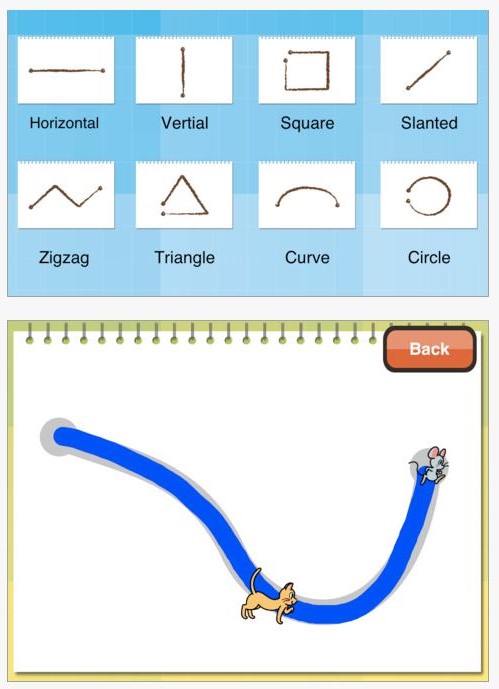
Let's tracing pic1 Let's tracing pic2Let’s Tracing app provides visual motor practice for 2-5 year olds learning to trace within lines and draw shapes. Each shape or stimulus provides provides at least 6 practices of drawing the shape in different sizes and orientation. After the user draws, a cat, dog or other creature follows the line from beginning to end providing visual attention to the line of the shape. Applauding is provided as a reward for accurate completion. If accuracy when drawing the lines is not achieved another trial is provided. Tolerance for going off of the tracing line is somewhat limited, however the lines are approximately  3/8″ width to draw on providing a fairly large path to stay within.

The app provides the 8 different shapes as shown above with each shape having several trials to practice the task. A back button on the screens allow the user to go back to end the app or try another shape at any time.

No settings or options are provided in this app. Music plays during the app, however if unwanted. Turning the sound off is an option.

As a basic drawing app, I liked the numerous trials with slight variations provided in each shape drawing practice. A draw back of the app is some of the feedback in the app is provided in writing (Good!! Try again! which is not typically able not fully close. A gap for the circle, square, triangle remains once drawn which provides a poor model of the shape for some of our concrete and visual learners.

At .99, this app provides visual motor practice and some feedback for accuracy with staying on the line. Although this is featured for 2-5 year olds, this could be appropriate for students in kindergarten or first grade who are working on pre-writing skills.

Let’s Tracing is also reviewed by Angelia Woods, OTR at Advance for Occupational Therapy Practitioners. Check out Angelia Wood’s review her review for more information.

More for your OT mTool Kit!

Carol

Posted in App Reviews, Apps for OT's, Apps for Special Needs, Early Childhood, Education, Elementary School, Fine Motor Development, Focused attention, iPad, Occupational Therapy, Special Needs, Visual Motor | Tagged , , , , , , , , , | Leave a comment

Belkin Tablet Stand with Storage Box

Belkin Tablet Stand with Storage

Belkin has this sweet new tablet stand with a storage box that seems to be a perfect little stand for your iPad. The storage container has space for your charging equipment, stylus or even a microfiber cleaning cloth, a great piece of equipment for elementary students who use an iPad, iPad Mini or other tablet computers.

Since I had to try this out, I purchased a gray Belkin Tablet Stand with Storage
which was originally a little less expensive ($31.99) than the cute green Belkin Tablet Stand with Storage which now is selling for 26.99 at Amazon (available at the OT’s with Apps Amazon Store at the menu above).
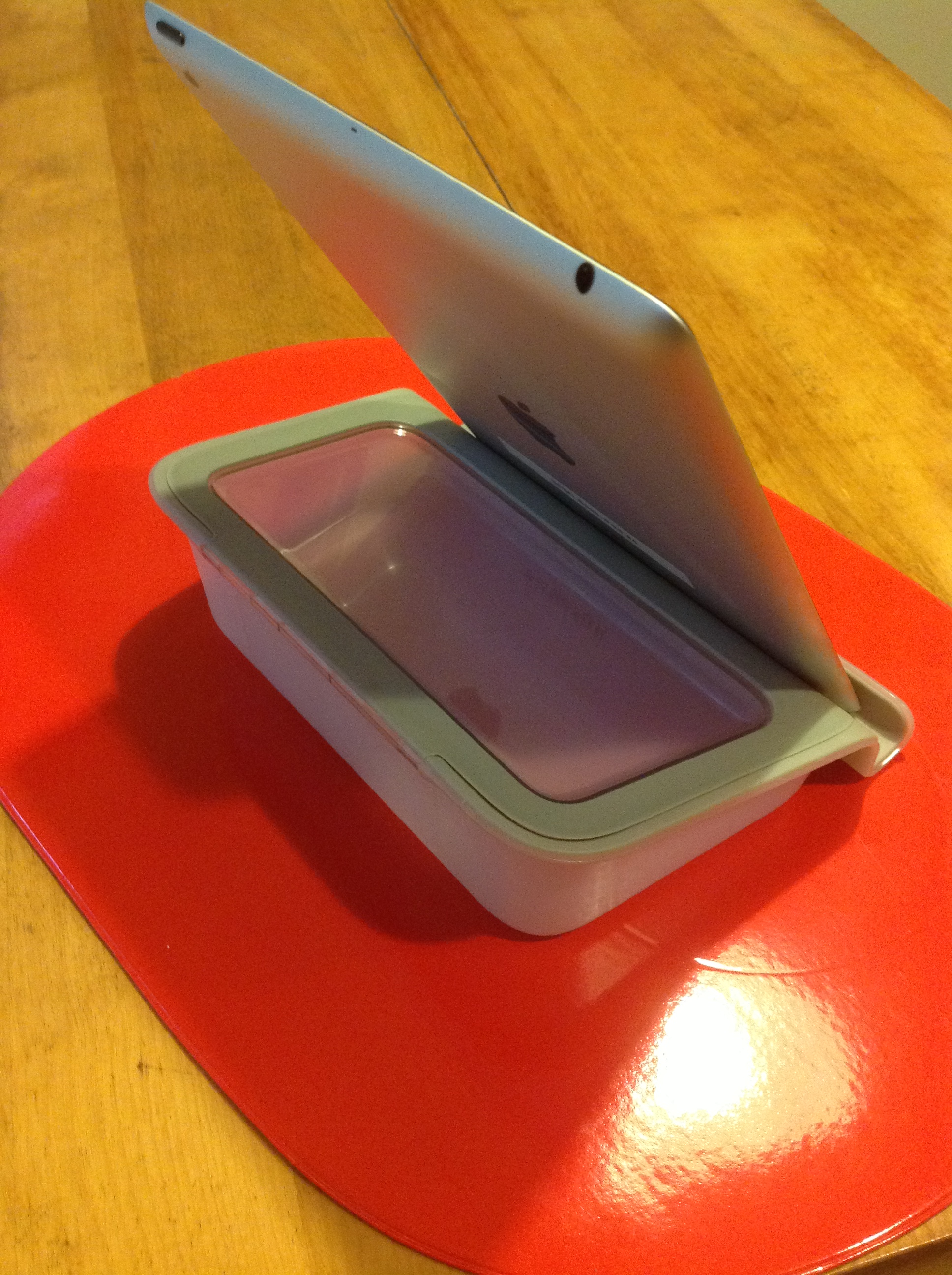
Here’s a screen shot of my new Belkin Tablet Stand with Storage with my iPad:

Belkin tablet stand with storage

The Belkin Tablet Stand with Storage  will work well with the Gumdrop and Trident cases on the iPads at school but did not work the best with the iPad cases with covers such as my Targus Versavu or iLuv case.  Non-skid material is on the bottom of the stand to keep it from sliding around which was effective as trialed.  This offers a good ergonomic solution to positioning the iPad for  reading or when using a bluetooth keyboard to write.

The storage compartment provides a great place for the assessories (stylus, cleaning cloth, cables, charging unit) used with the iPad and a little more cool that the pencil case pouches from the Dollar Tree we use at school. I could definitely see this used with some of our students with iPads at school!

Carol

Posted in Accessories, Ergonomics, iPad, iPad Management, Occupational Therapy | Tagged , , , | Leave a comment

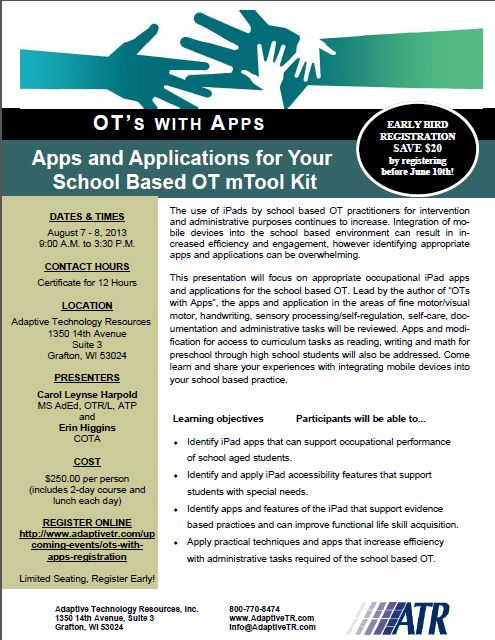
OT’s with Apps Workshop: “Apps and Application for Your School Based OT mTool Kit!

Interested in learning about apps related to school based Occupational Therapy intervention and administrative tasks?

Join OT’s with App’s for “Apps and Application for Your School Based OT mTool Kit” August 7th & 8th !

Registration Information

OT's with Apps Invite pg1

For more information visit ATR’s registration information or call: 800-770-8474 .

Carol

Posted in Apps for OT's, Continuing Education, Occupational Therapy, Pediatrics, Pre-writing, Primary Grades, Print Disabled, Productivity apps, Rest and Sleep, School Based Interventions, Self Care, Self-regulation, Sensory Apps, Sensory Apps for ASD, Social Skills, Special education, Text to Speech, Video Modeling, Visual Communication, Visual Motor, Visual Perception, Voice Recognition, Word Prediction, Work Flow, Writing | Tagged , , , , , , , , , , , , , , , | 3 Comments