iAnnotate App on Sale for Teacher Appreciation Week

iAnnotate icon

Among the myrid of apps for note taking rise a few that are well worth mentioning for personal or professional note taking as well as creating worksheets with text boxes for students with dysgraphia or dyslexia to complete. iAnnotate app is one of those 4.5 out of 5 star apps that has a history of being well supported as well as well liked. For Teacher Appreciation Week (May 6-10), iAnnotate is reduced to 4.99 (from 9.99), a good deal for this app.

iAnnotate app for iPad provides many features which appears somewhat overwhelming initially, however customization of its tools can help reduce the visual overload with for the user. Along with annotation of PDF files, highlighting and numerous other writing/typing tools, iAnnotate provides file management within the app and ability to sync with many services (Dropbox, Google, Box, Windows SkyDrive).
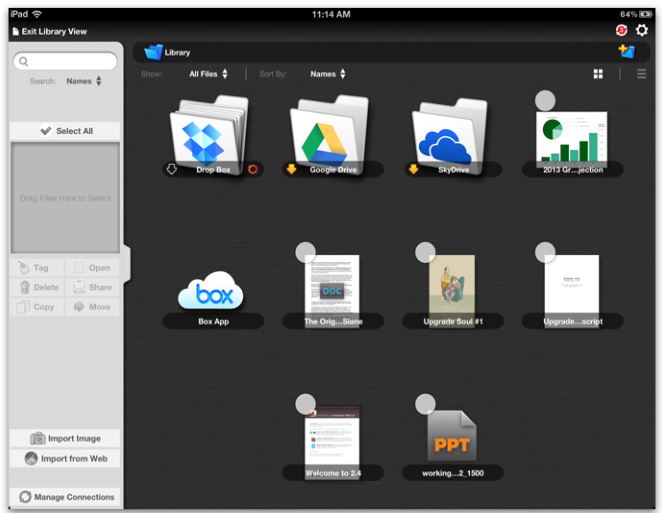
iAnnotate pic2

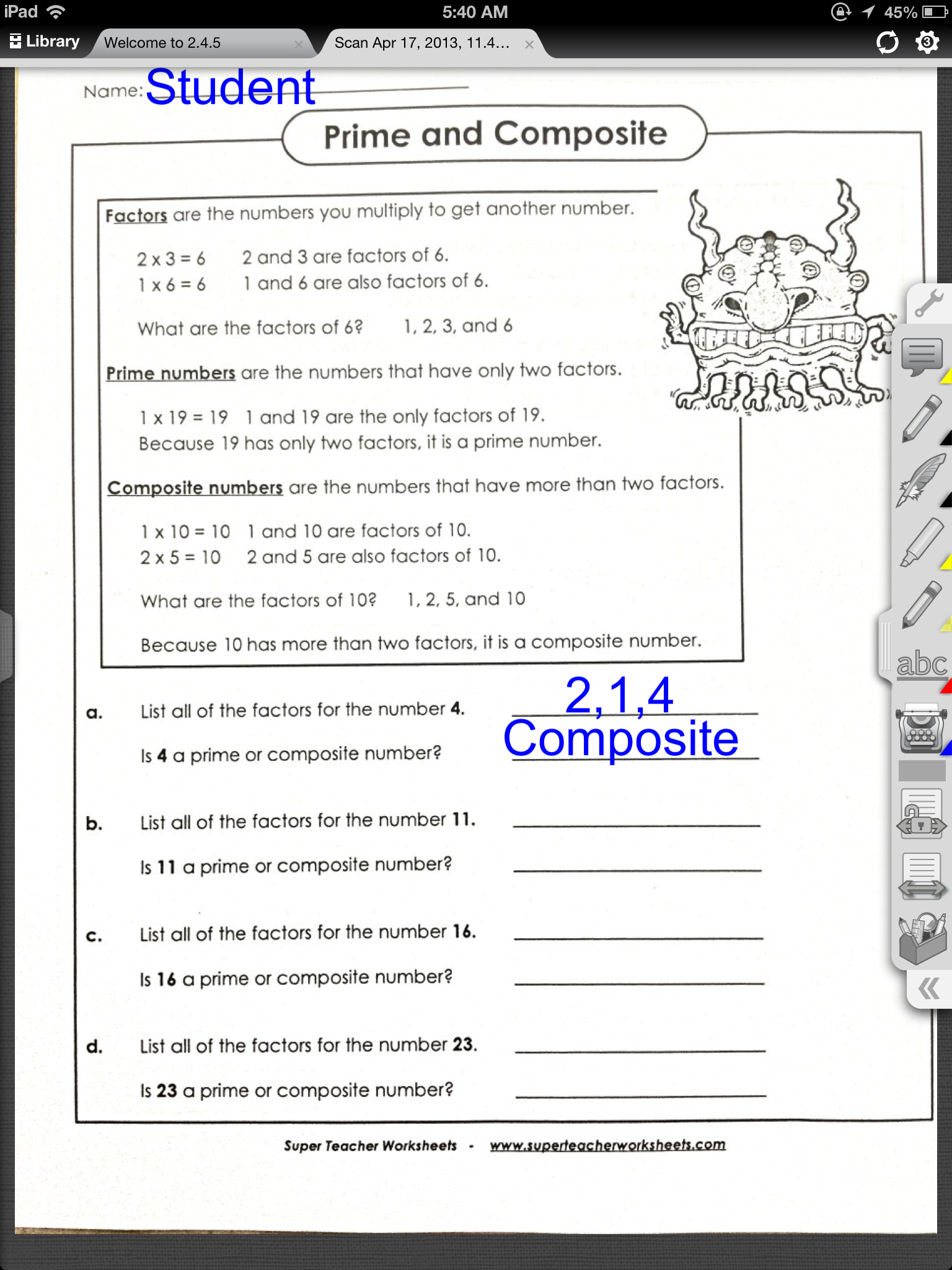
iAnnotate provides many tools for teachers and students including the ability to create text boxes to complete classroom worksheets scanned or emailed to be completed on the iPad. Here is an examples of iAnnotate used with a classroom worksheets scanned to a PDF and imported or emailed for a students with significant handwriting illegibility:
iAnnotate pic1

iAnnotate provides several documents to be open and available to toggle through using tabls noted at the top of the app screen. The tool bar on the right side of the screen can be customized with the users desired tools for ease of and simplified view .

Although, iAnnotate is a bit more expensive than some of the note taking apps and can look somewhat overwhelming, it provides a method of organizing files and allows customization of its tools which is not typically provided in other free apps I have used. At a reduce price, this app may be worth the cost for you or as a method of compensation for the student with handwriting challenges!

More information on iAnnotate can be found on the developers Branchfire website. An introductory iAnnotate app for Android is also available. is also available for Android.

Do you have iAnnotate in your teaching or OT mTool kit? Share how you use it if you do!

Carol
Posted in Android, App Reviews, Apps for OT's, AT for Handwriting, Customizable app, Handwriting, iPad, Learning Disability, Mobile Device Use, Note Taking, Occupational Therapy, Writing | Tagged , , , , , | Leave a comment

Preschool Visual Motor Apps Gone Free!

Preschool Visual Motor apps pic

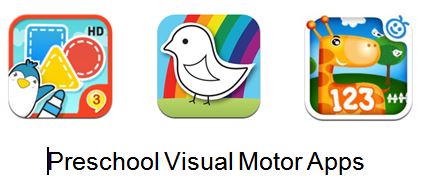
Here are a few apps with visual motor activities gone free for the weekend. Whether they are for a day or for a few days is not always known so check them out soon to see if they will be added to your OT mTool Kit.

123 coloring book talking123 Color HD: Premium Version – for iPad/iPhone is an international version with several languages and many themes within the coloring pages. A fun color by number activity on your iPad. Regularly .99.


123 Zoo icon 123 ZOO for iPad/iPhone is an educational app featuring numbers. Learning, counting, drawing numbers and a game reinforcing number concepts is included in this app for preschool children.


Wow Doodle HD icon Wow! Doodle HD  for iPad features preschool drawing /visual motor activities. Tracing straight lines to a variety of shapes, drawing simple parts  on to animals and free drawing in scenes and pictures provides a variety of fun activities for preschool to kindergarten aged children. Share with parents and teachers for practice of visual motor activities.

Not your kind of apps? Share with a teacher or parent as learning activities! You might also share how to set guided access on the iPad to encourage learning rather than just entertainment. Sharing a timer with parents might also be a good ideas to limit screen time as recommended by the NIH .

More for you OT mTool Kit!

Posted in App Reviews, Apps for OT's, Apps for Special Needs, Early Childhood, Elementary School, Free apps, iPad, iPhone, iPod, Occupational Therapy, Primary Grades, School Based Interventions, Special education, Visual Motor | Tagged , , , , , , | Leave a comment

Write to Read – Cool Learning App ~ Educational Technology and Mobile Learning

Richard Byrne’s post Write to Read – Cool Learning App ~ Educational Technology and Mobile Learning” reviews  the Write to Read app.

“Write to Read http://ow.ly/kHCNS ; is an educational iPad app that helps young kids, ages 3-10, hone their reading skills through writing, specifically story creation. The app was developed based on input from teachers and leading Danish scientific researchers and is currently in widespread use in homes and schools throughout Denmark.”

See on www.educatorstechnology.com and also on Scoop.itOT mTool Kit

Carol

Posted in Apps for OT's, Education, Elementary School, iPad, Learning Disability, Occupational Therapy, Special education, Special Education Teacher, Writing | Leave a comment

OSnap! Time-Lapse and Stop Motion App – Gone Free

OSnap! App

OSnap! App

OSnap! Pro for iPhone and iPad is a time-lapse and stop motion app currently free. I have not had a chance to work with this app, but watching the video tutorials shows this app has many options for creating and editing videos or photo sequences for client instruction, video modeling or taking assessment videos or photo to name just a few. OSnap! has many options including but not limited to taking videos or photos in different orientations, using a grid for alignment, “eyes” to enable taking pictures at another time in the same orientation for pre-post photo comparisons and many more photo and video editing options.

Here is a video tutorial from OSnapapp.com presenting basics of OSnap!:

If you are thinking of doing video modeling or video self modeling for students or self-care tasks, vocational or iADL’s this free app might be a good option. Some of the options provided in this app such as the grid or “eyes” can assist with taking pre and post digital data with exact orientation if using it for posture, alignment or range of motion. A OSnap lite version is also available.

OSnapp.com is an easy to navigate and provides written tutorials and video tutorials to help you get started. With the power of camera and video features on your iPad2, 3, 4, iPod or iPad Mini, using the multimedia for treatment, instruction or monitor visually treatment outcomes can be a very valuable tool.

OSnap! is currently free and seems to be to be a valuable app to have for many therapeutic, clinical or educational uses. This will be in my OT and AT mTool Kit!

Carol

Posted in App Reviews, iPad, iPhone, iPod, Medical, Multimedia, Occupational Therapy, Rehabilitation, Video Modeling | Tagged , , , , | Leave a comment

Free Technology for Teachers: Three Approaches for Getting Content to Elementary Students’ iPads – No Email, No Problem

See on Scoop.itOT mTool Kit

Carol Leynse Harpold‘s insight:

Work flow to and from iPads can be a challenge. Richard Byrne presents three options for iPad work flow in his post Three Approaches for Getting Content to Elementary Students iPads .

I found this a helpful post. Of course there are more options including using Google drive and Google Drive app or a Google Site for accessing content!

Always more than one way to skin a cat!

Carol

See on www.freetech4teachers.com

Posted in iPad, iPad Management, Occupational Therapy, Work Flow | Leave a comment

Creating Picture Vocabulary with Read & Write Google Extension

Read-and-Write-Screenshot

Kurtis Broeg in his blog post “Sharing Picture Vocabulary using Read & Write with Google Extension” provides an explanation and a video demonstrating how to create a picture vocabulary list in Read & Write in Google Chrome. I am thankful to be able to see his short but succinct video explaining the use of this tool that I have not been successful with using.

Check out his blog post and the helpful video he created  to make picture supported vocabulary lists for your students:

Thanks to Kurtis Broeg for creating the video and sharing!

Carol

Posted in Cognitive Impairment, Elementary School, Google Chrome, Occupational Therapy, Reading, Word Work | Tagged , , , , | Leave a comment

Kindle For iOS Will Now Turn Your Favorite Books Into Audiobooks | Cult of Mac

Check out Cult of Mac’s  post  “Kindle for iOS will now turn your favorite Books into Audio Books”

Also See link on Scoop.itOT mTool Kit

Carol Leynse Harpold‘s insight:

Kindle’s updated app for iOS now offers accessibility to VoiceOver along with other features. Check out Cult of Mac’s review : http://www.cultofmac.com/225836/kindle-for-ios-will-now-turn-your-favorite-books-into-audiobooks/

Carol

See on www.cultofmac.com

Posted in Accessibility, Kindle, Reading | Leave a comment

Story Wheel – Story Starters on Your iPad

Story Wheel – Story Starters on Your iPad as reviewed by Richard Byrne.

Schooped from  Scoop.itOT mTool Kit

Story Wheel is an app for the iPad and iPhone that is designed to promote audio storytelling. Spin the Story Wheel on your device and when it lands on an image, dictate a short story based on that …

Carol Leynse Harpold‘s insight:

Richard Byrne offers a review of Story Wheel app for your iPad on his blog iPad Apps 4 School.com . This looks like a fun way to jump start writing using story starters with students who have a difficult time generating ideas.

Carol

See on ipadapps4school.com

Posted in App Reviews, Elementary School, iPad, Middle School, Occupational Therapy, Special education, Special Education Teacher, Writing | Leave a comment

Memory Apps on ADVANCE for Occupational Therapy Practitioners

Memory Apps reviewed on Advance for Occupational Therapy Practitioners

See on Scoop.itOT mTool Kit

Smartphones prove to be worthy options as assistive technology for cognition for memory compensation following TBI.

Carol Leynse Harpold‘s insight:

Advance for OT Practitioners provides app suggestions to compensate for TBI. Apps for memory are reviewed at: http://occupational-therapy.advanceweb.com/Features/Articles/Memory-Apps.aspx. Well worth reading.

Carol

See on occupational-therapy.advanceweb.com

Posted in Activities of Daily Living, Adults, Apps for OT's, Cognitive Impairment, iADL's, iPad, iPhone, iPod, Life Skills, Memory, Occupational Therapy, Organization | Tagged , , , , , , | Leave a comment

Google Search for iOS gets Google Now! All the great features of Android… locked in one little app | iMore.com

Use of Google is pervasive, whether personally or in the schools for those who work in a Google schools.  Adding apps, extensions and other functionality to your mobile devices with Google tools can help with efficiency, some basic accessibilty and a host of synchronizing tools. Google Search for iOS gets Google Now! which can integrate more Google features on your iDevice. See the post at: http://www.imore.com/google-search-updated-weather-traffic-and-sports-information

Also scooped on Scoop.itOT mTool Kit

Google Search has just been updated to add even more features from the Google Now service including traffic and weather updates as well as information about sports teams and breaking news.

Carol Leynse Harpold‘s insight:

If you are a Google user on a mobile device check out the Google Now! app features as reviewed on iMore.com : http://www.imore.com/google-search-updated-weather-traffic-and-sports-information . Synchronization of tools such as calendars and notes are possible across devices with Google accounts.

Carol

See on www.imore.com

Posted in App Reviews, Apps for OT's, Google Chrome, iOS, iPad, iPhone, iPod, Occupational Therapy, Organization, School Based Interventions | Tagged , , | Leave a comment