BeBop Blox App

BeBop blox iconBeBop Blox app is a new block building interactive app created by the developers of Endless Alphabet, Mr. Potato Head Create & Play that is creative and delightful for young learners. Compatible with iPhone and iPad, this app is free!

BeBop blox picsBeBlop Blox provides from simple to more complex parquetry blocks assembly.

BeBop blox pic4When the block puzzles are completed, small characters in the blocks come alive. Buttons at the bottom spray confetti for the celebration of the completion of the design!

BeBop blox pic3 BeBop Blox app is a creative, fun, interactive block design app for preschool and early elementary aged students.  This app should be a treat to your visual learners!

Add this to your OT, parent or teacher mTool Kit for school time or summer time fun… and remarkably free!

Carol

Posted in App Reviews, Apps for OT's, Early Childhood, Elementary School, iPad, iPhone, iPod, Occupational Therapy | Leave a comment

Apps List by Occupational Performance

Apps Listed By Areas of Occupational Performance 

I recently had an opportunity to write an article for AOTA’s Technology Special Interest Section Quarterly “What’s in Your Occupational Therapy Mobile Tool Kit?” published this June 2013. Limitations of the length of the article did not allow inclusion of names of apps. The following is a brief list of apps by areas of occupational performance. More apps can be found on the menu link to the OT’s with Apps mTool Kit List, and of course there are many more that could be listed!

Note: App prices are subject to change.
ADL’s        
iDress for Weather  iPhone/iPad Seasons, clothing selection and weather concepts  Child 1.99
Visual Impact Pro   iPad Create multi media instruction for social stories, instruction and video modeling . Adult / Teen 49.99  
Shoe Tying 1 iPhone/iPad DTT app with discrete training, video on shoe tying; appropriate for all ages; many supporting materials. Adult /Child

4.99

1,2 Shoe Tying iPhone/iPad Basic step by step images of shoe tying Adult / Child

0.99

         
IADL’s        
Cash-Strapped iPhone/iPad Budget apps; Takes your expendable $$ and helps keep track of how much you have spend and have available. Adult  
PicList iPhone/iPad To do manager allowing pictures, lists of tasks to complete Adult / Teen 1.99
Shopping List Generator iPhone/iPad Create shopping lists with pictures, text to speech, item prices are totaled; Connor Company app Adult / Teen 4.99
Functional Planning System iPhone/iPad Scheduling and video prompting option to support daily tasks. Customizable. Adult / Child 4.99
One Tap Dial iPhone/iPad Customize with faces of contact phone number Adult / Teen .99
Unus Tactus iPhone/iPad Provides images associated with phone numbers for contacting others; provides ability to track users with GPS Adult / Child 9.99
GPS Alarm iPhone/iPad Set GPS location and alarm; alerts user when close to destination Adult / Teen .99
GPS Alarm Android Set GPS location and alarm; alerts user when close to destination Adult / Teen free
FaceDialer iPhone/iPad Create home screen pictures of phone contacts Adult / Teen .99
I Get Cooking Vocabulary iPhone/iPad Visual sequence apps for cooking. Provides visual task analysis and vocabulary for equipment, ingredients, and steps of mixing and cooking. Adult / Teen 4.99
Pillboxie iPhone/iPad Medication reminder app; on going reminders of medication regime; unable to set short term med administration Adult 1.99
Pictello iPad Create picture/story sequences with images and video for ADL and iADL tasks Adult / Child 18.99
Story Creator iPad Create picture/story sequences for ADL and iADL tasks Adult / Child Free/ .99 Pro
Counting Money iPhone/iPad Practice of counting money for all ages Adult / Child .99
Qcard iPhone/iPad Text based reminders for appointments, reminders and guided task allowing multiple step directions. Adult / Teen 4.99
Picture Scheduler iPhone/iPad Visual planner with images, video, audio, alarms, repeating functions. Adult / Child 2.99
Visual Picture Planner (Good Karma) iPad Picture based planning system with audio and video capabilities. Provides day and weekly calendar features. Adult / Child 14.99
First Then Visual Schedule iPhone/iPad Visual schedule app providing customizable visual schedule Adult / Child

9.99

First Then Visual Schedule Android Visual schedule app providing customizable visual schedule Adult / Child

9.99

Answer Yes/No iPhone/iPad Create simple customizable buttons with voice and text for pre-verbal or non-verbal individuals. Provides choice of two with up to 30 pages of choices. Adult / Child

free/1.99 for more options

Point to Pictures iPad AAC app capable of providing images and prompts; created by RJ Cooper Adult / Child

free/29.99

Proloquo2Go iPhone/iPad AAC app providing customization of communication choices by pictures, symbols and well as words. Adult / Child

189.99

Scene & Heard iPhone/iPad Contextual based AAC app allowing hot spots of communication choices and expression. Lite version available. Adult / Child

49.99

Sounding Board iPhone/iPad AAC app with up to 9 cells ; switch accessible with Blue2 by Ablenet Adult / Child

free

GoTalk Now iPad AAC app Adult / Child

79.99

Go Talk Now Free iPad AAC app Adult / Child

Free

My Talk Mobile iPhone/iPad AAC app Adult / Child

49.99

Autismate iPad Contextual based AAC app allowing hot spots of communication choices and expression.  Adult / Child

49.99

Tablet Talk iPhone/iPad AAC App, similar in features to iProloquo2go. Adult / Child

79.99

VoCal iPhone/iPad App creating reminders and alerts with voice recording capabilities. Adult / Teen

5.99 (full)

ToDo iPhone/iPad Manage tasks with audio alerts, subtasks and checklists; syncs with iCal and Outlook Adult / Teen

4.99

It’s Done! iPhone/iPad To do list of daily tasks that needs to be done Adult / Teen

2.99

         
Rest and Sleep        
SOSH Relax iPhone/iPad SOSH app with relaxation and shredder components only. Adult / Teen 4.99
Breath2Relax iPhone/iPad Instruction and practice of breathing exercises to manage stress Adult / Teen free
eCBT Mood iPhone/iPad Provides Strategies for identifying and dealing with mood disorders Adult / Teen .99
eCBT Calm iPhone/iPad App to help learn relaxation techniques Adult / Teen .99
Relax Melodies Android Provides a variety of sounds and mixes of sounds and ability to save for review Adult / Child free
Relax Melodies iPhone/iPad Provides a variety of sounds and mixes of sounds and ability to save for review Adult / Child free
Chillax iPhone/iPad Simple, easy to use app with relaxing sounds and music Adult / Child free
Autism 5 Point Scale iPhone/iPad Customizable 5 point scale to assist with awareness of emotions and self- regulation Adult / Child free
Pocket Pond iPhone/iPad App featuring a virtual koi pond. Splashing sounds provided when fish and water is touched. Relaxation app Adult / Child free
Pocket Pond 2 iPhone/iPad Virtual koi pond app. Relaxation app Adult / Child free
BrainWorks iPhone/iPad Sensory diet app, customizable, unlimited users Adult / Child

11.99

Zones of Regulation iPad Game app to teach self regulation. Uses Red, yellow, green and blue zones to describe sensory alert levels. Adult / Child

4.99

Autism Tracker Pro (also see Data Collection section) iPhone/iPad Data collection app; customizable, Pro version allows tracking 1 Person, in app purchase ($5.)provides 2-3 Persons; $10 for unlimited Persons; graphs and email data capabilities Adult / Child

9.99

         
Education        
Read2Go iPhone/iPad Bookshare.org app providing text to speech, highlighting and customization of font size and type for user. Adult / Child 19.99
Go Read Android Bookshare.org app providing text to speech, highlighting and customization of font size and type for user. Adult / Child free
iReadWrite iPad Text to speech, word prediction, phonetic spell checking, highlighting tools are available in this app. Adult / Child 19.99
EZ PDF Reader iPad PDF reader, TTS, annotation, highlighting, typing; Swiss knife of readers Adult / Child 1.99
AppWriter English iPhone/iPad Word processing app with text to speech, word prediction, OCR generator and file management support Adult / Child 19.99
Voice Dream Reader iPhone/iPad App with text to speech for imported file, PDF, web based text Adult / teen 9.99
ClaroSpeak iPhone/iPad App with text to speech, options to change background, high lighting, text and font size; reflows text on screen with zoom Adult / child 5.99
Abilipad iPad Customizable keyboard and word processor with word prediction capabilties. Also allows images to be featured in the writing environment. Adult / child

19.99

Typ-O iPad/iPhone Word prediction with text to speech and phonetic assistance Adult / child

14.99-iPad

Write&Say iPhone/iPad Text editor with Text to Speech, translator, exports to email dropbox, converts documents to MP3  Adult / child

9.99

ZenTap Pro iPad/iPhone Word prediction/word completion app Adult / child

free/2.99

Sentence Maker iPad/iPhone Create customized sentence tiles for students to sequence Adult / child

0.99

Type on PDF Pro iPad Type into text boxes in PDF files Adult / child

free/9.99

Panther Writer iPad Five trackpad configurations. One-touch clicks for most mouse controls. Touch icons to open files and manage applications. Features for individuals with motoric disabilities. Adult / child

14.99

Clicker Sentences iPad Provides picture supports and word banks for emerging writer. Text to speech, customizable. Adult / child

20.99

Clicker Docs iPad Provides writing supports: word prediction, word banks and tabs for customized banks of words, text to speech. Customizable writing environment. Developed by Clicker Adult / child

25.99

Dexteria iPad Fine motor/visual motor skill development and handwriting readiness Child

4.99

iWriteWords iPhone/iPad Letter/number identification and  formation app. Child

Lite/2.99

Letter School iPhone/iPad Highly interactive letter formation app providing numerous different animations to show direction of letter formation. Child

Lite/2.99

Panther Math Paper iPad Math equation writing keyboards for mobility impaired Adult / Child 14.99
Panther Calculator iPad Accessible calculator Adult / Child 6.99
My HomeWork Android Track classes, assignments, homework, tests; Sync with paid online option Teen

free

myHomeWork iPad Track classes, assignments, homework, tests; Sync with paid online option Teen

1.99

Astrid iPhone/iPad Calendar and assignment app for elementary/middle school students Teen free
4KidCal iPhone/iPad Primary aged calendar with stickers to mark events Child .99
         
Work        
Notability iPad Binder note book app; Manages PDF, docs, images; records voice files; syncs with Dropbox, Adult / Teen

0.99

PaperPort iPad Note taking app featuring voice recognition in the app on iPad2. Adult / Teen

Free

Evernote iPhone/iPad Note taking, organization apps; syncs with many apps Adult / Teen

Free

iAnnotate iPad Note taking, organization apps; drawing, highlighting options with file management system Adult / Teen

9.99

iAnnotate Android Note taking, organization apps; drawing, highlighting options with file management system Adult / Teen

free limited time

Calengoo iPhone/iPad Syncs Google calendar with iPad Adult / Teen 6.99
GeeTask Lite iPhone/iPad Manage to do tasks with Google calendar; easy sync’g  Adult / Teen free
         
Play        
Barnyard Mahjong iPhone/iPad Barnyard animals in a Mahjong (matching) activity. Adult

free (.99)

Fantastic Four in a Row iPhone/iPad Four in a row activity. Free allows one player. Purchase allows two players. Adult / child

Free (.99)

EnsenaSoft games iPhone/iPad EnsenaSoft provides both online and tablet apps. Adult / child

NA

Action Bowling iPhone/iPad Bowling app. Lite provides single player, purchased app allows 2 player mode for turn taking. Easy to use for wide variety of players. Adult / child

Lite/2.99

         
Leisure        
Fluidity iPhone/iPad Create fluids of different colors on the screen by touching and drawing. Adult / child

Free

Fluid iPhone/iPad Interact with water flowing over rocks. Calming Adult / child

Free

Fluid Monkey iPhone/iPad Colorful fluid you can interact with on the iPod Adult / child

Free

Monster Chorus iPhone/iPad Monsters create tones and tunes when touched. Calming, sweet sounds created. Adult / child

Free

         
Social Participation        
The Social Express iPad  Teaches users how to think about and manage social situations, helping them to develop meaningful social relationships; suited to elementary to high school levels; 16 lessons Teen / Child

89.99

Social Skill Builder iPhone/iPad Interactive videos to teach social thinking, language and behavior skills Teen / Child

Free; In app purchases

The Electric Company – Feel Electric iPhone/iPad  Focuses on awareness and identification of feelings and emotions with games, story creation and vocabulary building in a fun, age appropriate way. Appropriate for elementary, middle and high school Teen / Child

free

Osnap! iPhone/iPad Video and photo time lapse and editing app Adult / Child free
iMovie iPad Movie editing app Adult / Child 4.99
Toca Boca Hair Salon iPad Interactive app focusing on cutting hair Child 2.99
       

Many thanks to Jan and Gavin for their patience and assistance with the article! It is amazing what time and support they give to generate articles.

Do you have favorite apps in any of the occupational performance areas that you have used with clients? Please share!
Carol

Posted in Activities of Daily Living, Adults, Android, Apps for OT's, AT for Handwriting, Game, iADL's, iPad, iPhone, iPod, Leisure apps, Occupational Therapy, Rest and Sleep | Leave a comment

News-2-You App

News 2 You icon

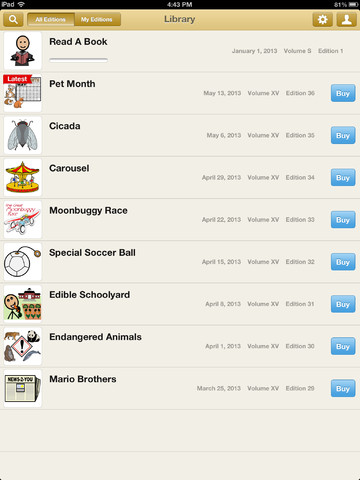
Do you subscribe to News-2-You in your special education classroom? Have an iPad? Now you can access the weekly News 2 You Newspaper on your iPad.

 AssistiveWare and N2Y new free News 2 You app allows you to access your online subscription within the app or purchase news through in-app purchasing by the week or a yearly subscription.

Here is a video overview of how it all works:

The free app provides one free newspaper to trial if you don’t have a subscription. Weekly subscriptions are available as seen below with the in-app purchase capabilities.

News 2 You pic1

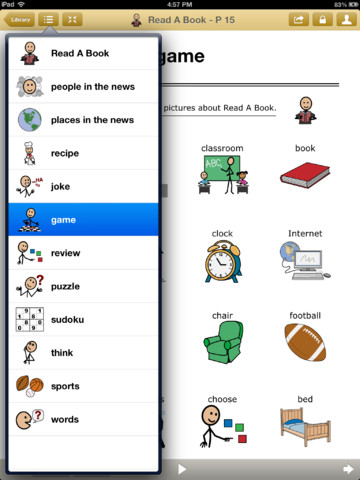
Weekly news provide the standard  topics of the News 2 You subscription service:
– Current Events
– Vocabulary
– Recipe
– Joke
– Sports News
– A variety of interactive games and puzzles for some fun while learning.

News 2 YOu pic2

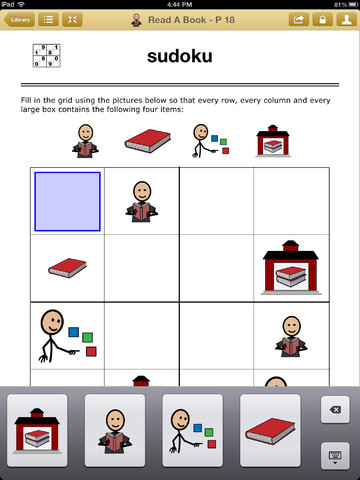
Activities can be completed within the app by typing text into crossword puzzles, completing the activities with provided symbol responses and text to speech, answering review questions by selecting picture/symbol answers provided. Reading progress and answers are tracked by user.

News 2 You pic3

Text to speech or audio feedback is available with the graphics and graphic supported text in the newsletter . Options are provided within the app to lock users access to a single edition or single section of the newspaper by the administrator.

Numerous options are available within the app including:

  • Adding users
  • Setting password
  • Easy linking/logging into your existing N2Y account
  • Changing the appearance of highlighting sentences, highlight color choices, highlight words or word highlight color
  • Speech settings: volume, voice, voice rate, voice personalization, editing pronunciations, speak as you type by word or sentence

News 2 You for iPad is a well thought out app that is easy and intuitive to access using direct access. The many options provide customization to the user. Zooming out is available however it does not stay at a larger zoom level. Turning Zoom or Large Text options did not affect changes in the text size in the app. It is unknown at this time if it can be accessed with switch capabilities, however VoiceOver was able to be used within the app, which is one method of switch access on the iPad. At this time I am unsure if the app is switch accessible.

Great job AssistiveWare and News 2 You! This app provides additional mobile access to literacy, leisure activities and news for special needs adults and students!

If you do not use News 2 You, share with teachers and parents of individuals who might benefit from this mobile newspaper!

Carol


Posted in Activities of Daily Living, Activity Worksheets on Your iPad, App Reviews, Apps for Special Needs, Autism, Cognitive Impairment, Education, Emergent Literacy, Game Apps for Special Needs, Holiday and Special Events, iPad, Leisure apps, Occupational Therapy, Reading, Special education, Special Education Teacher, Special Events, Special Needs, Universal Design for Learning, Writing | Tagged , , , , , , , | Leave a comment

MeeGenius!

Looking for summer reading suggestions?

AT Daily suggests  MeeGenius app for summer time reading options

Get the  #1 App for Children’s Books. Read along technology. (For FREE!) via MeeGenius! .

Carol Leynse Harpold‘s insight:

The AT Daily provides a great suggestion for summer reading with MeeGenius App.

See on attraining.org

(as posted via  Scoop.itAT 4 Education)

Carol

Posted in Education, Elementary School, iPad, Reading, Summer Programming Suggestions | Tagged , | Leave a comment

iGet It… Cooking Vocabulary and Create Recipe Photo Sequence Book App

iGet Cooking icon

iGet Cooking Vocabulary and Create Recipe

iGet It Apps has developed a new app, i Get… Cooking Vocabulary and Create Recipe Photo Sequence Books for iPhone and iPad (4.99). iGet Cooking provides not only vocabulary support but also the sequential steps of cooking tasks from identifying equipment needed, ingredients, steps to mix and make a recipe and the cooking process. Customization is allowed by creating your own books as well as creating users with their customized cooking contents and steps of the task.

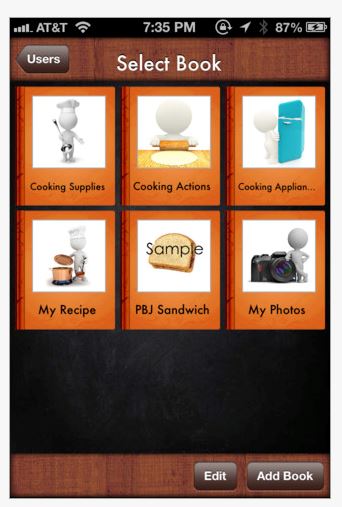
iGet Cooking pic1

Pre-made books are provided in the app:

  • Cooking Supplies – 36 pre-made pages provide a photos of supplies found in a kitchen.
  • Cooking Actions-33 pre-made pages provide photos of actions that take place while cooking.
  • Cooking Appliances -18 pre-made pages provide photos of appliances found in the kitchen.
  • My Recipe- a blank book template to be used to create your own sequential recipes
  • PBJ Sandwich- a sample recipe book showing the steps in making a peanut butter and jelly sandwich.
  • My Photos- blank book

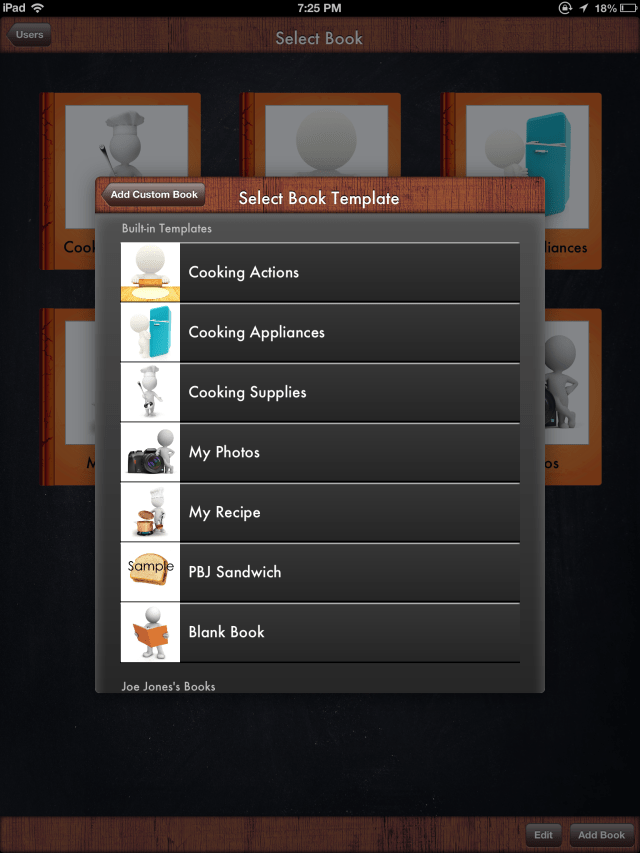
Customization is provided using a blank books or one of the book templates available:

  • Cooking Actions
  • Cooking Appliances
  • Cooking Supplies
  • My Photos
  • My Recipe
  • Sample PBJ Sandwich
  • Blank Book

Photo Jun 07, 7 25 25 PMI created a simple book “Cereal” of the steps of making cereal using one of the existing templates. It was an easy process, providing the typical options of taking a picture, adding a picture from the album or from the apps picture library, add audio recording or text to the title or page caption.
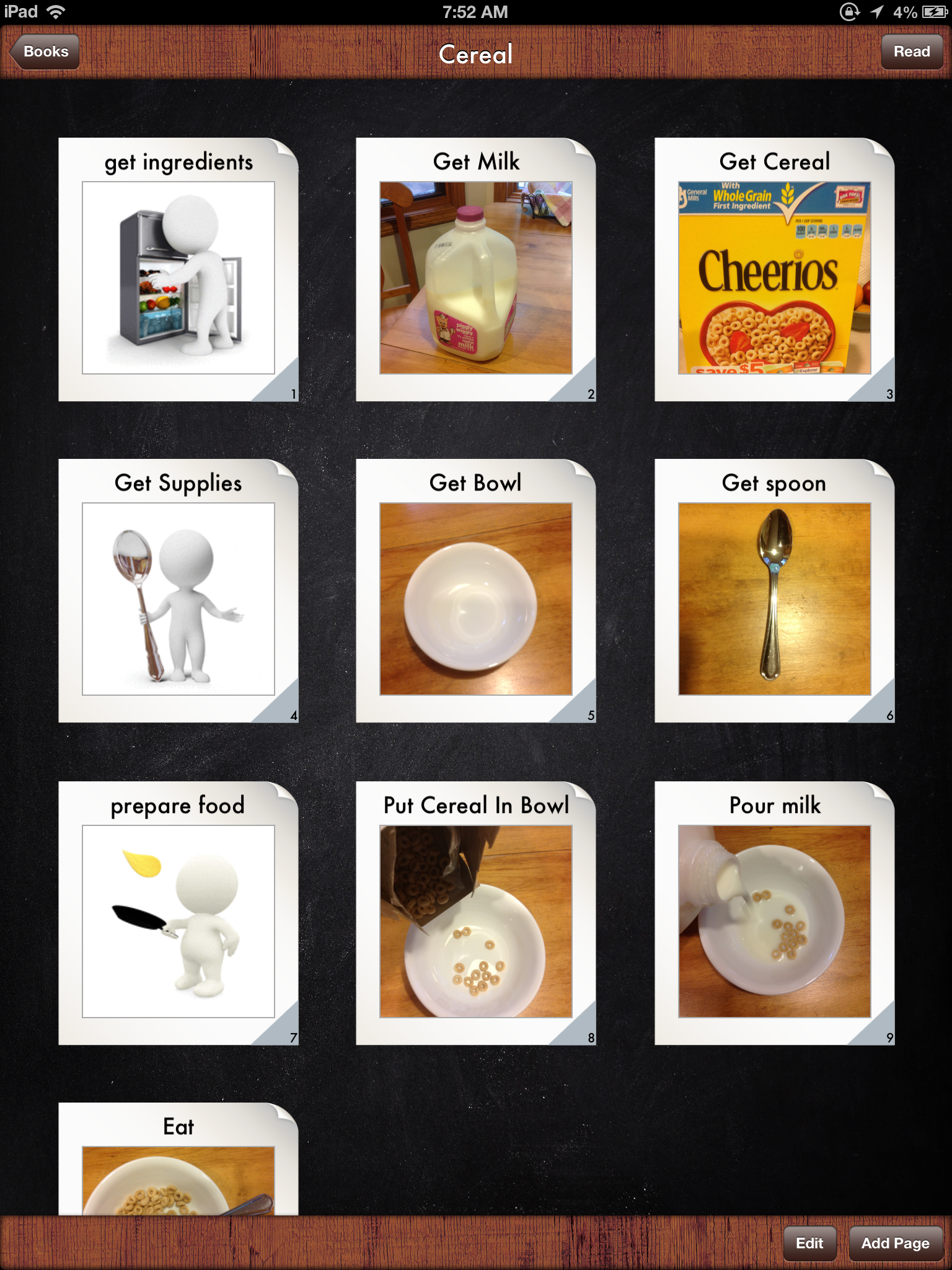
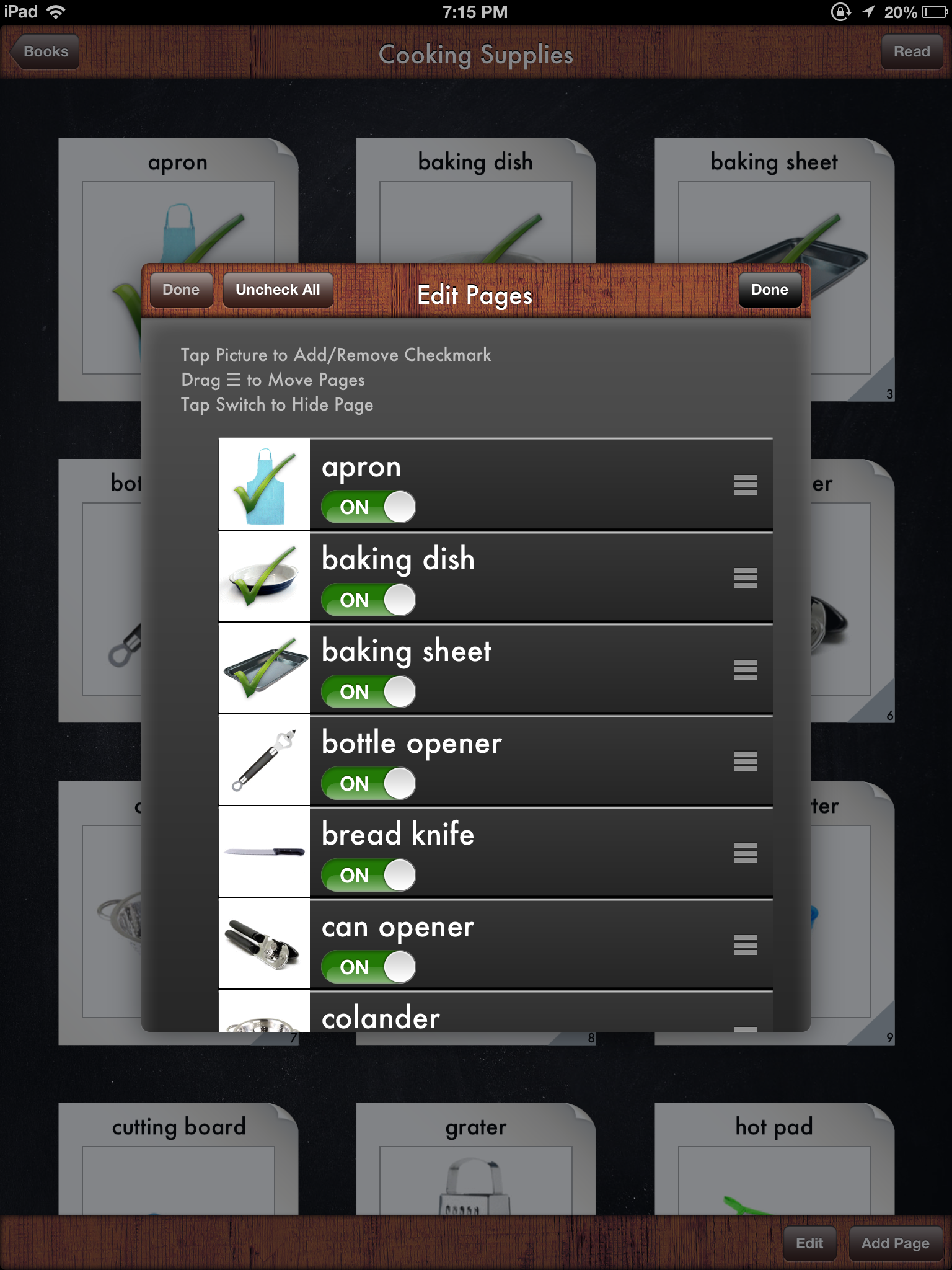
Photo Jun 08, 7 52 02 AM

Page ordering, hiding existing pages from templates and offering check marks for completion are some of the options that are readily available when adding or editing pages within a customized or existing book.

Photo Jun 07, 7 15 02 PMCreating a cooking book was easy and provided important options of easily providing real pictures of supplies or ingredients, adding text as well as audio to the task sequences. If needed taking pictures in context such as the individuals kitchen, refrigerator or cupboard could be created. Although this app library features support for cooking, this app could certainly be used for other ADL task sequences if needed by using the blank book template. iGet it Apps also provides an extensive library of video tutorials of their apps many features to support learning how to create and edit within the apps(http://igetitapps.com/video-tutorials/).

One option that does not appear to be available is importing a video, which would be a great addition given the positive research video modeling (Nichcy, 2007) has provided for the types of clients that benefit from apps like iGet… Cooking app.

Although this was a pretty easy process, it certainly required time to include the step by step sequence of a task. Having the pre-made task sequences available within the app is a boon to save time, even if needing to editing some of the pictures as needed for your client.

iGet It Apps provides a series of iSee-quence  and Identification apps for select tasks and special events which provide visual communication supports. Visit iGet It Apps for their many visual communication apps.

Thank you to iGet It Apps for providing me with this app for review. I would recommend this app for its ease of use if needing to create a photo based step by step task sequence for your client. It certainly has the flexibility to use it not only for cooking tasks but also other types of ADL or iADL tasks if needed.

References:

NICHCY (2007), retrieved on June 8, 2013 from: http://nichcy.org/research/summaries/abstract72

Carol

Posted in App Reviews, Apps for OT's, Apps for Special Needs, Autism, Customizable app, iADL's, iPad, iPhone, iPod, Life Skills, Occupational Therapy, Self Care, Special education, Special Needs | Tagged , , , , , , , , , | 5 Comments

OT’s With Apps Conference – 2nd Session Added!

hand masthead turquoise no dots

Adaptive Technology Resources is pleased to announce that we will be adding a second session to our OT’s with Apps Conference for school based OT on August 14-15th

Thank you to those that have registered already.  If you are interested in the joining us for the second session – register by June 10th  and receive a $20 discount!

Want to know more about what’s on the agenda? Visit http://bit.ly/11C3fL7

3 EASY WAYS TO REGISTER:

1. ONLINE with Credit Card at http://www.adaptivetr.com/upcoming-events (Be sure to choose the date you prefer)

2. FAX a purchase order to ATR at 262-375-6777  (We will accept POs for next fiscal year to be billed after July 1)

3. CALL to register at 800-770-8474 Ext. 106

Come and explore apps for your OT mTool Kit!

Posted in Uncategorized | 2 Comments

Chillax… with an App!

Chillax icon

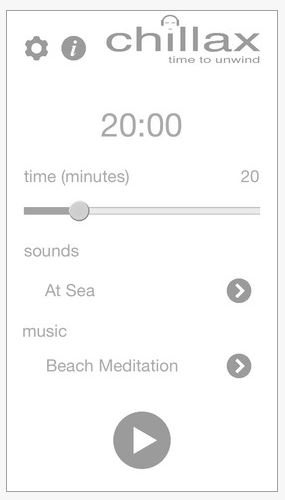
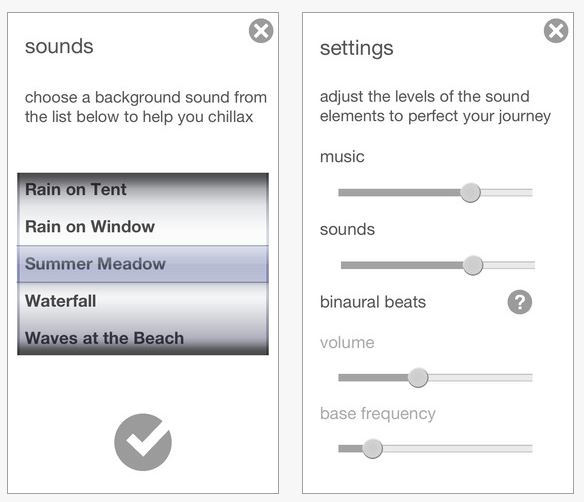
Chillax app – no it’s not your teenage son or daughter telling you to chill out, but an app that can help you do that all by yourself! Listen to varieties of music and sounds in this free and simple app that provides music to unwind to and environmental sounds  to dream about the ocean, beach, fireside, mountain stream, park and more with this free app.

What is great about this app is that it is simple, just a few controls and setting options and you are listening to calming sounds to chillax!

Chillax pic2 Chillax pic3

Here is a description about Chillax from iTunes:

Features:
– Works on iPhone, iPod Touch and iPad
– Multiple soundscapes and music tracks to choose from
– Chillax time selectable from 1 to 90 minutes – just set it and relax
– Binaural Beats with adjustable tone to aid relaxation
– Fade in and out so that you gently enter and return from your relaxation
– Set the levels of the music, sounds and binaural beats to suit you
– Works with the device locked, just like the iPod

BINAURAL BEATS
So what are binaural beats?  They are a psycho-acoustic effect created by the brain when you hear a different tone in each ear.  If you put a tone of say 300Hz in one ear and 310 Hz in the other ear, the brain produces a phenomenon resulting in low-frequency pulsations as the difference between the two tones.  Research suggests that binaural beats may be used to aid relaxation, and are often used in meditation. The waking, alert mind generates higher frequency brain waves, and as you become more relaxed and restful, the frequencies will get steadily lower.  Chillax generates these tones in each ear, to gently guide the brain waves from alpha down to deep theta waves found in meditative and relaxed states.

Interested in a bit more about binaural beats? Here’s a short piece of information on binaural from Wikipedia:

“Binaural beats may influence functions of the brain in ways besides those related to hearing. This phenomenon is called frequency following response. The concept is that if one receives a stimulus with a frequency in the range of brain waves, the predominant brain wave frequency is said to be likely to move towards the frequency of the stimulus (a process called entrainment). In addition, binaural beats have been credibly documented to relate to both spatial perception & stereo auditory recognition, and, according to the frequency following response, activation of various sites in the brain” (retrieved on 6/6/2013 from : http://en.wikipedia.org/wiki/Binaural_beats ).

Interesting? I will stick with Therapeutic Listening®  as an intervention for spatial and auditory perception, but I will try this app for myself, students or clients to facilitate calming behaviors. Add a speaker and provide environmental music to a class or therapy room to chillax?

It’s free, give it a try – add it to your OT, teaching or parent mTool Kit and … Chillax!

Carol

Posted in Adults, App Reviews, Apps for OT's, Apps for Special Needs, iPad, iPhone, iPod, Mental Health, Occupational Therapy, Rest and Sleep, Self-regulation | Tagged , , , , , | Leave a comment

Bitsboard Pro App Gone Free

Bitsboard icon

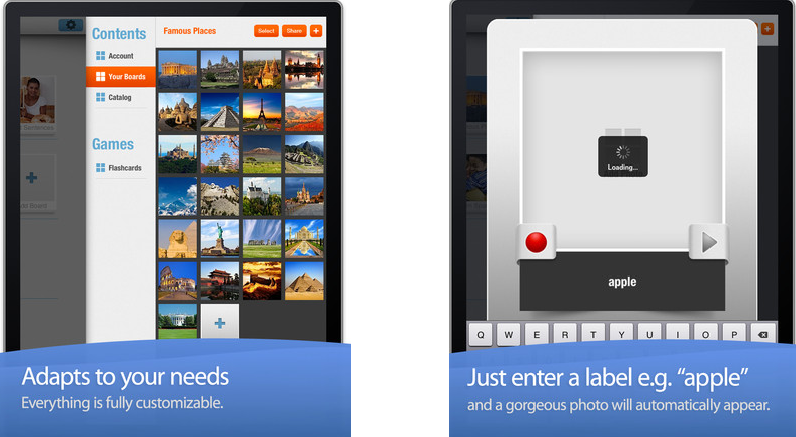
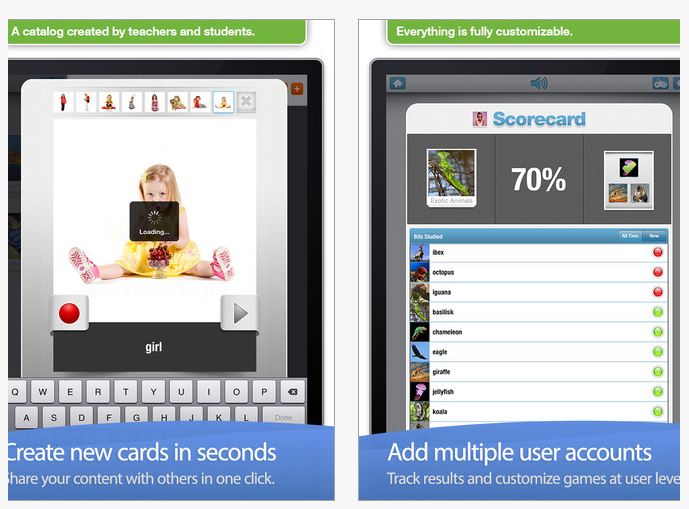
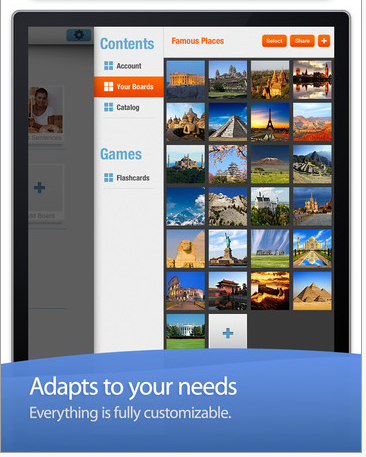
Are you familiar with Bitsboard app? By the developers at Grasshopper apps, this fabulous iPad language app provides many activities that are customizable activities for students with special needs. Thinking this is just for speech or the special education teacher?  Think again! For students who are learning basic new concepts you may want to put pictures of letters, numbers, shapes, symbols or functional pictures when learning ADL skills in to the board to reinforce the concept and pictures. Customization with pictures, recorded voices and text can be performed on each flash card.

Bitsboard pic 3,4

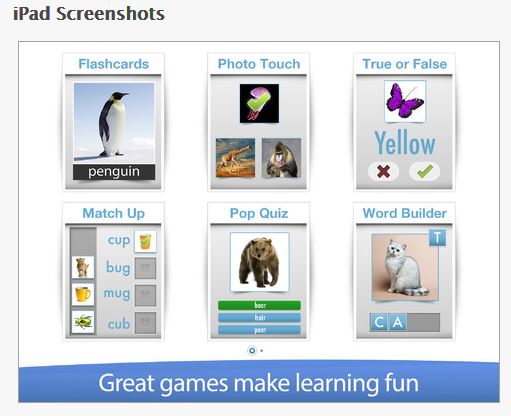
I use Bitsboard with students at the middle and high school that are learning functional life skills and vocational tasks. Reinforcing vocabulary of functional objects that require repetition with varieties of pictures of the same functional object (cups, plates, spoons, different sized towels/hand clothes) for learning and generalization to occur. Bitsboard provides a hierarchy of activities from easy more difficult.  Within the app they provide 10 different learning games as listed below in a hierarchy:

Game 1. Flashcards – 10,000+ free flash cards, fully customizable settings
Game 2. Explore – Review all flashcards at once.  Awesome study mode
Game 3. Photo Touch – Can you spot the right item? Play and learn at the same time
Game 4: True or False – Do you know the answer?
Game 5: Pop Quiz – Ready for a new challenge?
Game 6: Mach Up – Can you match the items?
Game 7: Word Builder Part 1 – Can you form the words?
Game 8: Word Builder Part 2 – Can you form the sentences?
Game 9: Spelling Bee – Suddenly spelling is a game
Game 10: Reader – A fun way to learn how to read
Game 11: Genius – Ready to mix up all the games at once?

Bitsboard pic7
TRACKS YOUR PROGRESS

• Bitsboard keeps track of every answer and makes it easy for you to see what words and boards you have mastered and which ones you need to study some more.

Bitsboard pic5

A NEW  PRO FEATURE SUPPORTS MULTIPLE USERS

• Bitsboard makes it easy to add multiple users and switch between user accounts
• Track progress at the user level
• Automatically saves game settings at the user level

ACCELERATES YOUR LEARNING

• Bitsboard’s learning algorithm automatically personalizes each game based on the players skills.
• Bitsboard knows your problem words and when you are ready to move on to your next challenge.

SHARE AND SYNC CONTENT ACROSS DEVICES

• With Bitsboard, you can share and sync your custom lessons across devices with just one click

• You can also utilize a huge resource of online Bitsboard activities completed by other colleagues.

Bitsboard pic4

This is a great app! If this won’t be part of your OT mTool Kit, share with parents, speech therapists and special education teachers – they will love it!

Carol

Posted in App Reviews, Apps for Special Needs, Customizable app, Early Childhood, Elementary School, Free apps, iPad, Life Skills, Middle School | Tagged , , , , | Leave a comment

AppWriter US Update Reads PDF’s on the iPad!

AppWriter icon

Ling Apps has been working hard on this first version of their PDF reader in their AppWriter App (US, 29.99) for iPad. Most PDF files can be read aloud, and each word will be highlighted directly in the PDF file as it is being read. We are working on optimizing the feature now, and you can expect another update with enhancements and bug fixes very soon.


There are two ways of opening a PDF file in AppWriter:

  1. Import from Google Docs – using the built-in import feature in AppWriter
  2. Use the built-in “open in” feature on the iPad directly from the browser, Dropbox or any other app supporting this feature.

File Types

We added icons for the two files types currently supported in AppWriter, i.e. txt and PDF files. You will notice that txt files are displayed with a blue icon, and PDF files are displayed with the typical red PDF icon next to the file name in the document list. This way you can easily find the file and file type you are looking for. Just tap on a PDF file to open it directly in the AppWriter PDF Reader.

PDF Reader

In the PDF reader you have the following options:

  • Navigate the PDF file by sliding between the pages or by choosing one of the thumbnails at the bottom of the screen
  • Tap the play button to read aloud your document. The read aloud feature will highlight each word as they are being read.
  • Tap the globe and switch between your currently installed voices
  • Tap the “open in”-button to extract the entire text of the current PDF page into the AppWriter editor for further processing.

With the newly added PDF reader, AppWriter is one step further to become the ultimate all-in-one tool for anyone struggling with reading and/or writing.

If you haven’t tried AppWriter lately the upgraded features are stable and easy to use. The ability to scan and convert text from hard copy to electronic format using their scan tool allows easy access to print using their text to speech tools. I found the AppWriter scanning feature accurate and easy to use with the camera on my iPad3.  For individuals who may have difficulty managing the work flow needed when using several different apps to convert hard copy to electronic, AppWriter’s ease of use makes it a great choice.

If you have students or adults that need to access print, give AppWriter a whirl.

Appropriate for your OT mTool Kit?

Carol

Posted in App Reviews, Apps for OT's, Apps for Special Needs, iPad, Occupational Therapy, Reading, Scanning, Text to Speech, Word Prediction, Writing | Tagged , , , , , , , | 4 Comments

OT’s with Apps: Apps and Applications for Your School Based OT mTool Kit

hand masthead turquoise no dots

Interested in learning about iPad apps, application of apps and some tips and tricks for your school based OT mTool Kit?

Join us this summer for a 2 day app-extravaganza of ideas and apps you’ll use at school!

DATES & TIMES

August 7-8th 2013

9:00 A.M. to 3:30 P.M.

CONTACT HOURS

Certificate for 12 Hours

LOCATION

Adaptive Technology Resources

1350 14th Avenue

Suite 3

Grafton, WI 53024

Presenters: Carol Leynse Harpold, MS AdEd, OTR/L, ATP and Erin Higgins, COTA

COST

$250.00 per person

(includes 2-day course and lunch each day)

REGISTER ONLINE

http://www.adaptivetr.com/upcoming-events/ots-with-apps-registration

Save $20 by Registering before June 10th

Description:

Mobile devices have the potential of supporting school based OT practitioners with intervention activities and documentation tools due to its ease of use, portability, wide selection of apps, multimedia and administrative tools. The iPad in particular is a popular mobile device used in schools that has been proposed to increase engagement, access and efficiency, however, identifying appropriate apps for student or professional use can be overwhelming and time consuming.

This presentation will focus on iPad apps and applications for the school based OT Practitioner. Apps and application in the areas of fine motor/visual motor, visual perception, handwriting, sensory processing, self-regulation and self-care will be reviewed and demonstrated as they relate to school based practice and home programming. Apps and iPad features supporting assessment, documentation and administrative tasks for the OT practitioner will also be reviewed. Access and production of curriculum tasks for reading, writing and math as it relates to OT intervention and inclusion of preschool to high school students will also be addressed.

Learning objectives: Participants will be able to:

1. Identify iPad apps that can support occupational performance of school aged students in the areas of activities of daily living, instrumental activities of daily living, education, rest/sleep (regulation), play and leisure.

2. Identify and apply iPad accessibility features that support successful iPad use for students with special needs.

3. Identify apps and features of the iPad that support evidence based practices and can improve functional life skill acquisition.

4. Apply device features and apps that can increase efficiency with administrative tasks required of the school based OT.

Come and learn about apps successfully used by school based OT’s. Bring your own apps and experiences with integrating mobile devices into school based practice and share with others. This presentation requires the participant to bring an iPad 2, 3 or 4, iPad Mini basic iPad navigation skills, and an active iTunes account, user name and password.

Questions? Email for more information : OTswithapps@gmail.com

Hope to see you there!

Posted in Continuing Education, Occupational Therapy | 2 Comments