Schizophrenia: If a Disease Falls in a No-App World, Does It Exist?

On Candidaabrahamson’ blog, insight on the prevalence of mental health apps is shared with one despairing fact on a diagnosis lacking support from a mobile device tools. Read and enjoy her blog post.

Wouldn’t you love to see this experts app list?
Enjoy the post as well as her thought provoking blog.
Carol

Unknown's avatar

On Candidaabrahamson’ blog, insight on the prevalence of mental health apps is shared with one despairing fact on a diagnosis lacking support from a mobile device tools. Read and enjoy her blog post. Wouldn’t you love to see this experts app list? … Continue reading

View original post

Posted in Mental Health | Leave a comment

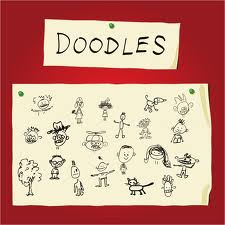
Doodling for Relaxation with Kaleidoscope Doodle Apps

Doodles pic3

Finally, Don’t Forget Art!

Activities that relax come in many forms and are individual for everyone.  I have students who doodle or draw for relaxation at school, as long as it does not distract from learning – or occlude all of the work on their paper, as a way to relax.

The Calm Clinic in their online article “Fool Proof Anxiety Relaxation Techniques” , defines a variety of different strategies including breathing, progressive muscle relaxation, aromatherapy, positive affirmations as well as using art as a form of relaxation. They describe art as a method that helps refocus mental energies. Not always do you have access to paper and pencil to draw or you may not exactly have the drawing skills to allow you to doodle (I would resemble that!). Using a mobile device might just be the tool for some who is not exactly artistically inclined, but still like to be creative, like symmetrical visualizations which can be relaxing.

Here are a couple of apps, one new and one shared (Thank you, Cindi P. ) that would fit as an electronic doodle providing visual and sounds/music for adults and students:
Kaleidoscope Doodle Pad icon

Kaleidoscope Doodle Pad (free w ad, .99) for iPhone/iPad is a new app that creates a kaleidoscope drawing with a variety of colors, backgrounds and stamp features. It is easy to create the drawings, requiring only basic swipes to create a kaleidoscope design. Sounds and visual effects when drawing are added in the mix of the kaleidoscope creation. When completed, you can replay a video of your kaleidoscope drawing providing a visual sensory treat. The creation can also be saved as an image to your Photo Library.

Kaleidoscope doodle pad pic1

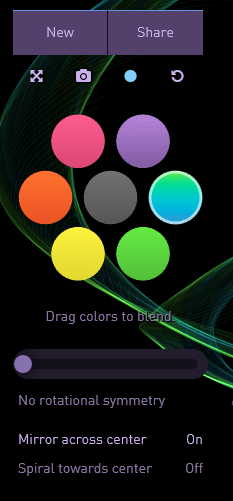
Silk iconSilk app (2.99) for iPhone/iPad is another drawing app that creates interesting drawings with a few tools to create symmetrical or asymmetrical drawings with different colors that can be blended. Silk app also provides music (not customizable) for a calming effect for those that relax when creating visual designs and music.
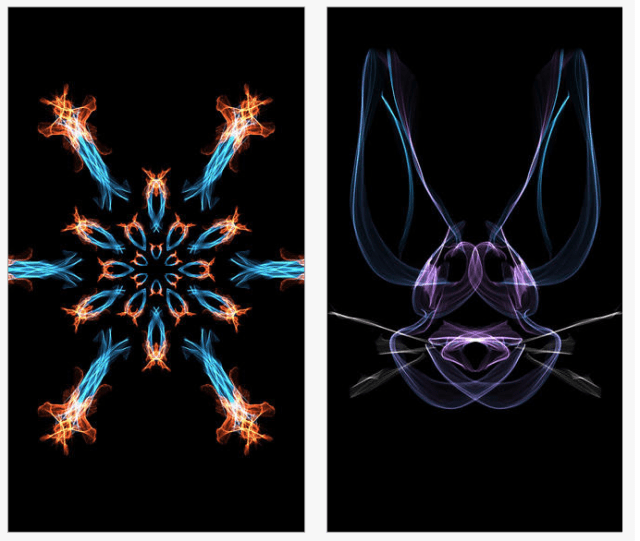
Silk pic1 Designs can be shared and saved. If you are interested in testing the app features out, the tools are available to doodle with on the developers website, Silk-Interactive .
Silk pic2

Don’t have a mobile device you would give to your student? There are many calming and relaxation activities available. Kim Peterson, Licensed Professional Counselor, provides practical suggestions on Creating a Calm Down Box on her Kim’s Counseling Corner website. She provides practical, simple suggestions for calming and relaxation activities for children.

Another method of drawing for relaxation is with a mandala. The University Health Center at University of Georgia on their website page Managing Stress: A Guide for Students, lists relaxation techniques and also “Drawing and Coloring” as a method for stress management. They identify mandala as a relaxing and calming activity:
“Mandala is Sanskrit for circle, polygon, community and connection. The circle       concept exists in nature, is found in many religious symbols and represents       wholeness. Mandalas are intricate designs that can be a part of the meditating       experience. When you color a mandala, your goal is to focus on the process       of coloring, and be mindful of how it feels to color. It is very relaxing       and calming. When you have finished, you have created a lovely picture.  Download a mandala for coloring .” Retrieved on 11/16/2013 from: http://www.uhs.uga.edu/stress/relax.html . Coloring mandalas is not only for college students, I have provided mandala coloring sheets for the class room of behaviorally challenged students to color as a calming activity. It is one of many things they like to color or draw. Paper, colored pencils, markers and crayons are always available and frequently used by the middle school students in their resource rooms.

Duck taping a small pocket made of sturdy material on the inside and underside of the top of a student desk has also been a strategy for easy access to doodle pad paper when appropriately used for calming in the classroom.

Looking for iPad mandala apps or more suggestions? Here is a link to some more ideas about apps and mandala creations: “Marvelous Mandalas – Art App Lesson Idea”

Relaxation apps and activities for your OT Tool Kit!

References:

Fool Proof Anxiety Relaxation Techniques retrieved on 11/16/2013 from : http://www.calmclinic.com/anxiety/treatment/relaxation

Creating a Calm Down Box, retrieved on 11/16/2013 from: http://www.kimscounselingcorner.com/2012/05/09/creating-a-calm-down-box/

Managing Stress: A Guide for Students retrieved on 11/16/2013 from: http://www.uhs.uga.edu/stress/relax.html

Marvelous Mandalas retrieved on 11/17/2013 from:  http://www.ipadartroom.com/marvellous-mandlas-art-app-lesson-idea/

Post revised on 11/17/2013.

Carol

Posted in Adults, Apps for OT's, Apps for Special Needs, Cause and Effect apps, Drawing, iPad, iPhone, Mental Health, Occupational Therapy, Rest and Sleep, Sensory Apps, Special education | 2 Comments

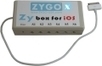
ZyBox X for iOS 7 (L) “Switch Control”

As scooped from Zyg0-USA  

ZyBox X for iOS 7 is a switch adapter designed to utilize the Switch Control capability of iOS 7 for switch scanning.

Carol Leynse Harpold‘s insight:

Zybox X switch control for iOS 7 for switch scanning.

As scooped from http://www.scoop.it/t/ot-mtool-kit

Posted in Accessibility, iOS, iPad, Mobility Impairment, Scanning | Leave a comment

AppoLearning App – Gone Free

appoLearning icon

AppoLearning App

Apps and services that provide app reviews are a great source when scouring for the right app. There are several that are my favorite go to apps for reviews – KinderTown app and Autism App providing a rating and overview of apps for specific populations and age ranges.

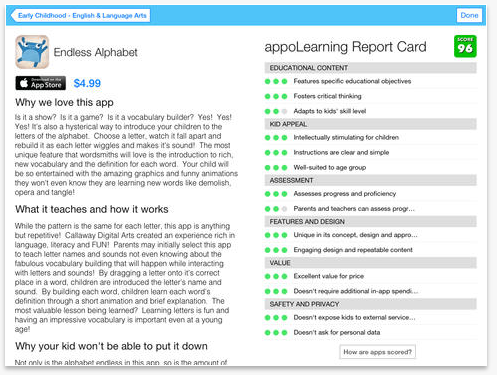
appoLearning iconAppoLearning app, developed for iPad by Appolicious™  website reviews iOS and Android apps in a number of categories, provides a review of educational apps by grade level and subject. Early Childhood, Elementary, Middle and High School grade apps covering numerous subjects areas, including special needs, are reviewed and rated. Here is a video describing their app:

Checking out their listing of apps for MS Special Needs Dyslexia included familiar  and favorite apps  such as Visual Attention TherAppy, Read2Go, PaperPorts and Voice Dream Reader apps) . Here is an example of the Elementary School Special Needs app category and the subjects of app reviewed:

appolearning spec needs

Five apps are selected for review in each of the subject areas:

01141a3c147b47ee5e2fc402e10e7e16d4dd42941d
A narrative describes why these particular 5 apps were chosen. Each app is reviewed and  scored according to 6 traits: Educational Content, Kid Appeal, Assessment, Features and Design, Value, Safety and Privacy generating a report card score between 0-100.

AppoLearning pic3 AppoLearning appis an easy to navigate and time saving tool when searching for apps to support students in the classroom.   Currently free this may be well worth your time to download or share this app with your favorite teachers.

Review of educational apps can also be found directly on the AppoLearning website with other features such as saving a personal list with creation of your own account.

What other tools do you use for app selection?

Carol

Posted in Android, App Reviews, Apps for OT's, Apps for Special Needs, Assessment, Autism, Early Childhood, Education, Elementary School, Emergent Literacy, Fine Motor Development, Free apps, High School, iPad, Language Arts, Learning Disability, Life Skills, Math, Middle School, Occupational Therapy, Productivity apps, Special education, Vision, Writing | Leave a comment

iOT Screener App

iOT Screener icon

iOT Screener App

The iOT Screener app is a free screening tool for professionals and parents who may have concerns regarding their child or student. Created by Dr. Frederick B. Covington, OTD, the iOT Screener  app requests the user to input answers to general information about the child and themselves using a series of Yes/No questions. For children under the age of five, the app’s questions pertain to developmental milestones and progress typical to the child’s age.  For children over the age of five/school aged the app looks at maladaptive traits or behaviors noticed that may affect academic performance or everyday tasks.

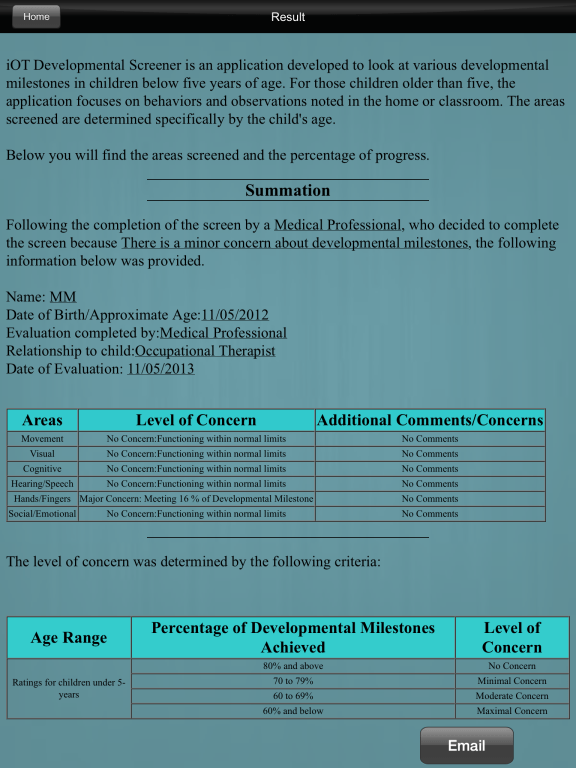
Results of the screening for children ages under 5, reveals what percentages of developmental milestones are currently being met.  For the children over five/school aged, it reveals the percentage of maladaptive traits observed.  The ratings are categorized as;

  • No Concern: Functioning Within Normal Limits
  • Minimal Concern
  • Moderate Concern
  • Maximal Concern

Screening areas include cognitive, sensory, visual, hearing, fine motor, gross motor, self-care, functional skills and social emotional skills pending the age of the child. Age ranges for screening offered:

  • 1-3 months
  • 4-7 months
  • 8-12 months
  • 13-24 months
  • 2-3 years
  • 3-4 years
  • 4-5 years
  • 5 years and above

Pending the age range of the child, areas of screening differ. As an example the screening for a 4-7 month old child includes the following screening areas:

  • Movement
  • Visual
  • Cognitive
  • Speech/Hearing
  • Social/Emotional

For 5 year olds and older the following screening areas are provided:

  • vestibular
  • tactile
  • olfactory
  • functional skills
  • self-help

A report of the iOT Screener for a 1 year old  resulted in the following:

iOT screener pic report

The iOT Screener app provides the ability to email report results. Concerns raised after viewing the screening results are addressed by locating appropriate medical professionals consisting of Occupational Therapists, Psychiatrists, Pediatricians, Physical Therapists, and Speech Pathologists from a searchable data base by location.

Use of the iOT Screener app was easy to use. As a free app it does provide a YouTube ad at onset thus not free from advertisement.  Initial trials of the app finds it appropriate for teachers, parents, counselor, child care worker or other health professionals who are familiar with a child and looking for a method of deciding whether to refer to OT for further evaluation. As a school based OT, this could only be used if involved in a group screening where no single student was identified but generally screening to identify needs. The screening requires that you are familiar with the child and can answer questions about their skills in areas of their development. No protocol, just observation and knowledge of the child is required. Certainly it is definitely a tool to trial to assist with referral decision-making. Free, it is worthwhile downloading and checking out if you are looking for a mobile device OT screening tool.

Perusing the iOT Screener website indicates an Android App is on the way.

Have you tried it? What are your thoughts?

Carol

Posted in Administrative Apps, App Reviews, Apps for OT's, Assessment, Early Childhood, Elementary School, Fine Motor Development, Free apps, iPad, Medical, Mental Health, Occupational Therapy, Pediatrics | Leave a comment

iPad Masterclass: Using iPads to support people with Autism

Spectronics iPad Masterclass: Using iPads to support people with Autism

Spectronics’ post ” iPad Masterclass: Using iPads to support people with Autism provides resources for the iPad as well as application and apps for individuals with Autism. Information is provided in the following categories (these categories are Evidenced Based Practices for ASD as identified by the National Professional Development Center of Autism Spectrum Disorders) :

  • Communication
  • Positive Behavioral Supports
  • Visual Schedules
  • Video Modeling
  • and more…

As also ways, the Spectronics Blog expertise in working with individuals with special needs is displayed in the well presented information on this blog post. Check it out at the link above and peruse their blog for more information.

Using iPads to support students with Autism Spectrum Disorders
This information has been compiled by the Spectronics Consultancy Team. Please email us on mail@spectronicsinoz.com if you need any further information….

Carol Leynse Harpold‘s insight:

Spectronics is a great resource for all things AT. Check out their recent resource for communication for ASD.

Carol

As scooped with Scoop it . See on www.spectronicsinoz.com

Posted in Apps for OT's, Apps for Special Needs, Autism, Communicaton, School Based Interventions, Video Modeling, Visual Supports | Leave a comment

Protect Hands from Digital Distress – Handout from Advance for OT

texting

Are you or your clients feeling the effects of abuse from use of electronic devices in their hands, arms or fingers?

Check out this article from Advance for OT “Protect Hands from Digital Distress“, by Cheryl McEvoy, providing tips and exercises to counter the effects of abusive texting and use of electronic devices.

OT_Hand_Handout

Information in the handout comes from the American Society of Hand Therapists’ National Consumer Education Alert on Heavy Use of Handheld Electronic Devices.  In their position paper they provide a few additional tips relating to the use or abuse of handheld electronic devices:

ASHT released professionally designed guidelines to foster healthier use of handheld electronics and portable devices:

  • If  you have pain during the activity, stop. Pain is one of  the ways your body is letting you know that you are overextending a particular muscle group.
  • Use a neutral grip when holding the device. A neutral grip is when the wrist is  straight, not bent in either direction (not strong or weak). It will allow for wrist motion in a plane where more motion is available in the wrist.
  • Take a break every few minutes or switch to another activity. Overuse of repetitive motions, such as pressing buttons, can cause  tendonitis of the elbow or lead to Carpal Tunnel Syndrome (tendon or nerve  irritation).
  • If possible, place pillows in your lap and rest arms on pillows or use the device supported on a desk or tabletop. This will allow you to keep your head in a more upright position and therefore decrease neck strain. The pillows or desk will help support the arms so they do not have to be held up in the air.
  • Sit in an appropriate chair. This is a chair that allows you to put your feet comfortably on the floor and also provides good back support.
  • Switch hands frequently and vary the use of fingers/ digits. This will allow the one hand or other fingers/digits to rest and reduce fatigue.
  • Frequently look away from the screen and focus on a distant object to help reduce eye fatigue.

Retrieved on November 3, 2013 from: http://www.asht.org/professionals/handheld_electronics_release.doc

Advance for OT is a free subscription service and provides  a monthly electronic and hardcopy magazine for Occupational Therapists. For years I have enjoyed the articles and  information it provides as a professional source of information (for free).

Posted in Ergonomics, Medical, Occupational Therapy | Leave a comment

CloudCam – Camera App for Dropbox and Google Drive

CloudCam icon

CloudCam App

  • Having difficulty managing available space on your iDevice?
  • Are you managing numerous devices with photos and videos hogging space on each of them?

With devices that have now had a year or more of accumulated apps, photos and videos, lack of space on mobile devices seem to be a recurrent theme. This is especially true for teachers who manage several devices each with a wide variety of apps and photos taken on each of the devices. Discussion of where to look to check out what is taking up space on iDevices happens frequently at school and space taken by photos is frequently one of the culprits (tips on how to tell storage space used by Photos ).

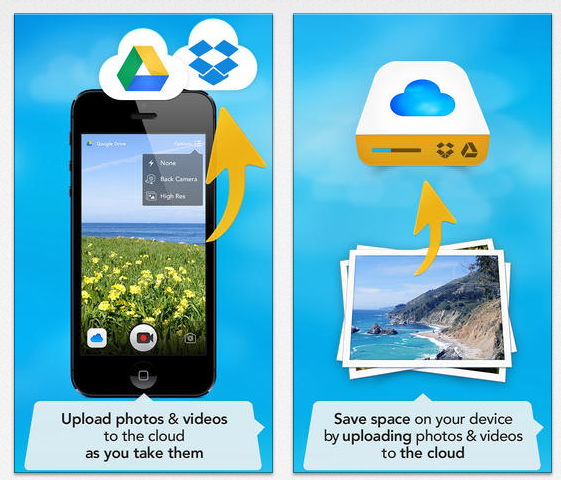
CloudCam iconCloudCam app (free; upgrade .99) might just take care of a number of issues with managing and archiving photos and videos, especially for Google Drive or Dropbox users. Use of the free app provides medium quality pictures, however with an iPad4 I did not see significant differences with picture quality using the free app.

CloudCam app provides a camera app that links directly to your Google Drive or Dropbox account to immediately upload the picture taken.

CloudCam pic1Options are available to upload from your devices Photo Library and save to the desired cloud drive.

A huge benefit, I believe, is the automatic creation of a CloudCam folder in your Google Drive eliminating the need to return to locate and organize the photos within your Google Drive (organization within my Google Drive is a huge challenge for me …). Uploaded photos/videos will consistently be transferred to this file!

CloudCam pic2

You also have the option of importing or uploading existing files from your iDevice Photo Library to the Google Drive or Dropbox CloudCam folder. The CloudCam folder allows numerous choices within your Google Drive. The folder can be shared with others who might need access to those photos (such as when used for communication devices, visual schedules or other supports or storytelling) for student activities. I was also able to easily download the entire CloudCam folder or single photos from Google Drive on my computer.

CloudCam folder pic

Photo storage and transfer options are also available for those using  Google Drive app on their iPad.

Not the only way to manage, transfer or archive photos, but a fast and easy solution if you dislike the process of uploading photos to cloud storage services. I will pick and choose when I will use this app, but I definitely will start using this app to help with managing storage space on my devices.

Have you used this app or anything similar?

Carol

Posted in App Reviews, Apps for OT's, Computer Utilities, iPad, iPhone, iPod, Occupational Therapy, Photo, Utility, Web 2.0 resources | Leave a comment

Math – Visual Fraction Apps

fractions

Fraction Apps

A colleague asked me about fraction apps for some of her students who needed concrete methods of learning and would be motivated by using the iPads available at the school. The search began with some of the available fraction math apps listed:

Virtual Manipulative iconVirtual Manipulative app (free) by ABCya.com came immediately as a suggestion, providing visuals and interaction with fractions, decimals and percentages for activities that are guided by a teacher. A few settings are available (bar graphs or circles or pie shapes’ numbers on pieces, opaque/transparent) within the app and instructions for how to use. This app is designed not as remedial practice but an interactive tool used with teacher instruction.

Virtual Manipulative pic1

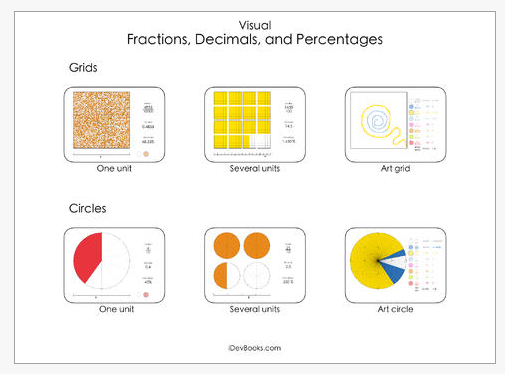
 Visual Fractions, Decimal and Percentages iconVisual Fractions, Decimals and Percentages app (free; iPad) developed by Esa Helttula, is about visually exploring how percentages and decimals are types of fractions.  No tasks to complete or problems to solve, this apps purpose is to build conceptual understanding. This app is one of many educational math apps created by the developer.

Visual fractions, decimals and percentages pic1

Here is a video of the Visual Fractions, Decimals and Percentages app:

Here are a few more resources for reviewed fraction apps:

AppAdvice- http://appadvice.com/appguides/show/learning-fractions

Make Use of – http://www.makeuseof.com/tag/5-apps-that-will-make-learning-fractions-easier-more-fun-ios/

Grasshopper Apps – Match the Fraction (.99) a game app that can be customized according to the skills of the students.

Any other favorite fraction apps ?

Carol

Posted in App Reviews, Apps for Special Needs, Elementary School, Free apps, iPad, Learning Disability, Math, Middle School, Special education | Leave a comment

OT’s with Apps List for Middle School thru Adult Individuals with Disabilities 10-2013

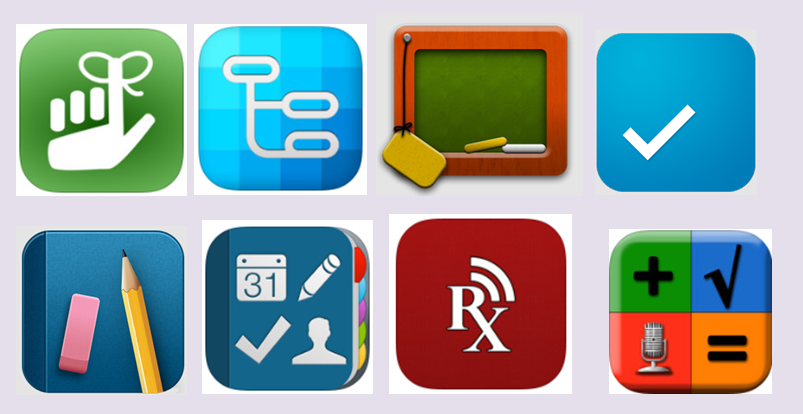
Apps for MS thru adults pic

OT iTool Kit App List for MS thru Adults with Disabilities 10-27-13 – (PDF file).

A partial list of apps from the complete OT’s with Apps List, this list focuses on apps in the following categories (not limited to) for iOS and Android:

  • Alternative Keyboards
  • Reading Apps
  • Writing Apps
  • Math Apps
  • Spelling Apps
  • Dictionary Apps
  • Text to Speech and Word Prediction Apps
  • Organization Apps
  • Scanning Apps
  • Visual Supports
  • Visual Schedule Apps
  • iADL Apps
  • Low Vision Apps
  • Note Taking Apps
  • PDF Management Apps
  • Dementia
  • Relaxation
  • Sensory

And more – always a work in progress. If you have suggestions for apps to include, please let me know!

Carol  @ OT’s with Apps.com

Posted in Android, App Reviews, Apps for OT's, Apps for Special Needs, iOS, iPad, iPhone, iPod, Learning Disability, Life Skills, Low Vision/ Blindness, Math, Mental Health, Mobility Impairment, Note Taking App, Occupational Therapy, OCR, Organization, Post secondary, Presentation Tools, Productivity apps, Scanning, Self-regulation, Sensory Apps, Text to Speech, Visual Memory, Word Prediction, Writing | 2 Comments