Voice Dream Writer app (9.99) developed by Winston Chen was released this past week. Also the developer of Voice Dream Reader app (iPhone/iPad), Winston Chen has been dedicated to improving and offering features in his Reader app for individuals with disabilities. Continual improvement of his apps for greater functionality as requested by his users has been a hallmark of his apps.
Voice Dream Writer app (iPhone / iPad) offers unique and comprehensive writing tools for individuals with disability. Text to speech for editing, phonetic spelling and word finder options to support selection and generation of spelling and word usage as well as methods of aiding written organization is offered in Voice Dream Writer. Winston Chen has again listened to his users to create an app supporting the needs of individuals with disabilities.
Here is a video from Voice Dream web page explaining some of the unique features in Voice Dream Writer app:
Exciting new writing app from a dedicated developer! I am looking forward to trying it out!
After testing the app for a month with two classes of students, I can endorse Study Habits as the best student productivity app for iOS. Compared to its competitors, Study Habits provides the richest array of features and augments its planning capabilities with proven study aids.
The app enables students to manage their time, monitor their GPAs, and adopt effective study habits. Thanks to its educational-psychology-based learning and motivation strategies, Study Habits is unparalleled in the productivity app market. Read on to find out what Study Habits can do and why no other student planning app compares.
iStudiez Pro app for iOS has generally been the recommended app for secondary and post secondary students. Edudemic reviews a new student planner app, Study Habits (iPhone/ iPad) used to become a self-regulated learner. The app’s goal is to instill healthy study habits that focus on the following areas: deemed as critical for learning: memory, stress/anxiety, reading comprehension, time management, writing, and motivation. Ratings have been good – time to check it out and reconsider app recommendations!
Here are a few new and free apps to check out (remember, its still a mystery for how long it’s free…) to determine if they will support your intervention or administrative needs:
Quick Math Jr. (iPhone / iPad) by Shiny Things is a basic math app for 3-7 year olds featuring counting, addition, subtraction, number sequence, count skip, writing numbers and more. Allows unlimited user profiles.
PT Pad (iPad) is an functional assessment app for therapists and nurses. Provides 3 free tests (Timed Up & Go), 6 Minute Walk, Berg Balance Scale). Other standard assessments require subscription. 7.99 for 30 days or 79.99 for 365 day purchase.
Monki Hide and Seek (iPhone /iPad ) for 2 + year olds is a hide and seek game with difference geographical areas as the scene where animals hide.
Check them out and see if they will support your OT mTool Kit.
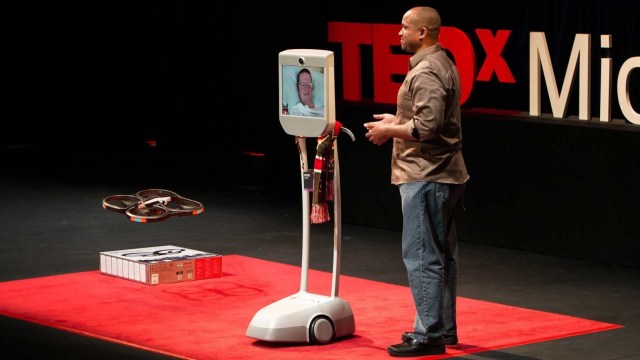
Paralyzed by a stroke, Henry Evans uses a telepresence robot to take the stage — and show how new robotics, tweaked and personalized by a group called ..
A big H/T to The Assistive Technology Daily who scours the Internet for the most interesting and state of the art AT news!
One of their recent posts review a telepresence robot. What a fabulous way for individuals who are medically fragile to be a presence literally anywhere. Do you know of any students, who are medically fragile and receive virtual education at home? Visualize them being present in the classroom with a telepresence robot!
How long will it take before we see this at school?
What fabulous opportunities technology (and some cash) can offer!
Recent assessment of a client with memory challenges resulted in needing a tool with numerous vocal reminders and a method to keep the tool with them through part of their daily schedule. An iPod Touch was recommended with use of Aida Reminder app, which allows vocal reminders, among many other alarm options. Identifying an app was not real difficult, but, finding a case with an attached lanyard for an iPod Touch 5 Generation was no easy task.
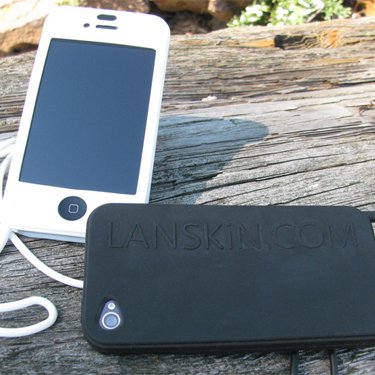
A number of cases with lanyards for iPod Touch do exist, but, they seem to change with each iPod Touch model. Search for cases, resulted in finding the Lanskin Executive Skin Case providing an attached lanyard with a clip lock for lanyard length adjustment. Certainly, arm and leg cases with straps are available, but for this client, use of a lanyard seemed the most accessible option. Thus far, the Lanskin case for the iPod Touch has been successful, given the careful handling of the user.
Here is a quick YouTube overview of the device:
As described in the YouTube, this case is made of silicon and would not be a best choice if a rugged, protective iPod Touch case was needed. In this situation, the client and environment did not require a rugged case. Once applied by the client, it provides easy and immediate access to the device and apps and eliminated misplacement.
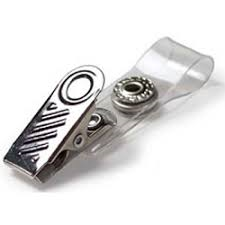
Applying a clip to the lanyard to further secure it to clothing reduced its movement and concern of hitting things or patients/student when leaning over.
Any other ideas or suggestions on maintaining portable devices with clients are welcome! More ideas for your OT, teaching or vocational mTool Kit!
Occupational Therapist Marnie Danielson co-authored the handwriting instruction The TV Teacher instruction using evidence based practice of video modeling¹ along with movement based understanding of letter formation (Chandler, C. 2014). The TV Teacher ™ DVD based program includes an introduction to upper, lower case letters, numbers, strokes, shapes and scenes, gross/fine motor skills, attention and additional handwriting neatness instruction.
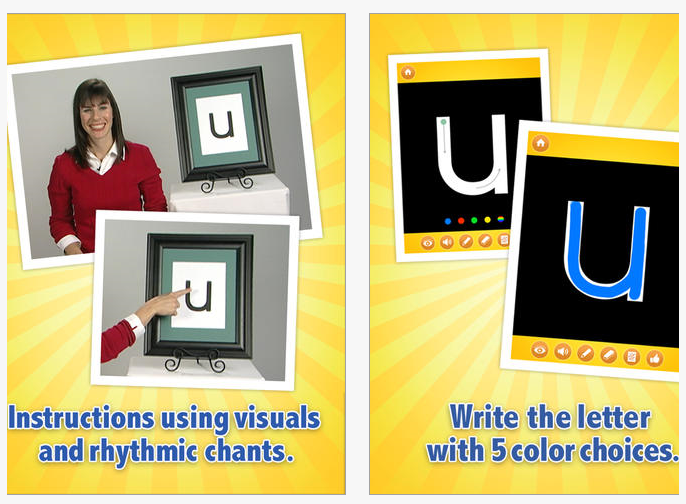
A TV Teacher : writing abc’s lower case app for iPad (free/4.99) is available to support the video modeling based handwriting program for ages 2-7 year olds. The free version provides an instruction of letters a-d with full paid version providing complete lower case instruction. A view of components of the app show:
The TV Teacher app provides video modeling instruction, opportunity to practice letters out of order, practice to draw letters and also draw pictures along with phonic instruction. Rhythmic chant for each letter, two levels of practice- one with structured instruction with dots and arrows for letter formation and unstructured practice of writing letters and drawing. Colored lines options are available for drawing.
The TV Teacher website provides an extensive listing of the video modeling studies supporting the visual method of instruction. In addition, research performed by Catherine Candler, Ph.D, OTR, BCP, “Embedding Video-Based Modeling Handwriting Instruction in a Montessori Preschool Phonics Program” ² found positive outcomes for preschool children who had access to the videos in a Montessori Classroom. Whereas studies show positive outcomes for skill development of students with disability, the study mentioned showed positive results for all children having access to programming with video modeling.
This program is exciting as an integrated handwriting program for preschool to primary aged students using a variety of evidenced based practices.
What is your experience with this program in inclusive or individual programming intervention?
More to consider for your OT or teaching tool kit.
Carol
References:
¹ Bellini, S. & Akullian J.(2007). A Meta-Analysis of Video Modeling and Video Self-Modeling Interventions for Children and Adolescents with Autism Spectrum Disorders. Council for Exceptional Children, 73, 264-287
² Catherine Candler Ph.D, OTR, BCP, Abbey Mulder OTR & Karen Nall OTR (2014) Embedding Video-Based Modeling Handwriting Instruction in a Montessori Preschool Phonics Program, Journal of Occupational Therapy, Schools, & Early Intervention, 7:2, 151-160, DOI:10.1080/19411243.2014.930618
Waitstrip app for iOS no longer is available. A blog comment/question from Emily asked about suggestions for a similar app to Waitstrip. I found few options, but here is what seems to be available currently:
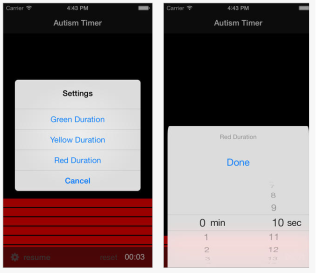
Visual Timer app for iPhone/iPad (2.99) provides a vertical, linear visual countdown. The green, yellow and red colors can be set for a specific time from seconds to hours. I did not download this app and could find little information on other features, such as if it runs in the background , or if the alarm will sound if used in the background of other apps (anyone ?). If you wanted the horizontal countdown, locking the screen and laying your device on the side might be an option.
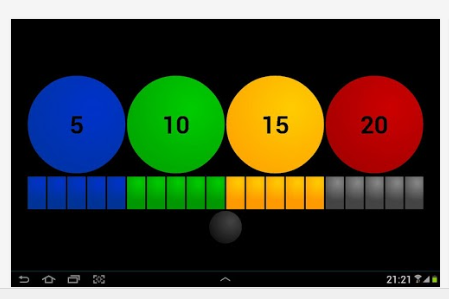
For Android users, an app called Visual Time Timer (free; 3.85) is available from the Google Play Store provides a linear, visual countdown of elapsed time. Here is what it looks like:
The free Visual Time Timer app (above) provides countdown time only in increments of 5, 10, 15 and 20 minutes. Time can be paused and restarted in those increment using the gray ball at underneath the countdown strip.
The Visual Time Timer Premium version (for 3.85 ) allows setting customized times with the same countdown visuals. The app must be open for the alarm to sound.
I downloaded the free version which is limited as aforementioned to the 5, 10, 15 and 20 minute times with no other menu options available in the app. Little other information was available following search on the Internet about the Premium version to determine the minimum or maximum available countdown times.
Anyone know of any other apps with linear countdown features like Waitstrip for iOS or Android? Please share.
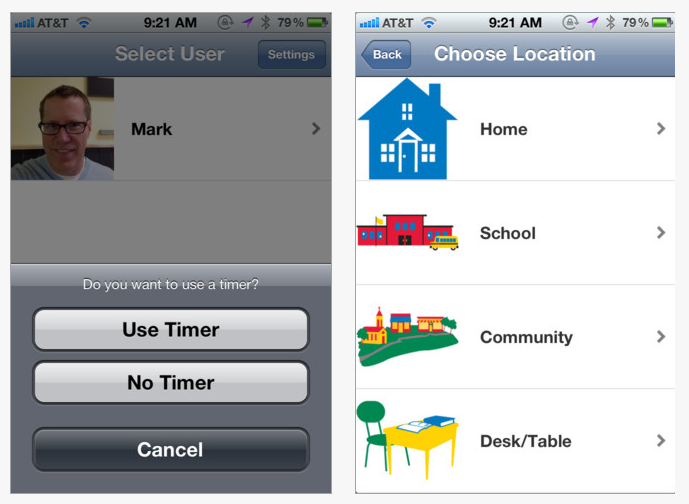
Brain Works app, for iPhone and iPad is at a reduced price 4.99 (originally 8.99). Created by Occupational Therapist, Gwen Wild of Sensational Brain.com, the app supports users with sensory modulation challenges by providing a selection of sensory diets following choice of environment and the users regulation state. Brain Works app offers multiple users selection of more than 150 sensory diet activities by environment and identification of feelings.
Here is a video about Brain Works app:
Want more specific information about the app? A Brain Works Info App Sheet is available on Sensational Brain website.
Perusing the Sensational Brain website found a number of free downloadable forms that may be useful for your practice:
Sensory checklists for sensory accommodations in the classroom
Sensory symptoms checklists (general and for school)
Home recommendations
Parent/teacher sensory modulation information sheet
Reduced on 1/16/2015 for an unknown time. A prior post provides an earlier review on Brain Works app can be found here : Brain Works App – A Sensory Diet Tool
Share your experience if you have experience with the app!
The STAC (Standardized Touchscreen Assessment of Cognition) App for iPad is an automated screening tool designed by Cognitive Innovation’s Simon Carson, OT/L, MBA and Heather Cole, MA CCC- SLP’s for health care professionals. The iPad app provides self-directed instruction of cognitive tasks, reducing administrative error and unintended evaluator bias. An efficient method of screening and assessment, the STAC reduces evaluation time, eliminates time required for scoring and management of hard copy forms.
Outcome of the assessment provides timed performance and ranked scores based on speed and accuracy of users test results. A four page report is generated of the results of the test available on the iPad, and can be generated for printing or emailing.
Here is a video with a look at the STAC components:
Test scores have been standardized on a normative group of 190 users ages 13-85 years of age without cognitive impairment as of October, 2014. The normative group was small for the 13-19 year old group. As additional data is accrued, strength of the percentile on the normative group will be more reliable.
The STAC app user pre-requisites are functional vision and hearing, intact motor in at least one extremity and be able to respond to simple written statements/questions. A brief training and skill check before the assessment begins determines if a user will be able to complete the assessment. The user does not need prior iPad experience.
The STAC app provides differing prices, with one free with in app purchases pending frequency of use:
5 runs of the app and report – 29.99 (in app purchase)
2 runs of the app and report – 19.99
10 runs of the app and report – 49.99
STAC Unlimited app and report is 129.99 and as stated provides an unlimited use and reports with purchase. Considering frequency of use, the unlimited version may be a cost savings considering its self-directed administration and report generation both significant time and cost savings.
A few test runs of the STAC app provided to me for review by Cognitive Innovations gave me familiarity with the assessment. Some test components were similar to other mental or cognitive screening typical for adult populations. What was different was the timed element of all of the components of the assessment. Additional language and executive function components required good recall, attention to detail and sequential skills with a timed component. The initial orientation to the iPad was thorough for the user. Knowledge of the keyboard and good spelling is necessary for the language and recall components. There were a few times that I accidentally hit enter after typing a word which reduces accuracy and timed responses. Instruction to the user regarding the keyboarding entry requirements would be helpful.
I found the results of the assessment helpful and reflective of my skills and challenges. As a rather slow and methodical test taker, my processing speed score were definitely compromised with review of my answers and my careful pace. Use of this app for the appropriate client however would definitely provide fidelity in assessment, reduce cost associated with purchasing protocols, scoring and report writing.
Last fall, I evaluated a client with significant short-term and attention challenges. This assessment would have been very helpful with quantifying the clients cognitive challenges. For professionals working with individuals with cognitive limitations, but familiar with using a keyboard and touch screen, the STAC app could be a valuable assessment tool.
Thank you to Cognitive Innovations for providing me with the opportunity to review their app.














 The
The 

 OT's with Apps & Technology