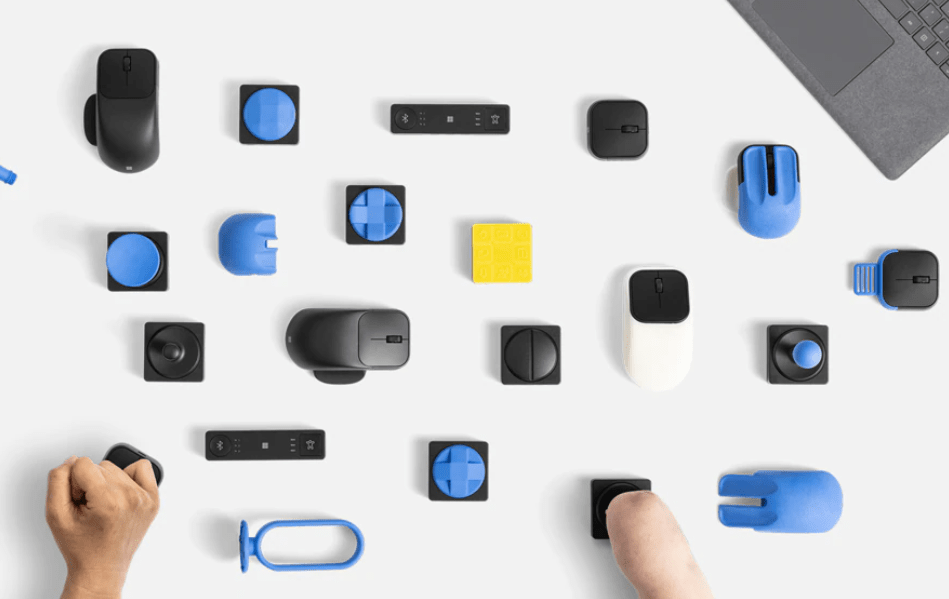
As an ATP working with persons with a variety of different physical disabilities, the Microsoft Adaptive Accessories is a recent and exciting new development, offering a tool kit of mouse accessories. Working with individuals with CP, MD, hemiparesis, limb deficiencies or upper extremity injuries requires finding different input methods as well as unique positioning for access to achieve independent and efficient use. Microsoft has created a new Adaptive Mouse system with interchangeable components and a wireless hub for customization to a client’s unique needs.
Here’s more about Microsoft’s new Adaptive Accessory kit:
While not yet available (coming Fall 2022), the Adaptive Accessory Kit will allow customization of mouse and keyboard input along with 3-D printing available – Wow! What a boon! I can’t tell you how many clients I’ve worked with could use this to increase their efficiency (and how often I wished I had a 3-D printer!).
Here are the Microsoft Adaptive Mice featured with some of the customization available:
Here are some of the mouse button options and wireless hub:
These adaptive input devices offer a system that can be customized to the users’ needed input methods and programming. Exciting! I’m eager to be able to trial the kits to explore customizing input methods.
I’m signed up to be notified about the new kit and trial it with clients as offered on their website. I can’t wait!
For more information check out the Microsoft Accessories website for more information or request a notification when the kit is available.
Looking for tech as a Boomer, for your aging parents or patients?
Joan Green, Speech-Language Pathology and owner of Innovative Speech, offers a free webinar on ElderTech available on demand. The hour-long webinar provides information on services, devices, and apps to keep older adults connected. The webinar was well worth the time and free!
In addition to her ElderTech webinar, Joan has a variety of services offered from her expertise as a speech-language pathologist including assistive technology tools to support the clients she works with. Check out her website, Innovative Speech as well as the ElderTech: Top Tech Tools for Older Adults webinar.
Handheld video magnifiers come in a variety sizes from 5-6 inch pocket size to larger magnifiers with 10–12-inch screen. This offers users devices for spot magnification using a portable device to devices that can present more enlarged print with the larger 10-12 inch screens. An additional feature being offered in the past year or two is text to speech capabilities along with magnification on a dedicated device.
A recent client evaluated for her AT needs with low vision and a reading disability required support to complete continuing education, however also required on the spot access to print enlarged and decoding support on the job and away from a computer. While iPad or iPhones can be an option, the client’s work situation did not allow use of standard electronics such as smartphones or tablets. While computer based assistive software was identified to support continuing education needs, magnification for spot magnification was also explored for vocational tasks.
Handheld portable video magnifiers 5” and larger were trialed with the client with a preference for a 5-6 inch device for ease of portability. While familiar with a variety of handheld video magnifiers, those with text to speech features have not been a need, nor trialed. A search for handheld pocket-sized video magnifiers resulted in a number offering text to speech and a variety of features such as touch screens, those with tactile buttons and OCR (Optical Character Recognition) to support text to speech capabilities among a variety of other tools. A visit to a low vision specialty center to trial handheld magnifiers with speech capabilities helped identify features that would support the client’s skills and needs.
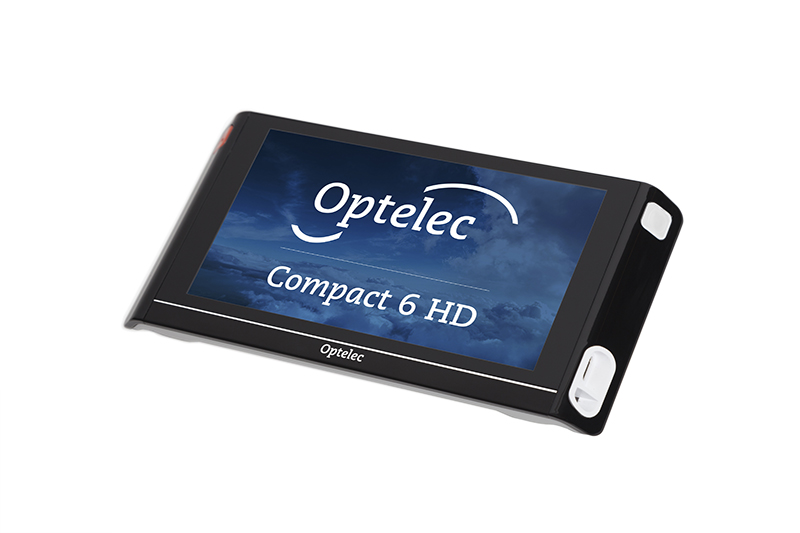
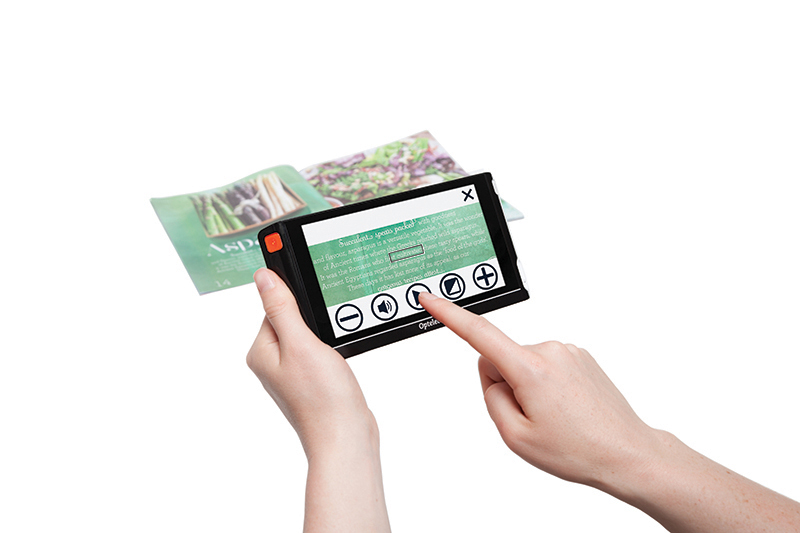
The Optelec Compact 6 HD Video Magnifier with Speech has been available for a year or two. This device was selected offering features of a handheld video magnifier, integrated stand for near vision magnification, in addition to excellent clarity, a touch screen and ease of processing captured print for text to speech output. The controls of the Optelec were visually large for the client to view with easy touch screen navigation, setting customization quickly navigated by the client with smartphone experience.
The Optelec Compact 6 has two cameras, one for Magnification when reading hard copy text and a second Overview camera for capturing images, processing with OCR for text to speech capabilities. The modes were easy to visually access for individuals with mild to moderate low vision and operate following instruction. Images captured using the Magnification mode and Overview mode can be processed and read, however to read a large amount of print or whole page, the Overview mode capturing a whole page for processing and reading is required. The Optelec Compact has many other features, as connecting to a computer or external monitor for enlargement, saving images and OCR documents, settings for customizing contrast, a screen tracking line, speech rate among others.
Optelec Compact 6 HD Text to Speech Tools
The following short video provides a quick look at the Optelec Compact 6 HD Video Magnifier:
Point the camera, capture the text, and listen as the text is read aloud
View and magnify text, objects and photos
Small and pocket-sized design
More words on-screen for maximum overview
Easy to hold thanks to the ergonomically designed side grips
Instant on and ready to use within 1 second
Customizable button bars
Clock function
Designed to move smoothly over reading materials
Specifications:
Large 6-inch high brightness touch screen
Continuous zoom: <0.5 to >21 times magnification
2 High Definition auto-focus cameras for reading and viewing objects and photographs
High contrast semi-colors for easier reading (set up to 4 combinations from a possible choice of 16)
Reversible USB C connector for charging
Rechargeable battery offering an average of 3 hours continuous use
Dimensions: 183 x 95 x 14 mm / 7.2 x 3.7 x 0.55 in
Weight Compact 6 HD 270 grams / 9.5 ounces
Weight Reading Stand 110 grams / 3.0 ounces
2-year standard warranty
The client easily navigated the Optelec Compact 6 HD with Speech after initial training, customization and application of the features of the device to access print with magnification and text to speech. Sleep modes were also customized for her use to maintain battery life during her workday. Other features such as connecting it to HDMI, use of Miracast to connect to smart TV’s and saving images and scanned documents are also features of this Optelec Compact Magnifier. I found the device easy to use with good instructions available in the manual and quick instruction handouts.
The Optelec Compact 6 HD Video Magnifier with Speech is a portable and easy-to-use dedicated video magnifier with text-to-speech capabilities. With its touch screen, it is especially easy for individuals with some available vision and experience with touch screen devices to navigate and use. It is available for purchase from Amazon.com * or from Optelec vendors. More information on the Optelec Compact 6 HD with speech can be found at the Optelec Website.
More for your OT or AT eToolkit!
Carol from OT’s with Apps and Technology.
*As an Amazon Associate, product purchases may yield earnings.
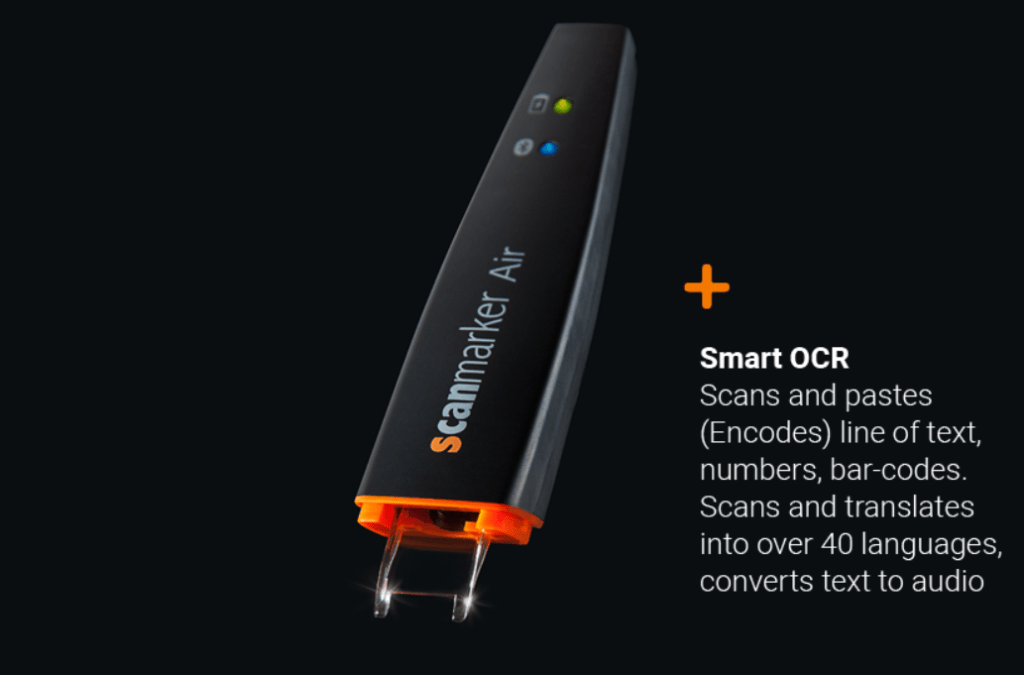
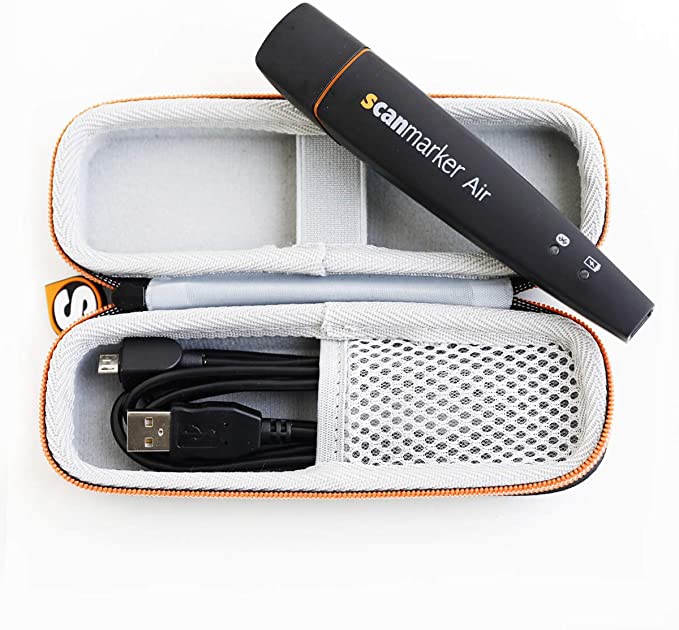
The Scanmarker Air pen is a wireless, OCR scanning pen. With scanning lines of print, the pen completes optical character recognition and transfers it to another source. Companion software installed on a computer (Mac or Windows) or iOS or Android tablet or smartphone offers features of text to speech, transcription or a bar code reader. When using a computer scanned text can be transferred direct into documents. The Scanmarker Air is the wireless digital highlighter pen whereas the standard Scanmarker Pen transfers text using a USB wired connection.
The Scanmarker pen has been available for a few years with the Air model the most recent version. The Scanmarker Air pen also provides a USB cable allowing it to connect directly to a computer. Here is a short video overviewing the Scanmarker Air:
Scanmarker Air Trial
Evaluation recently of a secondary student transitioning to post secondary education asked about the pen, resulting in checking it out more to determine the pen’s features and how it might support students with disabilities. My initial experience with the Scanmarker Air pen found the Scanmarker software and apps easy to download on my Windows computer and also older iPad Air. Connecting the Scanmarker to both devices and the software or app was also fast, and immediately successful. Short tutorials were provided with set up providing practice with the device and the software/app providing immediate successful experience that guided me in basic features of the pen to get started.
Scanmarker Companion Software Features
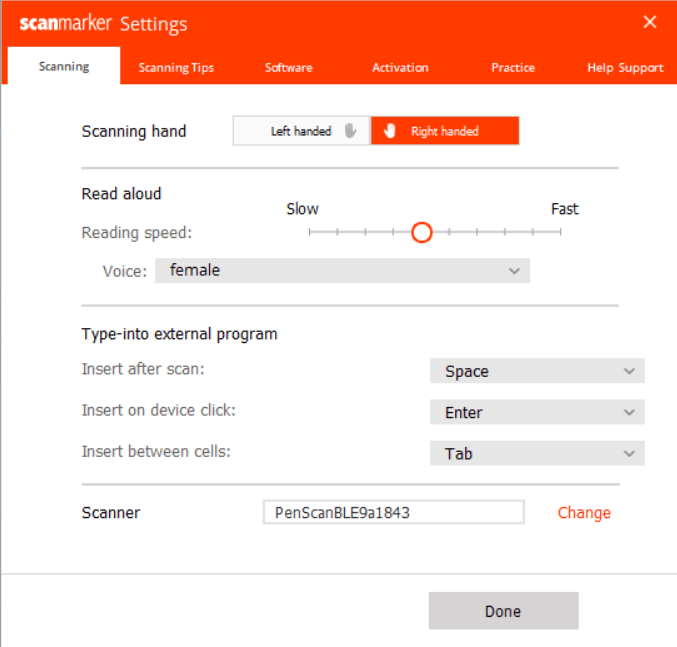
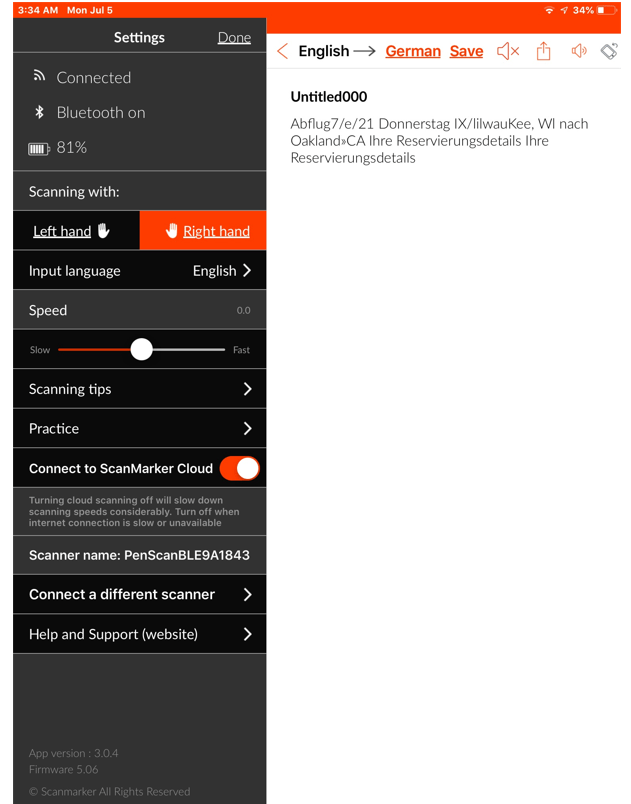
The companion software and app downloaded to my Windows 10 computer and also an older iPad Air tablet without any problems. The software is pretty basic with features of handedness, text to speech rate, speaking, transcription and languages. Over 40 languages are available for transcription. Below is a glimpse of some of the settings of the Scanmarker software for Windows and iOS.
Windows:
Windows Scanmarker companion software
iOS
Operation
The Scanmarker works by sliding the head of the pen over text, which is scans and sends the text to a document or the receiving companion software. The text is then entered into the interface or document to be edited, saved and or shared. Choices of read, transcribing, sharing the text (email, DropBox, Google Drive) is offered within the software. As aforementioned, there are more than 40 different transcription languages and the software provides changing the rate of the text to speech. Intial accuracy of the scanned text was good resulting in good text to speech when using the read aloud function. As with most other scanning pens starting well ahead of the first word or letter in a line of text scanned helped the accuracy of the scanned first word. Battery life is reported to be approximately 7 days of normal use. The device is extremely light weight, appears durable and easy to handle.
The Scanmarker Air is a text scanning tool available in a wireless and wired version offering copying text from a hard copy source to digital format for note-taking, reading aloud, or translation. Easy to set up and use, the Scanmarker Air is a tool for students or individuals taking notes, reading and saving information in a digital format.
For students who want to acquire and transfer digital notes from a hard copy source, have text to speech or translation capabilities, this tool was definitely easy to set up and use. If students are looking to access print using text to speech without the use of another device, they may want to consider using other scan and read pens, such as the C-Pen Reader that scans lines of print and reads it aloud directly from the pen or use a scan and read app such as Claro ScanPen app offering OCR processing in its app when taking a picture with a mobile device camera.
Having difficulty getting electronic books due to the COVID Pandemic?
The Low Vision Tech blogger shares instructions regarding downloading books using the BARD service. Check out the Low Vision Tech’s post to help you out.
“I’m out of books, what am I going to do now?” This was the short version of a call I received from a former client a couple weeks ago, when businesses and rehab agencies sent staff home to reduce public exposure to COVID-19. She’d heard a rumor that the Talking Books she looks forward to…
Brian Norton, Director of Assistive Technology, at Easterseals Crossroads shows us Braille Scanner App, which allow a user to take a picture of braille and convert it to text. Check it out: Click here to learn more about Braille Scanner.
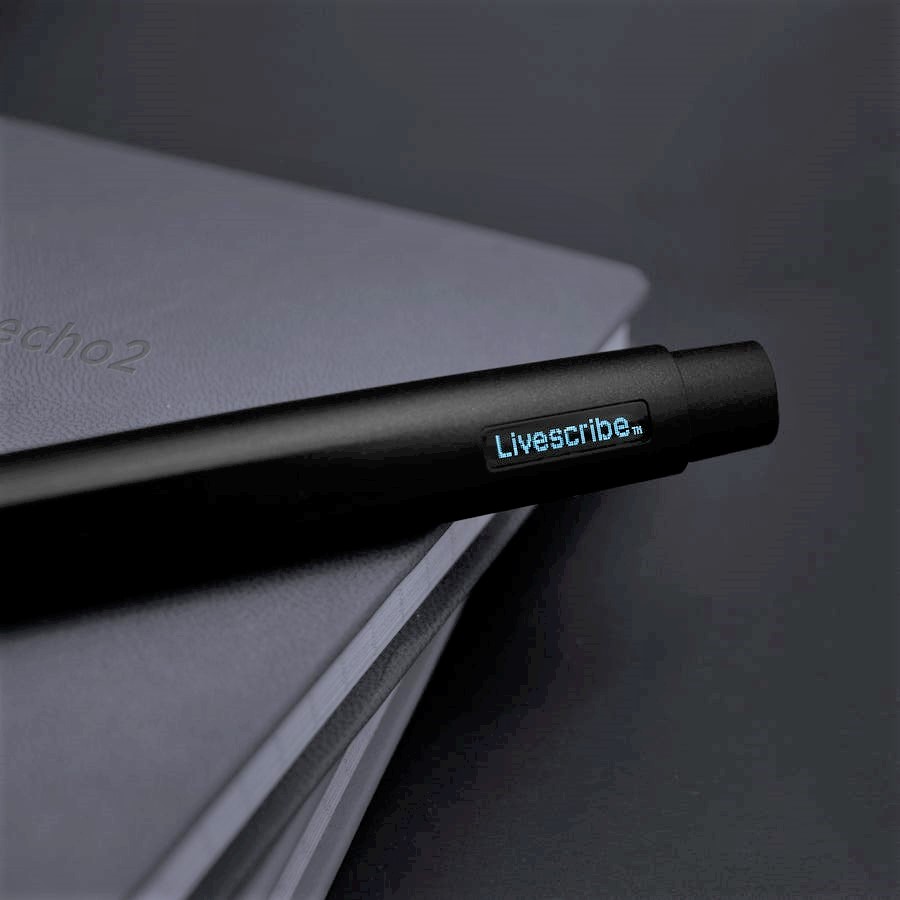
News from Livescribe, com announced the Echo 2 pen is available for pre order at a price of $149.95. Unavailable for more than a year, it appears it will be coming hopefully soon. It’s great news for individuals looking for assistive note taking options!
The Livescribe Echo pen for more than a decade has been a recommended assistive pen used for note-taking for both students and employees. The Echo pen is a rechargeable pen (with USB cable) that scans handwritten notes while voice recording and synchronizing both recording and handwriting information using specialized dot matrix paper. The Echo pen and Livescribe Notebook with dot matrix paper allows the user methods of listening to the recorded directions or lectures by tapping the handwriting on the specialized paper to review or gather missed information. The Echo pen notebook looks like a standard notebook and the Echo pen is discrete looking, only a bit fatter than a Sharpie marker. The Echo pen is very simple to use, offering individuals who prefer handwritting notes a standard handwriting method supported by voice recordings information presented for later review.
The Echo pen was a frequent choice for students who have difficulty taking notes during presentations with dense information, fast paced lectures or for employee or work meetings to gather detailed information they may miss (pending permission to record). Clients using the Echo pen were varied with individuals with learning disability, mobility impairments such as CP, an arm or hand injury, individuals with autism, attention deficits or those with mental health issues. Given its ease of use and discrete appearance, clients found the pen a great assistive note taking option. It is great news that the Echo 2 pen is coming back as an AT tool to support persons with a disability.
While the Livescribe is taking pre-orders for the Echo 2 pen, other accessories are available on their website or Amazon such as Livescribe Notebooks (dot matrixed notebook paper used for all models of Livescribe pens) or the Livescribe Symphony Pen which requires an electronic device ( Smartphone or tablet) to voice record.
Many clients are looking forward to the availablity of new Echo 2 pen! Stay tuned for more information when delivery is available.
Carol @ OT’s with Apps and Technology
Disclosure: OT’s with Apps and Technology may receive fees for purchases made with Amazon product links.
Easterseals Crossroads Indata Project curates all things AT. I admire their team that scours and reviews AT with the full spectrum of disabilities in mind. A recent post featuring Quadtools.com reviews an American-Made business that customizes tools for quadriplegics.
Congratulations to Winston Chen for receiving the 2021 Apple Design Award. Well deserved for his continued development of Voice Dream Reader apps supporting persons with reading disabilities since inception in 2011. Winston through the years has developed and improved his apps, listening to the needs of individuals with disabilities to make information accessible. He is commended for his dedication to supporting individuals with reading challenges for the past decade.
Since Voice Dream Reader App(s) debut, they have been my recommended app for clients benefitting from a mobile app for reading. A frequent recommendation, Voice Dream Reader and companion Voice Dream Scanner apps provide individuals with on-demand access to a variety of print sources with many customizable features for individuals with vision impairment, dyslexia, blindness, photophobia and other perceptual challenges. Available for mobile devices only, Voice Dream Reader, Scanner, Writer or Suite is available for iOS, and Legere Reader and Scanner apps are available for Android.
Until January 2, Voice Dream Reader apps for iOS are all 50% off. For more information about the apps, Winston Chen’s journey in developing the apps, and links to the apps visit VoiceDream.com. I highly recommend checking out these universal assistive reading apps for your clients. What a great investment!
Congratulations to Winston Chen for his recognition of the 2021 Apple Design Award – so deserved!
Neo Reco recording device for use with Neo smart pens and paper
Over the past couple of weeks, I’ve written about different Neo smartpens. In addition to a variety of smartpens, Neo also offers the Neo Smartpen RECO, which is the “world’s first intuitive voice recorder.” Further, Neo Smartpen RECO is the voice recorder that keeps track of notes written on paper. 20 more words
For years the Livescribe Echo Pen and notebook paper were my go-to handwritten assistive note-taking tools. It currently is not available, and after waiting for the Echo2 for almost 12 months, it has required finding another assistive note-taking tool that supports handwriting notes and recording. The Neo dimo pen, Reco recorder, and Neo Paper offers similar tools and products and are easy to use when handwriting notes are preferred. Easter Seals Crossroads review does a great job of reviewing these Neo devices. Click the above link to find out more about the Neo Smartpen RECO device as an assistive note-taking tool.
H/T to Easter Seals Crossroads for their continuous curating of the latest AT devices and updates!
If you are a therapist or assistive technology specialist, keeping up to date with new equipment, current issues regarding AT services as well as completing required continuing education for certifications requires finding online learning resources due during the COVID Pandemic. With the demand for remote learning, many continuing education webinars and conferences are on line with some free and some offering CEU’s typically with live on line sessions.
Listed below are a few continuing education resources that might help you with updating your skills, getting new ideas for remote delivery of training and services or to gain needed CEU’s.
AT3 Center Webinar Listings for Januarys:
The AT3 Center has listing of Free AT Webinars – January 2021 curated by Eliza Anderson sharing AT Webinars for Adults and AT Webinars for K-12 and AAC. The webinars appear timely and interesting! Check the AT3 Center Blog for monthly new webinars and information as well as their Archives for past blog posts you may have missed. H/T to Eliza for her curating and sharing of AT information!
ATIA 2021 – AT Connected
The Assistive Technology Industry Association, known for its annual conference in Florida in January and February is bringing you virtual and remote learning with many options of virtual attendence in part or for the full conference. Scheduled for January 25-28 and February 1-4, 2021, offered each week in the following strands:
Augmentative & Alternative Communication
Vision & Hearing Technologies
Education & Learning
AT for Physical Access & Participation
Registration is offered for full conference registration, by strand, or single day. Free registration is also available CEU’s may not be provided.
Live presentations are available during the scheduled days of the ATIA conference, however recorded content is available until June 2021. More information on conference costs and sessions can be found at ATIA 2021: AT Connected Home.
Georgia Tech Tools for Life
Georgia Tech Tools for Life website offers AT related webinars with live scheduled webinars offering CEU’s for specific credentialing agencies. Recorded webinars are also available for review of past AT presentations. For current webinars and registration information as well as archived webinars visit this link: Georgia Tech Tools for Life Training .
The Pacer Center has been a leader in providing AT training and services for children. Online webinars are available through the Pacer Center with 2021 monthly offerings listed on their website page- Workshops and Live Stream Events. Registration is typically required.
The Tennesse Association for Assistive Technology as an extensive list of linked associations that provide educational and professional development opportunities. Check out their extensive resource list of AT Professional Development on their TAAT website.
While not exhaustive in every area of AT, the list provides links to AT professional development opportunities that may offer needed information or CEU’s to keep you up to date, provide information on current issues or CEU’s for 2021 recertifications.
If you have any additional suggested AT training opportunities, please share!