Appy Holidays!!!

Looking for some holiday apps to use with your students?

Digital Storytime provides great reviews and deals on apps for children and students. Their Daily Deal Page, Holiday tab lists 9 different holiday apps for free. The apps feature drawing, educational content, stories and fun content. Searching other Digital Storytime tabs (check the Home, Books and Games tabs) you will also find holiday for-pay apps you may want to peruse. Although most of the apps are based on Christmas themes, one of the free daily deal apps is a Hanakkah and another a Snowman Builder HD app to stay culturally sensitive (see reviews and links below). Most of the apps also have winter activities such as snowman or tree activities that can be used during the winter months.

Here are some of of the apps that are my favorite for fine motor development that will be included in my OT iTools kit:

(Warning ! Cut the Rope: Holiday Gift is very addictive – trialing the app cut may interfere with holiday prep time!)

 Toca Boca Hair Salon – (Free) – Cut, color and style Santa Claus beard and hair or shape the pine needles on the christmas tree!  Simple but fun fine motor app the students (and adults) will enjoy!

Snowman Builder – (Free) Choose from several backgrounds then create and customize a snowman! Choose from a variety of parts and pieces. Provides opportunity for sizing the snowballs, adding body or snowman parts to create your own customized snowman. App allows you to email your creation.

123 Color: Hanakkah Coloring Book – (Free) 123 Color Hanukkah Edition now teaches numbers, letters, and colors, with voice-overs spoken in 12 languages and dialects.

  iLuv Drawing Santa HD – (Free) A drawing and tracing app appropriate for younger students. Provides lines to trace to create santa, christmas tree, bells, snowman so it can be used during the winter season. Step by step instructions are provided to add details to the drawing. Blank pages are provided to draw your own. Good for eye hand coordination and great for children who have a difficult time holding or prehending drawing or coloring tools due to strength or developmental skills.

Other available free holiday from Digital Storytime are stories that will support students who are emergent readers or have difficulty accessing a hard copy book if the student is able to swipe to turn the page when using an iPad. Check out the other free holiday apps or all the other apps reviewed at Digital Storytime. It is a great educational resource!

I am sure there are many other holiday apps available.  Here are just a few more apps, some that focus on other cultural seasonal celebrations to stay culturally diverse:

Christmas Tale II HD – (Free) A story book that provides read to me (read aloud) of the story line for emergent readers. Adds are posted and cost to remove.

Kwanzaa app – (Free) 7 Principles – Daily affirmations of the principles of Kwanzaa.

Kwanzaa Puzzles – (Free) – Educational game app featuring Kwanzaa art.

Have any other favorites? Please share!

Apptivate them this holiday! More for your iTools tool kit!

Carol

Posted in App Reviews, Apps for OT's, iPad, iPhone, iPod, Occupational Therapy | 4 Comments

App Reviews offered on The Friendship Circle Blog

It seems like endless resources are available for special needs students for mobile devices! I never cease to be amazed at what is available!

The Friendship Circle Blog is a website dedicated to the Friendship Circle organization of Bloomfield Michigan that supports special needs individuals with local teen volunteers.

One of their blogs is a series of posts featuring The Special Needs iPad and App Series which presents 9 articles or posts reviewing apps for iOS and Android mobile devices focused on specific needs for individuals special needs. Here is a listing of the articles posted on their 9 article series:

  1. The Special Needs iPad & App Series: Welcome
  2. 7 Assistive communication (AAC) apps for the iPad, iPhone and iPod touch
  3. 7 Scheduling and Behavioral Apps to help with transitions and more
  4. 11 Social Skills & Life Skills Apps in iPad App Store
  5. 10 Websites to Find Special Needs Apps for the iPad & iPhone
  6. 7 Special Needs Apps in the Google Android Market
  7. On a tight budget? 7 ways to get an ipad for your child with special needs
  8. 6 steps to get the iPad into your child’s special education classroom
  9. 4 Special Needs iPad/iPhone Apps for the Future

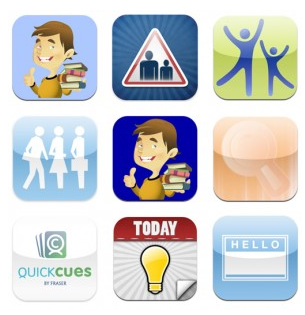
I found some familiar apps and some new apps or review sites I had not stumbled upon before. The review of social and life skills app reviews were helpful to me as new area of need as we deploy additional iPad and iPods in some of our multi-categorical classroom where functional life skills are an area of focus for students with varying needs. Here are examples of the social and life skills apps they review in their  Part 4 Post :

I also found a couple more app review websites unfamiliar to me. As the Android app market grows, availability of apps for other platforms are needed and are also included in the reviews.

If you work with students with developmental delays, cognitive impairment, autism or other significant special needs, I believe you’ll find worthwhile apps and resources in this series!

More iTools or mobile apps for your OT toolkit!

Carol

Posted in App Reviews, Apps for OT's, Apps for Special Needs, Augmentative Communication, Autism, Developmental Delay, iPad, iPhone, iPod, Life Skills, Occupational Therapy, Social Skills, Special education | Tagged , , , , , , , , , | 1 Comment

Grasshopper Apps – New and Free!

Grasshopper apps are some of my favorite apps for special needs students and pre-k and elementary aged students. They provide clean, wonderful real pictures, customization and real voices to their apps. Again, they provide those of us in education more new apps that benefit our students.

Here is their latest gone free along with one offered in iOSnoops today. I am providing links as a fast method of getting this out:

Match the Fraction-

http://itunes.apple.com/us/app/match-the-fraction/id485033468?mt=8

Learn How to Spell – Your First 1,000 Words-

http://itunes.apple.com/us/app/id425287191?mt=8

Check their website for additional apps that are free. It is worth your time if you service emergent literacy learners, elementary school students and special needs children:

http://www.grasshopperapps.com/hot-new/

Enjoy the Grasshopperapps they are a staple in my iTools!

Carol

Posted in App Reviews, Apps for OT's, Apps for Special Needs, iPad, iPhone, iPod, Math, Occupational Therapy, Special education, Special Needs | Tagged , , , , , , , | 2 Comments

iPad Stands – Purchase or Macgyver it?

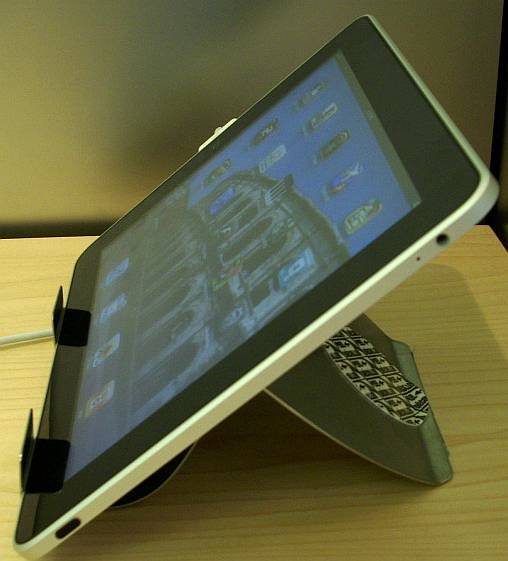
Looking for a stand for your iPad? There are many out there however if you are needing a stand that provides good stability and durability when used with students with special needs, the list appears to reduce.  Listed are some stands that provide stability and adjustability when choosing a stand for individuals with special needs. Mounts for attachment to wheelchairs or for specific positioning needs are not review in this post.

RJ Cooper has developed two tablet stands that will accommodate an iPad and are recommended for their stability:

RJ Cooper Fixed Angle Stand: Fixed angle stand ($39) comes with Stick and Suck pads to maintain stability.

RJ Cooper Variable-angle Super Stand – The Variable-angle Super Stand (49) adjusts to 30 and 45 degrees and can be collapsed to live flat for transport. Rubber feet assist with stabilizing it.

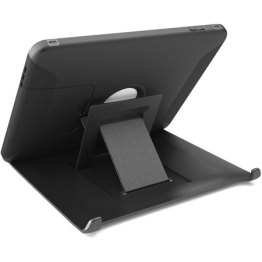
Otterbox Defender Case – This case has a cover which provides a pull out stand. Although it is not adjustable in angle, it provides a fairly stable base due to the rubber inserts provided on the case. The iPad can be positioned in portrait and landscape with the iPad2 case. My experience finds the iPad2 Otterbox stand improved over the first iPad stand.

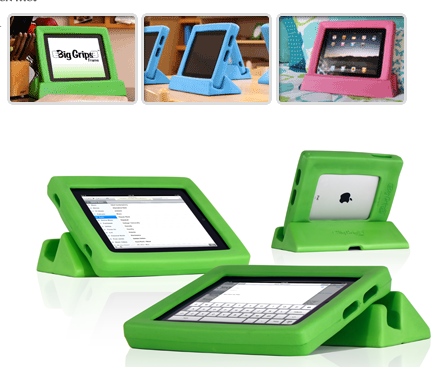
Big Grips Frame and Stand – This iPad case also can be purchased with a stand (49.95) and provides a few different positioning options. Reviews report the durability and ease of handling but not the stability of the stand. Looks promising however. Nothing that a bit of Dycem could not cure?

Ablenet Mounting Device – This product provides strong and stable mounting for your iPad 1 or 2 in either portrait or landscape orientation. The cradle securely holds the iPad steady while it’s in use and still provides access to all controls and jacks. 89.00 from Ablenet.

Interested in saving money and making your own stand? Watch this video demonstrating how to make your own iPad Stand from AT in New Hampshire  Institute on Disability:

Any other stands worth mentioning when needing to position the iPad for students with special needs? If you have another stand worth mentioning please comment!

Carol

Posted in Accessibility, iPad, iPod/iPad Accessory, Mobility Impairment, Occupational Therapy | Tagged , , , | Leave a comment

Spell Checking Apps – Supports for Students with LD #2

Spell checking apps reviewed in this post focus on apps for individuals with learning disabilities that will replace handheld spell checkers.  Such spell checkers, such as the Franklin Kids Dictionary, provides text to speech and phonetic based spelling suggestions are frequently used in our classrooms at school as a universal design tool for all students. Phonetic based spell checkers provide support for students who have acquired conventional spelling and have difficulty using standard, alphabet spell checking tools.

American Word Speller App – This American Wordspeller and Phonetic Dictionary app is one of few I found that uses a phonetic basis to spell checking. By typing in the first 2-3 letters of how the word sounds to you a list of possible words are generated. If the word is not there you can type in 2 more to narrow the search.

Other features provided in the app include:

  • Brief definitions
  • Homophones are cross referenced •petal/ pedal/ peddle •metal/meddle/medal/mettle/middle •carrot/ caret/ karat/ carat •immigrant/ emigrant
  • Suffix Speller – root word spelled out with all suffix endings attached. Example: ‘mad’: mad = madder, maddest, madden, maddening, maddeningly, madly, madness
  • Prefixes listed along with their definition. Example: satisfied =  dis (for dissatisfied) / un (unsatisfied)
  • This app does not require internet connection

Here is a video review of the use of American Word Speller App on YouTube: http://www.youtube.com/watch?v=67i2KUdb4_Y&feature=player_embedded

American Word Speller and Phonetic Dictionary is  available for Android, iPad, iPod/iPhone for $4.99. An ESL Edition is also available.

SpellChecker√ – This spell checking app by Enfour is available in a multilingual edition (1.99) and an English version (.99). Although it is not phonetic based it provides non-alphabetically choices in the list of spelling choices, especially helpful if individuals recognize the correct spelling. Spelling and grammar correction is offered in the app.

Although it has no text to speech to hear the words, I was able to use the Voice Over function with the Triple Click option turned on (this is one of my favorite accessibility features!! in the iPhone/iPod and iPad).  Tools to edit the dictionary and learn new words are also options. SpellChecker can be used to write and email, SMS, and can be integrated with American Heritage Dictionary or Oxford Dictionary if purchased and installed on your device. Text can be copied and pasted into other apps and it also reports it can be integration with other third-party apps.

The above image displays some of the languages of the multilingual version. Available for iPod/iPhone and iPad.

Speller – Free Spell Checker App – This is a free spell checker app providing spell checking and alternate spelling options. Provides a single word entry which does not accept hyphenated words (self-esteem) or two-word entries. Did not find corrections for phonetic entries as fone or phun when entered.

 English and Spanish language options are available in the app. Also provides dictionary option with Wi-Fi connection. I was not able to use Voice Over with Triple Click feature turned on with Speller- Free Spell Checker app.

Available for iPhone/iPod and iPad for free. Ads are presented on this app and can be removed with a $.99 purchase.

 iSpellChecker – This is another free spell checker that provides word processing capabilities with spell checking tool included. It offers a list of approximately 6 words in the correction at times offered a phonetic spelling choice in the list (did not catch fone, but did offer a correction to phun).

Voice Over using the Triple Click option was also able to be used in this spell checker. No  dictionary is available but email and SMS forwarding is an option. Other language choices are available in the app and integration into Twitter app. No advertisement appears in the app.

Other options for individuals with learning disabilities for spell checking include use of dictionaries that provide the voice search option when Wi-Fi connectivity is available. The dictionary apps as reviewed in an earlier post Apps for LD – Dictionaries #1 lists the following choices which have the voice search options:

Another option with the availability of Wi-Fi is the use of Gingersoftware.com spell checking tool if appropriate for the student’s skills. Ginger software provides online phonetic spell checking and grammar correction for the most aberrant spelling. It is a remarkable tool (it would be great if they came out with an app!) for students with learning disabilities! Check it out on their website which provides an available on line tool.

With numerous choices of spell checking apps, selection and use is dependent on the task, spelling skill and technical skill of the individual, connectivity and funds available for purchasing an apps. There are some possible free choices as well as possibilities for purchased apps that are suitable to individuals with learning disabilities when looking for a spell checking tool. Although I was not able to trial the American Word Speller app, its phonetic base and not being dependent on Wi-Fi are appealing to me.

If you have experience or a favorite spell checking app please comment with your favorite spell checking app. It is always helpful to have tried and true experiences on apps!

Happy spell checking!!

Carol

Posted in App Reviews, High School, iPad, iPhone, iPod, Learning Disability, Middle School, Post secondary, Special education, Spell Checking | Tagged , , , , , , , , , | Leave a comment

Spell A Word App

A post a couple of days ago briefly reviewed RJ Cooper’s Point to Pictures app currently availlable  for free. As a developer of software and hardware for individuals with special needs, RJ has developed software Spell A Word  for the Mac and PC which is now available as an app for the iPad and iPod/iPhone. The great news is he is offering it free for a limited time.

Here is bit more about the app: 


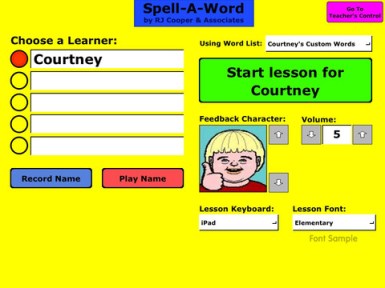
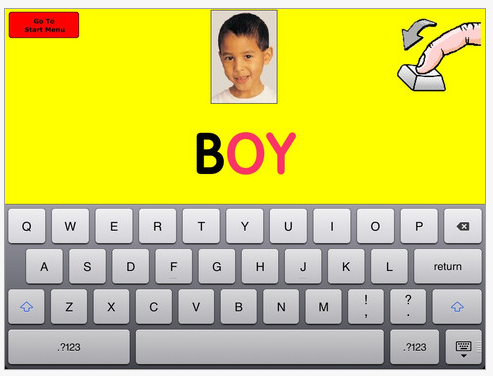
 Spell A Word – Information in iTunes describes it as a large-print, early academic program is for beginning to advanced letter users. Features allows it to be customized for individual students.

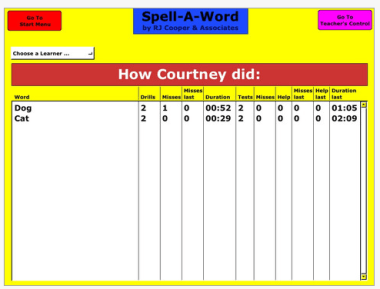
It uses an errorless learning method. Spell-A-Word works on identification, spelling, & word recognition (for reading). Scaffolding (as much help as needed but as little as possible) is embedded so as to help those with significant cognitive challenges. Customizing features are available in the teachers control tools (see image below).

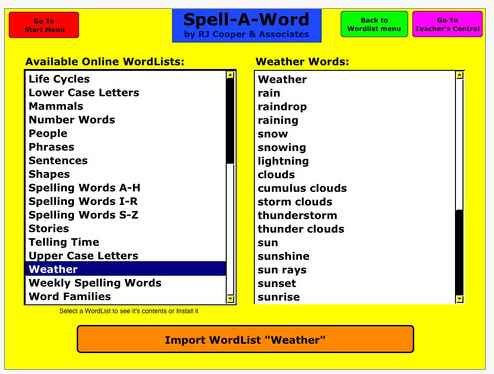
This program is designed for you to easily enter lists of spelling words/phrases for the learner to practice and be tested on. Word lists consisting of hundreds of words/sounds/pictures are available from the developer’s website at no charge for sharing and uploading.  Assessment data collection is available in Spell A Word – a huge bonus for tracking student skills.

Spell-A-Word also has special feedback for blind learners. Available also for MAC and PC, additional information and images on software features is provided on RJ Cooper’s Spell A Word for the PC and Mac link with examples of its use and additional word lists provided by Cynthia Weeks!

Thank you RJ Cooper for providing this app to our special needs students on a highly mobile, accessible and motivating tool. As a developer of adaptive tools RJ Cooper has provided special needs individuals years of support and products for access and learning (remember the Cooper Car??- I do!!). Thank you for allowing us access to you apps for free! What a boon! 

Carol

Posted in Accessibility, App Reviews, Apps for OT's, Apps for Special Needs, iPad, iPod | Tagged , , , , , , | Leave a comment

App Review Website – Fun Educational Apps

Fun Educational Apps website reviews educational apps for kids in different age categories. They also list sale apps or apps gone free. This is a new website I just stumbled upon and found a number of interesting apps suited to OT practice.

One app, Alien Buddies is a free app today only (I apologize for the late find!)  for young children ages 3-7 with activities focusing on:

  • Matching shapes, colors and letters
  • Dot to dot with sequential counting and for eye-hand coordination
  • Stickers reward as a creative activity

The matching and dot to dot activities are tasks familiar to OT’s and can be treatment activities to add to your OT iTool kit. Although I have not tested this app, it has gotten great reviews (5 stars) as a recent release. Available for iPad, iPod/iPhone, this app normally sells for $1.99.

I hope you’ll be able to take advantage of this freed app. If you aren’t able to get this app in time, there are other apps listed that seem worth the visit.  The Fun Educational Apps deals appears worth visiting or adding to your RSS feeds list.

Another good tool for your OT iTool kit!

Carol

Posted in App Reviews, Apps for OT's, Early Childhood, Fine Motor Development, iPad, iPhone, iPod, Visual Motor, Visual Perception | Tagged , , , , , , , | Leave a comment

AppleCore – A Great Mobile Device Accessory

Tired of dealing with tangled charging and ear bud cords?

Having numerous devices to care for,  the tangled mess of cords often defies me. More than a year ago I was at Batteries Plus and found these handy little AppleCore gadgets that immediately found a home with my devices!

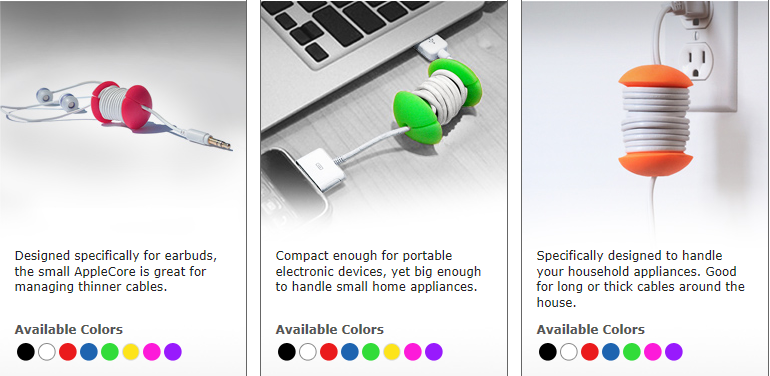
AppleCores  come in different sizes and colors and can be purchased individually or in combo packs.

Image of Combo 3 Pack

Looking for a stocking stuffer? Applecores might just be a good choice. Available online from Applecore International, Batteries Plus or Amazon.com   (yes and it is an Amazon Prime item!).

Simple, cheap organizer!

Carol

Posted in Accessibility, iPad, iPhone, iPod, iPod/iPad Accessory | Tagged , , , , | 1 Comment

Point to Pictures App

RJ Cooper has provided accessibility devices and software with special needs students for many years. As the cheese moves so has RJ Cooper, creating specialized apps for mobile devices that support students with physical and cognitive challenges. Point to Pictures is just one of his apps for communication with customizable features and currently Free from iTunes!!

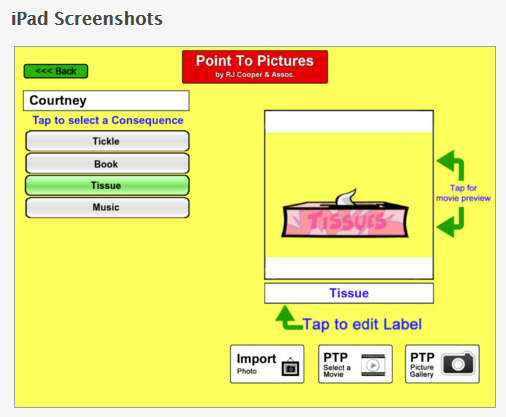
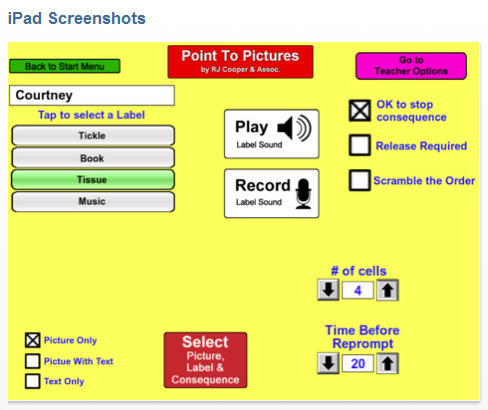
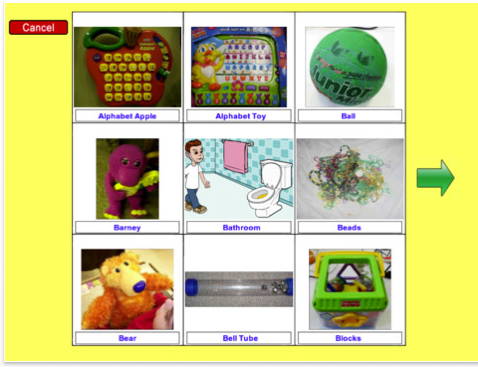
Point to Pictures app provides the tools to customize a communication board for students pending their physical access, communication or cognitive abilities. Here are a few screen prints of the tools and customization features:

Just last week one of the speech pathologists was looking for something that could be used for presenting information on an iPad in the regular education classroom with one of our students with PDD – I believe would have been a great solution!

The Point to Pictures app seems to be a flexible app, used as a choice board or communication board for students needing visual communication as well as working on basic communication needs. Although our speech and language pathologists typically establish the communication supports for our students, developing visual communication for functional life skills and working on developing skills to access devices is a part of our OT job. RJ Cooper describes the Point to Pictures as an augmentative communication “training” app designed for those persons “learning” to point/select a picture on an iPad in order to “get” that item in real life. I have a couple of student who are in need of those pointing and selecting skills as we begin to use iPad for their visual communication to perform functional tasks at school. Point to Pictures provide the type of customizable features that will support the students and is free!

Free and available for iPad only, I am looking forward to using this app with specific students on an iPad2 with familiar pictures taken of places and equipment at our school.  Have you used it? Any tips and tricks you can share?

Carol

Posted in App Reviews, Apps for OT's, Apps for Special Needs, Augmentative Communication, iPad, Occupational Therapy, Special education, Visual Communication | Tagged , , , , , , | Leave a comment

Dictionary Apps – Supports for Students with LD – #1

This is a first is a series of reviews of apps useful to individuals with learning disabilities. As our school has just issued some iPad to our LD teachers the search has begun for apps that would support students at the middle/high level as well as appropriate to students post secondary schools or for individuals with LD requiring support in vocational settings.

When I first started using my iPod several years ago, I was thrilled to be able to look up an unfamiliar word with my iPod Touch while in conferences or when reading.  With several years and thousands of app developments later, the choices of dictionary tools have only gotten better with more choices and supports available for students with spelling, vocabulary and reading challenges. In the public school setting, we support our high incidence students with LD using many different devices. Spelling to look up a word is often a challenge. The portability and availability of apps on iDevices as well as cell phones provides wonderful tools in the hands of students as well as employees who have learning disabilities. A recent inquiry to one of my employment opportunities, Adaptive Technology Resources, requested mobile device for an individual in a work place who had spelling challenges with daily documentation . My first thought was the use of a mobile device, such as an iPod Touch or iPhone (carried in a pocket) to look up words using Voice Search, or creation of a favorites list of frequently used words that were difficult to spell.

Although not inclusive, here are some dictionary apps that I felt would support individuals with learning disabilities and help compensate for spelling or vocabulary challenges:

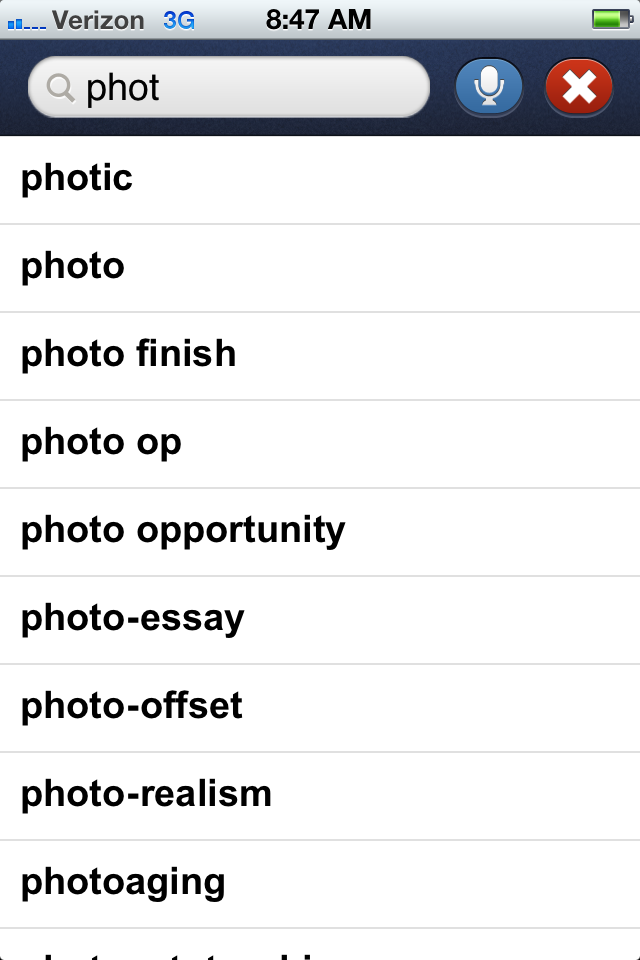
Merriam Webster Dictionary – Merriam Webster Dictionary app (free, iPhone/iPod, iPad, Android) is a boon for students who can not spell and need support with vocabulary.  With a wireless connection, Merriam Webster Dictionary has a voice search tool allowing an individual to speak the word into the app and the word will be transcribed and the word and the definition will be presented.
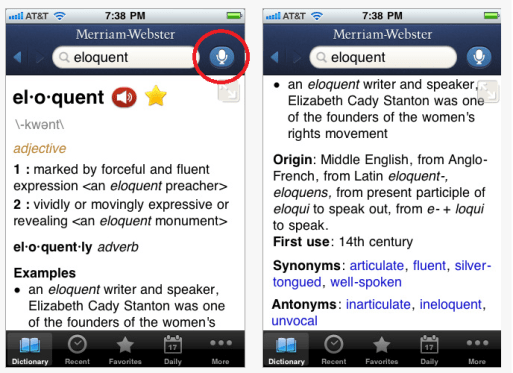
When Wi-Fi is not available the dictionary app will not allow voice search, but allows manual look up of definitions using the dictionary app.  Although word prediction is not available an alphabetized word list is generated on the device given the correct spelling.
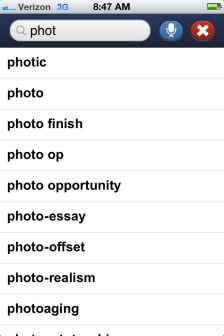
The dictionary app also features:

  • Collecting favorite words, allowing creation of a word list of frequently misspelled words or vocabulary list for specific classes or occupation related word list
  • Recent searches collects a helpful tool if needing to create a word list for individuals of frequently misspelled words or vocabulary usage for specific classes or as needed in a work situation (see bottom tools on image above)
  • Synonym and antonyms are available in each definition entry and are linked to the definition of the word to hear it spoken aloud
  • Easy navigation is available with arrows at the top of the app between links and features.

Although Merriam Webster Dictionary does not provide text to speech of the definition, nor does the Speak Selection function in the app, if you turn on Triple-click Home -Voice Over function on, you will have text to speech of the text definition with triple clicking. This takes a little bit of practice but is a very useful function for struggling readers for with many apps.

Available for iPhone/iPod. Android and iPad, the iPad app provides a scrolling listing of words on the screen.
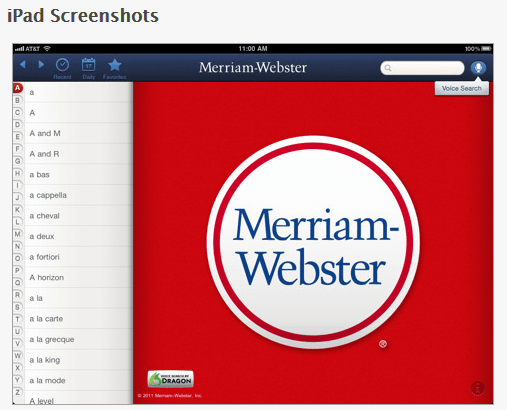
The free version of the Miriam Webster Dictionary has ads but which are minimally distracting however provide a link to the advertisement which may be problematic for some students. As a free app, this is an invaluable and accessible tool for individuals with LD especially accessible with Wi-Fi services.

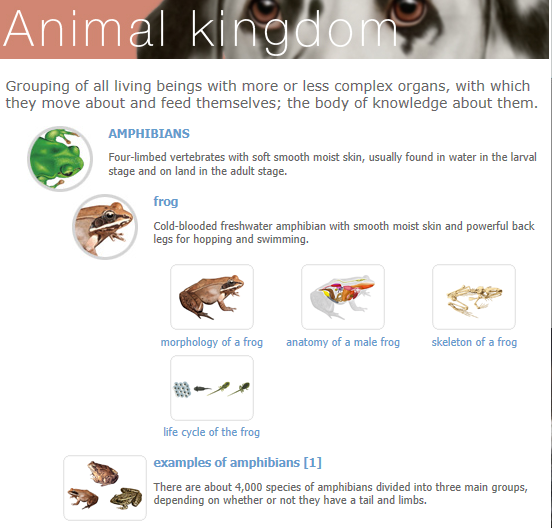
Visual Dictionary Online –  The Miriam Webster Visual Dictionary is an online tool that provides 15 different themes or subject areas (Human Body, Animal Kingdom, Astronomy, Earth, Plants and Animals, Food & Kitchen, House, Clothing and articles, Arts & Architecture, Communications, Transport & Machinery, Energy, Science, Society, Sports & Games) and 6,000 images. By adding the Visual Dictionary Online  as a Bookmark or using “Add to Home Screen” as an icon on your iDevice in Safari will provide you easy access to a pictorial dictionary for your students with Wi-Fi services. Here is an example of a visual dictionary entry when searching the Animal kingdom theme:
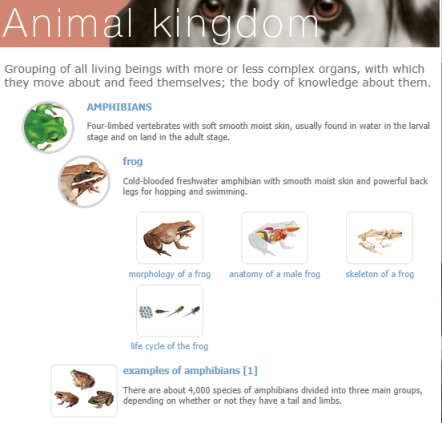
Each of the sub topic areas are linked to more information. Images are able to be saved or copied to your photo album by tapping on the pictures. Some images however were watermarked. Audio output of the main dictionary word is available however I found it to be a bit awkward in its functioning as it links you to another page to speak the word aloud.

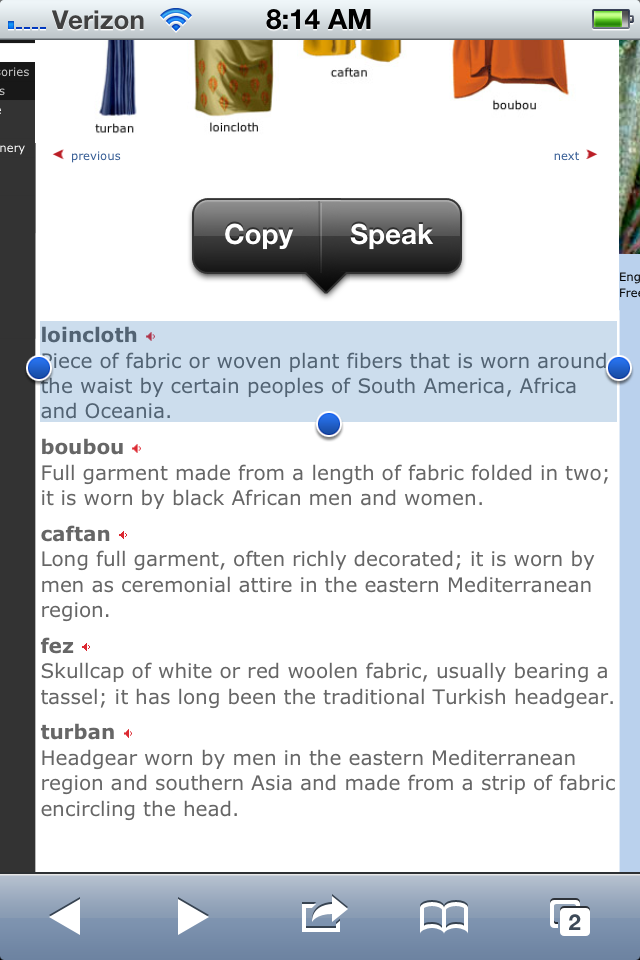
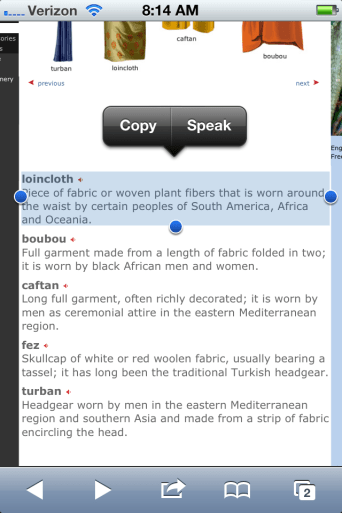
If you are on the new iOS5 operating system you have the additional bonus of tapping on a non-linked word and using the Copy, Define or Speak option when the Speak Selection (Accessibility>Speak Selection) is “On”.
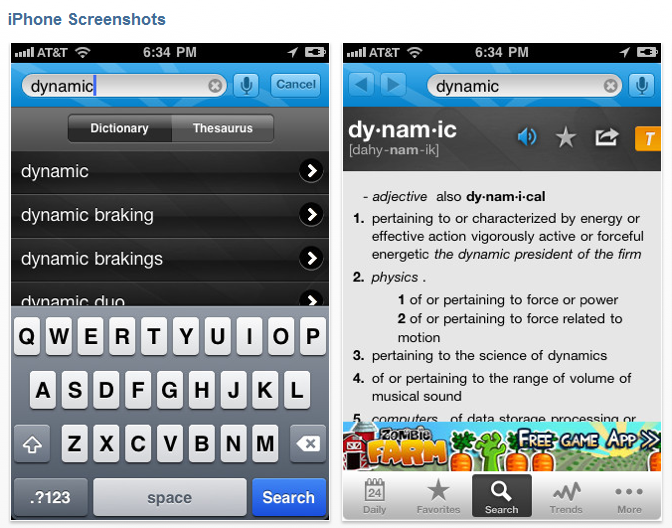
Dictionary.com – Dictionary.com app (Free/$2.99 for ad removal) is a dictionary app with a dictionary base of 2,000,000 words or entries which provides voice search  capabilities with Wi-Fi connectivity.
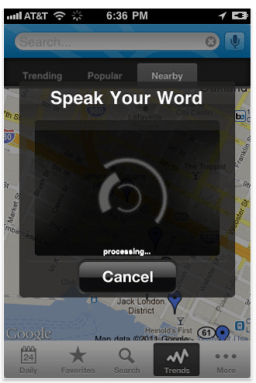
The dictionary is functional off-line using the search box. A list of alphabetized words is offered when the word is being entered.
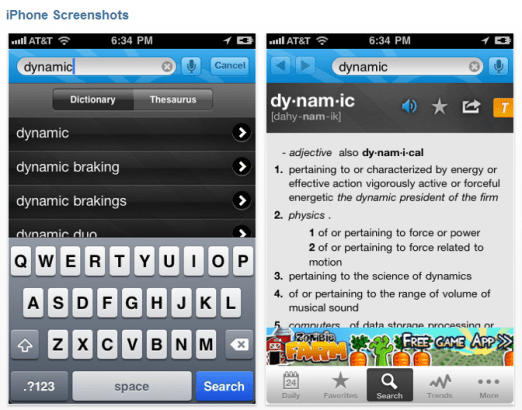
The text to speech button is provided for the targeted word to  be spoken aloud however the definition is not available for text to speech. Words in the definition are linked for look up and speaking of the individual words. Using Triple click-Voice Over, definitions can be spoken aloud.

Dictionary.com provides a toggling method of accessing the thesaurus or the dictionary with the  yellow T/blue D presented to the right of the screen. Other features provided in Dictionary.com include:

  • Favorites word list created by selecting the star when in a word definition
  • Options of a limited number of background colors
  • Dictionary and Thesaurus entries (as described above)

Dictionary.com’s dictionary and thesaurus tools I believe are more user-friendly however, navigation in Dictionary.com is not as intuitive as Miriam Webster’s Dictionary in my opinion. Both apps voice search was remarkably good using an adult voice.

A post in appadvice.com, “ Best English Dictionary Apps: iPad/iPhone Apps AppGuide” provides a great listing of dictionary apps. Research and trial of many of the additionally listed apps finds that many of them do not have speech pronunciation available or some may have it but requiring Wi-Fi service to function. In my opinion the dictionaries are only accessible if they talk aloud to support most of the students I service. Certainly Voice Over can be used with these dictionary apps however a quick look up with the pronunication readily available is preferred in my mind.

In addition to the above free apps with voice search here are a few additional apps worth looking at for use with students with learning disability:

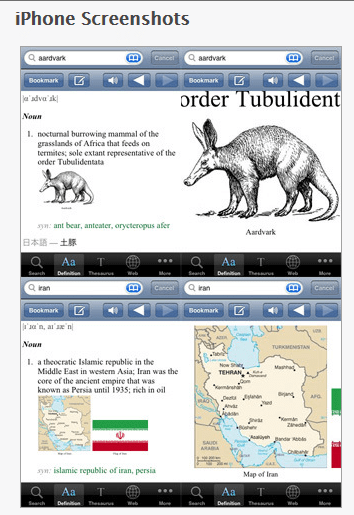
WordBook English Dictionary & Thesaurus – The WordBook Dictionary ($1.99 for iPhone/iPod; also available for Windows phone) has 150,000 entries with pronunciations for all words. pronunciations are available within the apps, not requiring Wi-Fi services for speaking pronunciations. WordBook is easy to navigate and provides tabs to navigate between a word entry dictionary thesaurus and other tools such as Wikipedia entries of the word. It also provides some word suggestions when typing in a word almost like word completion/word prediction without a phonetic base (see WordBook XL below).
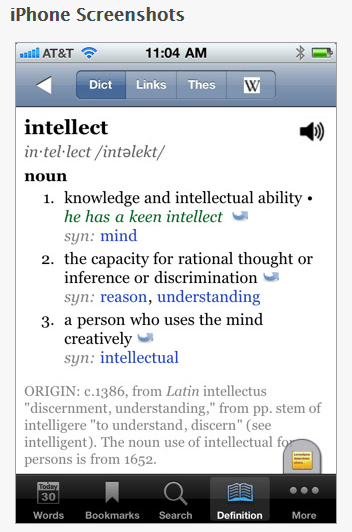
A tab in the bottom of the screen (yellow) provides other tools such as adding a note, bookmark or cross referencing other web-based tools such as Miriam Webster, Google, Wikipedia, answers.com or Wordreference.com if Wi-Fi is available.

WordBook XL – English Dictionary & Thesaurus for the iPad ($2.99) is laid out slightly different:
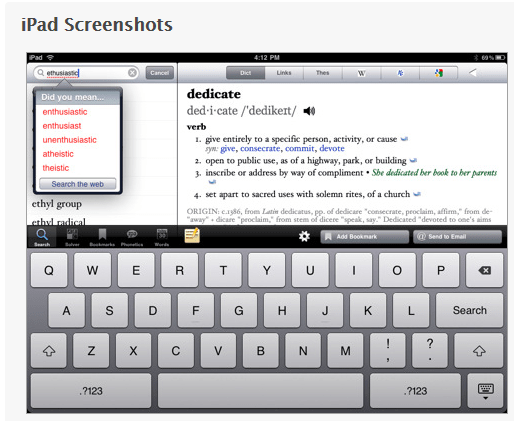
Other tools and features available within WordBook include:

  • Adding Bookmarks or History word lists for later review or reference (this could be used for word frequently misspelled)
  • Choice of font styles (7 different styles)
  • Text Size (Smallest, Smaller, Medium, Larger, Largest)
  • Choice of turning voice on or off
  • Customizing the web content URL’s used for referencing words searched

WordBook does not provide the tools to read the definitions, but using Voice Over (Triple-click turned on) allowed definitions to be read aloud. Although a smaller vocabulary base in this dictionary, I liked the ease of navigation and some of the other customizations and  features provided in this app that could aid with some visual challenges and provide links to web-based tools. The other reference tools provided within WordBook all are linked back to WordBook app and would require additional exploration for their usefulness determined.

Dictionary – by Xyster.net another of the numerous dictionaries ($1.99) for iPhone/iPod and iPad provides 150,000 entries with links and illustrations. Dictionary does not provide a voice search, but does provide pronunciation of the word and bookmarks for frequently used words. Other features available include:

  • Thesaurus
  • Suggested spelling list
  • Bookmark capabilities
  • Extensive rhyming list

Other classic dictionary apps for purchase to check out:

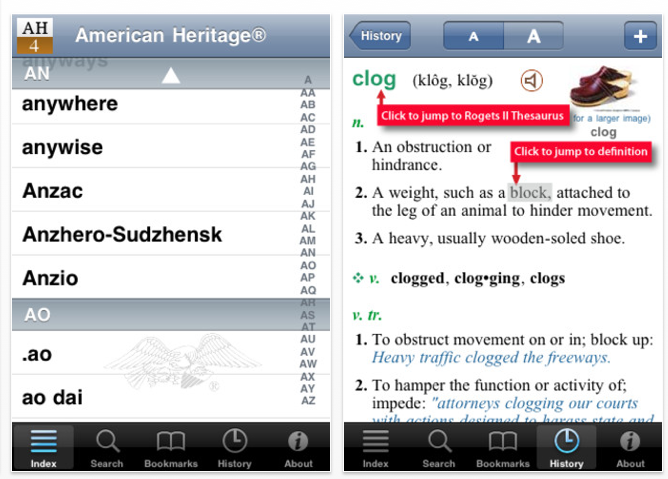
American Heritage Dictionary 5th Edition ($24.99)
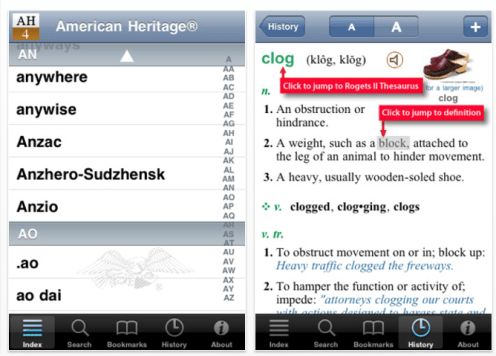
Merriam Webster’s Collegiate Dictionary, Eleventh Edition – ($24.99) for iPhone and iPad.

There are many dictionary app choices available, some have greater advantages for individuals with learning disabilities. Check out some of the dictionaries and provide some thoughts and feed back on which ones you would use with your students or individuals in employment. I look forward to any thoughts or experiences you may have!

Happy apping!!

Carol

Posted in App Reviews, Apps for OT's, Dictionary app, High School, iPad, iPhone, iPod, Learning Disability, Middle School, Post secondary, Voice Search | Tagged , , , , , , | Leave a comment