Data Collection App

Super Data TRacker pic

Assessment has been a part of my job whether working with students or adults, gathering information about student/client abilities to determine what skills require intervention. Working as an Occupational Therapist one on one with students, we are able to determine what steps and skills are needed to accomplish the long term objectives through assessment, observations, knowledge of development milestones and task analysis. Collecting data was typically performed through reassessment, checklists, rubrics, observation and anecdotal notes taken on student progress. Hard copy notes was the most typical method of collecting data.

iPads and iPods have been provided to many of the special education staff at my school this year to support students programming. The mobility of the iDevices lends themselves not only as a mobile treatment tool but an electronic data collection tool. It promises efficiency, a method of gathering and calculating data given the appropriate app to support those data gathering needs. With the availability of an iPad for many of us the search began to find an app that lends to easier, meaningful and more efficient electronic data collection.

Formative assessment is an emphasis at our school. When considering an electronic data collection app used by teachers and therapists functions of entering customized goals, ability to use standard formative assessment rating ( 4 to 1 ) or other rating scales, accumulate data over time, ability to calculate the accumulated data in a meaningful way (percentages or achievements/opportunities) and retrieve/manage the data in a format in compatible with our schools technology were features desired.

The search began. I may have missed apps that would provide more than what I could find but I had a difficult time finding an app of the desired functions for an iPad/iPod. The Super Duper Data Tracker is the one apps I believe come the closest to the functions that were desired.
Super Data TRacker 1


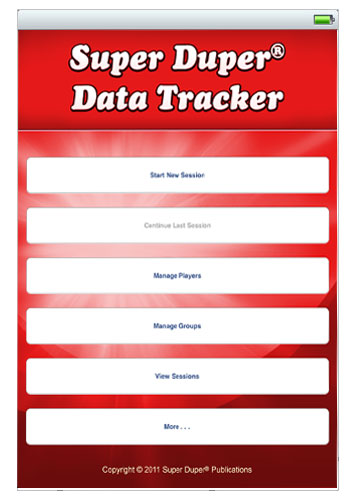
Created by Super Duper Publications,  the Super Duper Data Tracker App provides the following functions:

  • Create multiple goals for each student.
  • Choose from various response types — Tally, Correct/Incorrect, Approximated, and Cued.
  • “Undo” the last recorded response to correct an error.
  • Store data for an unlimited number of sessions.
  • Add students to multiple groups.
  • Add students temporarily to a group to make up missed sessions.
  • Write notes for each student in a session.
  • Email results for individual students or all students in a group.
  • Graph results for each goal.

 Example of creating a goal and choosing the response types including correct/incorrect, approximate or cued as used on an iPhone.

Super Duper Data Tracker session by player (client or student) showing accumulated scores by goal on an iPhone. The app allows you to collect or review sessions by date, player or goal. Players can be tracked individually or by group. Data is recorded by sessions and can be accumulated over time and ended at any time. Session data can be viewed in a chart by sums and percentages or a graph and emailed from the iPad or iPod.

Although this app had most of what I was looking for, what would be a welcome addition  would be a choice of response types with scores of 4 to 1 in addition to the correct/incorrect, approximate, or cued. This response type would fit standard formative assessment rubric format used by many teachers, therapists or related service personnel in education.

At present the app would be my and fellow teachers’ choice for data collection (we would all like additional choices of response types however) when using iPad or iPod for data collection. Spread sheets are another option but I prefer this app for its easy check off abilities rather than having to put numbers in a spread sheet.

Use of the Super Duper Data Tracker app found it easy to use. It is available for iPhone, iPod Touch, iPad from iTunes for $5.99. Super Duper Publications provides a video and FAQ about the app on its website for more information.  I also found Super Duper Publication easy to contact and quick to reply to questions and comments. Than you Super Duper Publications! If you have any other suggestions or thoughts for a data collection app appropriate for teachers and school based therapists – please share!

Carol

Posted in App Reviews, Apps for OT's, Data Collection, Formative Assessment, iPad, iPod, Occupational Therapy, Special education, Special Education Teacher | Tagged , , , , , | 2 Comments

Cleaning your iPod or iPad

When you work with young children and a wide variety of student in many classrooms keeping your iPad from being a germ spreading source can be a concern. Questions about cleaning the iPad and also disinfecting it are frequent. What does the manufacturer recommend for cleaning and what are some options for cleaning the iPad or iPod?

The Apple website provides the following instructions for cleaning your iPad:

Handle your iPad with care to maintain its appearance. If you are  concerned about scratching or abrasion, you can use one of the many  cases sold separately. To clean iPad, unplug all cables and turn off  iPad (press and hold the Sleep/Wake button, and then slide the onscreen  slider). Use a soft, slightly damp, lint-free cloth. Avoid getting  moisture in openings. Don’t use window cleaners, household cleaners,  aerosol sprays, solvents, alcohol, ammonia, or abrasives to clean iPad.  iPad has an oleophobic coating on the screen; simply wipe iPad’s screen  with a soft, lint-free cloth to remove oil left by your hands. The  ability of this coating to repel oil will diminish over time with normal  usage, and rubbing the screen with an abrasive material will further  diminish its effect and may scratch your screen.  (retrieved on 10/4/11 from: http://support.apple.com/kb/ht3226#ipads )

Questions still arise over all those germs shared by little and big fingers when using the iPad or iPod. Are there any antibacterial choices?

I found Klear products on the Technology for Education’s website as an ammonia and alcohol – free product for cleaning iPod and iPads. The Klear Screen iKlear Complete Cleaning kit  provides a cloth that states it ” is treated to trap and eliminate over 99.0% of the bacteria on their surfaces”.

The Klear Screen products are sold by iKlear. Their antimicrobial (def.- capable of destroying or inhibiting the growth of microorganisms) microfiber clothes are sold in kits available from TFE, iKlear or Amazon and come in different sizes as does the spray cleaner.  Prices range from approximately $20.00 for the kit to $6.00 for a single cleaner. I have not yet bought the products but the questions come up frequent enough to have encouraged me to find answers to the cleaning question.

Anyone have any other recommendations for keeping iDevices clean and germs at bay with the use of the iPad or iPod?

Healthy computing!

Carol

Posted in Cleaning your iPad/iPod, iPad, iPod, iPod/iPad Accessory, Occupational Therapy | Tagged , , , | Leave a comment

iPad/iPod Camera and Photoshop PE

Both the current  iPad 2 and the 4th generation iPod Touch have camera and video capabilities that are wonderful therapy and documentation tools. How many ways can you use the camera for therapy purposes?

  • gather electronic documentation of student work or performance using the camera or video (record a presentation, take a picture of their production)
  • record verbal or visual directions of an assignment
  • with permission record a lecture
  • take pictures for visual communication/schedules
  • provide students with immediate feedback on their performance, behaviors or or of expected behaviors
  • capture awesome student moments for parents to see
  • capture information for use at meetings or in IEP’s of students work
  • take pictures to make a story book
  • take pictures of field trips to make a book
  • take pictures or videos of classes to foreshadow activities that may be anxiety producing for a student

What if when you want to use the pictures on your device and the orientation is sideways  making the picture unusable? What if you want text on the picture but your app doesn’t provide that option?

Of course there are apps for that!

PhotoShop PE PhotoShop PE is a simple app that provides a few simple photo editing tools such as cropping, fliping, rotating, color enhancements, boarders and more to help manage your photos. Photoshop automatically accesses the Photo Library on your device to import photos for editing. Once edited it is resaved in the devices Photo Library for your use. Now your photos are edited and ready to use in a visual schedule, story book or social story! I find this a frequently used app for basic photo management.

Caption Plus

Another helpful tool is a caption app to insert text labels on pictures for individuals needing visual information. Thanks to the QIAT listserv AT techies (thank you James Nuttall ) I found there are many caption apps available. Caption Plus is a free app for iPad and iPod that easily accessed the devices photo album, allowed me to insert a text label, save it in the photo album for use in story telling apps like StoryRobe or visual schedule apps as First-Then.

If I did not have an iDevice with a camera, transferring the photo from a camera to a iDevice is possible using a Apple camera connector or SD card reader connector, storing them on your computer in a dedicated folder and transferring the folder pictures to your iPad or iPod using your iTunes account. and then up.  Other options to transfer photos include transferring your photo to a Drop Box account or other cloud computing accounts for retrieval, storage and uploading it to your device via Wi-Fi.

There are many other types of photo editing apps available. What kind of photo or video editor do you use on the iPad/iPod to support your therapy needs?

Carol

Posted in App Reviews, Apps for OT's, Apps for Special Needs, Computer Utilities, iPad, iPod, Occupational Therapy, Photo Editing | Tagged , , , , , , | 1 Comment

One of My Favorite App Developers – Grasshopperapp.com

Have you heard or seen the Grasshopperapps ? I tell everyone who works with emergent readers, writers or learners about Grasshopperapps.com. They produce many wonderful free apps as well as for pay  apps (typically .99)  for emergent reading, writing, spelling, numeracy, sorting, patterning, categorizing as well as perceptual skills (matching, puzzles).

Visiting their website or searching in iTunes for Grasshopperapps will provide you with over 80 different apps to meet the needs of your emergent learners.

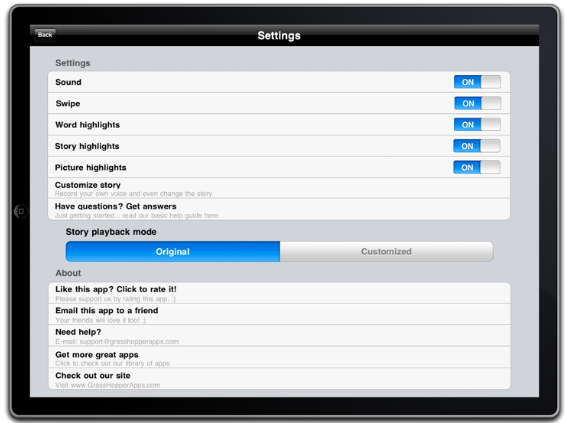
Some of their wonderful qualities of their apps are their clean presentation, wonderful, real images, ease and consistency of navigation and interaction in all of their apps.  A huge bonus is the ability to customize within the app (yes, really – you can customize levels of skills of the app!! – I tell everyone because most people are not used to having  the option available to them in apps!). Here is a typical example of the settings page where you can customize the the sound, word highlighting, story highlighting.

In the number, sorting, puzzles, letters or spelling apps you have a choice of the number of items, range of numbers, letters or  lower/upper case letters presented.   Customizing the activity by import your own pictures and recording your own sound is always an option in the settings.

Grasshopperapps also has story book apps that have wonderful kid centered real pictures and stories that will read aloud. I really love the grasshopper apps to work on specific skill development. Visit their website often, they are developing new apps on a regular basis and often offer them for free when they first come out!

Check them out . It will be well worth your time!

Carol

Posted in App Reviews, Apps for OT's, Apps for Special Needs, iPad, iPod, Phonics | Tagged , , , , , | Leave a comment

iDevice Accessory Bonanza!

What a bonanza! Check out the extensive iPad/iPod accessories list on Technology for Education’s website.

While searching for iDevice resources for speech and language pathologists and occupational therapists I wandered on to Technology For Education’s iPad/iPod Accessories link and found the most extensive listing of accessories for iDevices I have seen!

Listed are pages of cases, speakers, styluses, screen protectors, stands, mounts, covers, cleaners (clothes and spray, some clothes are antimicrobial – yeah, we know where those kids fingers have been), key guards for the iPad as well as for specific  AAC apps (Tap to Talk, Grace, Speak-It!, etc.), home key guard, switches and more! Accessories I did not realize were available.

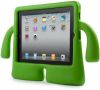
Here is a cute kid case sold through TFE – the iGuy I had not seen yet- comes in mango, peacock and lime as seen below. Sells for $37.00. Too cute. I would be most interested in how durable it is.

Otterbox cases are also listed with the numerous other offering of cases on the TFE website. I am biased with iPad Otterbox cases due to their reasonable cost and durability. We have been using the Otterboxes for our student dedicated iPads (true story, one of my teachers told me the iPad survived falling off of the stander tray on to the concrete floor of our high school iProloguo2go user) making me a thankful believer in the Otterbox cases!

If you are in the market for accessories this is a great place to peruse! Also check out RJ Cooper’s site as he is a master at adapting!

Have fun! Share what accessories you recommend!

Carol

Posted in iPad, iPod, iPod/iPad Accessory | Tagged , , , , | Leave a comment

Managing Your iDevice for the Young Learner – 101

Children love using the iPod or iPad and with a single touch can explore games and stories and lots of things, sometimes much more than you want them to! The iDevices ease of use can be a two edged sword with children/students easily getting to places you don’t want them to go.

I have heard repeatedly from fellow OT’s ” I wish I could hide the home button”. As a OT who frequently thinks about adapting things a number of things go through my mind, none which has come to fruition yet and chances are may not end up being esthetically pleasing. Good news, now there is something inexpensive and esthetically pleasing out there to help with hiding the home button and keeping the

BubCaps are home button covers for the iDevices that deter young fingers from pressing the home button. Available with different amounts of rigidity, BubCaps come in Regular, Ultra and Max depending on the age or strength of the user. Inexpensive, they come in 4-packs of a mixture or 4 of one kind for $5. BubCaps are available at their website (see link above) or through Amazon.com.

The making of BubCaps seems to come from experience (necessity is the mother of invention, right?). The company’s blog features a great overview of how to prepare your iDevice for toddlers. Check our their recommendations on protecting your iDevice on PaperClip Robot’s blog. It is worth it if you are new to using an iDevice and work with users with busy hands!

Anyone else have any methods of protecting the home button?

Happy Apping

Carol

Posted in Apps for OT's, Focused attention, iPad, iPod, iPod/iPad Accessory | Tagged , , , , | 4 Comments

More Apps for Developing Fine Motor Skills

Previously I listed a few apps that specifically work on developing fine motor skills in general or apps that also help develop skills to work on the iPod or iPad for students. Here are a few motor to add to the list of apps that support development of fine motor skills:

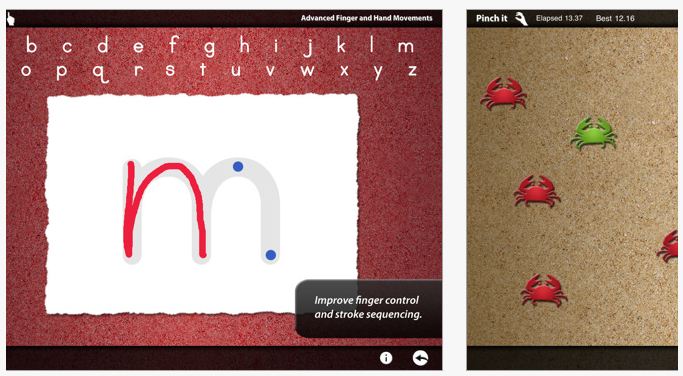
Dexteria – Provides explicit training in fine motor tasks of tapping, pinching and handwriting skills. Skills promoted to be developed with this app includes finger isolation, pinching and letter formation. Productions or challenges can be timed to encourage speed and dexterity. The handwriting skill development has levels and provides feedback to students when they draw out side of the lines when forming letters and shows the correct sequence visually with cues of where to start and where to end to assist with developing a motor plan for letter formation.

Although it does not provide that game element helpful for kids to engage and not know they are learning or practicing a skill, it does provide verbal rewards for successful completion.  Great for students with autism who benefit from visual information for learning. Compatible with iPad. On day of this review it sold for $2.99, regularly  $4.99. For more views and information check it out on iTunes or their website.

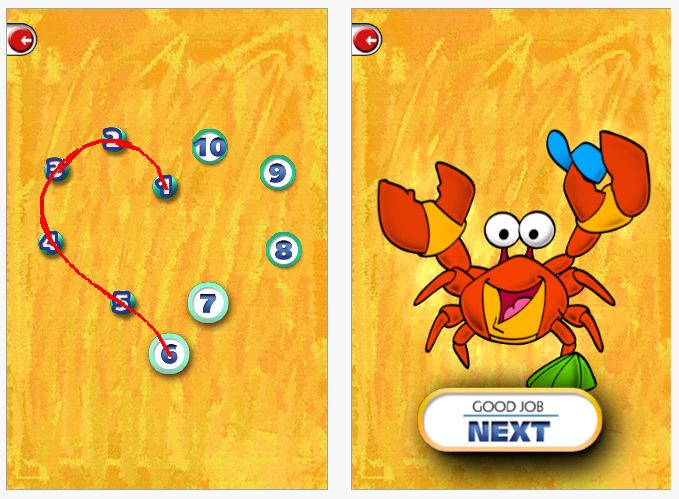
Dots for Tots – A simple app with nice visuals, animation to help users know what to do, music and also rewards after completing each dot to dot shape. It also nice provides auditory output of the name of the shape that was just drawn and starts out very simple with only 3-4 numbers for young learners. You can also purchase additional  addons for cost. Available in a free and paid version ($.99).

Although it has not gotten great reviews in iTunes, I have not had problems with it on an iPad and believe it is well worth trying out with kids. Available for iPod and iPad.

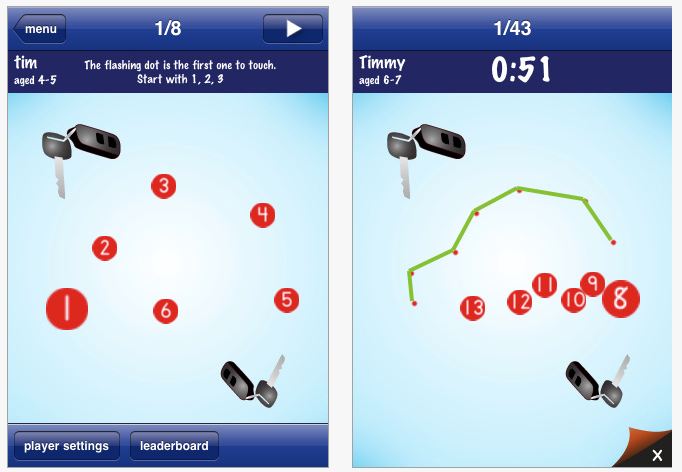
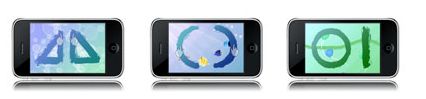
Dot to Dot Number Whiz –  Another dot to dot app (by the maker of Pocket Phonics – one of my favorities), allows you to customize by user, the age range of the photo library and pictures for the app. Provides visual for where to start drawing and gives you visual feedback for errors all which also can be customized for the user.

This app starts with more numbers as shown above for students who can count up to 5 or 10 (or more). Available in a free version and purchase version ($1.99) for both iPod and iPad.

Posted in App Reviews, Apps for OT's, Apps for Special Needs, AT for Handwriting, Fine Motor Development, Finger Isolation, Handwriting, iPad, iPod, Letter Formation, Occupational Therapy | Tagged , , , , , | Leave a comment

Finding Apps for Special Needs

Finding suitable apps can be a timely process much less really knowing what their capabilities are. How do you find them? Knowing trusted websites that regularly review apps is invaluable.  A few of my favorites are listed below. The sites review the apps and some provide a video review of the apps to really experience app features prior to buying. Finding “lite” versions of apps which are typically free is also helpful to evaluate an app.

Here are a few of my favorite websites I peruse to find recommended apps:

a4cwsn – Apps for Children with Special Needs does an awesome job of reviewing apps, categorizing them and providing a video overview of their features. Well worth the visit. I find great apps for my students and get an almost hands on review of the app.

momswithapps.com – I found Apps for Children with Special needs from this website Moms with apps. A great site for reviews of apps for general education, creativity, reading, families, special needs and more. It also provides links to other educational websites.  Well worth the visit.

Jeremy Brown’s App Recommendations for Students with Autism – Jeremy Brown’s recommendations are not only appropriate for students with Autism but for a wide variety of special needs students. Listed by category, you will find apps for many needs.

iPads in Special Education – This is an extensive categorized list of apps for special education. Worth checking out.

iNov8 – There’s a Special App for That series covers apps in categories such as providing autonomy, literacy instruction, communication, learning disabilities, fine motor, organization, mind mapping and social skills with screen shots, reviews and other helpful information. Well organized, checking out the new series being posted is informative and resourceful. Highly recommended.

Another resource that has been updated as of 4/11 is Pacer Center’s There’s an App for That: iPad/iPod 101 with resources for apps as well as peripheral equipment and set up for iDevices. Great updated resource if you are starting use of an iDevice.

Of course I frequently peruse the free apps posted daily on Freeappsalert!

Happy app hunting!

OTs with Apps

Posted in App Reviews, Apps for OT's, Apps for Special Needs, iPad, iPod, Occupational Therapy | Tagged , | Leave a comment

Splashtop App and Splashtop Remote

Thanks to Suzanne Feit and the QIAT listserv, I was introduced to Splashtop app that can remote into your computer desktop to operate Win based or Mac based software on your iDevice. Suzanne’s example of accessing software as Intellitools Classroom Suite sparked my interest in how this might work.

Splash App installs on your iPod Touch or iPad and makes connection to your computer when complimentary software is installed on your computer. Using WIFI you can connect from your iDevice to your computer to operate software installed on your desktop or laptop computer using the remote desktop software for access.

Although I have only used it on my iPod Touch (which due to size of the device is somewhat limiting to access), found it easy to install on my computer and iPod Touch after turning off firewall. It connected easily to my computer given great prompts and assistance with the IP addresses and port needed for connectivity.  I was able to navigate easily on my desktop (despite the size of the iPod screen), type into Word, open a Blio book to read and open up other software installed on my laptop computer easily and quickly. 

I am really excited about the possibilities of using our bread and butter Windows software available on our desktop or laptop extended to the highly portable, accessible and “cool” (kids love cool, we love our special needs kids to be cool like all other kids!) iDevices to extend access and learning opportunities for my special needs students. As an OT, the possibility of using an iPad at a students desk with it projecting/showing Intellitools Classroom Suite with modified curriculum materials (spelling, DOL, writing or reading, math), allows them to look and participate just like their peers! Can it get much better than that??!!

Check out a quick video on You Tube about Splashtop with Classroom Suite: http://www.youtube.com/watch?v=GxHDgjrd3xo

Splashtop is available for iDevices and Android and supports WIN and MAC OS. It is on sale Memorial Day weekend!

Amazing! Have you tried it? How can you resist not trying this??

Carol

Posted in App Reviews, Computer Utilities, iPad, iPod | Tagged , , | Leave a comment

Apps to Develop Fine Motor Skills

There are many iDevice apps out there to develop fine motor skills  for children. Drawing and music apps that can encourage fine motor development are readily available. Access to some apps on iDevices can require specific, new skills for some students. Although I find the iPad and iPod Touch to be very intuitive to most students, it requires a number of different skills to access and operate them. Touching/pointing, holding while touching and pointing, pinching, accuracy with touching/pointing and sliding in all directions are all different skills needed when interacting on the iDevices.

Listed below are few apps that provide specific practice of skills required to access the iDevice or apps as well others that support fine motor skill development. Certainly the type of instruction and the requirements of the app can facilitate what skills you might be targeting (finger isolation, waiting, timed, accurate touch), so knowledge of the app is important before you target its use with a student. This is a bonus I believe allowing you the opportunity to work (play) on the iDevices too! Here are some that I have found:

Touch Trainer (Lite is free) – Provides a structured method of training touching on the iPod/iPad for learners. The app provides different steps with options to change number of successful touches for mastery as well as the reinforcer length for a student.

While the lite version only has 1 level, the full version has 7 levels to assist with developing the touch skills for students who need more practice with developing those touch skills. Available for iPod and iPad this is worth trialing for beginning iDevice users with a very clean presentation.

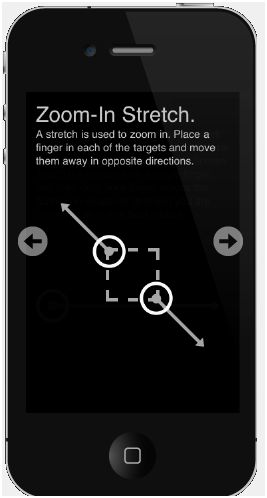
Touch Tutorial  (4.99)- Developed by the makers of Touch Trainer, Touch Tutorial provides specific trials in touching, tapping, swiping and pinching or zoom and stretching objects on the iDevice screen. Made for iPod and iPad, it seems a bit pricey but if you need specific training in developing the skills needed to operate these devices this app provides visually clean and clear training.

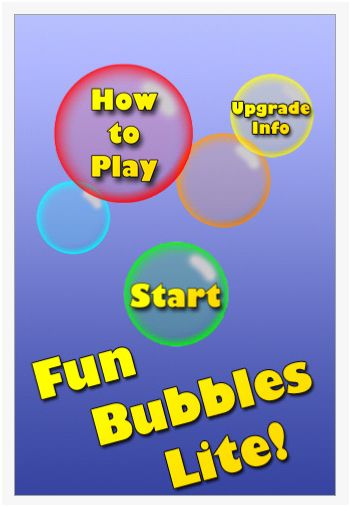
Fun Bubbles Lite (Free) – This is one of a gazillion available bubble apps. I like Fun Bubbles Lite as it provides a couple of different ways to make and bubbles which can develop skills of using an iDevice at the same time. Tap the screen and you make and bubble, tap the bubble accurately and you pop it! Touch and hold and you can make a bubble grow largers, but don’t hold too long or it will pop. Hold and drag or slide and you make a line of bubbles which you also can pop one by one accurately to get rid of them. It has a simple interface. The Lite version provides some ads on it. Upgrading to the full version costs $.99 .

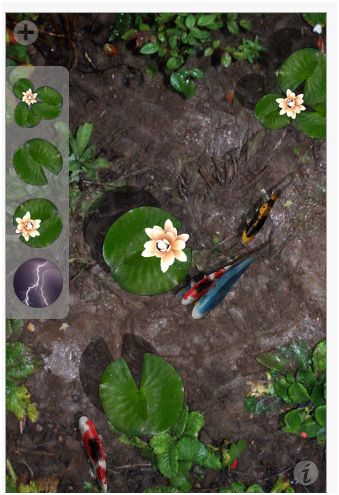
Pocket Pond (Free) – Previously mentioned in the previous review of sensory apps, is one of my all time favorites as well as our teacher and students favorite. Pocket Pond also provides an interactive method of tapping and sliding  to add fish or food, make the fish move. My coworker Gail also uses it for working on eye-hand coordination and timing skills with students (and they don’t even know it!). Pocket pond not only has calming effects but provides fine motor skill development as well. Available for iPod and iPad.

The Wheels on the Bus ($.99) – Is an interactive book that provides the music to the familiar kids song and interactive opportunities with wheels, wipers and other objects on this slightly different version of Wheels on the Bus. It is a very busy app visually but provides opportunities to poke (tap), slide in a variety of ways to interact with this book. Created by Duck, Duck Moose, there are a variety of other familiar titles of books (Old Mac Donald, The Itsy, Bitsy Spider, e.g.) to choose from. Available for iPod and iPad this is worth checking out.

Wipe and Learn ($.99) – Is a nice simple app that provides a picture you erase by swiping to reveal a flash cards of common objects.  Easy to use, this  works on swiping, attention to the screen, eye hand coordination and vocabulary. Available for iPod and iPad.

Peekaboo Barn Lite (Free) – Based on an Old Mac Donald theme this app provides a simple format of a barn you must tap to reveal different farm animals. A simple but inviting app for young learners, the lite version gives you an opportunity to check it out prior to purchase or follow the link above for a video preview of the full version for $1.99 app. Available for iPad and iPod.

MeMoves ($2.99) – This is a very different app that focuses on the  development of fine motor, calming and focused attention. Developed from the Me Moves DVD, this app provides skilled training at different levels for vision, eye hand coordination and relaxation. Targeted for special needs aged 3 -103 years, this app provides finger puzzles you perform to music and rhythm on the screen. Check out the developers theory, experience and a video to review at the link above. Well worth exploring.

What are your favorite fine motor apps? Please share!

Carol, an OT with Apps

Posted in App Reviews, Apps for OT's, Apps for Special Needs, Fine Motor Development, Focused attention, iPad, iPod, Occupational Therapy, Special education | Tagged , , , | 2 Comments