Stock the fridge with eggnog and put out your finest fruit cake, the Alien Buddies are coming to town!
This Holiday Season we’re pleased to offer our award winning Alien Buddies as a FREE downloadfor your iPad/iPhone – 1 Day Only, Friday December 14th.
“Alien Buddies is a fantastically entertaining, educational app that manages to seamlessly combine a learning experience into games that kids will want to play simply because they are fun.” – GeekMom, wired.com
This is a great preschool app with matching, dot to dot, puzzles and sticker activities! Put it on your list for download on the 14th – for free!
Wince- Don’t Feed the Worry Bug! (2.99) is one of a number of iPad/iPhone e-book apps written by Andi Green at iMagine Machine featuring the Worry Woo characters who deal with emotional wellness and self-awareness. Wince, one of the Worry Woo characters, in this eBook starves the Worry Bug’s voracious hunger of feeding worries in everyday life. Self awareness in this story about Wince, illustrates in pictures and words how worries can grow if continually fed. Interactive, this eBook has a number of interactive options that are subtle and do not distract from the storyline including adding plants or details in the pages, and feeding the Worry Bug. Here is a short video of the apps features:
Through this storyline Andi Green illustrates how worry can overcome your emotions and thoughts but through self-awareness can make the “worry bugs” disappear! This is a cute eBook that can help provide insight to students who might “feed” Worry Bugs and allow conversation about ways to starve such “bugs” from taking over your feeling and thoughts.
I really liked Wince – Don’t Feed the Worry Bug. It is suggested for ages 4-8 however I see it appropriate for elementary and fifth to sixth grade students to help them think about their emotions in light of Wince’s character and situations he encounters. Self management and self-regulation, as part of a team that supports students with social and emotional challenges, is an ongoing goal of the students we service and creating self-awareness and teaching students strategies supports those goals. Wince – Don’t Feed the Worry Bug eBook provides a tool to illustrate and explore emotions and ways to deal with those emotions – worries – when they get too big!
Eric Pramono, in his blog “geeks with juniors” provides an extensive review of Wince – Don’t Feed the Worry Bug if you want more information. Wince – Don’t Feed the Worry Bug gets a thumbs up from me and I will look forward to sharing this with a few of my students that have big worries and their teachers.
Rehabgadgets2go shares a favorite photo management app using Wi-Fi and how to use it in the above link. Use of photos on the iPad is a powerful tool for creating therapy instructions, visual schedules, visual modeling, capturing student productions, schedules and much more.
Duck Duck Moose is an award winning developer of preschool and kindergarten educational apps with familiar apps as their Wheels on the Bus, Old MacDonald, Draw and Tell, Park Math and Word Wagon to mention a few of their interactive apps.
Duck Duck Moose’s most recent app, Kindergarten Reading (introductory offer for .99) for iPad is the first in a series of apps they have created based on Common Core State Standards in reading.
Kindergarten Reading app features foundational reading skills at the kindergarten level:
Teaches phonics – recognizing and naming upper and lowercase letters
Demonstrating knowledge of letter-sound correspondences
Isolating and pronouncing sounds in CVC words
Here is a video of the app features:
The app provides interactive activities with age appropriate characters and also provides progress information or “lesson plans” reports on users. Kindergarten Reading app introduces letters based on the frequency of letter use in everyday lnaguage and the order in which students tend to learn them ” (Kindergarten Reading app, 2012, retrieved on December 7, 2012 from app) and work with word families, consonant and vowel sounds needed for the foundations of reading. The ability to track performance is available in the “Parents” section and shows what consonants, short or long vowels the student is working on and if they reached mastery on them.
Kindergarten Reading provides prompts when appropriate in some activities It requiring letter sounds, limiting students ability to just visually match letters instead of using a phonetic awareness or strategies to determine correct answers. Prerequisites of identification of words and consonent sounds are needed for engagement or support by an adult in the app may be needed for emergent learners who do not have phonetic awareness knowledge or strategies.
The app moved along in activities of “find the sound” quickly allowing users to earn new animals as they successfully completed activities in the app. The speed of objects or words scrolling across the screen was fast requiring a quick responses to listen to the word or item and match with the verbal request given. Some students who might struggle with processing this auditory information might find this frustrating. It would be a great addition for special needs students to slow the speed of the items presented and provide a button to repeat the sound requested. Offering varying speeds such as slow, medium or fast might allow differentiation for student at differing levels of skill acquisition and ability. Background and animal sounds are able to be turned on and off in the app.
Duck Duck Moose’s has a blog providing a free, accompanying Kindergarten Activity Workbook to the Kindergarten Reading app with paper-pencil activities to reinforce learning letter sounds and word families.
Summary:
Duck Duck Moose has produced another engaging app that supports Core Curriculm Standards in the area of reading for kindergarten students. As a home or school activity app, assessment data provided helps parents or teaching staff understand the users skill levels. As an adjunct to classroom reading instruction, Kindergarten Reading app can help reinforce user skill development and assist parents in understanding core standards of the reading curriculum. Offering workbook activities also can provide non-electronic means of working on the skills, balancing hands on activites with and screen time limits for learners. Knowledge is power. With the app and worksbook activities provided to parents can help with the understanding of reading development of students at a young level.
Just a couple of options that I would like to see include adding a button to repeat the auditory instruction of the activity if needed. Visually there is much of interest in the app and students who do not have strong receptive language skills would benefit from having a repeat directions button or tool. Options of having the responses provided at different speeds would help differentiate the task to a variety of learners.
Kindergarten Reading app is a nice addition for kindergarten students who are working on phonetic skill development. Although this is not particularly an intervention OT’s may work on, my experience is we may assist parents or teachers with determining appropriate apps for students we service. Pass the word on to teachers and parents to check it out this app while at the introductory price!
It soon will be here, Christmas, Kwanzaa and Hanukkah and what apps might help with the celebration and learning?
Fun Educational Apps has numerous apps listed for the holidays. Here are some apps that appear appropriate for occupational therapy and educational interventions :
Kid’s Christmas Pattern Game (free) for iPhone and iPad provides a little season variation to a skill game of patterning. Rated for 4 year olds and up, this seasonal app will continue to provide practice with sequencing.
Bo’s Matching Game – (Free) for iPhone and iPad provides early learners with practice with matching 6, 12 or 20 cards. Described as appropriate for toddlers and preschoolers, special needs students of with primary skill levels may enjoy this seasonal matching game. Images are sketches rather than real items.
Christmas Joy Puzzles – (free) for iPhone and iPad provides 4 different scenes with 20 different puzzles to assemble for preschool aged children.
iLuv Drawing Santa (free) for iPad, is back again provides 13 different step by step seasonal drawing activities for ages 5 to 99 years. iLuv Drawing apps are great apps providing winter theme images to draw. Great for therapy.
Menorah’s By Kids (free) for iPhone and iPad. Light electronic Menorah candles on your iDevice, recite blessing and color your own Menorah are some of the choices in this app.
Kwanzaa Puzzles (free) for iPhone and iPad offers 10 puzzles with three levels of difficulty in a Kwanzaa theme.
Christmas Characters (free) for iPhone and iPad is a word game for all ages. 100 different words for all ages. Younger children may require assistance.
Some fun and learning apps for your OT or teaching iTool Kit!
HandySpeech is an iPad app (29.99) created by a 12 year old for his sister, an individual with Autism. Check out Eric’s video describing the HandySpeech and the story behind the app:
Created by iSpeak4U, you will find more information on their website including multiple video tutorials that are helpful to see the features of the app used: http://www.ispeak4u.com/tutorial.html .
This sounds like an interesting tool, now available for mobile devices for individuals as ALS, individuals who have had a stroke or other speech impairments but with the ability to write.
Have you used the app? What clients might be aided in their occupation by the use of a mobile device with this app?
On Sarah’s Pad features Advent calenders available for the iPhone and iPad to help you get started today for the holiday season! Check out her favorite picks!
Carol
Most of us are familiar with Advent calendars. The most common form has scenes with windows numbered 1 through 24, with a window opened each day from December first until Christmas Eve. In these modern times, there are lots of Advent calendars available for iPhone and iPad, and it is fairly easy to find them. Advent officially starts tomorrow, on Sunday 2nd December, but most Advent calendars will start today.
Advent Calendar 2012
I was lucky enough to win this one in a code drop on the JustKidsApps Facebook page, but it is one I’d be happy to pay for as it is simply beautiful. I love the enchanting illustrations, the music, the stories, and the activities, which my children and I can enjoy together.
A question was posed about how to edit text using Dragon Dictation app for iPad, so I searched and found a great YouTube video from C-Net Systems that answer many how to questions about Dragon Dictation app. Here is their video overview of Dragon Dictate that describes the voice recognition functions and help within the app very well:
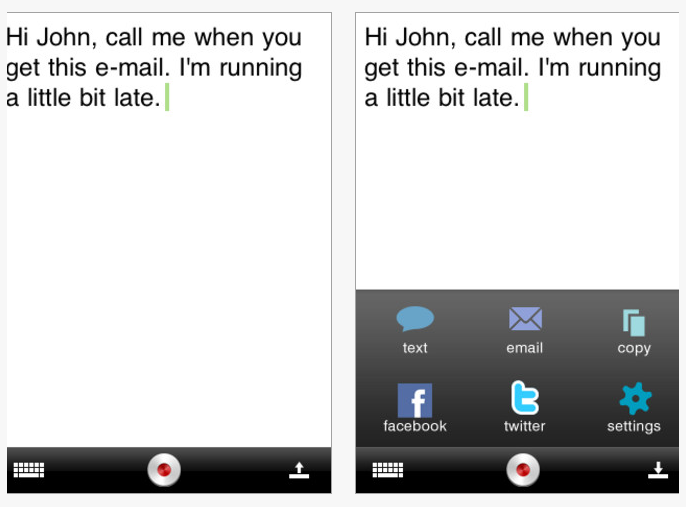
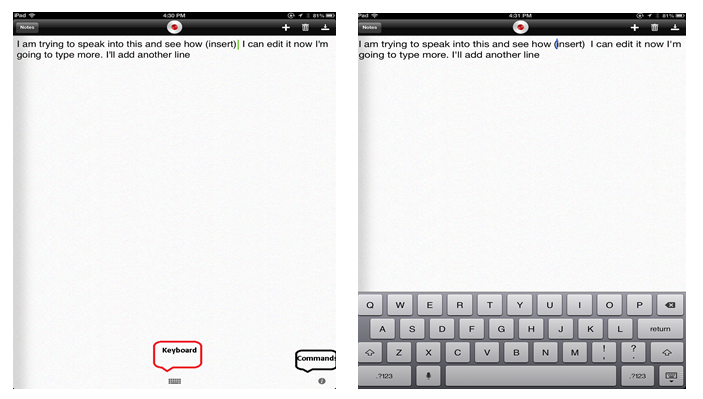
C-Net Systems shows in their video how to find the basic commands using i (see below) or help/information at the bottom right of the app and use the keyboard icon located directly at the bottom of the screen. Tap the keyboard icon at the bottom of the screen (picture on left) the keyboard will present allowing you to backspace or type within the text. Tapping with your finger within the text will allow you to insert or edit the text. Suggestions for replacement of words is also provided and can be persistent so sometimes you have to be patient and it might take several trials to get the cursor in the correct place.
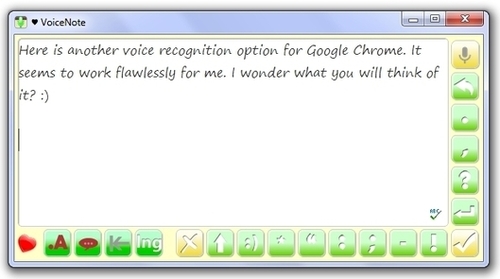
If you really want to give the voice recognition a try (and don’t have an iPad 3 where the voice recognition is built into the keyboard on almost all apps) a great option for a voice recognition app is PaperPort Notes . It is also free and developed by the Nuance the creators of Dragon Dictation and the computer program Dragon NaturallySpeaking. You still need to have wireless for the transcription of voice recognition to occur, but PaperPort Notes provides you a more complete word processing, note taking app with highlighting options, ability to import PDF documents, type on the PDF, record audio notes, draw as well as import images, take images within the app and perform OCR (need to register) with the app. For an app it is quite amazing and provides the voice recognition within it even if you don’t have an iPad 3. We have been using this app with middle school students and more recently with elementary school students due to its multiple features. I highly recommend trying PaperPort Notes if you are looking for a functional note taking app to use with Dragon Dictation with an iPad 2 or 3.
If you have an iPad 3 the voice recorder on the keyboard provides you with voice recognition in most apps, a real boon to help with composition for individuals with spelling challenges! You still need to use the keyboard to edit however.
Thanks to C-Net Systems for their video.
Wondering about voice recognition apps for Android? I have a Toshiba Thrive tablet (Android) that I have had for more than a year that had voice recognition integrated into the keyboard when I got it, well before the iPad came out with the keyboard option. It works as well as any mobile voice recognition apps that rely on cloud computing to transcribe voice output to text. For more information on the Nuance mobile solutions for Android you can find current information here : http://www.dragonmobileapps.com/android/ .
Hope that answers some of the questions! Great apps for your personal, teaching or OT i Tool Kit!







 is available as a hardcover book from Amazon as well as in eBook format for iPhone/iPad. A













 OT's with Apps & Technology