Technology for Sound Sensitivity

image of distressed child covering ears

Sensitivity to sound, often referred to as auditory defensiveness or hyperacusis, can be a socially isolating condition hindering social participation for many of our clients or students. The Friendship Circle identifies different types of noise sensitivities as described in the online post, “Noise Control: 11 Tips for Helping your Child with Autism Deal with Noise” (Wang, 2014). Causes of hyperacusis are varied and may be due to neurological, otological. congenital, endocrine, medication among others (Hyperacusis Focus – Causes, 2019). As an occupational therapist, we often have many students exhibiting the symptoms of sensitivity to sound requiring intervention to assist with reducing isolation, avoidance or behavior challenges.

Treatment of hyperacusis is varied with severe cases requiring medical intervention and counseling (Hyperacusis Focus – Ear Plug Use, 2019). Other treatment methods can include desensitization, avoiding exposure, use of electronic hearing devices or noise cancelling ear protection as well as alternative treatments for stress reduction and symptom management (Hyperacusis Focus – Causes, 2019) (Wang, 2014).

As an occupational therapist in the school system a typical method of intervention is using noise cancelling ear muffs. Noise cancelling ear muffs are readily available, low cost, and can be independently applied by the student on demand. A wide variety of noise cancelling ear muffs are available that are affordable (see list or link below). Noise cancelling ear muffs however are not discreet in appearance, especially when used in the classroom where peers are not permitted use.

Student Case Study

A middle school student I work with has a long-standing history of sound  sensitivity. Ear muff continue to be needed for him to comfortably participate in assemblies and join peers in the cafeteria. Results of a sensory processing assessment indicated he still falls in the “more than most people” range in sensory sensitivity and avoiding,  with noise a major factor. As a middle school student transitioning soon to high school, exploring other discreet options that will continue to allow him to participate in school activities with his peers. Exploring options of noise reducing tools was discussed with his teacher and the student for self esteem and social acceptance as he transitions to the secondary level.

Noise Reduction Ear Plug Trial

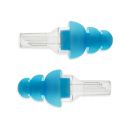
One solution immediately trialed was providing him with a set of Vibes High Fidelity Noise Reduction Ear Plugs previously purchased and identified as a noise reduction tool used by individuals with autism (Lamb, 2018). While high fidelity noise reduction ear plugs are used by musician and employees who work with equipment or environments with loud and continuous noise, these noise reduction ear plugs also are known to support individuals with noise sensitivity. Noise reduction ear plugs decrease sound levels (dB), filter specific frequencies while maintaining the ability to hear and the quality of the sound. High fidelity noise reduction ear plugs each have different levels of sound reduction identified by the manufacturer and are just one of many types of sound reduction ear plugs available (sleep, work, shooting, flying, music, etc.) (Banks, 2018). Noise reduction HF ear plugs for musician are generally recommended for individuals with hyperacusis. The Vibes HF Ear Plug offer noise reduction up to 22 dB and come with different sized replaceable ear tips. Use of these types of noise filtering earplug, depending on the user, could also help grade exposure to sound, allowing some noise but filtering out louds sounds to help individuals with sound sensitivities increase their tolerance as recommended (Hyperacusis Focus, 2019).

The trial of the Vibes with the student was successful. He was motivated in using the low-profile ear plugs and applied them consistently during his school day to join peers at lunch time in the cafeteria. On a rare occasion he sought out eating in the resource room due to high noise and a report of “whistling sounds” with the noise level. This may be the result of a poor fitting ear tip or certain noise levels particularly challenging to his auditory processing. Although the Vibes have successful for the student, additional research on options for this student continued for this trial period.

Resources on Hyperacusis and Ear plugs

Helpful information about sound sensitivity and ear protection  was found at in the following articles and websites:

  • Lindsey Banks, Au.D. ‘s online article “The Ultimate Guide to Wearing (and Choosing) Ear Plugs”, (Banks, 2018). Her updated post provided great information on different kinds of ear plugs, purposes and a listing of “Best” earplugs in each category.
  • Hyperacusis Focus.org provided an excellent overview of the condition of hyperacusis. The concept of discouraging overprotection or over use of hearing protection was presented with evidence that it will lower loudness thresholds over time (the more you protect, the greater the sensitivity over time) (Hyperacusis Focus – Ear Plug Use, 2019). This evidence is similar to the recommendations for light sensitivity, the more you protect the greater the sensitivity and anxiety about exposure. Slow, graded exposure to sound is important to improve tolerance generally. This is typically evidenced with our students as they age.
  • “Noise Control: 11 Tips for Helping your Child with Autism Deal with Noise”, written by Karen Wang provides types of sound sensitivities, strategies for the condition, interventions as well as alternative treatments for the condition.

This general information provided good background information from a general viewpoint.

Ear Protection Options

Research and experience with noise cancelling ear protection identified the following ear protection options. There are many options on the market with the following being just a few gleaned from research:

Ear Muffs: Over the ear headsets or ear muffs are a handy, durable solution for individuals with sound sensitivities. A wide variety of headphones are readily available for children and adults in stores with sporting goods and sound equipment. Here are just a few ear muff recommendations:

High Fidelity Ear Plugs:

Livemusic earplugs image

  • Etymotic HF ER 20 Earplugs – (12.95) One pair, available in two sizes available (Large and standard) with 20 dB NNR.Etymotic earplugs
  • Etymotic HF Earplugs (ER20X; $19.95) High fidelity noise reduction ear plugs. Reduces nose by 20 dB. Available in large and standard size.

Some noise reducing earplugs comes with a case. strap or neck cord to help with maintaining and locating these small earplugs.

High Tech Noise Reduction Earplug Option

Other options for noise reduction include high tech active noise cancelling earplugs which have a microphone and a processor that produces anti-noise to cancel sounds. These earplugs are expensive with costs in the $300 range. An option to explore include the active noise cancelling earplug technology produced by QuietOn.

Summary: Low profile ear plugs are available to reduce noise levels for individuals with sound sensitivity, however, may be dependent on the users sound sensitivity, fit motivation and safety with use. Many options are available for ear protection, with standard ear muffs readily available and high-fidelity noise reduction earplugs which reduce certain levels of sound. High tech active noise cancelling ear plugs are also available at a much higher cost. Recommendations were found suggesting limiting overuse of noise cancelling ear protection which may contribute to reduced sound tolerance when used for a long period of time. A variety of intervention methods and strategies including medical, counseling, therapies and devices are available for individuals with sound sensitivities.

What other experience and recommendations do you have for noise cancelling headsets or earplugs?

More for your OT and AT Tool Kit!

Carol

References:

Banks, L. (2018, May 8). The Ultimate Guide to Wearing (and choosing) Ear Plugs. Retrieved from Everyday Hearing: https://www.everydayhearing.com/hearing-technology/articles/ear-plugs/

Hyperacusis Focus – Causes. (2019, February 3). Retrieved from Hyperacusis Focus : http://hyperacusisfocus.org/research/causes/

Hyperacusis Focus – Ear Plug Use. (2019, February 3). Retrieved from Hyperacusis Focus: http://hyperacusisfocus.org/other/

Lamb, E. (2018, February 19). Vibes High-Fidelity: EarPlugs for Autism and Sensory Processing Disorder. Retrieved from The Autism Cafe: https://theautismcafe.com/high-fidelity-earplugs-people-sensory-issues/

Wang, K. (2014, May 6). Noise Control: 11 Tips for Helping your Child with Autism Deal with Noise. Retrieved from Friendship Circle: https://www.friendshipcircle.org/blog/2014/05/06/noise-control-11-tips-for-helping-your-child-with-autism-deal-with-noise/
 

Posted in Activities of Daily Living, Assistive Technology, Hearing, Occupational Therapy, Self-regulation, Sensory Processing, Special education | Leave a comment

OrCam MyEye 2.0 – “A Game Changer”

orcam156-780x382A recent AT assessment with a client with low vision explored both computer based and handheld magnification tools as well as text to speech tools that would help her access print required of her online classes. Reading hard copy print (textbooks) is also a need with quantity of material required for her to consume for her classes. She also experiences visual fatigue and experiences unforeseen periods when her vision declines causing additional challenges in her functional vision.

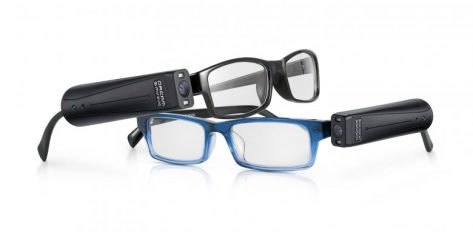
One of the assistive reading tools, the OrCam MyEye 2.0, a wearable scanner with text to speech was trialed by the client as a low vision tool for accessing print with text to speech. This wearable device was described by the client as “a game changer”, allowing her access to her hard copy textbooks, computer print, some environmental print as trialed. Further discussion about the OrCam’s capabilities such as facial recognition and barcode scanning astonished her with immediate identification of ways this device could support her independence throughout her daily life.

OrCam

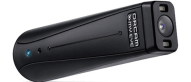
This new OrCam MyEye 2.0 is a small, discreet wearable computer that attaches to a glasses temple with magnets and offers gesture and  touch controls to activate scanning of text and barcodes to generate voice output. The scanning process is fast and amazingly accurate with a high quality text to speech voice.  As aforementioned, it can also be used for reading text on the computer,, reading restaurant menus as well as signage and articles, identifying colors, dollar bills as well as reading barcodes on goods at home and in the community. As the client almost instantly recognized, it’s functionality extends beyond just reading course textbooks.

For the client I was working with, of all products explored, the OrCam MyEye 2.0 was identified as the “game changer” that would support her academically but also aid her in many functional daily tasks. It’s discreet, mainstream appearance is also appealing for individuals who are concerned about how others may perceive them. .

The new OrCam MyEye 2.0 provides significant improvements when compared to the flagship model sold in 2016. The new OrCam MyEye 2.0 improvements offer:

  • Wireless model with battery life of 1-2 hours
  • My Eye 2.0 has been streamlined, now measuring approximately 2-3 inches in length with magnets used to easily attach the unit to glasses temple(s).
  • Size and positioning do not interfere with hearing aids or glasses frames.
  • Easy access controls on the exterior of the device (touch or tap) to activate scan and reading print.
  • My Eye 2.0 can now be positioned on the right or left side to accommodate handedness.
  • Improvements in facial recognition, product scanning, dollar bill identification make it easier to use.

Here is a video describing more of the OrCam MyEye 2.0

Where can you get the OrCam My Eyes 2.0 and receive training?

Check out the MyEyes 2.0 at Adaptive Technology Resources, a supplier with certified trainers!

As stated by the client, this wearable assistive technology tool is a “game changer” for some individual. Do you have clients who have used OrCam MyEye? It is an awesome product for the right client.

More for your OT, AT or LV Tool Kit!

Carol


Posted in Accessibility, Activities of Daily Living, Artificial Intelligence, Assistive Technology, Learning Disability, Life Skills, Low Vision/ Blindness, Uncategorized, Wearable technology | Tagged , , , , | Leave a comment

Fun with Math Apps — Tech it Issie

At the Beit Issie Shapiro School for Special Education, we are always looking for new ways to make the concepts and practice of math more relevant and engaging. Once a week, the occupational therapists and the teachers work together to use games and play to strengthen math concepts. We use many kinds of games including…

via Fun with Math Apps — Tech it Issie

Check out the recommended apps on Tech it Issie!

Carol

Posted in Apps for OT's, Math, Print Disabled, Uncategorized | Tagged , , | Leave a comment

Otter AI – Recording and Transcription Service & App

Otter AI icon

Otter AI

Note taking is a frequent concern of students transitioning to post secondary education. Keeping pace with lectures delivered at a fast pace, spelling, processing information and writing notes simultaneously are just a few of the barriers for students and professionals. Audio recording, as appropriate or permitted has been standard accommodation used by students to gather and review lecture information that might have been missed in class. For professional, note taking at meetings, lectures or with clients (as appropriate) are tasks that can be a challenge. From standard handheld voice recorders to smart pens, mobile device apps and computer based software there are many note taking solutions available for students and professionals currently for voice recording lectures.

Transcription Options 

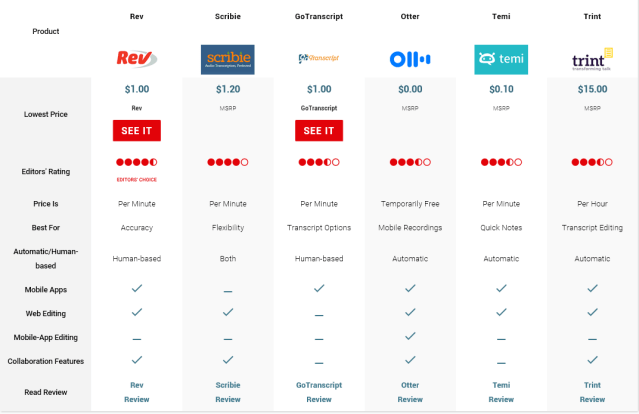
One question regarding note taking frequently presented by students involves capabilities of attaining transcribed notes. Inquiry on use of voice recognition software, transcription of hand written notes or audio is often a question. With exception of real time transcription for individuals with hearing impairment, mainstream transcription or recognition has been not been accurate enough unless pay for human transcription services with costs ranging from approximately $1.00/min and up are used. Higher quality transcription, for better accuracy result in higher cost. A recent review from PC Mag ” Best Transcription Services of 2018″ compares current transcription services:

transcription review PC 2018

Recent kick starters like the Titan Note (what happed to that 2 year old kickstarter ??)promising transcription of audio recording using a recording device with transcription, was hopeful as a mainstream automatic speech recognition and transcription service, however has not become a reality.  Recent development of the Otter AI service (see comparison above) now provides a mainstream tool for transcription of voice recording for a variety of purposes and users.

Otter AI Service & App

Otter AI is artificial intelligence development offering real time transcription of conversations, meetings, calls, video conferences, lectures or other voiced audio recordings. It provides automatic recognition using AI technology developed for transcription. With a user login, 600 transcription minutes are offered for free. A tiered monthly subscription dependent on amount of purchased is available. Six hundred minutes is a generous amount of free transcription!

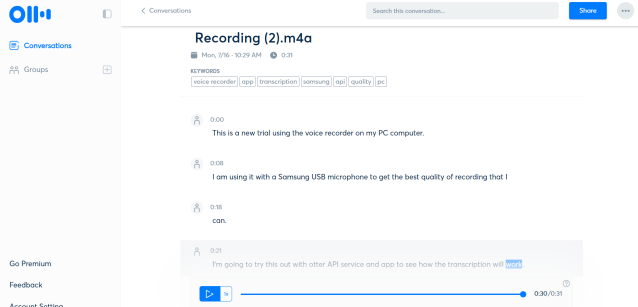
The online Otter user interface provides an easy to use service. Google Chrome is the preferred online browser for the service. Below is a screen shot of the online user interface and transcription of a short 30 second audio recording using my PC computer native voice recorder and USB mic:

Otter AI pic PC 4

The Otter Voice Notes broke the verbiage into chunks with timeline assigned. The audio recording is readily available at the bottom of the screen to listen to the real time audio to determine accuracy. When the audio is played, the text spoken is highlighted to help you track the sound and text. An edit and copy tool for the transcribed text is available to correct errors and save or copy the transcription. Audio files are easy to import into the services for transcription of audio recordings from mobile devices, handheld voice recorders or other audio files from computer programs. The interface and tools are extremely intuitive and simple, making it very easy to use.

Transcribed text can be shared with others for editing or distributing meeting or lecture word processed documents. Although transcription is not perfect, initial use has found it remarkably accurate with easy review using text and audio to correct errors.

Additional tools within Otter Voice Notes include recording group conversations and phone calls. Examples of such transcriptions seen in the mobile device apps:

Features at the bottom of the above images show tools to review voice notes taken, record, and share voice notes.  Settings allow you to connect with different accounts, record using Bluetooth and create your own user voiceprint (recognition).

My initial trial using the Otter AI app for iOS or Android Otter app and Otter AI service found it to be very promising. Using voice recordings from my PC voice recorder, other voice recording apps, recording in OneNote and exporting and importing from Sonocent Audio Notetaker were all successful with minimal errors. Although Otter can be used as a self standing audio recording and transcription tool, for students already using Echo Pen, Sonocent or OneNote, Otter can provide transcription of the audio with a few additional steps. For individuals with mild hearing impairment, Otter might provide an cost effective method for reviewing notes with assistance for editing to ensure accuracy. Otter may also provide notes for students taking online courses with video instruction or webinars for verbatim transcription.

Microphones

Recording quality audio with a good mic is important. There is a wide variety of high quality mics for PC as well as mobile devices with a wide range of costs. A 2018 review on best mics for voice recording can be found at Podcast Insights ranging from $1,000 to under $100.  After searching for an affordable and portable mic for PC or iPad Pro I recommend the following low cost, portable mics:

Samson Go Mic Portable USB -Approximately $40.00 from Amazon can be plugged into any USB port for omnidirectional recording. This will work for recording with Sonocent Audio Notetaker, OneNote or native PC recording app.

PowerDeWise mic for iPad Pro – Approximately $22.00 from Amazon. This omnidirectional mic with lapel clip was a great find and has worked will with my iPad Pro (2017). Mics used with older iPads did not work requiring search for a new one. This PowerDeWise works like a charm allowing recording using my iPhone,  iPad Pro as well as Galaxy S phone.

Conclusion

Otter AI online service and apps are exciting new tools that can assist both students and professionals with note taking transcription of recorded information. It’s flexible interface allows transcription of imported audio files as well as directly within the Otter app or online service. Web services are required for recording within the services or app and transcription. Using a good mic when recording will improve accuracy of transcribed audio. Otter AI offers free service up to 600 minutes/mo.

Use of a quality microphone is recommended for best audio recording for best transcription.

More information can be found at Otter AI regarding the service.

Have you had experience with the app? Share if you have!

Carol @ OT’s with Apps

Posted in Android, Assistive Technology, Digital Recording, iPad, iPhone, Learning Disability, Note Taking, Note Taking App, Transition, Writing | Tagged , , , , | Leave a comment

KNFB Reader App on Sale

KNFB Reader Sale – $59.99 until July 10, 2018.

KNFB Reader app icon

KNFB Reader App

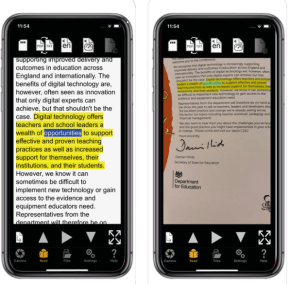
The KNFB Reader app is one of those staple apps for individuals with low vision or blindness and for some individuals with a learning disability. Its efficient and accurate scanning tool (however dependent on a good mobile device camera) offers single page OCR recognition with immediate text to speech and batch scanning to manage multiple pages. You can save files, import files and images for conversion to  text for use with text to speech and corrects the orientation when scanning to read the text. Available across platforms for iOS, Android and most recently Windows for smartphones or tablets, KNFB Reader app provides instant access to print in any situation.

New features to the KNFB Reader 3.0 app includes text to Braille and management of PDF and ePub documents. Developed by Sensotec nv, this tool has been around for a long time with continual innovation of portable access to print for individuals with disabilities.

KNFB Reader 3.0 app

Regularly priced at $99.99 (yes, expensive but worth it), the KNFB Reader app is on sale for $59.99 until July 10th. If this is not in your arsenal of apps and you work with individuals with print disabilities, you may want to spring for this while it is on sale. Although it goes on sale a couple of times per year, this is about as low cost as it gets.

Posted in Accessibility, Android, Apps for Special Needs, Assistive Technology, iOS, iPad, iPhone, Learning Disability, Low Vision/ Blindness, OCR, Reading, Windows | Tagged , , , | Leave a comment

MiniGuide US: Haptic Feedback Device for the Blind — The Assistive Technology Daily

The Assistive Technology Daily provides a review of a new guide for individuals with visual impairment or deaf/blindness.

MiniGuide US,  developed by the American Printing House for the Blind is a haptic feedback tools that uses ultrasound to detect objects during travel. Used in conjunction with standard methods of travel for individuals with visual impairment (cane, guide dog or a guide) it provides the use with vibration or auditory feedback.


https://player.vimeo.com/video/61563337

Miniguide US: A User’s Review Review by Ashlie McCrae The Miniguide US is a handheld device that registers with pulses and vibrations when it detects objects in its path. 2,105 more words

via MiniGuide US: Haptic Feedback Device for the Blind — The Assistive Technology Daily

H/T to The Assistive Technology Daily for their curation of all things AT!

OT’s with Apps

Posted in Accessibility, Assistive Technology, Low Vision/ Blindness, Vision, Wayfinding/GPS monitoring, Wearable technology | Leave a comment

Cyber Eyez M300 – smart glasses — Technology Options for Special Needs

The wearable technology options continue to expand providing more and more options for individuals with visual impairments. Check out the Cyber Eyez review as reposted from Technology for Special Needs.

Smartglasses or smart glasses are wearable computer glasses that provide additional information alongside to what the wearer sees (i.e. Wikipedia article). Most of manufactures that develop smart glasses focus on including features such as clear pictures, videos, music, light weight, long battery life, light level adjustments, styles, and have compatibility to run on multiple devices […]

via Cyber Eyez M300 – smart glasses — Technology Options for Special Needs

H/T to Technology Options for Special Needs

OT’s with Apps and Technology


Posted in Accessibility, Low Vision/ Blindness, Wearable technology | Leave a comment

iPad Mini Cases with Shoulder Straps

iPad case with strap 2

iPad Mini Cases with Straps

The recent post  “iPad Cases with Straps for iPad 9.7, iPad Pro and iPad 10.5” identified cases for the iPad 9.7 and 10.5 providing a method for clients to transport the iPad safely and hands free. The need again arose while working with the team of a recent client in a transition program which used an iPad Mini.  A new search for an iPad Mini protective case with a strap was needed.  Here are the options found for iPad Mini cases  with straps:

My Sense Buddy Case for iPad Mini 4. Protective iPad Mini case for kids. This protective case has cut out for attaching a shoulder strap. The case has a protective screen, stand and handle. Sells for $29.95 on Amazon at time of post.

Pure Sense Buddy iPad mini 4 case w strap

Cooper Trooper Case for iPad Mini 4 . This protective case also comes with cut outs on all corners for orientation in portrait or landscape. Cost is 19.95 (USD) on Amazon at time of post.

Cooper trooper case for iPad 9.7 2017 model

BRAECN 360 protective case for iPad Mini 4  . Offers cutout for attachment of an adjustable strap in portrait and landscape orientation. Stand and hand strap provided in the case. Amazon cost is 19.99 (USD) at time of blog post.

Braecn 360 iPad Mini 4

Cellular360 case with strap for iPad Mini 4 – Protective case with handstrap and shoulder strap for iPad Mini 4. Available in a variety of colors. Amazon cost is $16.99 at time of post.

Cellular360 iPad mini 4 case w strap

RJ Cooper’s iPad Ultimate II case – for iPad Pro’s, iPad 9.7 and iPad Mini provides a protective leather case with strap.

pink-mini-carry-case-front iPad mini

rooCase breakaway strap for LifeProof iPad Mini 4 case (strap only). This break away shoulder strap can be applied to the Life Proof Nuud iPad Mini 4 case. Cost of break away strap is $19.99 (USD) on Amazon.com. Purchase of case is separate.

roocase break away strap for ipad case

rooCase sleeve with breakaway strap for Otterbox Defender case for iPad Mini 4  is also available for 29.99 on Amazon. Requires separate purchase of Otterbox case.

roocase ulity sleeve for Otter box

For clients involved with transition programming, an iPad Mini often becomes the preferred device due to its easy access and viewing of contents while offering portability.

What do your clients use?

More for your OT eTool Kit.

Carol from OT’s with Apps

Posted in Accessories, iPad, iPhone, Transition | Tagged , , , | Leave a comment

Survey Says! Assistive Technology Writing Supports for Handwriting and Writing — AT and OT: Assistive Technology for OTs

As an occupational therapist (OT) that has certification in assistive technology (AT) from the Rehabilitation Engineering and Assistive Technology Society of North America (RESNA), I compiled a survey in preparation for a national AT conference in 2017. I developed a 10-question survey to determine the current use of writing supports by professionals working with children […]

via Survey Says! Assistive Technology Writing Supports for Handwriting and Writing — AT and OT: Assistive Technology for OTs

Thanks to Molly Shannon for sharing her survey information about assistive writing supports. Interesting information!

Carol

Posted in Uncategorized | Leave a comment

iPad Cases with Straps for iPad 9.7, iPad Pro 9.7 and iPad 10.5

iPad case with strap

Looking for case with a strap for your student or client’s iPad?

Past searches for iPad cases with attachable shoulder straps provided limited choices in my experience. A recent search for a cases with strap options for clients using iPad for communication or access to organization, text or object recognition tools found a few more options for current tablets. It is exciting to have such choices available, as long as you match your device with the correct case!

Here are some cases with attachable shoulder straps currently available for the iPad Pro 9.7, iPad, iPad 9.7 (2017 edition) and iPad 10.5. Make sure you know what iPad you have for appropriate fit of the case and ports.  The back of you iPad offers you your model number in the small print below “iPad” label. A recent Livewire post dated 9/28/2017 also provides a nice list and info on iPad model numbers. Here’s a quick list of current iPad model numbers to help determine if the case will fit your device:

  • iPad 10.7 Pro 2017 model number (Wi-Fi model) : A1701
  • Pad 2017 model number (Wi-Fi model) : A1822
  • iPad Pro 9.7 model number (Wi-Fi model: A1673

Some cases available for current iPads:

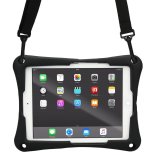
TopEsct iPad Air 2 and iPad Pro 9.7 (2017 edition) case for kids. The TopEsct iPad protective case comes in a variety of bright colors with cutout for attaching a shoulder strap. The case has a protective screen, stand and handle. Sells for 19.99 on Amazon at time of post.

TopEcst case 2017

SEYMAC case for iPad 9.7 (2017 edition) and iPad Pro 9.7. This case has a stand and removable shoulder strap. The protective case comes in a variety of colors. Sells for 20.99 on Amazon at time of blog post.

SEYMAC ipad case with shoulder strap

Cooper Trooper Case for iPad 9.7 (2017 edition). This protective case also comes with cut outs on all corners for orientation in portrait or landscape. Cost is 19.95 plus shipping on Amazon at time of post.

Cooper trooper case for iPad 9.7 2017 model

BRAECN 360 protective case for iPad 10.5  and iPad 9.7. Offers cutout for attachment of adjustable strap in portrait and landscape orientation. Stand and hand strap provided in the case. Cost is 23.99 at time of blog post.

Braecn 360 case 10.5 iPad

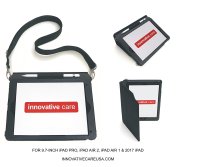
Innovative Care case with strap for iPad 9.7 (2017 edition). This case offers a cover and attachable shoulder strap. Offered by Innovative Care on Amazon, cost is approximately $60 plus shipping.

Innovative care 9.7 case with strap

RJ Cooper’s iPad Ultimate II case – for iPad Pro’s, iPad 9.7 and iPad Mini provides a protective case with strap.

RJ Cooper iPad ultimate 2 case pic

rooCase breakaway strap for LifeProof iPad Pro 9.7 case (strap only). This break away shoulder strap can be applied to the Life Proof Nuud iPad Pro 9.7 case. Check iPad model and case model to ensure the correct case for your iPad. Cost of break away strap is 29.99 on Amazon.com. Purchase of case is separate.

roocase break away strap for ipad case

rooCase sleeve with breakaway strap for Otterbox Defender case for iPad 10.5  and iPad 9.7 is also available for 29.99 on Amazon. Requires separate purchase of Otterbox case.

roocase ulity sleeve for Otter box

Many of the above manufacturers may also make a case for the latest iPad Mini 4. A search of the above brand names + iPad Mini should provide that information.

What mobile device cases have you found useful for clients or student?

More for your OT eTool Kit!

Carol

Posted in Accessories, Assistive Technology, iPad, iPad Management, iPod/iPad Accessory, Mobile Device Use | Tagged , , | Leave a comment