The Assistive Technology Daily provides a review of a new guide for individuals with visual impairment or deaf/blindness.
MiniGuide US, developed by the American Printing House for the Blind is a haptic feedback tools that uses ultrasound to detect objects during travel. Used in conjunction with standard methods of travel for individuals with visual impairment (cane, guide dog or a guide) it provides the use with vibration or auditory feedback.
Miniguide US: A User’s Review Review by Ashlie McCrae The Miniguide US is a handheld device that registers with pulses and vibrations when it detects objects in its path. 2,105 more words
The wearable technology options continue to expand providing more and more options for individuals with visual impairments. Check out the Cyber Eyez review as reposted from Technology for Special Needs.
Smartglasses or smart glasses are wearable computer glasses that provide additional information alongside to what the wearer sees (i.e. Wikipedia article). Most of manufactures that develop smart glasses focus on including features such as clear pictures, videos, music, light weight, long battery life, light level adjustments, styles, and have compatibility to run on multiple devices […]
The recent post “iPad Cases with Straps for iPad 9.7, iPad Pro and iPad 10.5” identified cases for the iPad 9.7 and 10.5 providing a method for clients to transport the iPad safely and hands free. The need again arose while working with the team of a recent client in a transition program which used an iPad Mini. A new search for an iPad Mini protective case with a strap was needed. Here are the options found for iPad Mini cases with straps:
My Sense Buddy Case for iPad Mini 4. Protective iPad Mini case for kids. This protective case has cut out for attaching a shoulder strap. The case has a protective screen, stand and handle. Sells for $29.95 on Amazon at time of post.
Cooper Trooper Case for iPad Mini 4 . This protective case also comes with cut outs on all corners for orientation in portrait or landscape. Cost is 19.95 (USD) on Amazon at time of post.
BRAECN 360 protective case for iPad Mini 4 . Offers cutout for attachment of an adjustable strap in portrait and landscape orientation. Stand and hand strap provided in the case. Amazon cost is 19.99 (USD) at time of blog post.
Cellular360 case with strap for iPad Mini 4 – Protective case with handstrap and shoulder strap for iPad Mini 4. Available in a variety of colors. Amazon cost is $16.99 at time of post.
rooCase breakaway strap for LifeProof iPad Mini 4 case (strap only). This break away shoulder strap can be applied to the Life Proof Nuud iPad Mini 4 case. Cost of break away strap is $19.99 (USD) on Amazon.com. Purchase of case is separate.
For clients involved with transition programming, an iPad Mini often becomes the preferred device due to its easy access and viewing of contents while offering portability.
Looking for case with a strap for your student or client’s iPad?
Past searches for iPad cases with attachable shoulder straps provided limited choices in my experience. A recent search for a cases with strap options for clients using iPad for communication or access to organization, text or object recognition tools found a few more options for current tablets. It is exciting to have such choices available, as long as you match your device with the correct case!
Here are some cases with attachable shoulder straps currently available for the iPad Pro 9.7, iPad, iPad 9.7 (2017 edition) and iPad 10.5. Make sure you know what iPad you have for appropriate fit of the case and ports. The back of you iPad offers you your model number in the small print below “iPad” label. A recent Livewire post dated 9/28/2017 also provides a nice list and info on iPad model numbers. Here’s a quick list of current iPad model numbers to help determine if the case will fit your device:
iPad 10.7 Pro 2017 model number (Wi-Fi model) : A1701
Pad 2017 model number (Wi-Fi model) : A1822
iPad Pro 9.7 model number (Wi-Fi model: A1673
Some cases available for current iPads:
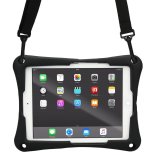
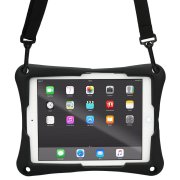
TopEsct iPad Air 2 and iPad Pro 9.7 (2017 edition) case for kids. The TopEsct iPad protective case comes in a variety of bright colors with cutout for attaching a shoulder strap. The case has a protective screen, stand and handle. Sells for 19.99 on Amazon at time of post.
SEYMAC case for iPad 9.7 (2017 edition) and iPad Pro 9.7. This case has a stand and removable shoulder strap. The protective case comes in a variety of colors. Sells for 20.99 on Amazon at time of blog post.
Cooper Trooper Case for iPad 9.7 (2017 edition). This protective case also comes with cut outs on all corners for orientation in portrait or landscape. Cost is 19.95 plus shipping on Amazon at time of post.
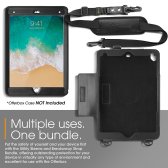
BRAECN 360 protective case for iPad 10.5 and iPad 9.7. Offers cutout for attachment of adjustable strap in portrait and landscape orientation. Stand and hand strap provided in the case. Cost is 23.99 at time of blog post.
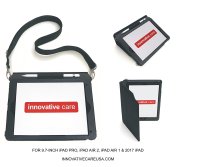
Innovative Care case with strap for iPad 9.7 (2017 edition). This case offers a cover and attachable shoulder strap. Offered by Innovative Care on Amazon, cost is approximately $60 plus shipping.
rooCase breakaway strap for LifeProof iPad Pro 9.7 case (strap only). This break away shoulder strap can be applied to the Life Proof Nuud iPad Pro 9.7 case. Check iPad model and case model to ensure the correct case for your iPad. Cost of break away strap is 29.99 on Amazon.com. Purchase of case is separate.
Many of the above manufacturers may also make a case for the latest iPad Mini 4. A search of the above brand names + iPad Mini should provide that information.
What mobile device cases have you found useful for clients or student?
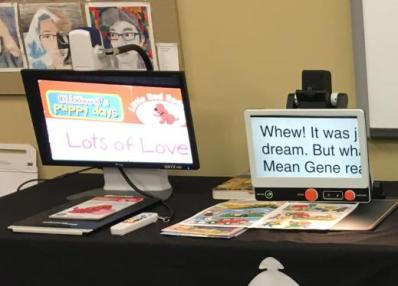
In the school system, selection of video magnifiers are typically reserved to the Teachers of the Visually Impaired. Their expertise on the needs of the student, core curriculum and expanded core curriculum tasks make them best suited to select the AT that support students.
In the community, employment and post secondary education, assistive technology specialists and occupational therapists might be involved in selection of technology to support individuals with visual impairment. Staying abreast of assistive technology can be a challenge with all the options available. One, of many online resources, is Perkin’s School for the Blind e-Learning, offering courses and blog posts of current assistive technology options for students with low vision and blindness.
The January Paths to Technology Blog shares helpful information in their post ” Choosing the Appropriate Video Magnifier“. Their blog post discusses different types of video magnifiers categorized by features and tasks. Also included in the blog post, is a list of Common Video Magnifier Model which synthesizes basic features and the purpose of each device to assist with identifying appropriate devices. As an ATP and recent CATIS, I find such feature match lists invaluable, offering assistance with winnowing down choices when making decisions between AT devices.
If you service students with low vision or blindness or need information about technology for students or individuals with visual impairment, be sure to check out Perkin’s e-Learning resources. Even if you are not choosing the AT for your students with visual impairment, there are wonderful resources in their online resources.
H/T to Perkin’s e-Learning for their great, free resources.
Great maintenance tips for the end of the year! Add to you end of the year resolutions!
This week, I’m sharing three holiday activities that will get your computers, technology, and social media ready for the new year. Here’s what you’ll get: Update Your Online Presence Backup and Image your computer 19 Ways to Speed Up Your Computer A note: The links won’t work until the articles publish! Today: 19 Steps to a Speedier…
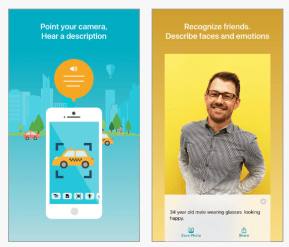
The Seeing AI iOS app (free) developed by Microsoft brought a variety of object recognition tools to mobile devices. The first version offered text and object recognition via text to speech. Although not perfect, the Seeing AI app provides remarkable accuracy for general object recognition (use for medical purposes or for tasks reliant on personal safety is not recommended). Recent updates in Seeing AI version 2.0.1 now includes the following additional object recognition tools:
Currency (US, Canadian, British Pounds, Euros).
Light – Detections of how much light is in the environment
Color Recognition
Handwriting – Recognizing handwritten text
Other features in the recent 2.0.1 update include:
Documents are read aloud with highlighting without use of VoiceOver (VO)
Tools selected are spoke aloud
Adjust voice type and rate without use of VO
Allows choice of what tools are assigned 3D touch recognition
Recognizes images in other apps using “recognize images” in mail, Twitter, photos
The changes not only provide additional tools for object recognition but provide instant access to text without turn VO on. Although VO is an extremely helpful tool, managing its verbosity and turning it on and off can be difficult for some individuals.
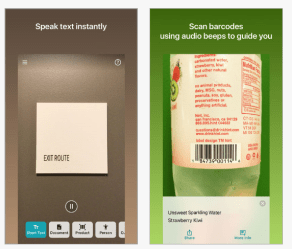
Short text – reads short text as soon as it is in front of the camera
Document – Provides audio guidance to capture a document and read the text
Scans barcodes – Read contents aloud using bar codes (name and product information)
People – Scans peoples faces, gives then an estimate of gender, age and emotion
Scene- Provides an overview of the scene captured
Currency – Identifies currency note
Color – Identifies color
Handwriting – Recognizes handwriting like in greeting cards
Light – Detects the amount of light in the environment. Provides audible tone relative to the amount of light
Images in other apps – Tap “Share” and Recognize with Seeing AI” to describe images from Mail, Photos, Twitter and more
Seeing AI app has been upgraded multiple times in the past months with remarkable new, promising features for individuals with visual, learning or cognitive disabilities. Providing instant text, object recognition and product information is a boon for not only individuals with visual impairment, but also those clients with a significant reading disability or a cognitive disability who just can not crack the code of reading. print For individuals such as some students with autism or those with visual impairment, facial recognition may help them navigate social situations. It is exciting to see the outcomes of these new development projects offered in ubiquitous apps (much less free) that have direct application to improving functional capabilities of individuals with disabilities!
If you haven’t checked it out, here is a link to more information about each of the features: https://www.microsoft.com/en-us/seeing-ai/ . This app is only available for iOS (iPhone/iPad).
So many tools are getting smarter and more functional – offering you more for your OT eToolkit!
TRiLOC GPS Monitoring Safetracks offers a reliable GPS Personal Monitoring Device which is ideal for communicating and locating those with living with Alzheimer’s/Dementia, Autism, those suffering from PTSD, Lone Workers and other high-risk applications. Key Features: SOS button Fall detection Up to 1-minute location updates PING for updated location 2G/3G/4G connection variable reporting…
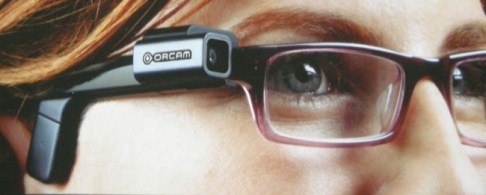
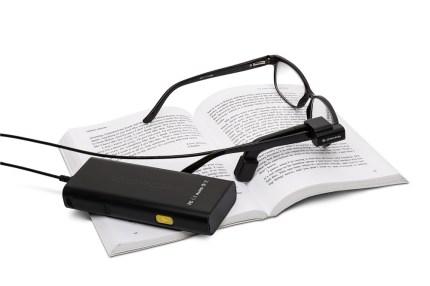
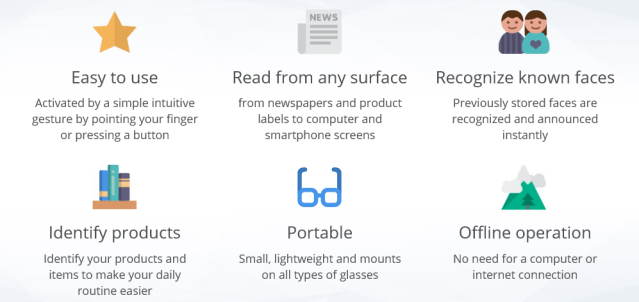
Advances in optical character recognition (OCR), object recognition, artificial intelligence and computer vision has resulted in remarkable, new products to aid individuals with visual impairments. One such new device, the OrCam, provides a variety of features allowing OCR and recognition of print and environmental text, product recognition, money recognition as well as facial recognition. Once recognition is completed, the processor speaks the information aloud using its small speaker located in the device which attaches to the temple of a glasses frame. It’s ease of use, fast processing and accuracy makes this device a functional, electronic scanning/recognition device for many tasks and environments.
The OrCam is a small camera that mounts to the frame of glasses. Hardwired connection to a handheld processor, the camera is able to read text at a distance or close using gestures or with operation of a few buttons on the handheld processor.
OrCam My Eyes functions, as described on OrCam’s website include:
The OrCam comes in two versions, a basic OrCam My Reader that performs OCR and OrCam My Eyes offering OCR with other recognition capabilities (money, products, time, facial recognition).
Trial using the OrCam found good accuracy with reading textbook information, reading environmental print in signs and posters good (with exception of some word art) with good ability to recognize products. As indicated in its features, it requires connection to the small handheld processor but no Internet connection, allowing its use virtually anywhere. The battery is stated to last a day and offers a sleep mode when not in use to conserve battery level. Voice quality is also good, with clear speech and easy to access volume control. Discussion with an OrCam certified trainer indicated that it also works well with clients who have hearing aids.
Here is a YouTube video from the Blind Life with an overview of the OrCam device with MyEyes:
Reviews and trial using the OrCam finds it is a remarkable device offering recognition of text, products, faces and environmental text. It continues to be updated for additional features and improvements with its operation. Trial found it fast, accurate and easy to use following training and application of gestures and understanding the features available. Although created for individuals with vision loss, this might also be a solution for some individuals with dyslexia or other significant reading challenges but good motor and problem solving abilities.
Where can you get the OrCam or a demo? In the Midwest, contact Adaptive Technology Resources , Grafton, WI (ATR; ph.: 800-770-8474), a supplier of the device with certified OrCam trainers. You can also respond or contact me through this blog for more information on the OrCam.
More for your OT or AT eTool Kit!
Carol Leynse Harpold, MS, OTR/L, ATP, CATIS
OT’s with Apps and Technology
Virtual on-screen keyboard for any taste Replace Windows On-Screen Keyboard with Hot Virtual Keyboard and start typing like a pro in just minutes! Hot Virtual Keyboard packs a number of advanced features to make on-screen typing faster, easier and more accurate. Make full use of your touch-screen PC (Tablet PC, UMPC, Panel PC, Car PC, Touchmonitor, Kiosk) or type…













 OT's with Apps & Technology