Here are a few apps that provide some preschool educational or mobile app touch learning with a holiday theme. Certainly there are more, however these are currently free (time line for free is unknown…). Whether for learning shapes, focused attention, language or motivation, these apps might be considered for your eTool Kit if you are working with preschool children.
Tiggly Christmas app (free; iOS) has a Christmas theme while working on shape recognition. Can be used with or without the Tiggly Shapes.
Bogga Christmas Tree app (free; iOS and .99 for Android ) presents a Christmas tree to decorate suited to young children
A client recently evaluated for his assistive technology needs required access to an AAC app to augment his communication using one hand and arm due to motor impairment of his non-dominant arm. The client has gross movements of their non-dominant hand and arm allowing functional positioning of that arm to his dominant hand and arm for visual and physical access, however a method of stable positioning was needed for use with his dominant hand and arm. An armband/wrist band was sought as a solution for a smartphone identified as the device to support the AAC app selected to support his communication needs. The evaluation was performed by this ATP specialist along with an SLP specializing in ACC due to the clients multiple needs of communication and computer access.
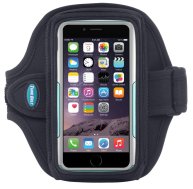
Thanks to the research by the speech and language pathologist, the following Tunebelt arm band, available for iPhone 6 plus and iPhone 6, was identified which manages the iPhone and accommodates a variety of protective cases frequently applied to the iPhone:
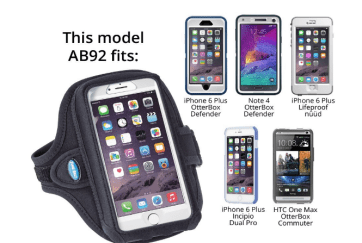
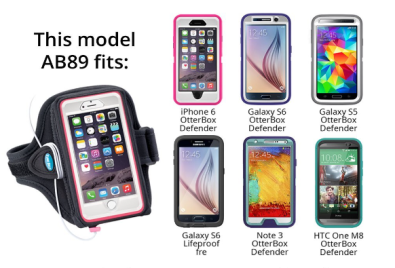
This Tunebelt arm band is available for iPhone 6 and iPhone 6 Plus as well as a wide variety of other smartphones and models. As advertised, the arm band also accommodates a variety of cases applied to iPhone 6 or 6 Plus accommodating protective cases often applied to these smart phones (Otterbox, LifeProof, etc.) as seen below.
Although lanyards and holders can be used for managing small, handheld devices with AAC devices (such as iPhone, iPods, Android phones) who have use of two hands. For those using one hand and some movement with their non-dominant arm, a wrist band can allow easy access to their communication. An extension strap is also available for the armband that could allow accommodations for coats or those with large builds.
Other solutions previously explored including lanyard options can be found at:
It’s easy to think of commuting as a total waste of time. When you’re standing on the train platform or waiting at a traffic light, every minute that ticks by can seem like a minute los…
Reblogged from Steve Johnson’s website post, 15 Easy Ways to Make Your Commute More Productive , there are productivity apps and tips for everyone, even if you don’t commute. On days when I am evaluating AT needs for clients, I can spend hours in the car. Although I find it takes some organization before the trip to access these resources safely by voice, it can make the time productive while stuck in the car. Steve shares familiar and new apps that can aid with productivity.
Thank you to Steve Johnson for these productivity tips.
Luis Perez describes the features and function of the Amazon Echo and Dot as an accessibility support. Read his post Amazon Echo as an Accessibility Support for a thorough review on features he uses for access on the Amazon Dot and Amazon Echo devices using voice recognition and how he uses the Amazon Dot with Proloquo AAC app with a mobile device.
Amazon describes the Echo as a hands-free, voice-controlled device that uses Alexa (Amazon’s answer to Siri, Cortana and other voice assistants) to play music, control smart home devices, provide information, read the news, set alarms, and more. I had been wanting to try the Echo since its launch, but I was just not willing to pay the $180 for […]
Book Creator for iPad recently added a new Read to Me text to speech feature that allows learners to hear their books read aloud within the app (without having to transfer the book to iBooks first). The feature also supports accessibility in two other ways: all embedded media can be played automatically. This
Luis Perez provides expert information on accessibility on his Website of Luis Perez. If you are seeking accessibility information, make sure you peruse his up to date information shared on his website.
Thank you to Luis for sharing his expertise with the AT community!
Wenyao Xu, left, an assistant professor of computer science and engineering at the University at Buffalo, and undergraduate Kun Woo Cho show a smartphone with the autism screening app they are developing. The purple areas show where the child’s eye is gazing. (Douglas Levere/University at Buffalo) A smartphone app could dramatically speed up the…
Scanning pens with text to speech and dictionary support have been around for quite sometime. The first pens I used were the Quicktionary Pens probably about 10 years ago as a handheld reading tool. Although they scanned and read text aloud, they worked best for individuals with good fine motor control and patience for scanning hard copy text, listening to the line of print scanned as well as scanning single words and definitions for individuals with reading challenges. Starting the scan at the right place, scanning a line of text and stopping the scan to capture a whole line took practice, patience and the right size print. Having trialed them with a number of clients, a few really liked them, but they required persistence with use.
The Wizcom pen, more recently purchased, I found to be an improved scanning pen, however it continued to require accuracy with placement of the scanning head and alignment of the pen with line scanned for accurate recognition. Limitations with size of text and accuracy of recognition was improved but still required patience with use.
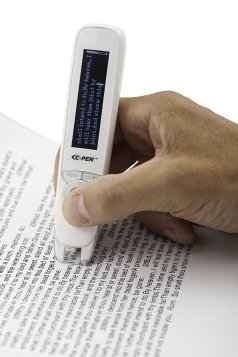
The C-Pen Reader Pen is a new scanning pen developed by Scanning Pens LTD now available in the US. A recent purchase of the pen found it easy to use, fast and accurate. Trial on a variety of font sizes from dense 10 point textbook print to newspaper ads to worksheet print at 12-15 point found it accurate with all print trial. A light turns on when scanning assisting with guiding the user with text being scanned. Placement for starting and stopping a scan captured all of the print without missed words or letters. Only when I tried to scan very fast with less control did inaccuracies result. I was also able to scan line after line quite quickly, resulting in it reading one line at a time in succession. Controls on the pen also allows the user to move the cursor to prior lines of text to review and use text to speech to read additional lines of scanned text.
Below is a short video of use of the C-Pen Reader showing its ease of use and features:
OLED 256*64
CPU 600MHz
Memory – 4GB (OS 1G, User 3G)
Earphone 3.5mm
Battery 1,200mAh
Scan Font Size Range 6.5 – 22 pt
Electronic Dictionaries – Collin English 30th Anniversary Dictionary 10th Edition (156,120 words) & Oxford Spanish>English>Spanish Dictionary
Certifications CE RoHS FCC
Size Dimensions: 135*33*19mm Weight: 50g
USB – USB 2.0 High speed / Micro USB
Extracted Content – Extracted text saved as a .txt file
File System – FAT\FAT32\NTFS
Menu Languages – English
The C-Pen Reader Pen comes with a micro USB charging cord, earbuds and a case. It is small, making it easily portable for use in a variety of environments. Although targeted for individuals with sight, it can be used on text that has been highlighted (worked on yellow, pink and orange highlighted text accurately using highlighting pens) by individuals with low vision.
My initial trials found this pen to be highly accurate scanning and reading medical (OT textbook) and news correctly with text to speech output. Fast and easy to use, I would again consider recommending use of this new model C-Pen Reading pen for spot reading for individuals with decoding challenges.
The pen is available at Amazon.com for $262.50 + 10.00 shipping. Although a bit pricey, its accuracy and ease of use makes it a portable reading assistive tool for individuals with learning disabilities.
The C-Pen also comes in a C-Pen Exam Reader pen, with the same scanning and text to speech tools but without the dictionary and file saving option also for $262.50.
Have you used the C-Pen Reading pen? What has your experience been with its use?
Easy Push Wheelchair Pushing a standard manual wheelchair can be tough, but with the IntelliWheels Easy Push, pushing instantly becomes twice as easy. The IntelliWheels Easy Push uses simple gears in each wheel to make it significantly easier to push forwards, backwards, around corners, and over any surface. No Motors or Batteries You will never…
There are many continuing education opportunities available for OT’s with many online opportunities. Several months ago I subscribed to Occupational Therapy.com for an annual fee of $99. The continuing education and have had positive experiences with the courses enrolled. As I continue to work as an Occupational Therapist and ATP, I have found relevant courses in both areas of which I work.
Occupational Therapy.com offers online courses, webinars in slide presentations and also text and audio format. Handouts supplement each presentation format. I especially enjoy the audio format, uploading podcasts and listening while traveling. I have the opportunity to review or re-listen to the presentations in either format. CEU’s are earned after participating in the course, webinar, text or podcast and taking a test.
There is a wide selection of topics and media choices. I have enjoyed learning on demand at Occupational Therapy.com when time allows or I want or need background on a topic. Occupational Therapy.com also stores all my transcripts in my user account!
Certainly there are other web based continuing education opportunities. Occupational Therapy.com has been a positive, low cost solution. I will be ready with my needed CEU’s come 2017 when my credentialing licenses are due!
What online OT continuing education do you recommend?
KMINA Crutch Surprisingly, something as necessary as crutches have barely evolved over time. Beyond the inclusion of bandages or padded handgrips, no significant changes have been made since ancient Egyptians. KMINA has developed a new crutch concept in order to improve the mobility and quality of life of users. This new crutch reduces pain in…
Thanks to The Assistive Technology Daily for their constant stream of new AT equipment from low to high tech! Their post on the KMINA Crutch shares a new type of augmented mobility device. Augmented mobility, or devices that assist or augment ambulation was a new term learned from an online webinar by Michelle Lange, ATP/SMS specialist. Check out is new AM technology at the AT Daily blog!

 Tiggly Christmas app (free; iOS) has a Christmas theme while working on shape recognition. Can be used with or without the Tiggly Shapes.








 OT's with Apps & Technology