
Top 75 OT Blog Winner

-
Recent Posts
OT’s with Apps Pages
- About Me
- OT Apps by Area of Occupational Performance (10-2015)
- OT’s with Apps Blog
- OT’s with Apps Equipment List
- OT’s with Apps eTool Kit Lists
- App by Occupational Performance (updated 10- 2015)
- Online Keyboarding Resources for Kids through Adults
- OT Admin Apps List
- OT’s w Apps List for Middle School thru Adults with Disabilities 10-2013
- OT’s with Apps – Handwriting App List
- OT’s with Apps List 10-2015 Updated
- OT’s with Apps Visual Motor Integration App List
- OT’s with Apps Writing Apps for Special Needs
- Visual Tracking / Motor Coordination Apps List
-
Join 1,257 other subscribers
Twitter
Tweets by csleynseOTs with Apps
- AAC
- Accessibility
- accessories
- Activities of Daily Living
- Android
- App Review
- App Review sites
- apps
- apps for fine motor
- apps for visual perception
- Assistive Technology
- Autism
- cases
- cleaner for iPad
- Communication
- data collection
- Drawing
- Early Childhood
- Echo Pen
- education
- Ergonomics
- fine motor
- Fine motor apps
- Games
- Handwriting
- iADL
- iOS
- iOS accessibility
- iPad
- iPad accessories
- iPad apps
- iPhone
- iPod
- iPod/iPad Management
- iPod apps
- Keyboarding
- Learning Disability
- Low Vision
- Low Vision/ Blindness
- math
- Medical
- Memory
- Mental Health
- Mobility Impaired
- Note taking
- Object Recognition
- occupational therapy
- OCR
- Organization
- OT Apps
- photo editing
- pre-writing
- Reading
- Rehabilitation
- Scanning
- Self-regulation
- Self Care
- Sensory Apps
- Social Skills
- special education
- special needs students
- spelling
- story telling
- Stylus
- Text to Speech
- Vision
- visual communication
- Visual Impairment
- Visual motor apps
- Visual Perception
- Voice Recognition
- Voice recording
- Word Prediction
- Writing
Categories
Author Archives: Carol Leynse Harpold, MS, OTR/L, SCLV, ATP, CATIS

App Gone Free – Spiffy Photo Editor
Spiffy Photo Editor app (iPhone/iPad; .99), a photo editing app is currently free. Although not a huge savings, if you are in need of an app to do some photo editing if creating or modifying a book or story for … Continue reading
Posted in Android, App Reviews, Apps for OT's, iPad, iPhone, iPod, Occupational Therapy, Photo, Photo Editing, Utility
Tagged Android, App Review, iPad, iPhone, iPod, occupational therapy, photo editing, Utility
Leave a comment
Dexteria Dots 2 – Fine Motor Skills and Math Concepts
Dexteria Dots 2 App Review from Teachers with Apps (As Scooped from: Dexteria Dots 2 – Fine Motor Skills and Math Concepts ) Binary Labs is known for quality educational apps, and Dexteria Dots 2 readily joins the ranks with exceptional content … Continue reading
Tablift Stand for Tablets (iPads, Nexus, Dell Venue 8 and more) – Very Cool!
The folks at nbryte generously provided me with a brand spanking new Tablift Stand . Working with a wide variety of clients requires solutions for many different environments. Stands for students tend to be table or desk surfaces whereby stands for adults … Continue reading
OT’s with Apps for School Based Therapist- August 11 & 12
What’s in your OT mTool Kit? Interested in functional ways to use your iPad as a tool in OT? Manage your iPad and student iPad for safety and focused use? Review apps for school based occupational performance using feature matching (handouts)? Explore apps … Continue reading
CyberChase Shape Quest App – A PBS Kids VR Perceptual Motor App
CyberChase Shape Quest free app developed by PBS Kids app for iPad and Android tablets providing a virtual reality games for ages 6-9. The app provides three games using geometry and spatial reasoning improve their problem solving skills. It is highly interactive, … Continue reading
OT’s in Pediatric Practice – Take This Survey…
Are you an OT practitioner working in a pediatric practice setting? Master’s students from Misericordia University are doing a research project on the use of mobile apps by occupational therapists in pediatric practice settings. Help them out by completing the … Continue reading
AZTAP Google App Attack! Symbaloo

I really like Symbaloo! A place where you can organize and share your favorite websites. How do you like Symbaloo?
Source: www.symbaloo.com
As scooped on Scoopit from http://www.symbaloo.com/mix/aztapgoogleappattack?searched=true
Fabulous collaborative work of Aaron Marsters and Mary Keeney from AZTAP. A Symbaloo focused on Google Apps and Chrome as AT. What a great resource!
Thank you to Aaron Marsters and Mary Keeney for all their work!!
Carol from OT’s with Apps and Technology
Posted in Assistive Technology, Google, Google Chrome, Scoop.it
Leave a comment
Dyslexia font: Experience the ease of reading – Dyslexie font – The Assistive Technology Daily

The Dyslexia font makes reading easy and enjoyable for people with dyslexia. Experience the ease of reading and try the test now.
Source: attraining.org
So, what’s the big deal with Dyslexie font??? Assistive Technology Daily shares the information and links to understand more about the reasons and research backing the use of Dyslexie font. If you work with individuals with Dyslexia or learning disability you might want to consider this font option.
Carol – OT’s with Apps and Technology
Posted in Scoop.it
Leave a comment
Weekend Websites: 31 Keyboarding Websites
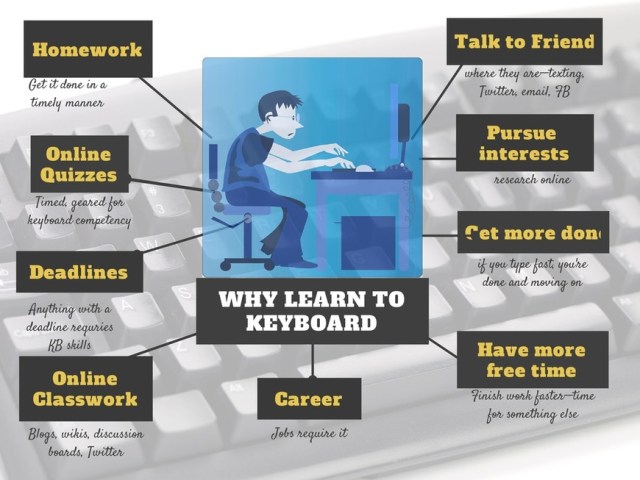
If summer is when your children are absolutely positively going to catch up on keyboarding, here’s a list of 32 keyboarding websites for all ages (be sure to view the full post–I have a free poste…
Source: askatechteacher.com
It is mid-summer, halfway to the start of another school year. Oh and remember all those recommendations made about working on keyboarding?
Jacqui Murray, from Ask a Teacher.com, nails it with "summer is when your children are absolutely going to catch up on keyboarding skills" – time to dig into her list of 32 keyboarding websites!
Over the years I have discussed keyboarding practice with many parents. One suggestion I often made was to use different keyboarding programs to keep the skill and drill novel. Hmm…, think 32 potential keyboarding options provides enough novelty???
And don’t you just love her infographic ??
Thank you to Jacqui for all your resources!
Carol from OT’s with Apps and Technology
Posted in Keyboarding, Scoop.it
2 Comments
Visual Perceptual Apps for Preschool and Primary Students
The iPad is a great tool for providing supplementary visual perceptual and visual motor therapy or home programming activities. Features of the iPad can allow verbal feedback on performance, language reinforcement and options of graded activity levels to the user depending … Continue reading

