Autism Tracker Pro App for Data Collecting

Need to collect data on your students or clients behaviors ? Tired of filling out forms and tallying the data?

Is there an app for that? (Of course…)

Touch Autism website  as well as their Autism Apps  app lists at least two dozen apps available for data collection in a wide range of costs and measures. Yet, finding a data collection app that is easy to use, customizable and fits your assessment needs can be tricky. Important features that support data collection may include:

  • Ability to enter one or multiple ratings in a day
  • Provide different scales or ratings suited to the skill or behavior being assessed
  • Allow anecdotal note taking
  • Easy entry of data
  • Ability to gather and enter data over different time periods
  • Summarize totals, averages, ranges of skills or behaviors over a select period of time
  • Allow the ability to transfer the data to other sources for sharing, compiling or archiving
  • Have a method of security to protect sensitive or private data

Autism Tracker Pro is one app chosen to perform data tracking for specific students behaviors due to the features provided to collect data as desire by the above list. Made by the developer of Track & Share, it is available in a Lite version for iPad and iPod touch and the Pro version ($9.99). It has taken some work to learn and to utilize but has provided a method of data gathering of behavioral information helpful in determining when interventions might be necessary or if they are working. Staff has been positive with using it given time and assistance with setting the app up for specific student needs.

Here are some of the features of Autism Tracker Pro app:

The main screen shows the menu tools of Categories, Graphing, Tracking, Sharing and More.

The app allows you to create your own categories (Mood) for a user and items within a category (Mood, Stress, Activity Level, Weather). The calendar (right) provides a quick access to daily tracking and entry of assessment data on each of the items listed.
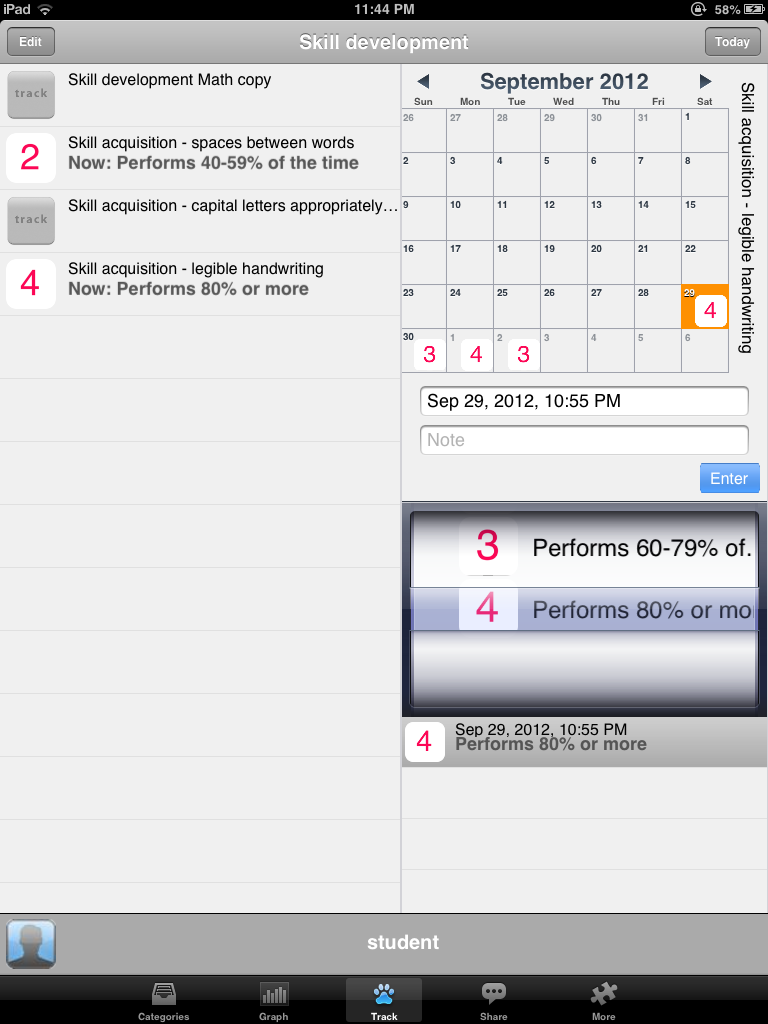
The app also allows you to define your own objectives or items you want rated and you can also create your own pictures or icons use want used to help define the measures used. Although this is app is primarily set up for behaviors, I entered some skill goals used for assessment gathering of OT objectives and created my own rubric or assessment to gather the data. Anecdotal notes can be entered with each entry as needed.

Data entered over time can be displayed in a daily, weekly or monthly mode and can include categories or items. Graph information can be displayed in a variety of ways pending preference and data gathered. Daily data minimums, maximums, average or last can be displayed in the graphs.
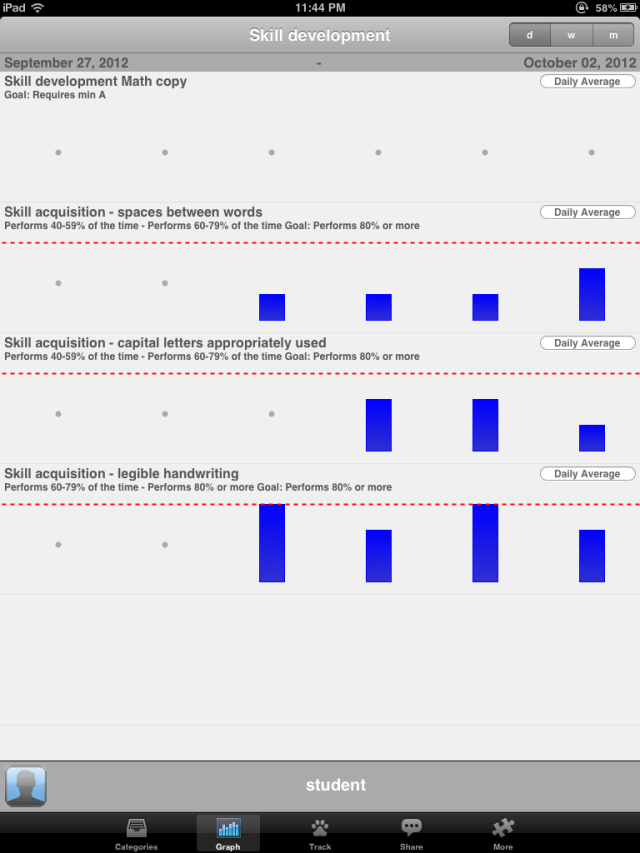
The app also provides a method of sharing the data in an html or CSV (comma separated value) exported as a spreadsheet. Column, bar or line graphs can then be made in software such as Excel following email options of the data.

Other options are provided in the More menu such as the ability to customize the rating tools, password protect the app, purchase additional user capabilities (1 is provided in the Pro version, up to 3 for an in app purchase of $5., unlimited users for an additional $10.), help menus, clearing the data or editing category information on a user.

Autism Tracker Pro took some time to learn and customize for specific student data collecting. It has proven to be a valuable tool for data collection and believe that it can be used to collect information on skill development along with behavior. One of things that it does not do is provide duration information with a start and stop timer within the app, or provide the graph information over time through a day. There are ways however that time information or items could be entered within a category.

A specific use for this app could be for gathering self regulation, sensory processing levels. Are they high or low during the day? What would a student rate themselves? Tracking alert levels during the day by a para professional working with a specific student could also be performed electronically given a specific set up and numbers of rating times through the day.  Although this app does not provide suggested strategies or solutions within the app, it would provide the data to help to determine when interventions might be needed.

This app has been helpful with data collection given time to modify and adapting for specific student use.

Here is a link to a video from the University of Nebraska with a review of the app : http://mediahub.unl.edu/media/2816

Here is a handout created of directions for using Autism Tracker Pro: Autism Tracker Pro training handout if interested.

Are you interested in using Autism Tracker Pro? For those who have endured through the end of this post here is a free promo code from the developer (if you redeem this please just comment that you redeemed it- it will save a lot of frustration for others) :

73EFK3X9KAM3

What do you use for data collecting? Share any suggested data collection apps or methods you might be using!

Thank you to Uwe Heiss, Founder of The Track & Share Movement.

Carol
Posted in App Reviews, Apps for OT's, Data Collection, iPad, iPhone, iPod, Occupational Therapy | Tagged , , , | 7 Comments

iPod Touch as a Vocational Support for People with Autism

Are you familiar with the Accessible Technology Coalition (ATC)?

The ATC provides numerous resources including free membership, monthly online webinars and a newsletter on AT topics. Their October 2012 newsletter features a link to the full research article from the Journal of Vocational Rehabilitation entitled “iPod Touch as a Vocational Support for People with Autism“.  Authored by Tony Gentry, Stephanie Lau, Alissa Molinelli from the Virginia Commonwealth University OT Department, Amy Fallen from the Career Support Services in Richmond, VA and Richard Kriner from VA Department of Aging and Rehabilitation Services, this article provides three case studies on the tools, apps and procedures used to provide successful AT interventions using iPods to people on the autism spectrum within a work environment.

This is an inspiring read providing mobile device intervention ideas and tools as they relate to individuals needing organizational and task management supports in a work environment. Interestingly, the apps they used within the case studies were primarily the OEM/Apple iOS apps such as iCal, Clock app, Notes app, Camera and Contacts app for their interventions. Purchased apps were low-cost or free including VoCal app, iReward app, and StoryKit app.

I encourage you to become inspired by the use of mobile devices to improve functional and vocational skills as presented in this research article. It also reminds me that even just a few basic mobile apps utilized for the right task can improve independence with good intervention models and creative application.

Be inspired by this research article and check out ATC’s wonderful website resources!

Carol

Posted in Uncategorized | 2 Comments

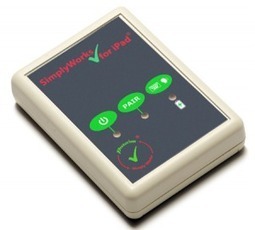
SimplyWorks for iPad Part 1: Switch Access | Jane’s Blog

See on Scoop.itApps for Special Education

Jane Farrall offers her expertise on another switch access device for the iPad and explicit instructions for it’s use (I find this type of information hard to come by and Jane does a fabulous job!). As accessibility continues to emerge for mobile devices, Jane helps us all sift and winnow through the possibilities!

Don’t miss the opportunity to glean from Jane!

More resources for your iTool Kit!

Carol

See on www.janefarrall.com

Posted in Accessibility, Apps for OT's, iOS, iPad, iPad Management, Occupational Therapy, Physical Disability Tool | Leave a comment

Shape Up! Lite App

Shape Up! Lite app by Busythings is a free version of the full app (.99) for iPhone/iPad. This is a delightful, visual motor app that draws shapes that develops geometric pictures similar to the three-dimensional parquetry or tanagrams. More of a visual motor task for students than a spatial reasoning app, it is lively and motivating with the sound and animations it provides. Sound can be turned off if needed.

The lite version of Shape Up! provides four geometric pictures to make out of the 20 provided in the full version. Pictures can be reset after drawing them. Tracing over the provided dotted lines of each of the shapes is required to complete the picture which results in an animation. Tracing has to be quite grossly inaccurate for the lines to not be accepted requiring the inaccurate sections to be redone. Tools provided are either a paintbrush or paint can to trace or fill the shapes of the pictures.

This is a delightful, simple visual motor activity for young children and primary aged students. The animation and sounds are motivating and fun.

Other methods of intervention that might be considered with this app might be to:

  • Print out the pictures created by the app (take screen shot then email or print off) and have students cut out the shapes and recreate them from the completed model in the app
  • If you have parquetry (real shapes) that are similar in shapes, have the students recreate the geometric designs with real shapes using the completed shapes as a model.
  • Print out the pictures created by the app and work on shape names, circle all the squares, rectangles, circles, triangles (etc.). How many are there of each?

Shape Up! is a very fun app addition to your OT iTool Kit. Check out the lite version to see if it is a keeper!

Carol

Posted in App Reviews, Apps for OT's, iPad, iPhone, iPod, Occupational Therapy, Uncategorized, Visual Motor | Tagged , , , , , , | Leave a comment

Digital Storytime App Deals

Digital Storytime is a website that offers educational app reviews and also has a Daily Deals section with many categorized listing of apps.

I peruse their website frequently to see what they have curated, especially in their deal sections.

Todays listing offers many apps suited to education, special education and school based services. As a OT I like the “Game” category which today features apps like Moody Monsters (free), Geared (free), Where’s Waldo (reduced in price to .99), Sprouts Doodle Dots and more.

Check out all their deals for apps that you might use in your OT iTool Kit!

Carol

Posted in Apps for OT's, Apps for Special Needs, Free apps, Game, iPad, iPhone, iPod, Occupational Therapy | Tagged , , , , | Leave a comment

New Features for Assistive Touch – Video by Luis Perez

Here is another video by Luis Perez reviewing what new in Assistive Touch features in the new iOS 6 for iPad.

Features Luis Perez reviews are: enabling Siri, using the task switcher for multitasking and making a screenshot  with a single tap with assistive touch features.

More information about Luiz Perez and his resources are available on Mobile Learning 4 Special Needs. Check it out!

Carol

Posted in Accessibility, iOS, iPad, iPad Management, Occupational Therapy, Physical Disability Tool | Tagged , , , , | Leave a comment

Kid Tech – According to Apple [Infographic]

MDG Advertising  created this informative infographic on the use of Apple tablets with kids today. It demonstrates the presence of (Apple) tablets available within families, as well as statistics on the impact of iPads in general education and for specific special needs use (autism-related, alternative and augmentative communication).

Reviewing this infographic brings some questions to mind about the prevalence of mobile technology, use and accessibility of them to all special needs students (or clients) to make information or the device accessible to them. Are we ready to embrace the technology changes projected? What are best practices with their use?

Kid Tech, According To Apple [Infographic]

Infographic by MDG Advertising

What do we need to do or know as parents, professionals or stake holders of individuals with special needs to support their appropriate use and access to such ubiquitous devices?

Carol

Posted in iPad, iPod, Occupational Therapy, Special education, Special Needs | Tagged , , , , | 2 Comments

Guided Access in iOS 6 – Video by Luis Perez

Luis Perez  shares key features of Guided Access available in  iOS 6 in his video review geared to use with individuals with disabilities.

For more videos from Luis Perez visit his YouTube collections  or visit his wiki, Mobile Learning 4 Special Needs  for more of his expert information and resources.

Carol

Posted in Accessibility, iOS, iPad, iPad Management, Mobility Impairment, Occupational Therapy | Tagged , , , , | 2 Comments

Maze-A-Licious Counting Farm

Maze-A-Licious Counting Farm  app is a number/counting and maze activity combined in one app. Developed for iPhone/iPad by Brainster Apps, it is free with in-app purchase (.99) to unlock intermediate and advanced levels.

Maze-A-Licious Counting farm enrolls 4 players at a time and provides three levels of play:

  • Beginner for ages 2-4; counting from 1-10 (free) with three levels within the beginner level

  • Intermediate for ages 3-5; counting from 1-20 (in app purchase to unlock levels 4-6))
  • Advanced for ages 5-8; counting by 1’s, 5’s, 10’s (in app purchase to unlock levels 7-9)

This maze activity is performed by tipping the iPad to move the character through the maze. Rather than a visual motor integration activity, this is a bilateral/two-handed, visual motor activity, requiring the user to tip the device to make it move towards numbers in the pathway to get to the finish line. Time is recorded in each level. Levels get more complex and longer as number sequences increase. The screen expands to provide additional pathways needed for the longer number sequences.

Between every second maze, users are asked to tap balloons in numerical order to reinforce counting skills.

I expected that Maze-A-Licious app was a traditional maze drawing activity. I was pleasantly surprised to find this app requiring bilateral and motor planning skills not often found in iPad apps along with reinforcement of academic skills.  My experience with younger students I have intervened with found many of them having bilateral motor coordination challenges, exhibiting difficulty holding a paper while writing and performing self-care activities requiring two hands to perform (few ADL’s do not require bilateral skills!).  Apps such as Maze-A-Licious provide  bilateral integration and upper extremity motor planning practice  frequently needed as a part of the foundational skills for writing, tool management and upper extremity gross or fine skill development.

In app purchases are required for levels 2 and 3, which I did not buy. I did like the app which provided free beginner levels as a trial to determine if appropriate for the user. Although we all love free, $ .99 is affordable for unlocking intermediate activities within the app.

Brainster Apps, has developed Maze-A-Licious Counting Farm and also have apps that reinforce ABC and word recognition.

Check out Maze-A-Licious to determine if this might be part of your OT iTool Kit!

Carol

Posted in App Reviews, Apps for OT's, Apps for Special Needs, Early Childhood, Elementary School, iPad, iPhone, Occupational Therapy, School Based Interventions | Tagged , , , , , | Leave a comment

Speak Selection and AssistiveTouch in IOS 6

Posted in Accessibility, iOS, iPad, iPad Management, Occupational Therapy | Tagged , , , | Leave a comment