iOS Apps to Support Learners Who Struggle with Reading and/or Writing – Updated Annotated List | Free Resources from the Net for EVERY Learner

See on Scoop.itSFSD iPad Scoop

Paul Hamilton, blogger of Free Resources on the Net for Every Learner, provides an updated list of apps to support learners who struggle with reading and writing. Many are familiar and favorites of mine as well as a few new that I might be using a different app for. All in all it is a great updated list to check on what else might be out there to support struggling learners.

Check out Paul Hamiliton’s list, are these tools in your OT or Education m/iTool Kit?

Carol

See on paulhami.edublogs.org

Posted in App Reviews, iPad, iPhone, iPod, Learning Disability, Mobile Device Use, Reading, Special education, Writing | Tagged , , , , , | Leave a comment

Panther Moto Racer App – New, Reduced For a Limited Time!

Panther Technology is offering a 50% discount on their new app Panther Moto Racer – $3.99 until Tuesday, November 13, 2012 (no mysteries about this price reduction time frame!).

Panther Moto Racer app for iPad is designed for individuals with motoric disabilities. Features of the app as described on iTunes:

• A full range of speeds, including very slow ones for people with limited motion.
• Develop motoric accuracy. Start by leaning to place your hand in the line of the car – and it goes. Hit obstacles and start again.
• Ability for individuals to race the same course at different speeds, so you can compete with others as you compete with yourself. Anyone can win!
• Two different tracks. Four cars. Constantly changing courses. Variety. Fun. Gorgeous design. And complete engagement!
• Completely thought-out controls so that individuals with different motor abilities can all play, enjoy, and participate at their own level.

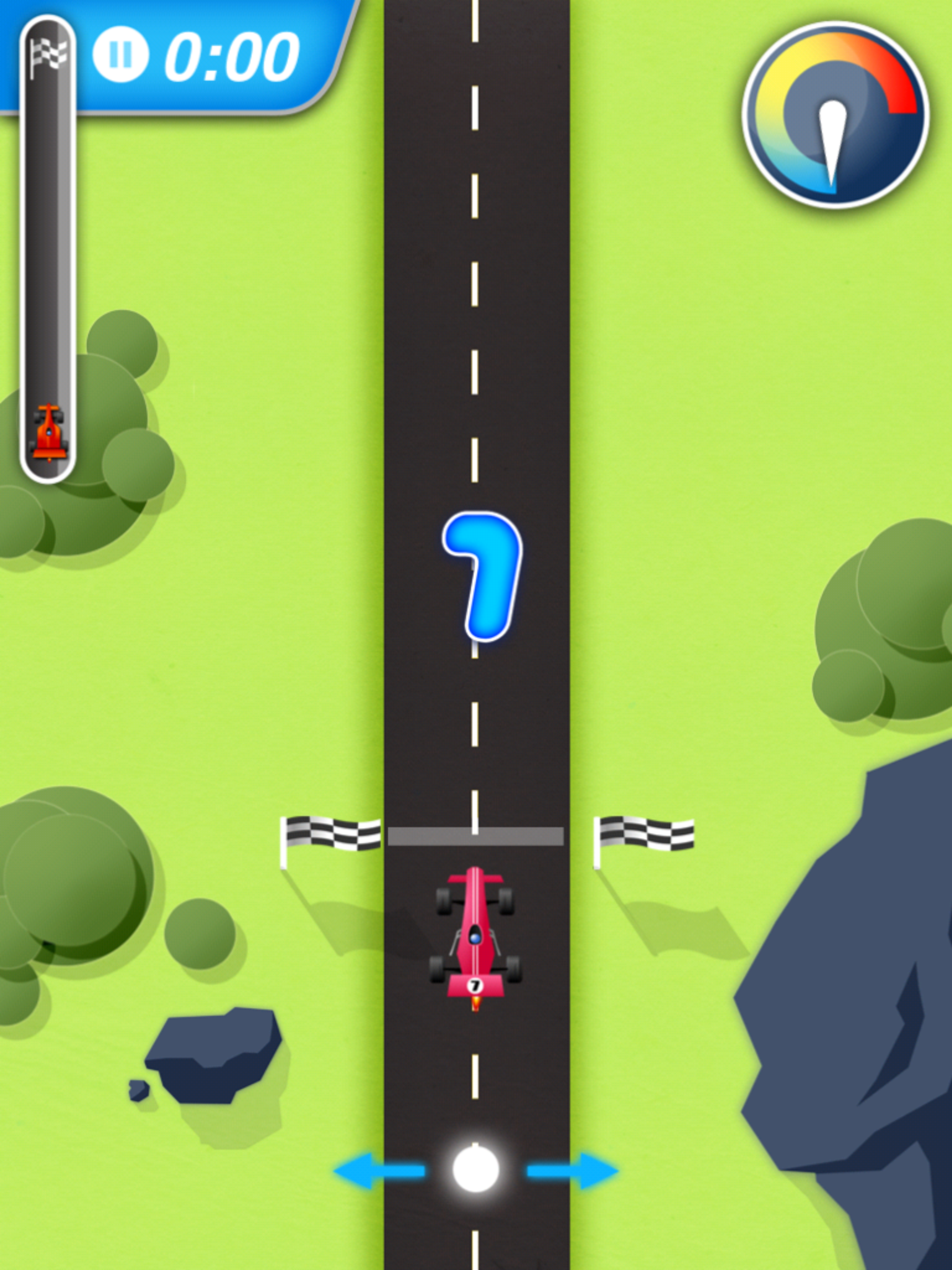
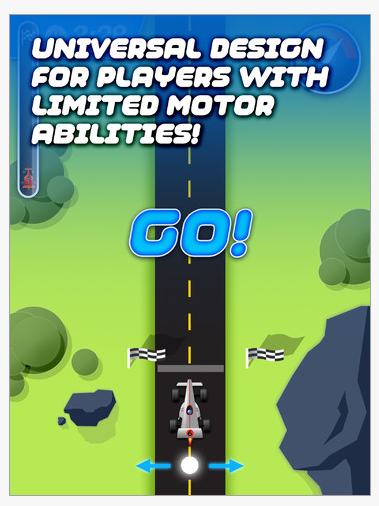
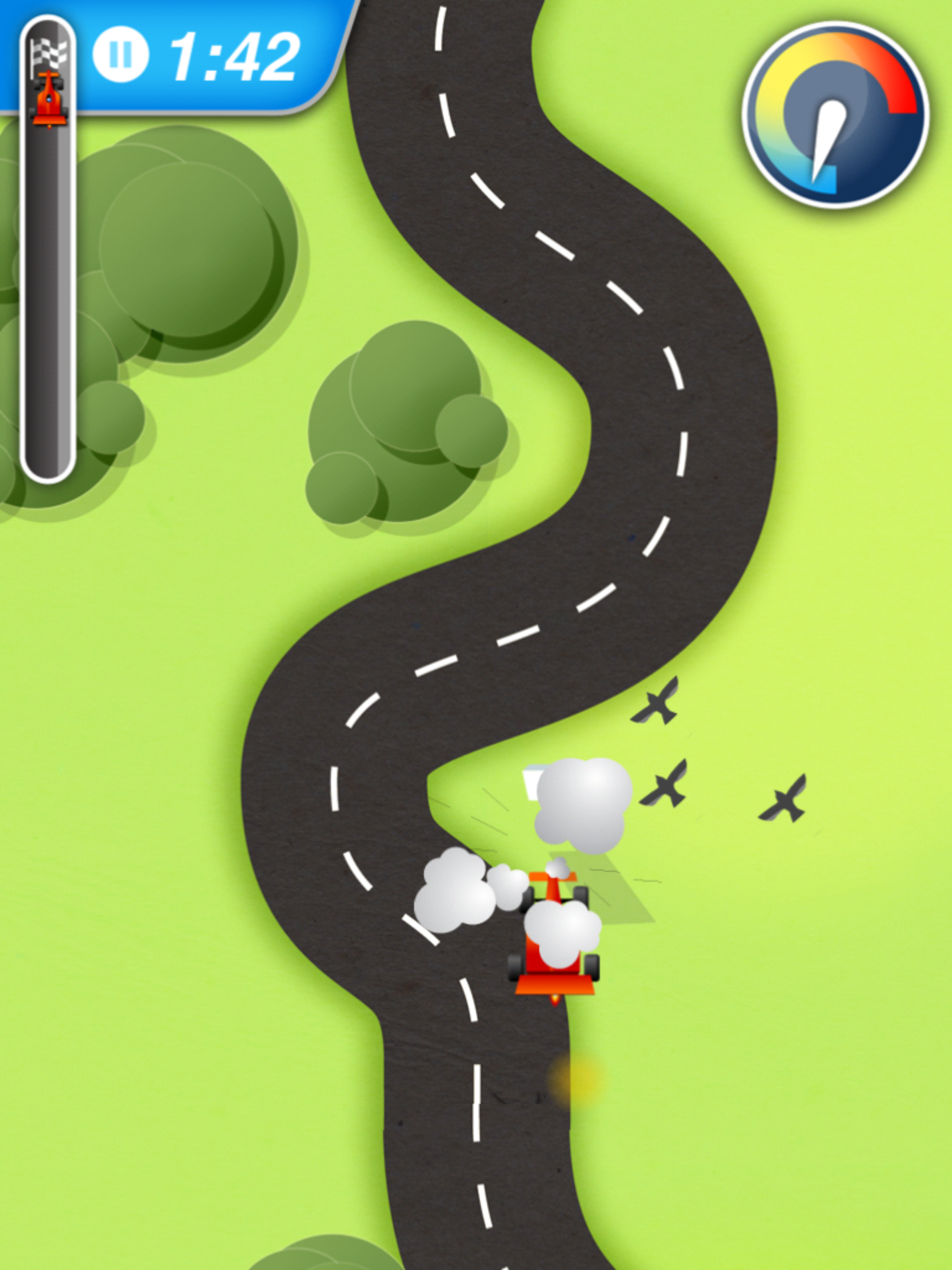
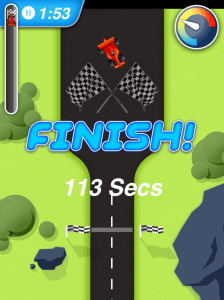
Here are a few screen shots of the Moto Racer:

Racing modes include a choice of a country road or Arizona desert terrain. Choice of race length are 1, 2, and 3 mile lengths are provided in large big buttons on the screen. Once you choose one of the four race car choices you are ready to choose a level from 1-4 which controls the speed and difficulty of your race. Get ready for at the start line for the countdown given visually and spoken… 3, 2, 1 to 1 then Go!

Music, graphic animation provide an exciting race situation. The pathway is forgiving unless you crash into the rocks or bushes along the raceway but allow you to get back on the track to finish your race while the timer continues to time the user. Visuals are given on the screen of a speedometer and how far along the race track you are in relation to the finish line. I liked the animation when I crashed the car of puffs of smoke or leaves scattered about the raceway.

The finish line gives you your speed when racing against yourself or against another racer as determined when you start your race. Panther Moto Racer is a fun nicely presented car race game for a wide variety of ages. Who doesn’t like to race and beat their time or someone else. I found the app to be easy to use with choice to run the race provided with each race. The size of the track and the car are adequate for someone who have have gross manipulative skills. The four levels of speeds are definitely geared to individuals with motor challenges with level 1 – speed really slow, frustrating for myself with typical motor skills but be great for individuals with significant motor impairment. Level 4 speed provided a bit of a challenge with curves but still was too slow for me liking, but which would be great for those with mobility impairments.

Sound is provided but no options to turn it off other than using the volume control which worked adequately. No other options are available in the app for changing the width of the track or to make any changes with the speed.

As an adaptation, I used a stylus to drive my car which worked as well as using my finger. Trial of higher quality styluses to lesser quality ones all worked the same.  Use of an easel or stand for the iPad when racing should be considered for better positioning of the screen for physical and visual access.

This is a well developed app geared to individuals with mobility impairment. A suggestion would be to  create a few more levels of speed and sizes of tracks allowing this app to be used with a wider range of individuals. The ageless graphics and music of this app makes this appealing for all ages and might interest typical peer interaction to beat their own time if provided greater speed levels.

Panther Moto Racer is a great app suited to those with motoric challenges providing more choices of interaction with friends on a mobile devices! I would definitely add this to my category of ageless games (Tic Tac Toe, 4 in a Row, Action Bowling, Skeeball, Ant Smasher, Cat Fishing, or Jitterbug).

Check out other apps developed for individuals with mobility impairments Panther Technology  offers!

Will this be added to your OT m/iTool Kit?

Carol


Posted in App Reviews, Apps for OT's, Apps for Special Needs, Game, Game Apps for Special Needs, iPad, Leisure apps, Mobility Impairment, Occupational Therapy | Tagged , , , , | Leave a comment

Mobile Device Use Survey Results

Thank you to those of you who took the time to complete the survey posted in October, 2012. Here is the results of the Mobile Device Use Survey:

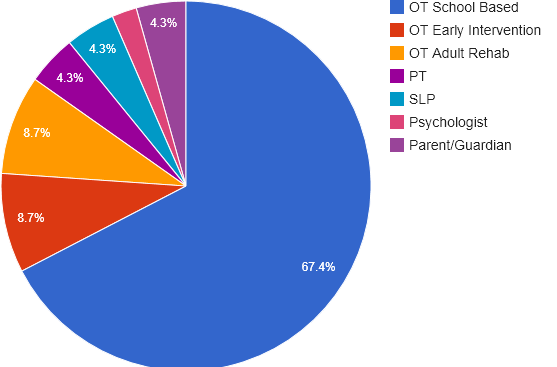
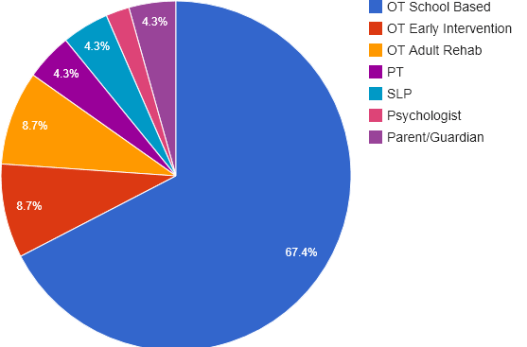
Survey Respondents:  Forty six surveys were completed with 85% of the respondents Occupational Therapists, 13% PT’s, SLP and Parents/Guardians and 2% Psychologists
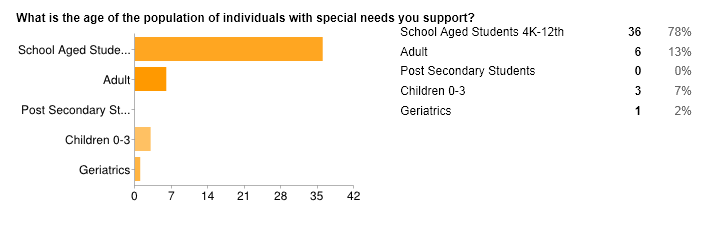
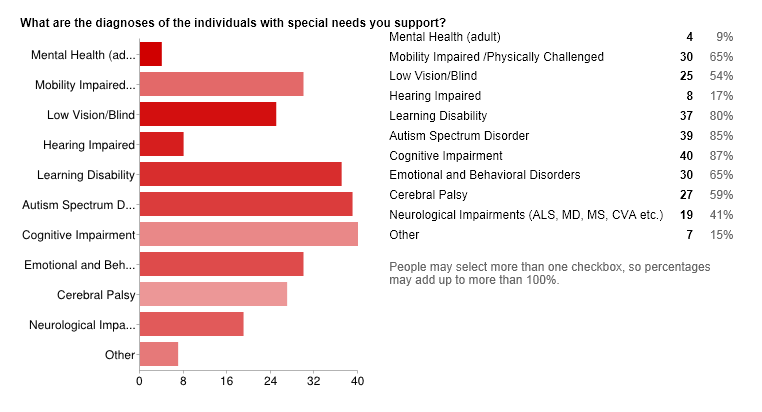
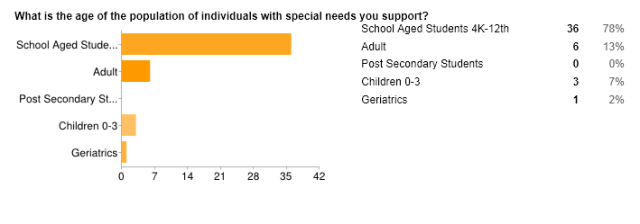
Population Serviced: The population serviced by the respondents were primarily school aged students (78%) with adults serviced by 13%, early intervention serviced by 7% and geriatric serviced by 2%.Diagnoses Serviced: Diagnoses most frequently supported by the respondents were individuals with cognitive and learning impairments, Autism Spectrum Disorder, Emotional and Behavioral Disorders,  Mobility Impaired/Cerebral Palsy and Neurological Disorders. A small percentage of respondents supported Mental Health and Hearing Impaired. Other diagnoses shared by respondents were SDD (presumed to be sensory defensive disorder), Down syndrome, traumatic brain injury (TBI), dementia, dyspraxia and complex communication needs.
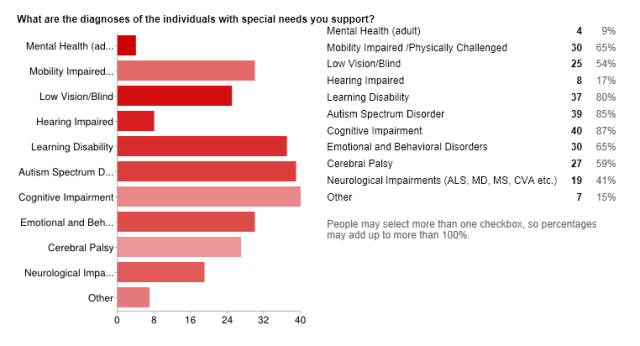
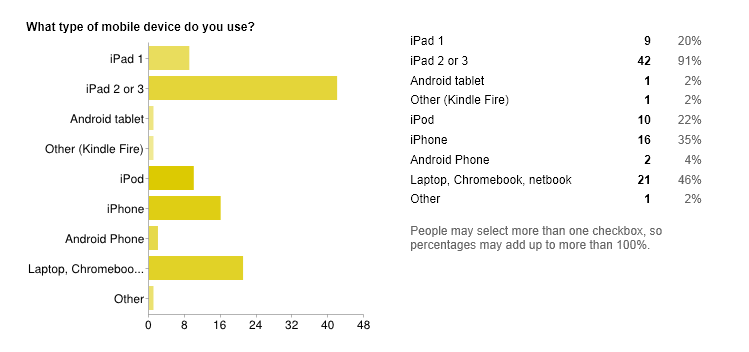
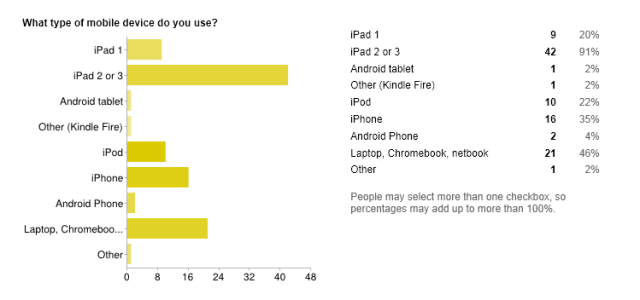
Type of Devices: Respondents most frequently use iPads, iPhones and iPod Touches. Laptop or Chromebooks were also used by 46% of the respondents.  Android devices, Kindle tablets were infrequently used by respondents. One respondent reported using other speech generating devices (SGD).
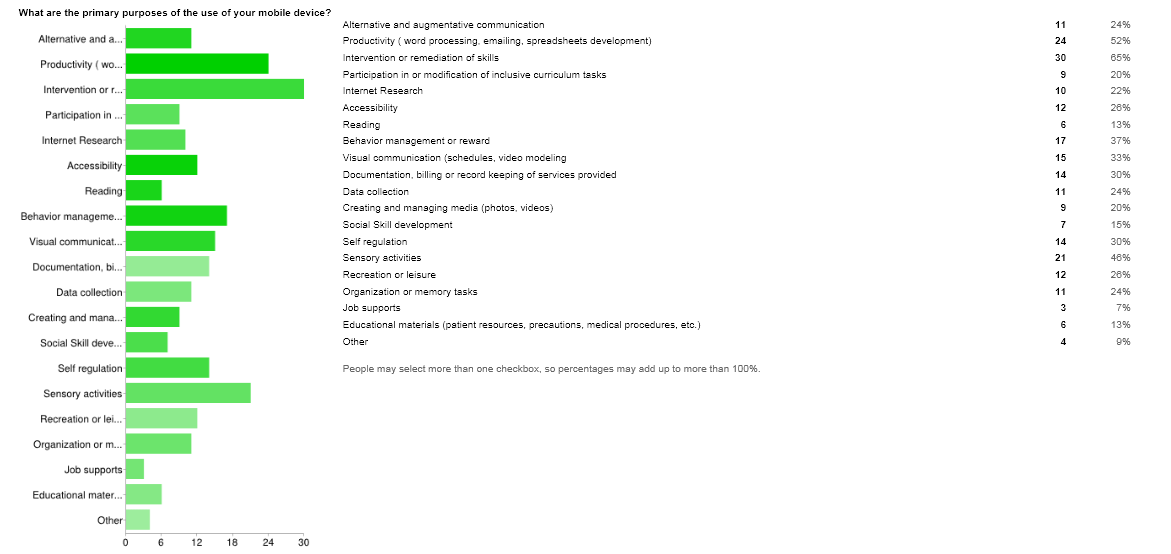
Primary Purposes: The top ten primary purposes  of mobile devices  by respondents were for intervention, productivity, sensory activities, behavior management and rewards, visual communication, self-regulation, documentation, recreation/leisure, accessibility, organization and memory tasks. Other purposes shared by respondents included apps for demonstration to parents, fine motor and vision.
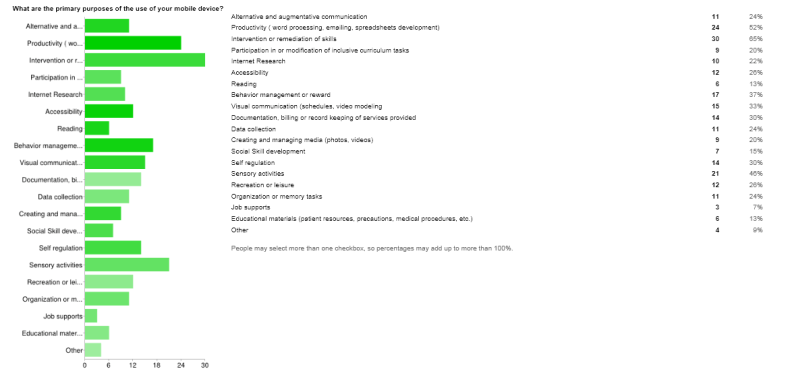
The question and response choices allowed some redundancy in purposes and did not separate professional or client purposes limiting interpretation of the primary use being for professional or client use.

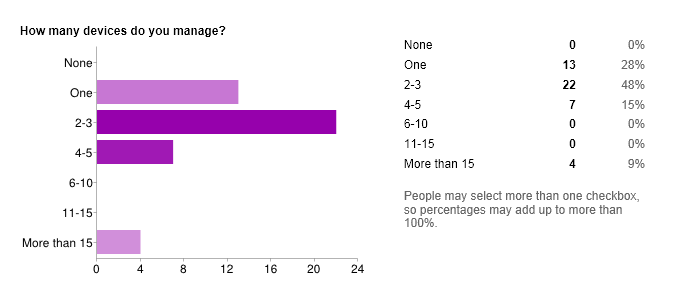
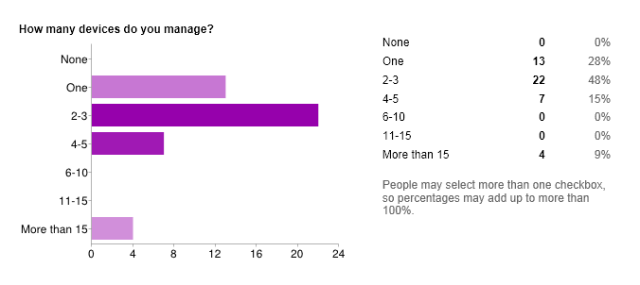
Device Management:  Device management use indicated the majority of respondents managed 2-3 devices.
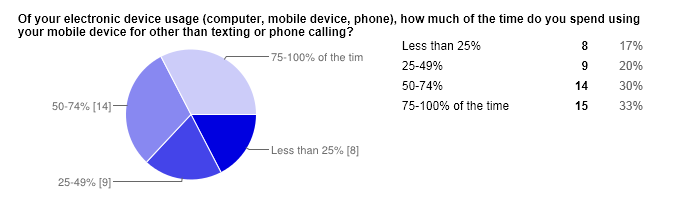
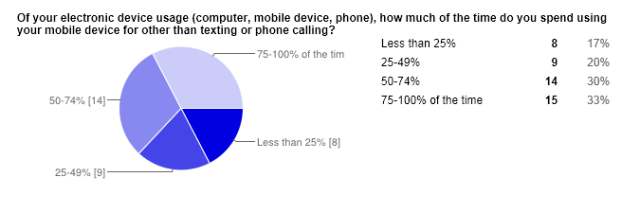
Mobile Device Use: Lack of clarity of this question unfortunately makes interpretation of the results difficult.  If interpretation includes use of mobile devices for intervention purposes the majority of respondents use their device more than 50% of the time for other purposes.
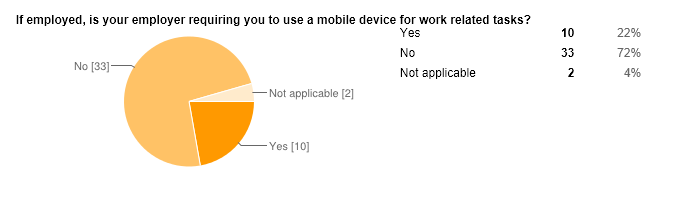
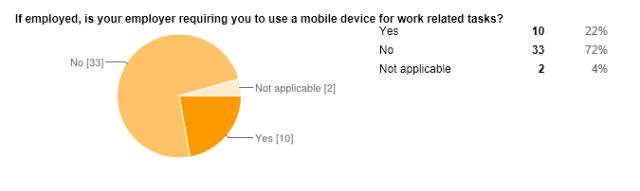
Mobile Device Use Required: Respondents indicated 22% were required by their employer to use a mobile device for work related tasks. Of those respondents required to use their mobile device for work related tasks, the majority were school based OT’s with one OT working in rehab and one OT working in early intervention.
Summary: The survey was completed by 46 respondents with the high majority being school based, 0-3 intervention or adult rehab Occupational Therapists. Majority of respondents supported children or students ages 0-3 or 4K to 12th grade with diagnoses of cognitive or learning impairments, Autism, emotional or behavior disorders,  mobility impairment or CP, low vision or other neurological impairments. Results appeared to indicate mobile device use is applied to similar diagnoses whether used with children or adults with exception of neurological impairment diagnoses reflected with adult usage primarily (driven by item description on the survey).

Uses of mobile devices were primarily for intervention or remediation with sensory, behavior management, visual communication, self-regulation, leisure, organization/memory, accessibility and communication intervention being the highest percentage of purposes identified by respondents. Devices use was also most frequently used for productivity, documentation, data collection by respondents along with lesser responses indicating professional use for Internet research and modification of inclusive curriculum for students.

iDevices were the most frequently used devices by respondents with the majority of respondents managing 2-3 devices with some managing more than 15 devices. However results also showed many individuals also use laptop, netbooks or Chromebooks along with tablet or personal digital/smartphones which mirrors usage of the general public.

Unfortunately, lack of clarity of the question of percentage of time the device was used makes interpretation difficult. Responses regarding if device use is required by employers indicated the majority of respondents are not required to use mobile devices.  Almost a quarter of school based and one rehab OT indicated mobile device use was required by their employer.

Results of the survey indicated mobile devices are being embedded in a wide variety of uses with adults and students by a variety of stakeholders that support children, students and adults in their occupation. Parent responses indicated targeted uses as a dedicated device that supports individual needs. Some questions lacked clarity or possible responses that might reflect more accurately mobile device use. The survey also indicated device use show frequent use by professionals for productivity purposes.

Having performed a similar survey my school, it is interesting to find that the interventions of both surveys were similar reflecting the nature of the tools available and use of mobile devices.

Thank you again for your time spent in responding to the survey!

Carol

Posted in Early Childhood, Occupational Therapy, Rehabilitation, School Based Interventions | Tagged | 4 Comments

Candy Cards – Panther Technology Game App

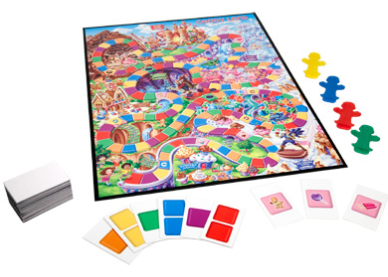
Do you like to play CANDY LAND – Kingdom of the Sweets Board Game with your students or kids but need a more accessible method of participation for them?

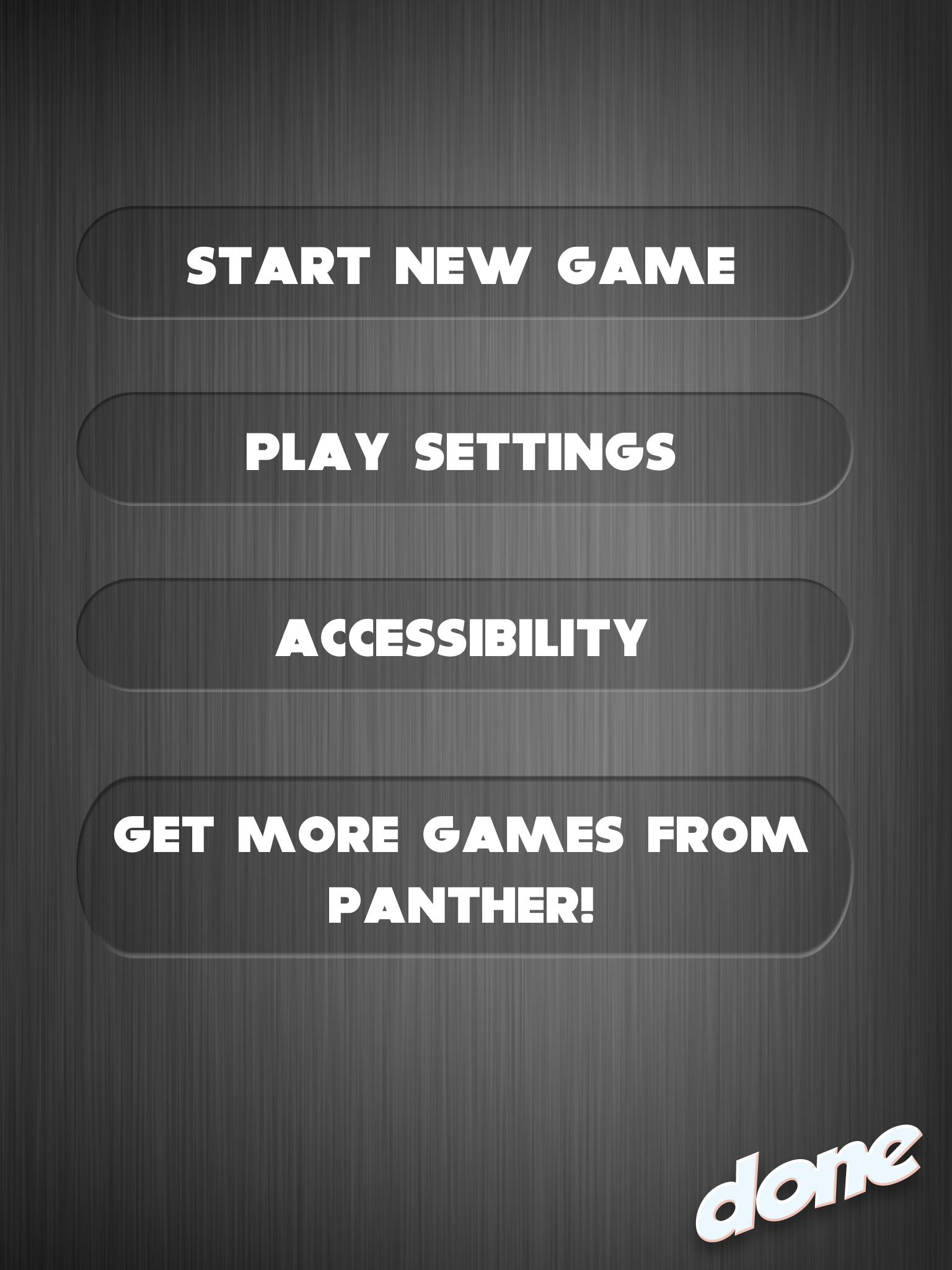
Candy Cards  app, one of the  Pounce Games  developed by the Panther Technology  currently $.99 -(  price just changed yesterday – I apologize – price changes are often a mystery).  Candy Cards app provides participation to the game using a iPhone/iPad touch and draw a card during the game.  It simply, but cleanly offers just a touch on any part of the screen to draw a card. Here’s what the app screen looks like with one of the four different background choices provided in the play settings:

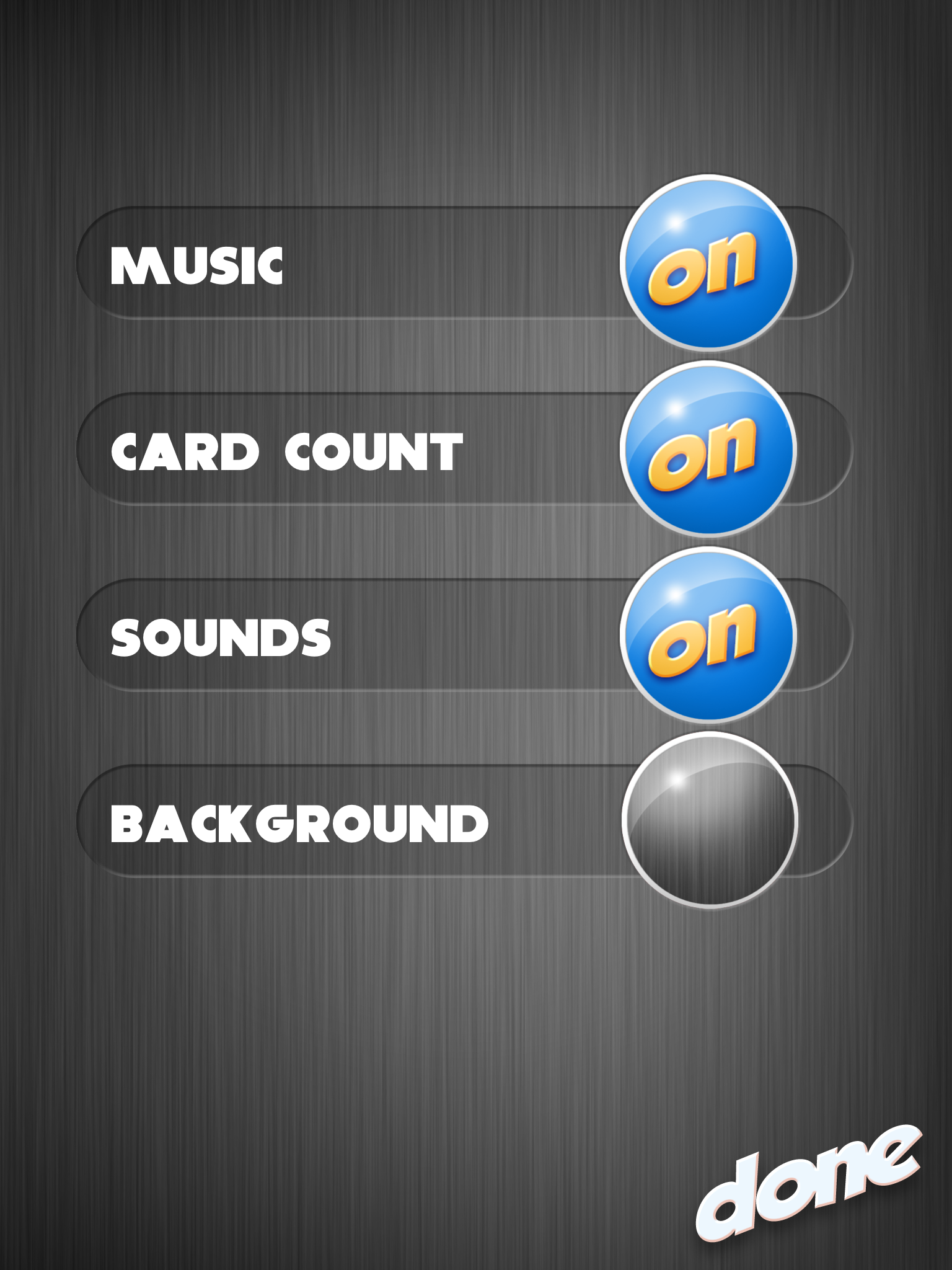
Settings include:

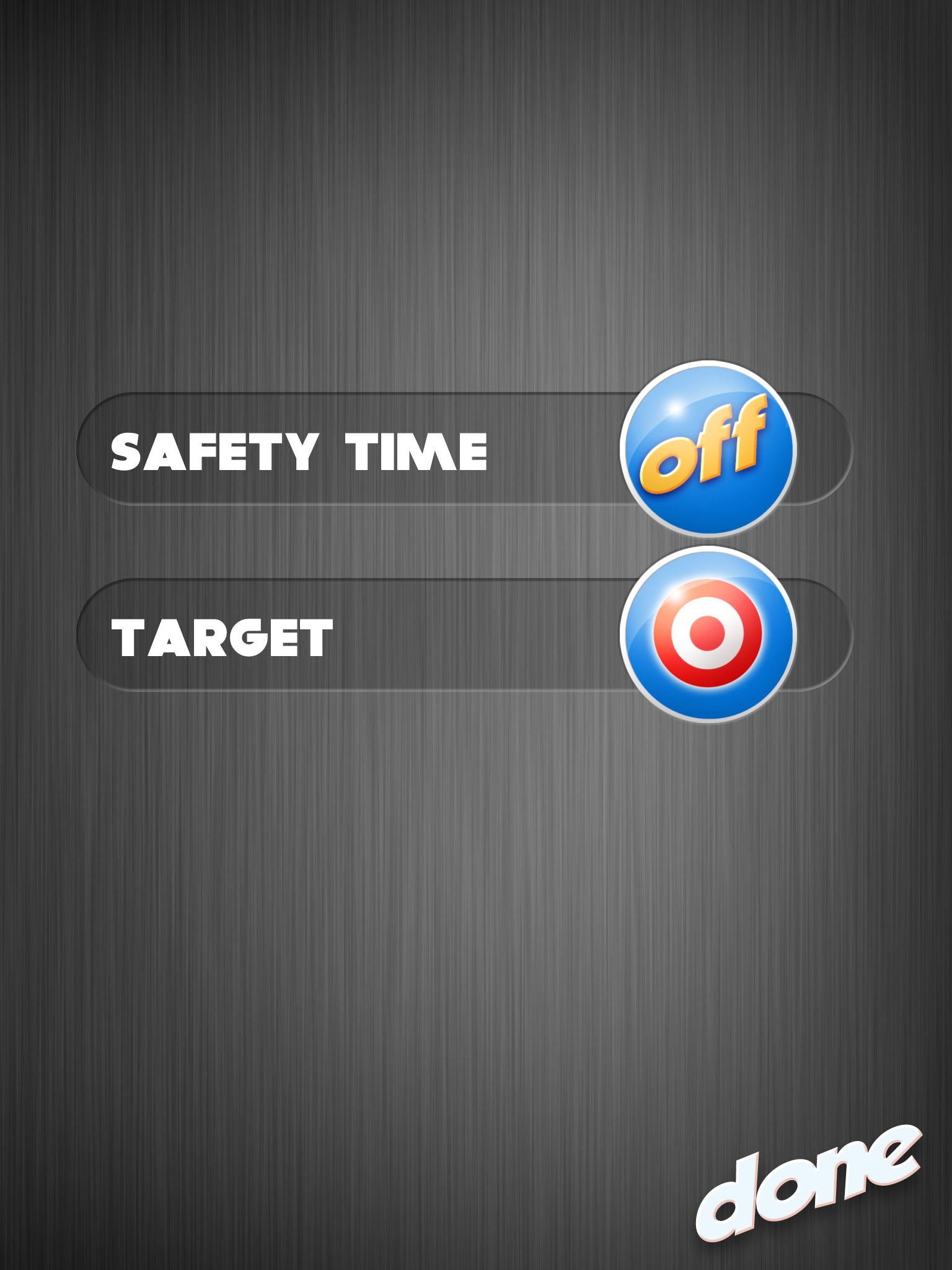
Play setting can be turned on and off. Four background choices are available (this slate, above green, yellow or white and red stripes.

Accessibilty setting are safety time and target. Safety time allows you to set the time (2,3, 5, 10 sec) to lock out the ability to draw a card. This feature reduces the multiple tapping that occurs with some students. The target setting provides a single, fixed target, concrete button for players to touch and draw a card.

This is a simple app but allows inclusion of some students in classic games. Cleanly made with some accessible components allows students who can participate with direct access to the iPad or iPhone in a part of this board game. I am hoping that switch access might be an option at some point with apps like this or speech output of the color of the card drawn to provide some students with a voice.

Watch for other games and apps developed by Panther Technology  geared to individuals with access and significant learning challenges.

Carol

Posted in App Reviews, Apps for OT's, Apps for Special Needs, Cognitive Impairment, Game Apps for Special Needs, iPad, iPhone, iPod, Leisure apps, Occupational Therapy | Tagged , , , , , , | 2 Comments

BuzzBack Cause & Effect With Vibrations & Sound

See on Scoop.itSFSD iPad Scoop

Get BuzzBack Cause & Effect With Vibrations & Sound on the App Store. See screenshots and ratings, and read customer reviews.

This looks like a great sensory cause and effect app! Looking forward to trying it.

Update (11-10-12) – After trialing this after posting  (not a particularly good idea…) a bit more explanation about this app. Created by a teacher specifically for students with auditory and visual impairment it is best suited for use on an iPhone which has vibration capabilities, not a feature of the iPad. Developed by Touch Autism, creator of Touch Trainer app, BuzzBack provides specific cause effect for low incidence students with dual sensory impairment. If not an app that you might use, pass it along to teacher or parents of individuals with multiple handicaps!

Carol
See on itunes.apple.com

Posted in Uncategorized | Leave a comment

Book Creator for iPad

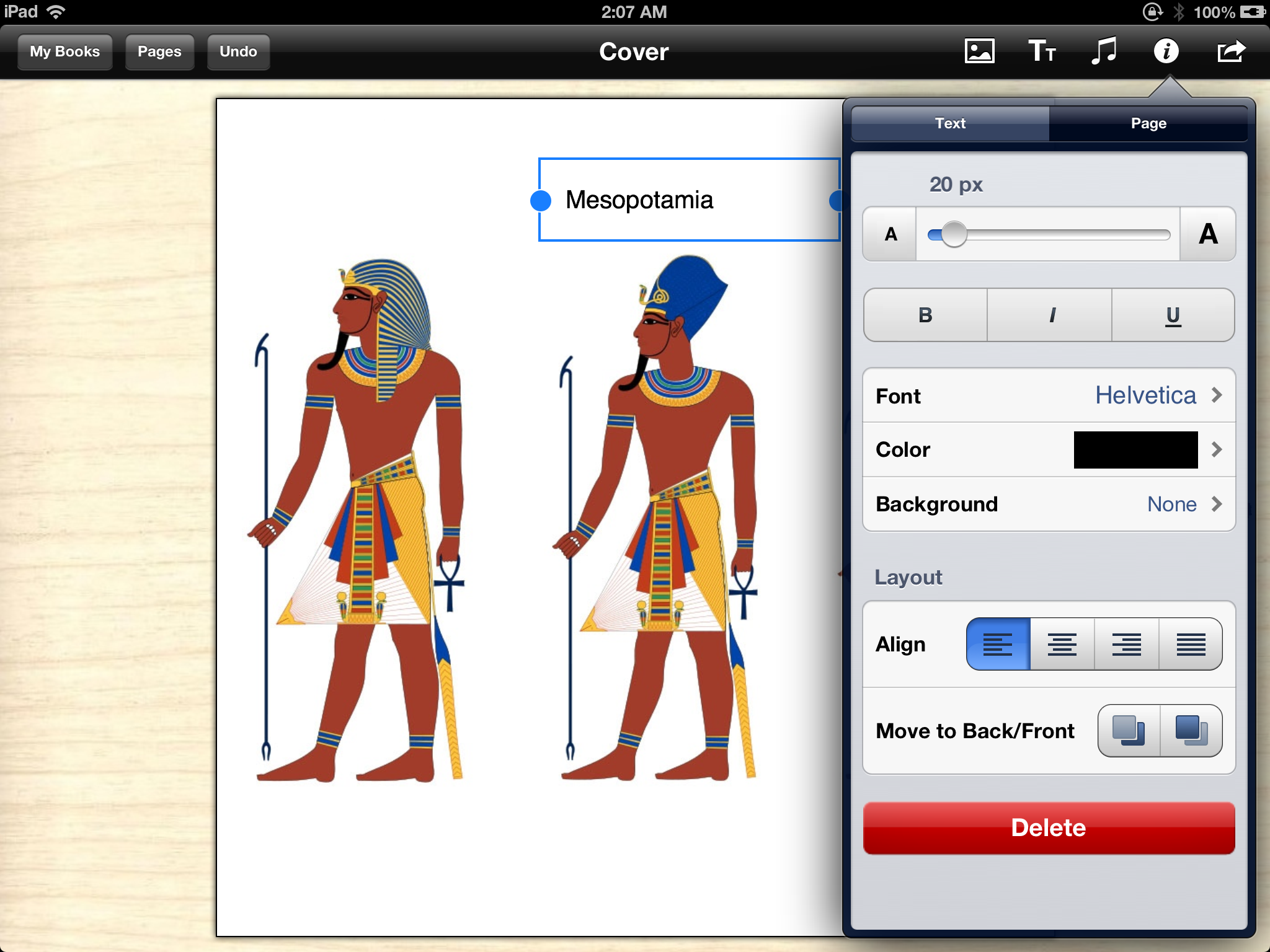
Book Creator app for iPads is on sale for $1.99. I thought this was a deal at 4.99 buying it in quantity at our school as a book making app for use with a variety of grade level students.  Although there are many other book making apps I like as previously mentioned, Book Creator app offered the workflow I was looking for in a book creating app as well as features of UDL for students to create with the opportunity of multiple means of media and methods of text production (recording, typing and voice recognition) to produce a class project.

Book Creator is intuitive to use for students as well as digital immigrants. This was the first time with these students using the iPad. Importing pictures and videos from the Photos library was easy to do and offered the ability to import more than one photo as well as videos on a page. Moving images front to back is also supported when dealing with more than one image.  Different page layouts (single or double paged books) are offered along with different background colors, font and font colors for your book.

Audio recordings or music from your iTunes library are also easy to add to your pages providing multiple ways of adding narration to the story.

Workflow options are often a tricky part when needing to produce a hard copy for grading or just publishing. Book Creator provides export of  your book creation to Dropbox, Evernote, iBooks,  other PDF or ePub apps or the ability to email the book for printing.

An easy to follow tutorial is provided as a book within the app. This was a worthwhile purchase prior to going on sale and even a better deal now! Making sensory stories, social stories, step by step instructions or story telling just got easier.

Can you use this app in your OT mobile/iTool Kit?

Carol

Posted in App Reviews, Apps for OT's, Apps for Special Needs, eBook Creating, Elementary School, iBooks, iPad, Middle School, Occupational Therapy, Social Story, Special education, Story Telling, Uncategorized | Tagged , , , | 4 Comments

The iPad Mini – It doesn’t suck! – Device Comparison Grid for Kids’ Tablets | The Digital Media Diet

See on Scoop.itSFSD iPad Scoop

Wondering about the differences between tablets? Check out Clarisa Kluver’s comparison grid to help you with decision making about devices!

Carol

See on digitalmediadiet.com

Posted in Uncategorized | Leave a comment

GoRead App – Android Bookshare App

Did you know about the Android accessible book reader app – GoRead for individuals with print disability for Bookshare?

GoRead app (free) is an accessible e-reader app that allows downloading directly from Bookshare!

Here is a description of the from Benetech and FB Reader project developers of Go Read :

Go Read is optimized for people with visual impairments and allows readers to:

  • Read on-the-go with a variety of Android tablets and phones (Android 2.2 Froyo or above)
  • Access and download books directly from Bookshare  (must be a Bookshare member to download)
  • Supports both Individual and Organizational Bookshare memberships
  • Read with voiced navigation and text-to-speech
  • Read books in DAISY and EPUB formats

(Images from : http://goread.org/about/ )

For more information check out Go Read . Exciting news for Android users!

Carol
Posted in Android, App Reviews, Learning Disability, Occupational Therapy, Print Disabled, Reading, Special education, Text to Speech | Tagged , , , , | Leave a comment

Miracle Modus App for Relaxation and Calming

Miracle Modus app (free) for iPhone/iPad and for Android,  is a really interesting app developed by an individual who enjoys patterns  and mathematical calculations. After diving under the hood I found this apps development and features to offer more than what just meets the eye initially, offering insight and reasoning for the app as explained in iTunes:

“The Miracle Modus is a source of hypnotic rainbows and soft bells. I’m autistic, and I wrote this because I wanted something to mitigate sensory overload. I find mathematically patterned rainbow lights very soothing. After I showed it to a couple of friends and they had similar experiences, I decided to publish it.”                                                            (Retrieved on 10/2/2012 from iTunes https://itunes.apple.com/us/app/id555904748?mt=8 )

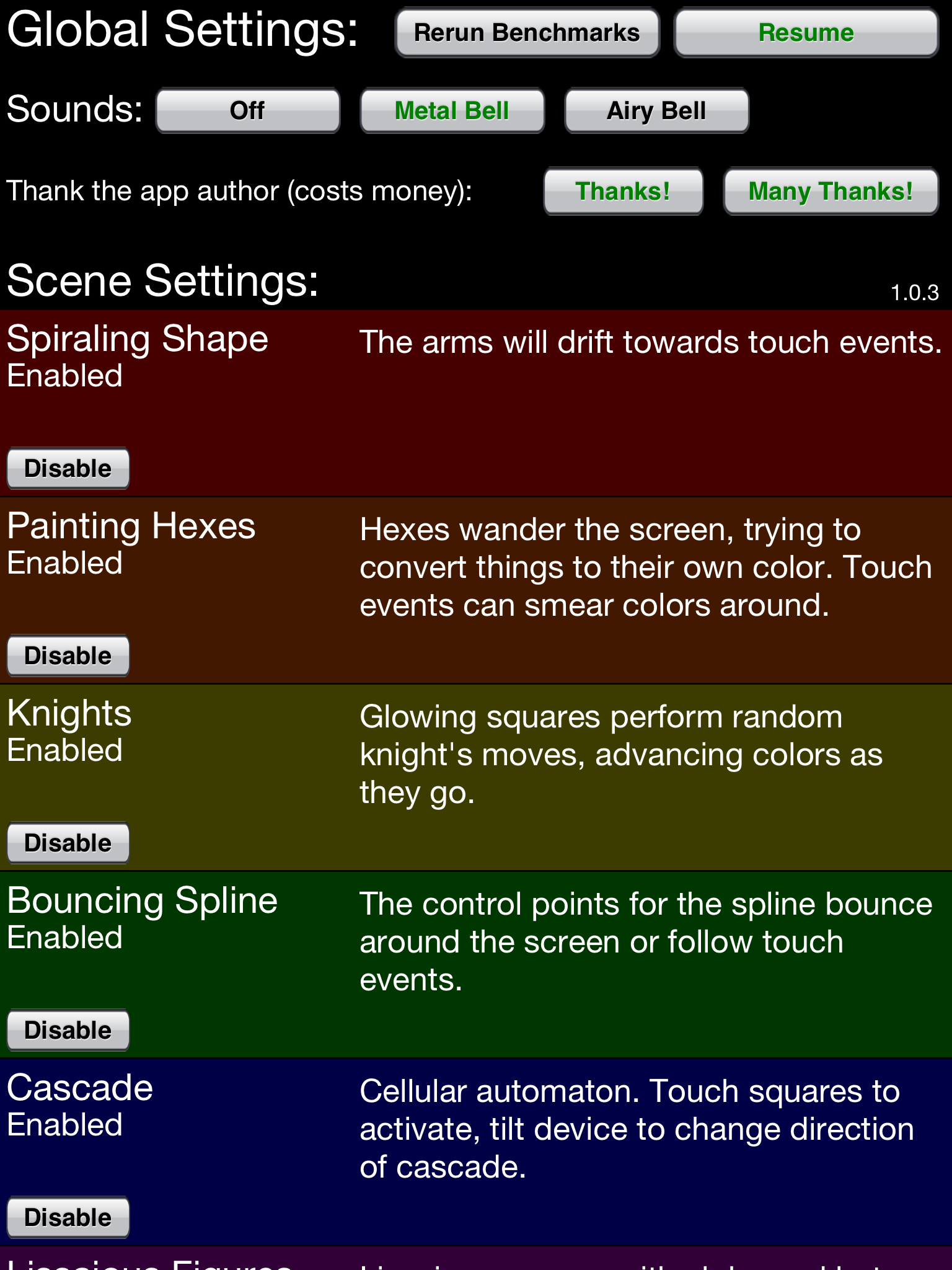
The app provides a variety of pattern “scenes” that can each be enabled/disabled in the settings menu. The patterns also are explained in the settings menu and are worth taking just a few moments to realize the sophisticated, mathematical features of each of the patterns and how each of them are uniquely interactive.

Visiting The Miracle Modus website will provide you information on Understanding the Modes , if interested.  The pattern choices in the app include:

  • Spiraling shapes & Spiraling shapes 2
  • Painting hexes
  • Knights & Knights 2
  • Bouncing Spline
  • Cascade & Cascade 2
  • Lissajous figures
  • Raindrops
  • Bouncing lines
  • Wandering color

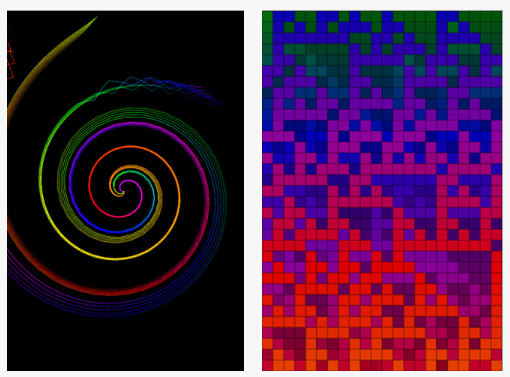
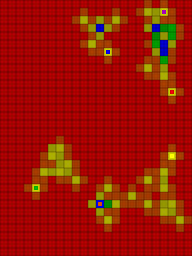
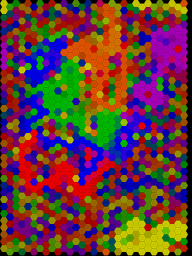
Here are some samples of the patterns but which does not do them justice with out the interactivity of the real app: 

Sound choices are “metal bell” (a pleasant chime like sound) or “Airy Bell” (a   synthesized piano sound) or sound can be turned off. Sound tempo differs for each of the patterns chosen varying from fast to  slow and very rhythmic to varied tempo pending the visual pattern chosen.

The developer in his website link A Note About Autism provides a caveat about the app: “Note that this app is not a medical device, it’s not something that has been checked with the FDA, or anything like that.”It will not “cure” autism”. It may help some autistic people handle a common problem we have, that being sensory overload. It won’t help everyone; autism is a spectrum, not a single trait that’s the same in everyone, and not all autistic people find the same things soothing or even tolerable.” (Retrieved on 11-3-2012 from http://www.seebs.net/modus/autistic.html ).

I found this app very calming to watch and listen to with a wide variance of tempo and rhythmic included in the different patterns. Realizing the sophistication of the mathematical base and interactiveness of the app gave me a huge appreciation of the resources put into developing this app (there is an in app purchase option for donating money to the developer ). Another aspect is the insight it provides from a perspective of an autistic perspective of what might calm. Given that all of us have our own uniqueness, this app might be helpful to some and not everyone as the developer mentioned.

Thank – you to the Miracle Modus developer for providing this app for free and sharing his perspectives for better understanding and tools for the offering.

More for your OT i/mTool Kit!

For more information about the story behind the creation of this app check out the developers’ website The Miracle Modus .

Carol

Posted in Android, App Reviews, Apps for OT's, Autism, iPad, iPhone, iPod, Occupational Therapy, Self-regulation, Sensory Apps | Tagged , , , , , , , | 4 Comments

Marble Math Junior App – a Free Treat on Friday!

Artgig developers, creator of Alien Buddies (a great OT app with matching, dot to dot, recognizing shapes, numbers, eg.) and Marble Math is providing a seasonal treat with  Marble Math Junior app going for free on November 2, 2012 – tomorrow!

Marble Math Junior is an iPhone/iPad app (regularly 1.99) gone free tomorrow. I have not used or trialed this app (I’m waiting for the treat tomorrow…) however review speak positively of the content of this math app geared to 5-8 year old’s. Although math apps might not be a typical app found in an OT’s m/iTool Kit, this app includes shape recognition and matching along with the following concepts:

• shape recognition/matching
• sequencing number values and ordinals
• addition, subtraction and multiplication to 100
• identifying fractions
• counting money (USD, AUD, CAD, EUR or GBP)
• telling time
• completing addition equations

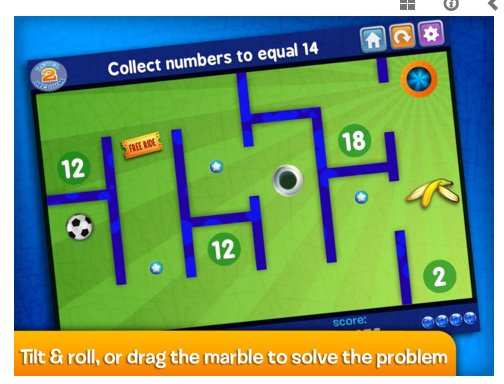
The object of the game is to complete math problems by gathering numbers as you roll or drag your marble through a series of mazes. Tilting the iPad is one method of rolling the marble or you can turn that feature off and swipe the marble through the mazes to earn more marbles and collect bonuses to achieve a high score.   May be math, but tilting the iPad sounds pretty bilateral with motor planning skills required while doing math!

Other features described from reviews on the app provide supports for special needs include providing the problems spoken out loud for our non- readers,  customizing the content levels and turning off the tilting for those with motor challenges.  Multiple users can be added to use the app for a caseload of students.

Sound like a worthwhile app to have if you are working on skills required of kindergarten through 3rd grade students.

More for your teaching or OT m/iTool Kit!

Carol

Posted in Uncategorized | Leave a comment