We Want Apps App

We Want apps icon

Interested in a more efficient way to find an educational app?


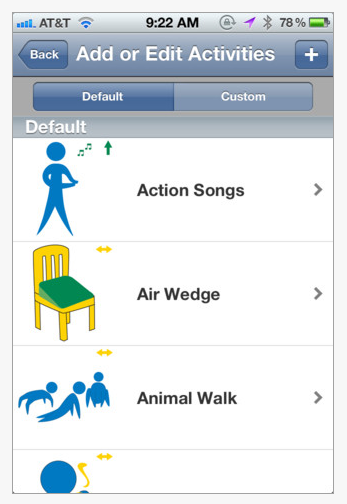
We Want Apps app (free) from Goodbeans GmbH  curates educational apps suited for children up to 14 years of age.   The app also provides a search tool by category, age, price, platform and language. A brief review and rating of likes is provided in the app.  Here are a few screen shots of the app:

we Want Apps pic1 Richard Byrne, educational blogger of Free Technology for Teachers describes this as a time-saving tool when searching for educational apps for parents or teachers (or therapists). We all could use some time savers in our busy educational day!

A few other app review apps that are go to’s for special needs students are:

  • KinderTown app – (free)  reviews apps for children ages 3-7 from Kinder Town website. Both the app and the website provides great information on preschoolers. Check out their blog!
  • Autism App – (free) Apps are categorized and reviewed in this thorough app review app from Touch Autism website. The Touch Autism website is another resource of information if you are working with individuals with Autism Spectrum Disorders, Down Syndrome or special needs.

Happy (faster) Apping!

Carol

Posted in App Reviews, Apps for Special Needs, Education, iPad, iPhone, iPod | Tagged , , , , , , , | Leave a comment

Visual Attention App by Tactus

Visual Attention App

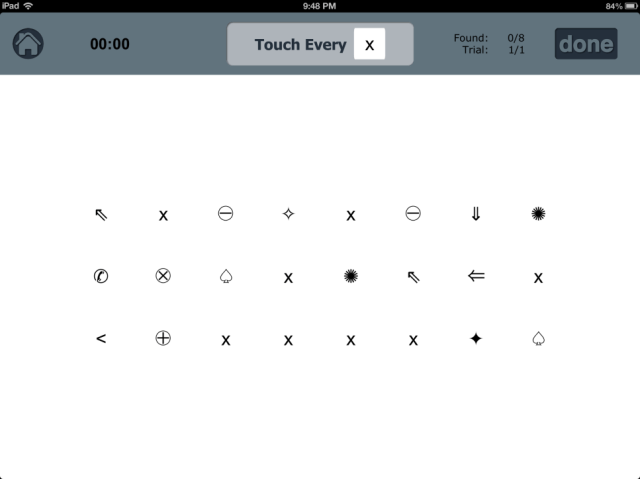
Visual Attention TherAppy  ($9.99) , a Tactus Therapy app , is an iPad app designed to help assess and train visual attention in individuals who have difficulty with visual neglect, visual scanning or sustained attention.  It is one of the few perceptual apps that I have been able to find that is designed to be age appropriate for adults, as well as older children. 

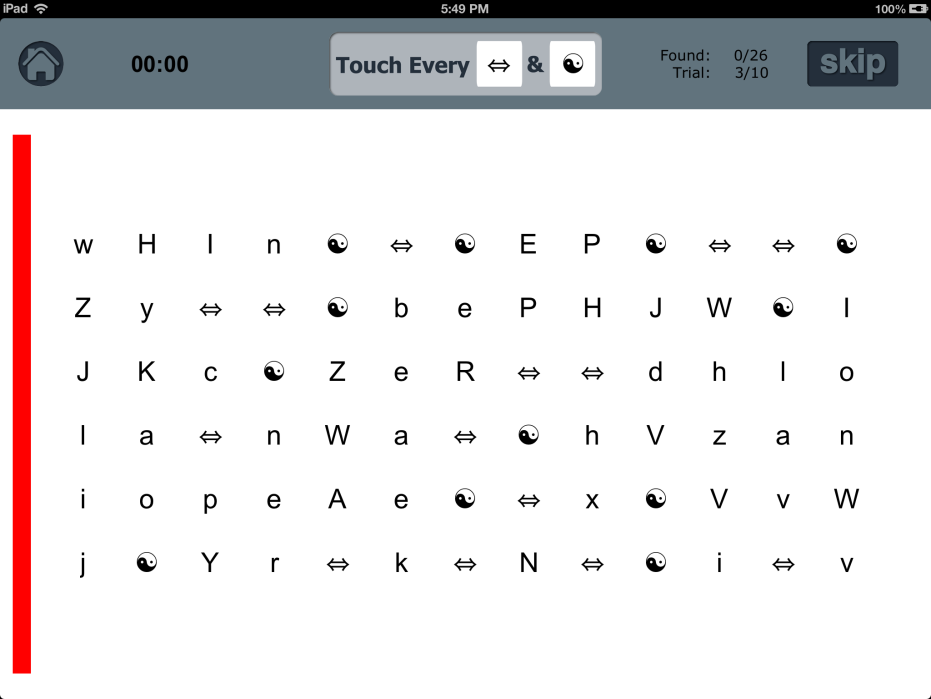
The task involves scanning and tapping on 1 or 2 targets from a screen of symbols or letters.  The app will keep track of the errors and omissions.  The task can be graded by choosing the number of targets (1 or 2), symbols/letters, number of trials at each level, the number of lines on the screen, spacing between symbols/letters, and use of visual cues. The size of the font cannot be increased.

The app has a Test Option and a Practice Option. The Practice Option can be used to train an individual to scan in an organized fashion.  The app provides an auditory cue when the individual has tapped on the correct target.  If the individual has missed a target, it will make a different auditory cue for error.  The app will only let the individual enter a target if it is the correct target in the correct left-to-right sequence. 

You can also set up the Practice session to have a red/yellow/or flashing bar on the side of the page (left or right) to cue the individual to scan to the edge of the page. The Test Option is similar to the Practice Option exception that it will accept target that are out of sequence (do not need to scan left to right).

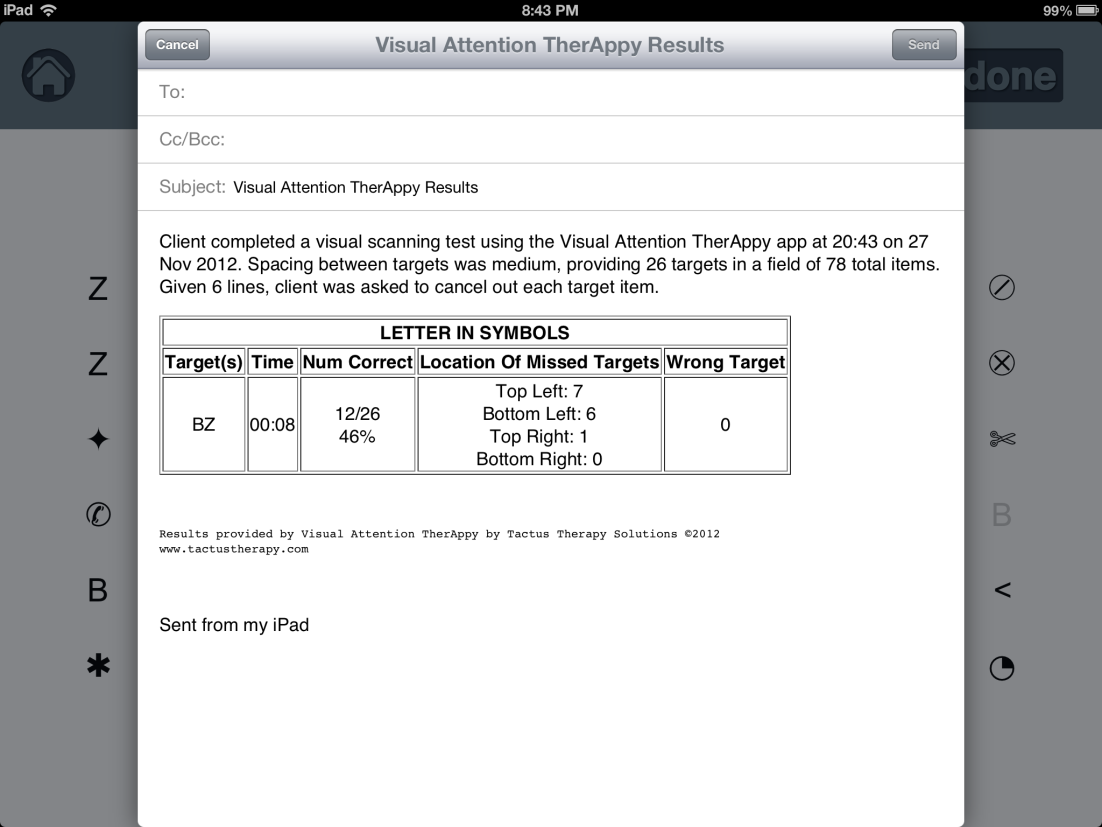
Both the Test and Practice Options will report the time and accuracy at the end of each level.  There is also an option to email more detailed results of the session.  The email report includes information on time, number of correct targets, location of missed targets (by quadrants), and the number of wrong targets.


Here is a sample report of an individual who has left inattention.

When I start using this app with a client with left inattention, I will place the iPad directly in front of the client so the information is located in his/her midline.  As the client progresses, I may move the iPad closer to his/her left side, to encourage the client to scan further to the neglected side.  I also explore with my clients what types of strategies they use to improve their scores, and how they can try using these strategies in their activities of daily living.

I like this app because it provides quick and accurate feedback to my clients, and easily records their progress.  The Practice Option provides opportunity for individuals to improve their awareness of their inattention.  The app comes with very clear instructions, though most will find the app is intuitive to use.

  And like all good apps, Visual Attention TherAppy Lite version comes in a free “Lite” version . Visual Attention TherAppy is on sale for $4.99 until the end of November, 2012.

Written by guest reviewer Adele MacNeill, OT

Adele MacNeill, OT, B.Sc., has 24 years of OT experience in the field of Acquired Brain Injury  with adults in B.C. Canada. Her experience includes working in inpatient, outpatient and community settings as well as a consultant to a group home for individuals with acquired brain injury.


Posted in App Reviews, Clinic Based Interventions, iPad, Occupational Therapy, Rehabilitation, School Based Interventions, Vision | Tagged , , , , | 4 Comments

Free or Reduced Apps for your OT mTool Kit!

Here are a few apps gone free or reduced for today (unsure how long they will be free) that you might consider for your OT iTool Kit:

Old MacDonald by Duck Duck Moose (free)  for iPad and one for iPhone. Duck Duck Moose develops award winning interactive apps that are well worth downloading! Old Mac Donald has 35 activities in the app for young children.

Splashtop 2 app – (.99) App for remote access of your computer from your iPad. Use your iPad as a touch screen to interact with computer based software on your mobile device. Allows you access to the software on your computer on your iPad. Smartboarch Technology recommends Splashtop for their desktop products.

LetterReflex – Overcoming Reversals  (1.99) By BinaryLabs  for iPad and iPhone. LetterReflex contains activities to work on overcoming letter reversal through fun activities.


Carol

Posted in App Reviews, Early Childhood, iPad, iPhone, iPod, Learning Disability, Occupational Therapy, Uncategorized | Tagged , , , , , , | 2 Comments

BrainWorks App – A Sensory Diet Tool

BrainWorks app (11.99) for iPad and iPhone was developed by Occupational Therapist, Gwen Wild of SensationalBrain.com! to provide sensory diets menus for children and teens. Customizable, this app can manage an unlimited number of users and provide in app activity choices as well as customized sensory diet activities using photos from your iPad/ iPod photo library.

Here is a helpful video that provides a great overview of the app and settings:

More about how the BrainWorks app is set up:

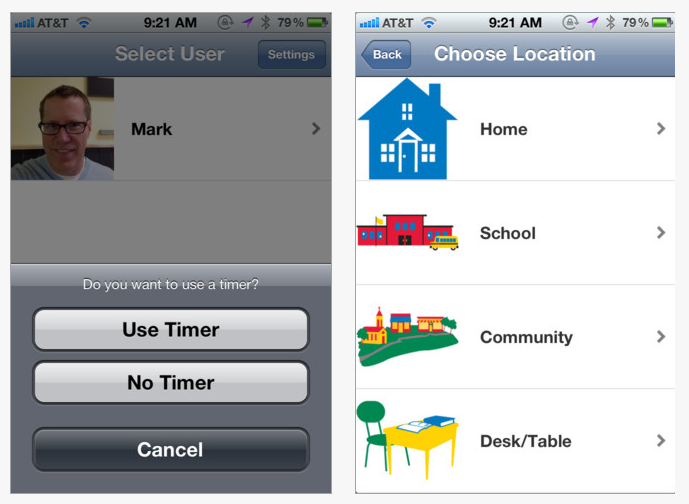
1. Enter user(s) – an unlimited number. Once a user is entered you have the option of using a timer or not.

2. Choose the locations that you will be using the activities.

3. The next step for the user is to choose how they feel. Their feelings will determine what activity choices will be available to them, either calming activities, alerting activities or just right activities.

4. When the user has chosen their feeling a list of activities is presented. The user then chooses one of the images they will use. If using the timer was chosen and time was set in the settings menu the time will start lapsing (see time remaining on right picture).

5. If a needed activity is not in the image list, pictures can be added from your photo library. If you do not have the equipment the stock activity can be removed from the list.

BrainWorks app provides a well thought out tool providing supports using a “How does your engine run?” type of problem solving to individuals who need sensory diet activities to help with self-regulation. It provides a familiar framework of sensory diet and many activities with graphics that are explicit visually to the user. I like their terminology of defining user feelings, Just Right, Slow and Sluggish, Fast and Stressed and Fast and Hyper along with the visuals they provide to the user. Customizing the app by adding users and your own activities makes it a flexible tool for therapists and parents and reinforces the concepts and activities that can support self-regulation for the user. Help menus are provided in the app as well as on the SensationalBrain website for using and setting up the app.

A few things I would like to see modified in the app include:

1.  Being able to add in activities rather than removing activities from the activity listing for the user.  There were more than 75 choices of calming activities listed to choose from which is good, however that list might be overwhelming to a student and removing that many is rather tedious. We also provide fewer choices to students for calming, or alerting activities for students and provide them with explicit instructions for some activities such as belly breathing (do 2 minutes of breathing) or theraband (do 10 repetitions x 2) which are often needed to structure the sensory diet activity appropriately during their break time.

2. It would also be great if text or audio could be customized in the user items selected to provide more specific instruction for the user to be effective.

3. Also, it would be great if the app could collect time stamps and data of the users feeling selection  – Just Right, Slow or Sluggish, Fast and Stressed or Fast and Hyper especially at school to help determine some of the antecedents of their dysregulation to help with determining time of breaks or environments that may need some modification. Not sure that can be done, but sure would be great data.

Overall this is a great app with great application for creating sensory diets for parents, teachers and therapists. Sensational Brain website also provides some great information on sensory processing and sensory diet information along with checklists and handouts. They also offer different memberships that provides access to their materials for creating sensory diet activities.

Kudos to  Sensational Brain for their work, providing one of the first sensory diet apps on the market that I am aware of.

Will this app be included your OT mTool Kit?

Carol

Posted in App Reviews, Apps for OT's, Apps for Special Needs, Autism, iPad, iPhone, iPod, Occupational Therapy, School Based Interventions, Self-regulation, Sensory Apps, Sensory Apps for ASD | Tagged , , , , , , | Leave a comment

Check out the Speech Guy’s new holiday collect of apps. The Gift Wrap App is a hoot! Fun for everyone!
Carol

Jeremy Legaspi's avatarThe Speech Guy

Hopefully most of you found my Halloween Edition of Appdapted very useful. I really wanted to do a thanksgiving one but honestly there were only a few apps out for Turkey Day and most involved hunting turkey, not a good therapy activity. We have now moved into the Holiday Season so take a look at some great apps to use in therapy. A good majority focus around Christmas. I tried my best to find some relevant Hanukkah or Kwanza ones with very little success.

I have lots to share so keep an eye on this post as I will be updating it regularly. For now start off with these awesome apps that will keep your kids motivated!

Updated 11/27/12

Snow Doodle– $.99  Buy it Now!

Snow Doodle is the latest addition to the Doodle family by Shoe the Goose. This app has tons of potential and was released just…

View original post 711 more words

Posted in Uncategorized | 2 Comments

Black Friday App Specials from Small But Kinda Mighty

This is a few days after this was posted on Small But Kinda Mighty website but I thought I would share this none the less for those looking for a last minute Black Friday App Special or a Cyber Monday deal. Some apps remain on sale, some returned to regular price and some were listed in the Black Friday list on OT’s with Apps on November 23, 2012. Browse for what you might be interested in and perhaps you will be lucky to find the app still reduced!

Black Friday Sale Specials from Small But Kinda Mighty

Posted in Uncategorized | Leave a comment

OT’s with Apps iTool Kit Apps List Updated 11-24-12

Here is an update as of November 24, 2012 with a few new apps and categories for  OT’s with Apps  iTool Kit Apps List

If you have any problems with the link please send me a comment or contact me!

Thank you!

Carol

Posted in Android, App Reviews, Apps for OT's, Apps for Special Needs, iPad, iPhone, iPod, Occupational Therapy, Special Needs | Tagged , , , , , , , , | Leave a comment

Autism and Learning

Infographics are like pictures with research and statistics imbedded for quick understanding of a subject. Here is a great infographic from Online College.org on Autism and Learning that shares information and strategies to help individuals with Autism.

Autism & Learning
Via: Online College Advice

Mobile technology and apps are just one of the many tools that can provide strategies to individuals with Autism. Low tech tools, environmental tools, social interaction, sensory strategies, direct instruction and high technology desktop software all provide supports to individuals with Autism.

Here are just a few apps and resources that can support the cited strategies of visual aids, structure and communication from the infographic.

Visual aids or visual communication apps:

Time Timer  HD – (iOS 4.99), (Android 1.99). Provides a clock timer that counts down the time from start to finish. Aids anticipation of the end of an activity visually. Customization of the features is available.

VisTimer – (Free; full version 1.99) – Visual timer with customization of sounds, colors, text colors. Free version has limited time options. Good alternative to more expensive visual timers.
Kiddie Countdown Timer – (iOS free; 1.99 remove ads) – Visual times with image of stop sign, Yeild and Go, familiar to young learners. Great app but with upgrade to iOS 6 some errors occurred. Well worth trialing for young learners.

Stop Go! – ( iOS Free) – Stop sign timer. Settings allow options for set up of the stop sign and sounds. Each light can be set as a specific time on the stop sign.

Waitstrip – ( iOS .99) – Provides a horizontal count down of time to “wait” using dots that fill with passing time.


Also see apps for structure below which provide step by step visual instruction.

Apps for Structure:

First /Then Visual Schedule-  (iOS 9.99), (Android 9.99 )Provides ability to create your own customized schedule by days, events with context specific images of people, places, objects or events. Text and audio out put is available.

iSee quence – (iOS 2.99) A simpler visual schedule app providing customized sequence of scheduled tasks, places and event using real photos. Allows creation of multiple users. Can also be used for social stories.

Visual Impact – (iOS Free; Pro 49.99) Provide customizeable step by step visual and spoken instructions of tasks and schedules. Import pictures of tasks to create step by step instructions with audio support. Free version provide demo of the Pro capabilities.

iPrompts – (iOS 39.99 ) , (Android 9.99) – Visual schedule app with photo and video capabilities. Create visual schedules with capabilities of task instructions within a schedule.
Visual Routine – (iOS 4.99) – Provides visual schedule and choices using text, audio and photos for scheduled tasks with in the app. Check off is provided for items completed.


Autism App – (Free) Provides categorized lists of app reviews including visual communication/schedule apps available suited for individuals with Autism. Very helpful app.

Communication Apps

Scene & Heard – (iOS 49.99) – This communication app also can provide visual communication for everyday tasks using its context based tools to create scenes of tasks for the user. Easy to use with photos and customized hot spots created within the app. Many scenes can be created.

Answer Yes/No  – ( iOS 1.99) – Create simple boards with one and two choice cell with this easy to use app. Good for simple communicative choices.

SoundingBoard – (iOS Free) – Offered by Ablenet, this is a simple to use communication board that can be customized with existing symbol library or personalized photos. Switch accessible using Ablenet’s Blue2 iPad switch and blue tooth or wired switches.

Proloquo2Go – (iOS 189.00) Highly customizeable AAC app for iPod and iPad. Provides symbol or picture based communication or text based communication environments with word prediction. Instructions and webinars from developers website tutorial aid in  creating customized AAC environments.

GoTalk Now – (iOS Free, 79.99 ) – Offers 3 styles of communication: standard, express and scenes providing basic symbol cell selection, creating sentences and context based communication opportunities in the scene mode.

JabTalk – (Android Free) – Free AAC app for Android. Use pictures, text and record audio to support comunication user. Also provides sentence building in this free app.


Other resources for structure, visual communication and communication apps:

Jessica Chase’s extensive list Social Skills and Autism Disorder Spectrum List for everything Autism and current posts – http://consonantlyspeaking.com/posts/2012/05/social-skills-and-autism-spectrum-disorders-app-list

Jane Farrell offers wonderful information at the Spectronics Website including a listing specifically for AAC apps: Jane Farrell’s extensive Spectronics AAC app list. A bit overwhelming by all the choices but allows you extensive information based on Jane’s AAC expertise.
Autism App – (Free) From Touch Autism website curates apps under more than 30 categories related to Autism. I find this a very helpful resource.

More for your mobile Tool Kit!

Carol

Posted in Android, App Reviews, Autism, iOS, iPad, iPhone, iPod, Visual Communication | Tagged , , , , , , , , | Leave a comment

Panther Technology Black Friday Special Offers

Here are more Black Friday app specials from Panther Technology suite of apps…

Don’t forget to get your Panther Apps from the iTunes store today.

Discover Panther Technology. Apps are based on Universal Design, to unleash potential for individuals with motor disabilities.

Discover everything from Panther Connect, which creates innovative ways to control your computer from your ipad, to Moto Racer, a racing game that finally allows play for indivdiuals with complex motor needs.

Savings thru midnight Sunday night!

Panther Connect – 50% OFF   – Regularly $59.99. NOW $29.99

Panther Math Paper – 25% OFF  – Regularly $19.99. NOW $14.99

Panther Calculator – 30% OFF – Regularly $6.99. NOW $4.99

Moto Racer – 40% OFF  – Regularly $4.99. NOW $2.99

Panther Dice – 50% OFF – Regularly $3.99. NOW $1.99

Candy Cards – Free!

Start unleashing the potential so many others are finding with the Universal Design and Innovative access approaches in Panther Technology!

Check out the apps and the savings from Panther Technology.

Carol

Posted in Accessibility, Apps for OT's, Apps for Special Needs, iPad, Math, Mobility Impairment, Occupational Therapy, Physical Disability Tool, Special education, Special Needs | Tagged , , , , , , , | Leave a comment

Make the Internet Accessible with Google Chrome | Free Resources from the Net for EVERY Learner

See on Scoop.itAT 4 Education

Great suggestions from Paul Hamilton on accessibility apps or extensions in Google Chrome. Google is providing more and more options for accessibility for users with disabilities.

Check out resources from Free Resources from the Net for EVERY Learner.

There is always something new to learn from his web site!


Carol

See on paulhami.edublogs.org

Posted in Uncategorized | Leave a comment