7 Great Strength-Based UDL Programs & Apps for Students with Special Needs

See on Scoop.itOT mTool Kit

 
Posted on February 18, 2013 by Thomas Armstrong

“The rapid pace of new educational technologies has made it so that students with special needs can accomplish many things in the classroom that were difficult or even impossible for them only a few years ago. The following list contains some of the best apps I’ve seen for kids with neurodiversities in communication, reading, sociability, attention, and behavior.”

See on edge.ascd.org

Posted in Uncategorized | Leave a comment

Medicare Approved iDevice for Communication

FRS solutions aac

Here is a tip offered by Assistive Technology Daily in a recent post that caught my attention due to the difficulty with getting funding for Apple based products for communication devices.

FRS Custom Solutions  (Forbes Rehab Services), a Ohio based business offers devices for individuals with communication disorders that are Apple based with a choice of adding your own communication app that is Medicare approved. 

The Com Link ProSlate 10, is an AAC device advertised by FRS as an Apple based AAC device Medicare approved as a speech generating device.

FRS AAC Device

Here is what they list as included with this AAC device:

ProSlate™ 10D
SoundPOD™ Wearable
Speaker
FlexABLE™ Handle & Stand
Choice of AAC App (Proloquo2go, Gridplayer, Sonoflex, etc.)
ProSlate™ &
SoundPOD™ Charger
Soft Carry Case
Shoulder Carry Strap
Quick Start
Guide
Stylus

An interesting possibility to check into when considering funding of an Apple device for AAC. Has anyone had experience with this service or device?

Carol

Posted in Apps for Special Needs, Augmentative Communication, iPad, iPod/iPad Accessory, Mobility Impairment, Occupational Therapy, Physical Disability Tool | Tagged , , , , , , , | 3 Comments

Texting Ergonomics

Virginia Hixson, OTR, CPE is the Ergonomic Editor for BellaOnline.com. I stumbled upon her article  “Texting Ergonomics” and found it an interesting read with research provided on posture and repetitive stress as a result of using handheld devices. Relevant to the current frequent use of handheld mobile devices by adults as well as students these symptoms may be seen more frequently. Virginia Hixson provides information on the symptoms as well as healthy tips in her article as reposted with her permission from her ergonomic articles from BellaOnline.com:

Texting Ergonomics

Quick, repetitive movements over an extended period of time have been closely linked to tendon and tendon sheath disorders, in particular tendinitis and tenosynovitis. the thumb is not immune to these conditions. In fact, due to its high mobility it may be even more easily compromised than other body parts.

PubMed literature search of scholarly articles resulted in 42 articles. All but eight were discarded as they did not directly relate to texting. Remaining were one from Malaysia, One from South Africa, one from Finland and two from Sweden, one from Pennsylvania, one from Taiwan, one from Poland, and two from Canada.

Posture or Repetition

Several non–juried articles indicated that as much trouble as the repetitive, quick motions were, the general posture people used when texting was even more of a problem. The small size of the devices used for texting makes using both hands very difficult unless a shoulders forward and hunched posture is used. This overall posture affects every down–stream structure.

Berolo, Wells and Amick from Canada found a strong relationship between the amount of time people spent using their mobile device and right shoulder and neck pain (95% confidence level). Interestingly, base of the right thumb pain was just as strongly related to internet browsing. Perhaps the thumb is not where we should be looking for mobile device effects.
Texting ergonomics pic1
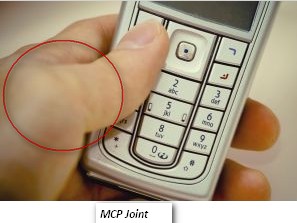
On the other hand, Ming, Pietikainen and Hänninen at the University of Kuopio in Finland found texting as the probable cause of subluxation of the right thumb and arthritis in the Carpal–Metacarpal Joint(CMC — Wrist to Thumb joint). But this is a single case.

In Taiwan, 12 college students were studied for muscle response in shoulder and thumb, Blood volume pulse from the middle finger, temperature of the middle finger, respiration while texting, and when not texting. The students were very familiar with texting. The results showed increases in all measures except respiration when the students were texting. They held their breath while texting. Skin response indicated excitement when they received text messages. Eighty-three percent of the students reported hand and neck pain while they were texting.

Now we have two articles supporting the postural set in neck and shoulders potential problems.

Texting ergonomics pic2

Ashurst, Turco and Lied from Pennsylvia looked at De Quervains tenosynovitis and texting. The most common cause of De Quervains is overuse of the thumb. This is a case study bilateral DeQuervains in a rural woman who did lots of texting. Limiting her texting and following normal conservative treatment for De Quervains resulted in a complete recovery.

Gustafsson, Johnson, and Hagberg from the University of Gothenburg in Sweden found that the quicker and more constant the thumb movement, the more likely a person is to experience pain and to develop stressors that may lead to injury.

Professionals across the spectrum of health care generally recognize that texting is probably a significant cause for the recent increase in De Quervains Tenosynovitis. The Canadian Occupational Health and Safety Association, the American Society of Hand Therapists and others all agree that Texting is problematic.
Who am I to argue?

It seems that the ergonomics risks in texting are the same as Ergonomic risks with any keyboard activity. Amount of repetition, Speed, Force and Posture are the main issues.

Here are some tips for good thumb health

  • Try to vary your posture. Sit back, sit forward, even slouch for a few minutes. Variety will assist in your protection.
  • Take frequent breaks
  • Hold the device with your wrists in a neutral posture.
  • Use the chair backrest most of the time.
  • Support the weight of your arms by resting them on a table when possible. This keeps the device fairly close to your eyes and reduces neck flexion.
  • Stretch your arms out and open your chest occasionally.
  • Use both thumbs. This lessens the probability of injury.
  • Stand up and stretch
  • Don’t try to do a long message all at once. Give your thumbs a break.
  • Don’t type too fast. That’s been shown to increase liklihood of injury.
  • Use keyboard shortcuts and abbreviations. Teach them to others so they can understand you.
  • As much as possible, bring the device to your eyes instead of your eyes to the device. This will help in maintaining good posture.
  • Stop frequently to slowly and gently stretch your hands and fingers. NEVER stretch into pain.
  • Be aware of your body. Be on the alert for discomfort, or a feeling of poor circulation in the arms and hands. If this occurs, stop texting and stretch
  • If you begin to feel lasting or recurring pain, see your Doctor.

Thank you to Virginia Hixson, OTR, CPE for permission to repost her article.

Reference: Retrieved on 2/19/2013 from : http://www.bellaonline.com/articles/art31215.asp

Carol

Posted in Android, Ergonomics, iPhone, iPod, Mobile Device Use, Occupational Therapy | Leave a comment

TooNoisy app

 TooNoisey pic3

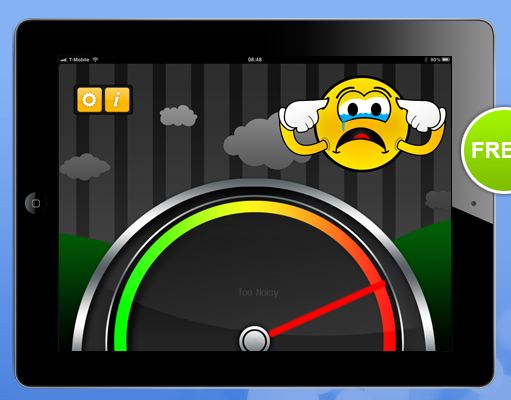
I had the opportunity to attend a Wisconsin DPI Statewide Autism Training,  Advance Level, Addressing Communication taught by Kate McGinnity, Mary Graczk-McMullen and Daniel Parker. So much great information (I wish I could say I was at an advanced level!).  One of the many apps discussed was called  TooNoisy  which addresses volume regulation for a classroom or individual student. TooNoisey is for iPhone/iPod Touch and iPad.  Here’s what the TooNoisy app looks like:

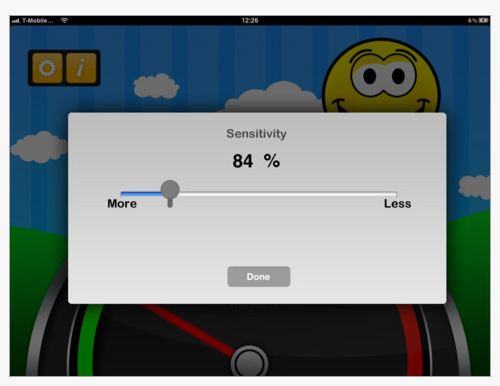
TooNoisey appTooNoisy provides great visual feedback using familiar graphics and emoticons. A sensitivity level can be set within the settings of the app.

TooNoisey app pic2

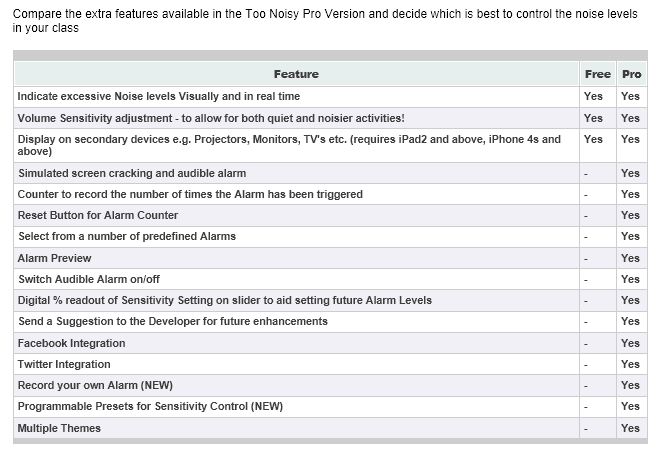
There is a free TooNoisy app and a TooNoisy Pro app (1.99). The list below describes the differencesbetween free and the Pro level:

TooNoisey pic1I have not used this app (yet) but the visuals are appealing and familiar to many students making it easier for students to understand the concept of Too Noisy! This also could be a great app to help students self-regulate the volume of their voice. I am anxious to try it with at least one of my students.

Carol

Posted in App Reviews, Apps for OT's, Apps for Special Needs, Autism, iPad, iPhone, iPod, Occupational Therapy, School Based Interventions, Self-regulation, Special education, Special Education Teacher, Uncategorized | Tagged , , , , , , , , , | Leave a comment

WriteForSchool App – Free

Write for School icon

WriteForSchool App, a handwriting iPad app is currently free (previously 5.99) for an unknown time. Here is some basic information about the WriteForSchool app from iTunes:

WRITE FOR SCHOOL PROVIDES
*A selection of international handwriting styles (fonts) used by your child’s school.
*Professional voiceovers in a variety of accents.
*Correct handwriting tuition to develop fine motor skills.
*Verbal prompts or auditory cues to identify differences in letter blends eg “sh” and “ch”
*Bright stimulating graphics to match sounds and letters.
*A program for parents to introduce lower and upper case letters and sounds to their children.

For a more in-depth review previously posted on OT’s with Apps click on this link: WriteForSchool – Customizable Letter Formation App

For customization of letter formation, give this app a try. Share with others what your experience is with the app !

Happy handwriting apping!

Carol

Posted in App Reviews, Apps for OT's, AT for Handwriting, Handwriting, iPad, Letter Formation, Occupational Therapy, Writing | Tagged , , , , , , | 6 Comments

Geoboard App

20130217-074636.jpg
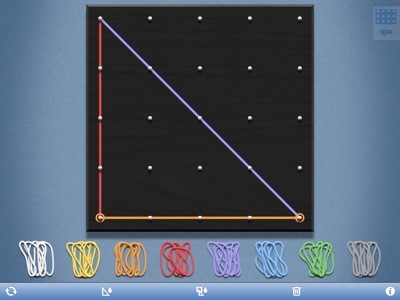
Geoboard app is a free iPad app providing an electronic method of producing geometrical designs on a 25 or 150 peg Geoboard. With 8 different colored bands, a wide variety of geometric models and levels of math instruction can be presented. Developed by Math Learning Center, it is described as ” a tool for exploring a variety of mathematical topics introduced in the elementary and middle grades. Learners stretch bands around the pegs to form line segments and polygons and make discoveries about perimeter, area, angles, congruence, fractions, and more.”

Sound familiar? Yes the same old Geoboard used for years only in an electronic format. Here is what each board looks like:

20130217-074706.jpg

20130217-075131.jpg

As an OT, my preference with Geoboards is the actual pegged board and rubber bands requiring haptic, graded fine motor control and bilateral skills along with visual perceptual abilities provided the possibilities of multiple layers of intervention. Use of an electronic Geoboard, however also has its advantages for learning mathematic principles or when just working on visual perceptual concepts. Presenting the Geoboard as an alternative to the real board certainly can be done easily when physical materials aren’t present or the electronic app is a motivator for engagement.

Try Geoboard app out and share how you might use it with your students.

Carol

Posted in App Reviews, Apps for OT's, Math, Visual Perception | Tagged , , | 3 Comments

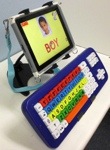
RJ Cooper’s LargeKey and Big Blue Keyboards for the iPAD

20130214-081750.jpg

RJ Cooper has been a developer of software and hardware for individuals with disability for along time with a commitment to adapting equipment for individuals with mobility impairments. Here is just one off the many adaptations he has developed allowing access of a large key keyboard with the iPad.

RJ has developed several models:
– Big Blue tooth keyboard with colored keys (Bluetooth)
– Big Blue with yellow on black keys (Bluetooth )
– LargeKeys – with colored keys (wired)
– LargeKeys – with yellow on black keys (wired)

http://www.rjcooper.com/big-blue-tooth-keyboard/index.html

20130214-080418.jpg

More information about his keyboards and other positioning aids and equipment for mobile device can be found at: http://www.rjcooper.com/big-blue-tooth-keyboard/index.html

Thanks to RJ Cooper who continues to develop and support the unique needs of individuals with special needs!

Carol

Posted in Accessibility, Accessories, iPad, iPod/iPad Accessory, Keyboard, Mobility Impairment, Occupational Therapy | Tagged , | Leave a comment

Tarheel Reader makeover and new beaut features | The Spectronics Blog

Tarheel Reader makeover and new beaut features from The Spectronics Blog

We’ve blogged in the past about what a fantastic resource Tar Heel Reader is and how you can use this free collection of easy-to-read and accessible books for kids…

( as scooped on  Scoop.itApps for Special Education)

Carol Leynse Harpold‘s insight:

Tarheel Reader has been a source of accessible books for emergent readers for years. Here is a review of their redesigned web site.

Carol

See on www.spectronicsinoz.com

Posted in Apps for OT's, Apps for Special Needs, Book, eBook Creating, Education, Language Arts, Occupational Therapy, Reading, Special education, Special Education Teacher, Special Needs | Tagged , , | Leave a comment

App of the week: iSolveIt | eSchool News

See on Scoop.itApps for Special Education

Free Universal Design for Learning math apps

Carol Leynse Harpold‘s insight:

iSolveIt apps for math provided by Cast: MathSquared and MathScaled. Check them out!


Carol

See on www.eschoolnews.com

Posted in Uncategorized | Leave a comment

4KidCal App Gone Free This Week!

4KidCal app going free

Just a reminder that the app – 4KidCal is free this week from February 11th -19th!

Interested in more information on the app? Check out a recent review on the 4KidCal App at this link:  http://wp.me/p1w0d0-1tj

Enjoy!

Carol

Posted in Uncategorized | Leave a comment