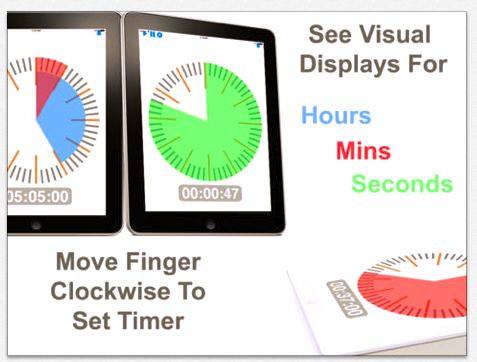
Time+ Touch HD app, by SixAxis is currently free today only (10-26-2013; regularly 1.99). Set the time up to 11 hr. 59 minutes and allow it to run in the background when using other apps. Provides visualization for hours (blue), minutes (red) and seconds (green). Compatible with iPhone/iPads.
A great tool to provide visual support (an evidence based practice) for individuals with autism. Visual timers also can support individuals with behavioral, cognitive or developmental challenges.
Bug Games app, by Busy Bee Studios, is a fun preschool app with four different activities: counting, letter identification, music and phonics as well as visual motor activities to entertain (don’t tell them that they are learning!!!) preschool children.
Based on a bug them, users match letters that make 3 letter words which are sounded and blended accurately when finished and cause a chrysalis develop. Users are rewarded with a choice of a sticker after matching the letters correctly on just a few words.
Other activities include recognizing number order to create a dot to dot “web” and spatially orienting a path/tunnel that when completed allow ants to find their home. Music can also be played in one of the activity choices providing standard children’s rhymes (London Bridge, The Famer in the Dell, Three Blind Mice e.g.).
Bug Games is a basic, preschool app for students with minimal customization (you can chose to work with upper case letters or lower case letters) but fun learning activities for young children. Currently free, it certainly is worth downloading given the visual motor/spatial relations components in the counting and puzzle activities that might be appealing to OT’s, parents or early childhood teachers.
Have you used the app? What other apps would you recommend?
Carol
Cognatus has created a series of PT and OT Helper apps available for Android with iOS apps projected in the future. Features of the apps include:
Save setups for each user
Create Templates for common injuries
Real Time Patent Pending Speed Adjuster
Graphically Track performance
Email setups and graphs
Four, single topic exercise apps are currently available:
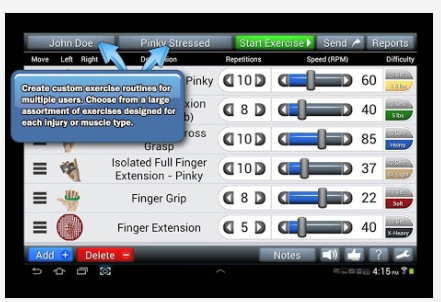
Fingers and Hands app – (Google Play – 4.99) – Provides customizable listing of exercises for hand injuries. Users can be created allowing selection of specific exercises, repetitions and animation of the exercise.
Other apps in the series currently available include:
For those in the medical work environments, have you used these apps or others like them? What has been your experience? How are clients responding to the apps? What clients would you recommend their use?
Halloween Card Creator (iPhone/iPad; free) -Make a spooky greeting card and email it to a friend or family member with this app. Use it for a seasonal writing activity.
The Very Hungry Pumpkin app (iPhone/iPad; free) Be a guide to find the candy in this just for fun gaming app for all ages. Skill levels advance as you move through levels.
Halloween 13– Thirteen days with a new spooky app each day from MagicSolvers.com. ( iPhone/iPad; free). From the Game Center. For older children or big kids (adults too!).
Carve a Pumpkin app – Still around from last year, but still free to draw or trace a face to make your own Jack-O- Lantern with this app for iPhone/ iPad. For young and old.
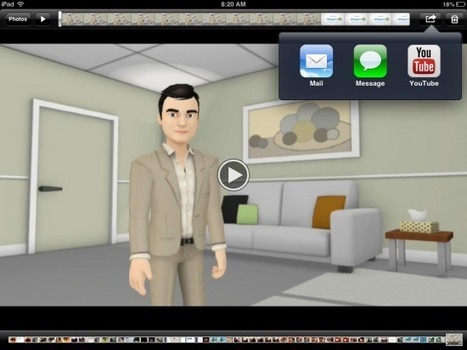
Tellagami is a free iPad that elementary school students will enjoy using to create narrated animations. If you have ever used Voki or GoAnimate, Tellagami will feel familiar to you. Tellagami allo…
Carol Leynse Harpold‘s insight:
Richard Byrne presents Tellagami app, an avatar – narrating app with text and audio capabilities for the iPad and iPhone.
Easy to use and currently free.
Might this be appropriate for some social stories? Or student created social narratives?
Luis Perez provides an overview of iOS 7 Accessibility Features on YouTube:
This video provides a general overview of some of the new features for accessibility in iOS 7. These features are covered in more detail in their own videos …
Carol Leynse Harpold‘s insight:
Luiz Perez provides a YouTube review of some of the new iOS 7 Accessibility options. Although this info is not hot off the press, for those of us who are suffering from the overwhelming effects of school start up and technology changes, – this might be our first glimpse at those features. Check out his YouTube accessibility videos at: http://www.youtube.com/user/lfperez72
Thanks to Luis Perez who simplifies and shares his expertise on accessibility for all to benefit from!Carol
Annotation apps are many, however finding an app that provide tools for inserting text along with text to speech are few. The developers at Claro Apps provides annotation tools along with text to speech capabilities in their ClaroPDF app for Dyslexia Awareness Week 2013. Currently free (5.99; in app purchase for a text to speech voice 1.99) and compatible with iPhone and iPad.
ClaroPDF app features allow:
1. Annotation features:
-Highlight
-Underscore
-Strikeout
-Notes
-Free Text (type straight into the PDF)
-Free line draw (with many colours, opacity and thickness control)
-Shapes (Circle, Square, Line – with many colours, opacity and thickness control)
-Images (you can even insert Photos from your iPad Camera or Photo Library into the PDF file)
2. Smart Zoom
3. Full-Text Search & Navigation
4. Manages PDF Files
– Open PDF files ClaroPDF from other apps
– PDF files can be Saved into the Gallery, sent by e-mail, or opened in other apps supporting the PDF file format
5. ClaroRead compatibility – ClaroRead Pro and Plus for Windows can scan paper into accessible PDF files, retaining the original page image. Can be opened and spoken in ClaroPDF.
6. Text to speech capabilities
Here are a few screen shots of ClaroPDF:
ClaroPDF is a great app that provides text to speech capabilities and annotation tools. If you work with students or adults, this is well worth the regular price for your OT or teaching mTool Kit – and free for a limited time! Check it out before it returns to regular price !
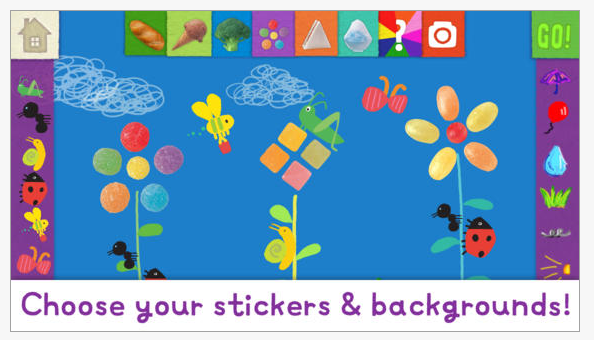
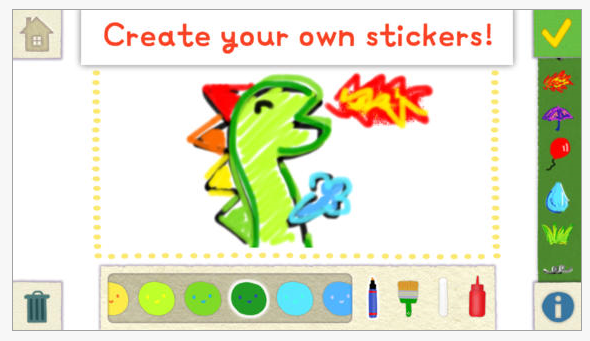
Magic Stickers app, for iPhone/iPad is a fun emergent writing and drawing app for preschool children currently gone free. Developed by the folks at Lazoo, makers of Squiggles and Let’s Color apps for preschoolers, this app provides creative play and story making with stamps, pictures drawing and animation tools.
Magic Stickers is a fun app that can encourage emergent writing skills with beginning writers. Free ( for a unknown time)!
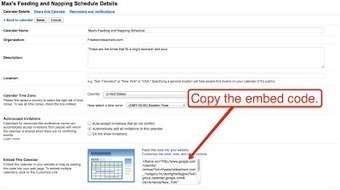
Richard Byrne on his Free Tech 4 Teachers Blog shares a short guide to creating and sharing Google Calendars. Although this is a pretty easy thing to do, he also shows how to attach a document or assignment to the calendar event.
Check out this additional way to make sure assignments, instructions and other documents are available to students through their calendar/ electronic agenda!
Let no assignment or due date be left behind!!
What a great way to scaffold supports for students with executive function challenges!









 OT's with Apps & Technology