National Occupational Therapy Month – OT Created Apps

With April being National OT Month, here is a review with a focus on OT’s who have contributed to our profession and use of mobile devices by creating  intervention apps. Kudos to them for their sharing their creativity  and expertise:
Ready to Print icon Diane Reid, OT, Ready to Print app  (9.99) provide pre-writing and writing interventions with graded activities and data collection. Featured on OT’s with Apps previously, this is a staple in many OT’s mTool Kit. Also available for Android (7.99) .

Shelby's Quest iconShelby’s Quest, created by Kami Bible, OT, is another great visual motor/pre-writing app with graded activities and multiple users. Available for iPad (4.99).


Dexteria icon 2Dexteria app (3.99), by BinaryLabs, created this app in collaboration with OT’s. Provides motor coordination and control activities in this app. Also available for Android (4.99)!

AbilipadAbilipad,(19.99) created by Cheryl Bregman, is a customizable keyboard and writing tool for a variety of ages and skill. Check out her recent updates in her app.

Other apps are available for evaluation and treatment planning, but these are a few intervention apps created by and for OT’s. Kudos to these OT’s!

More for your OT mTool Kit!

Carol



Posted in Uncategorized | 4 Comments

It’s April – National OT Month!

OT month pic It’s April and time to celebrate National Occupational Therapy Month!

To celebrate Occupational Therapy Month, here is a curated list of free or reduced apps that might be a worth considering for your OT mTool Kit (taking advantage of the apps offered from other current events – for a limited time!):

Timer+ Touch iconTimer+ Touch app (free, regularly 1.99 – reportedly not free in UK ) for iPhone/iPad – Visual timer with hours, minute, second colors. Runs in the background when working with other apps. Great therapy tool.

Choiceworks Calendar iconChoiceworks Calendar for iPad (.99 regularly 4.99) provides visual/ picture schedule and calendar features. Speaks calendar, set timer,  set recurring reminders and more with the visual and audio features.

Choiceworks iconChoiceworks for iPhone/iPad (2.99, regularly 6.99) provides visual schedule tools, timer and view options to support individual needing visual supports.


Bug Games iconBug Games for iPad – (.99 regularly 1.99) provides letter recognition, dot to dot and visual motor activities for preschool to early primary grades.


Busy Shapes iconBusy Shapes – a Game Center game for iPhone/iPad (1.99, regularly 2.99) provides visual discrimination activities for kids and appropriately presented for adults also.

Slide and Spin icon first appsSlide and Spin  for iPhone/iPad (free, regularly .99) from My First Apps. Provides activities to develop turning, sliding, spinning and pushing buttons.


ASD Tools icon ASD Tool for iPhone/iPad (free, regularly 1.99) provides basic visual schedule with steps or first then options, timer and reward system.


More for your OT mTool Kit!

Carol


Posted in Occupational Therapy, Visual Supports | Tagged , , , , , | 5 Comments

Mod Math App – Free Math Worksheet App

Mod Math icon

ModMath App

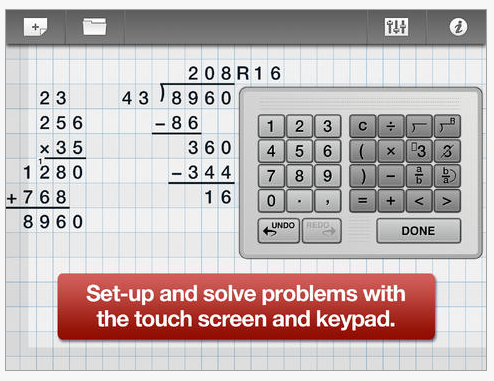
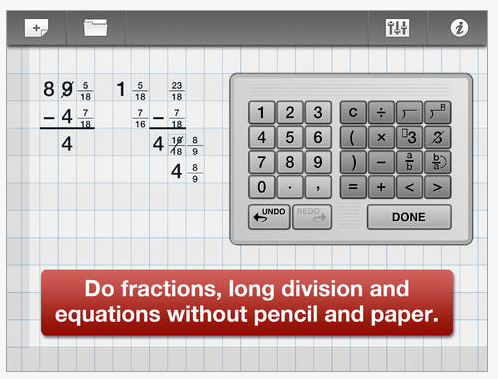
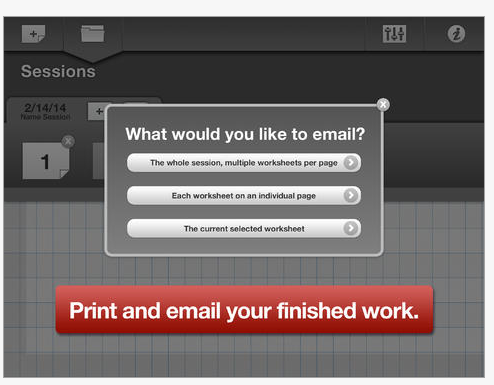
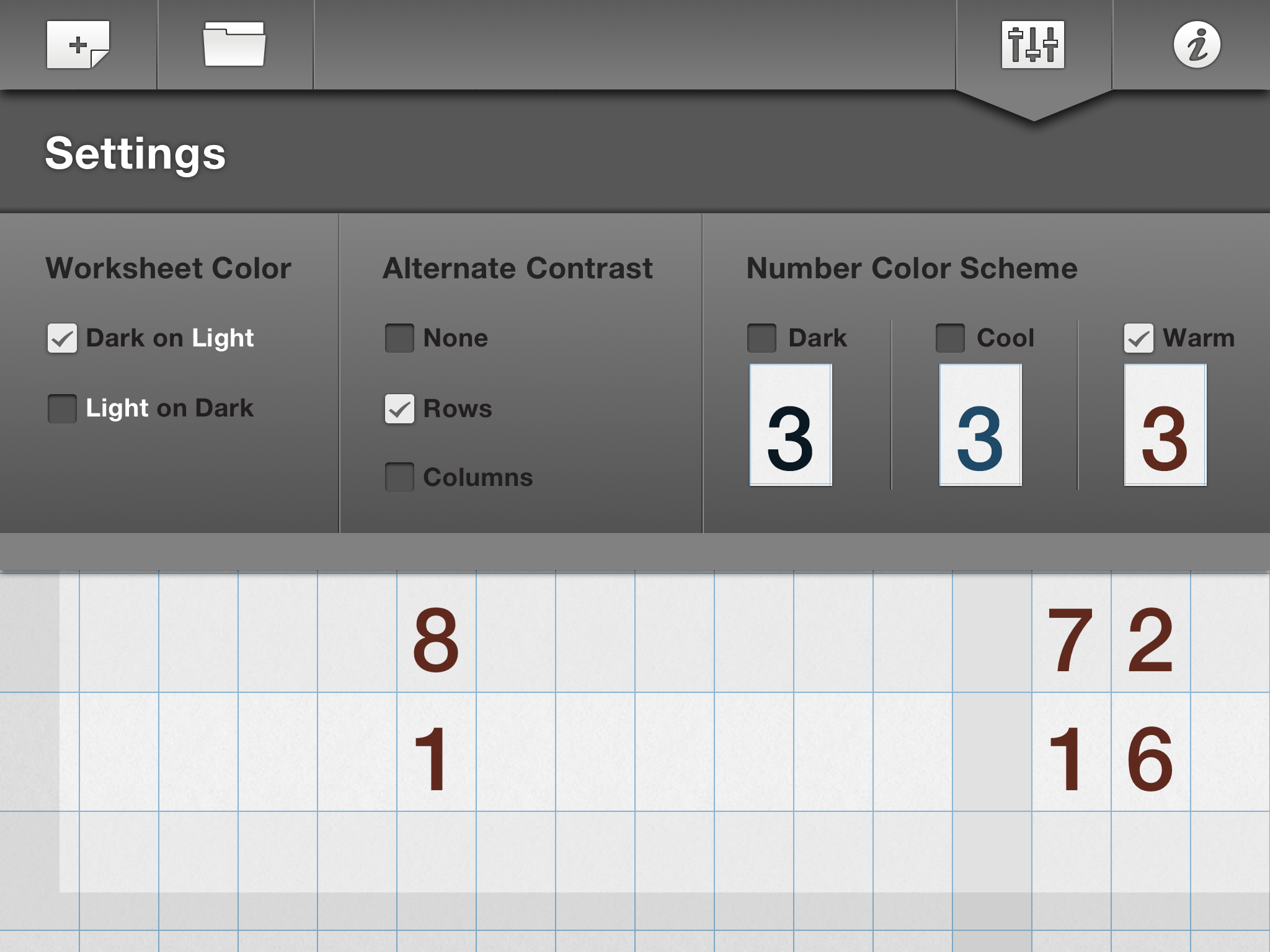
ModMath is a  new iPad app developed for individuals with dyslexia and dysgraphia to produce basic math problems.  And,  if that isn’t good enough the app is (currently) free! If you have searched for methods of producing math electronically, you might agree that options are limited. For the iPad, there are few math worksheet apps available that offer use of a division sign, align fractions and keep alignment with key input. ModMath app, on the other hand,  provides a worksheet format for producing addition, subtraction, multiplication and division problems along with tools to create fractions, equations, carryover symbol and division symbol with and without a remainder sign. Use of the app is easy and intuitive to use for students with little instruction needed (it does always help reading the information page!). The app also provides a grid to help with aligning and entering numbers and also automatically enters numbers in a left to right order.  Here are a few screen shots of the apps: with a description below of a few more of the features: Mod Math app pic1  Mod Math pic2 MathMod pic6a The app provides workflow options to print or email. Multiple or single pages can be sent or printed. The document is sent in a PDF file for ease of use. Mod Math pic5ModMath app has a few options in its Settings: Mod math pic7 ModMath is a great new app for primary to middle school aged students to produce basic electronic math problems. I trialed a Bluetooth keyboard (Amazon Bluetooth and RJ Cooper’s Big Blue-Tooth with the app to see if access using an alternative keyboard might be possible without success. I was able to use Voice over with the menu buttons,  number keyboard and work entered on the worksheet. I have not trialed use of a switch with the app however, I suspect that navigation on the worksheet may be a problem. Thank you to ModMath developers for creating this app and sharing it with students, teachers/therapists and parents for free. It is a great tool for students with dysgraphia who have an iPad and need to write out math problems. More for your Teaching / OT mTool Kit! Carol

Posted in iPad, Learning Disability, Math, Occupational Therapy, Special education, Writing | 2 Comments

Free Download: Apps for Students with Autism Spectrum Disorder

iTunes u

Mark Coppin, Director of Anne Carlsen’s Center for Assistive Technology, has created a iTunesU  “Apps for Students With Autism Spectrum Disorders”. The purpose of this course is to assist in determining what app features to look for when selecting apps.

It is totally free and best viewed using the free iTunes U app.
iTunes U App – https://itunes.apple.com/us/app/itunes-u/id490217893?mt=8

1) Download the iTunesU App, open the app
2) Click “catalog”
3) Scroll down the page and click on “enroll”
4) Enter this code to enroll: HF5-4R8-HZE

You can also enroll in this course through iTunes by following this link – https://itunesu.itunes.apple.com/audit/COH3CQR8H2

The course is best viewed through the iTunesU app.

Retrieved on April 3, 2014 from : http://news.annecarlsen.org/autism/free-download-apps-for-students-with-autism-spectrum-disorders/

The course is free. Available is a listing of apps for students with Autism.

Thanks to Director Mark Coppin for creating and sharing this resource.

Carol

Posted in Uncategorized | Leave a comment

iAutism – Apps Discounted or Free for World Autism Awareness Day

iAutism icon

Francesc Sistach at iAutism provides an outstanding categorized list of iOS apps discounted or free in observance of World Autism Awareness Day. Included in her list is a description and information on how long the price reduction is available. Many great iPad/iPod/iPhone apps are listed for those who support individuals with Autism, among other students or individuals with disabilities.

Free or Discounted apps – For World Autism Awareness Day 2014

Thank you to iAutism blogger for curating this well organized list!!

More for your OT m Tool Kit!

Carol

Posted in Apps for Special Needs, Augmentative Communication, Autism, Education, iADL's, iPad, iPhone, iPod, Life Skills, School Based Interventions, Social Story, Special education | Leave a comment

Autism Awareness Month Apps Discounted / Free – Smart Apps for Kids

Smart Apps for Kids [pic

For Autism Awareness Month, numerous developers offer their apps discounted or free. Smart Apps for Kids provides a list of 101 iPad, iPhone/iPod apps reduced or free in honor of Autism Awareness Month. Check out the apps at: http://www.smartappsforkids.com/2014/03/autism-awareness-month-1st-april-1.html

Carol

Posted in Autism, iPad, iPhone, iPod | Leave a comment

Mobile Devices as Cognitive Aids for People with Brain Injuries | RichmondMom.com

As scooped from Richmondmom.com‘s  post Mobile Devices as Cognitive Aids for People with Brain Injuries

Carol Leynse Harpold‘s insight:

Richmondmom.com writer, Fiona Bessey Bushnell, OT shares information and background about Tony Gentry’s work with cognitive aids for individuals with brain injuries. I have enjoyed following Tony’s innovative work with mobile devices for a while. He has been a forerunner of doing research on the use of handheld electronics to support individuals with cognitive disabilities. Ms. Bushnell summaries his work and provides some of his practical suggestions for the use of mobile devices.

Enjoy her post and check out more of Tony Gentry’s, PhD, OTR (Associate Professor of OT at VCU), publications on technology for individuals with cognitive challenges VCU’s Department of Occupational Therapy’s AT for Cognition Laboratory ( http://www.sahp.vcu.edu/occu/research/at_cognition.html ).


Carol

as scoop using Scoop.itOT mTool Kit

Posted in Activities of Daily Living, Cognitive Impairment, Life Skills, Mobile Device Use | Leave a comment

Ready To Print App

Ready to print icon

Ready to Print App

Ready to Print app is a Swiss army knife app for OT’s, providing touch screen training, prewriting, visual matching, basic shape drawing, letter formation activities with the ability to grade the tasks and collect data on multiple users. Ready to print pic 3-14

Ready to Print app, developed by Diane Reid, OTR, is a great tool for your pediatric OT mTool kit. For a more about the app check out  Ready to Print Updated! post.

Ready to Print generously provided promo codes for the participants at our OT’s with Apps at School Workshops. We have a few to also share. Redeem before April 1, 2014.  Please be polite and post a comment that you redeemed a code and the beginning numbers! It reduces frustration for others.

9YNW6PAFHJWY

HJTM4RRLNWNR

3RHJX4JJN934

FWHY3W4T7KH6

H7A7XTKJXPFA

Thank you to Ready to Print developers!

Carol


Posted in Uncategorized | 14 Comments

April is Autism Awareness Month and Apps Gone Free

Autism awareness month

April is Autism Awareness Month and there is always a frenzy of activity – including (typically) many apps gone free. With a few days yet to go, the apps gone free seems to have started. Here is one app, free for a limited time (yes, how long is typically a mystery) reviewed by the folks at Smart Apps for Kids :

S.E.E. icon  S.E.E – Social Emotional Exchange (iPad; currently free/ 29.99 typically). Described on iTunes as an “engaging and interactive way to teach children various human emotions by looking at facial expressions.
This app has been built from ground up while keeping kids with autism in mind.
S.E.E. has been developed with the direct consultation and feedback of ABA therapists.” Developed for 6-8 year olds who need direct instruction on concepts of emotions. Here are a few clips of the app:

SEE pic 1 SEE pic 2 SEE pic3

Check the review on Smart Apps for Kids to see if it will be a tool for your OT mTool Kit, otherwise, pass it on!

Carol


Posted in Uncategorized | Leave a comment

Motor App List From Boston’s Children’s Hospital

Boston Childrens Hospital logo

While searching for information, I stumbled upon Apps and Clinical Features Matching Handouts resource from Boston Children’s Hospital which provided not only feature matching templates but also an interesting list of Motor Apps created by Jessica Caron (May 2013) . Her list of more than 15 app provides a unique curation of “Apps Used to Refine Motor Movements”.

Created to identify specific apps that encourage certain interaction on a mobile device for access to communication (swiping, tap, precise pointing, etc.), Jessica Caron lists the apps and the skills needed when using the app (drag, tap, swipe, refined point). Although created for communication, this list could also be very helpful for those searching for apps for beginning iPad switch or direct touch users.

The image below is shows an example of part of her list of Motor Apps:

Boston Childrens motor app list 3-14

Check out her complete handout  Motor Apps  on the Boston Children’s Hospital website if you are looking for apps for emergent iPad users and apps with specific motor requirements. Jessica Caron also shares an App List and iPad Accessories for you to peruse on the Boston Children’s Hospital Resource.

If you are looking for more information on touch progression or switch access on the iPad, also check out Ian Bean’s resources at: http://www.ianbean.co.uk/publications.html . He has a wealth of information specifically on touch and switch progression!

So many resources and so little time!!

More for your OT mTool Kit!

Carol
Posted in Uncategorized | Leave a comment