OT’s with Apps – Apps and Application for Your School Based OT mTool Kit

OT's with Apps Promo image

Interested in learning about apps mobile device equipment related to school based Occupational Therapy intervention?

Join OT’s with App’s for “Apps and Application for Your School Based OT mTool Kit” August 11th & 12th!

Prior workshop participants received over $60 of free app codes and iPad accessories.

Course Information

Register by July 15th for a discount!

Registration Information

Hope you can join us! OT’s with Apps – Carol & Erin

Posted in Apps for OT's, Continuing Education, Dysgraphia, Early Childhood, Education, Elementary School, iOS, iPad, Letter Formation, Mobile Device Use, Occupational Therapy, OCR, Rest and Sleep, School Based Interventions, Self-regulation, Stylus, Therapist/Teacher Tools, Visual Perception, Writing | Leave a comment

Heavy Duty Cases for iPad Mini

sturdy iPad mini cases pic1Whether protecting your iPad Mini from mishaps of kids or adults, providing heavy duty coverage for your tablet can be a smart investment.

It has been a while since I reviewed iPad cases, much less for the iPad Mini, so here is a quick rundown on what I thought were the main contenders for protection:

OtterBox Defender Series for iPad mini with Retina display – Black (35.80 on Amazon) – The Otterbox is well known for its durable cases and its iPad Mini case stands up to its reputation. The current versions of the OtterBox case for iPad Mini provides multiple layers of protection, screen protector and stand/cover and meets military standards for protection.  The cover provides an additional layer of protection to the screen should it be dropped face forward as well as an easel for positioning.  Having used Otterbox cases since the first iPad, the current case features are well engineered (like the first case and much improved from the OtterBox case for iPad 2). Weighs 4.8 oz.

OtterBox Defender for iPad mini

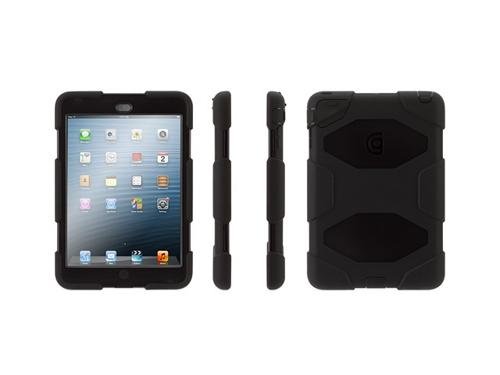
Griffin Technology Survivor for iPad mini ($35.00) – Has an integrated screen with covers for ports for protection. Internal frame protects from drops and shocks. Meets military standards.  Includes a stand. Comes in a variety of colors. Experience with Griffin cases has found them to be sturdy and well engineered. Rates well on Amazon by users. Weighs 5.8 oz.

Griffin Survivor iPad mini

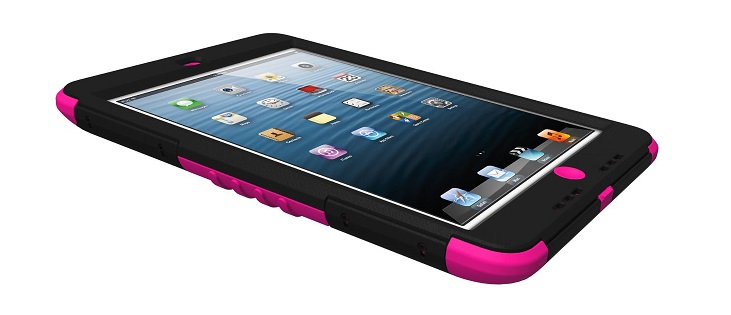
Trident Case KRAKEN AMS Series for Apple iPad mini ($33.53) – Comes with a built in screen protector, inner shock resistant shell, dust covers for speaker and microphone bays. Includes an attachment port to attach other straps or holsters. A stand attachment is also available. My experience with Trident cases for iPads has also  been positive with good ratings received for this case from Amazon users. Weighs 7.5 oz.

Trident case for ipad mini

LifeProof Fre Waterproof Case for iPad mini  (79.99) – Another military grade case for the iPad mini.. The LifeProof is waterproof for up to 60 minutes, has a screen protector and is shock proof. Comes in different colors. I have not had experience with LifeProof cases, however if you need one to be waterproof, this is the case for you! Weighs 4.8 oz.

Lifeproof case for iPad mini


Some of the same makers of sturdy cases for the iPad have comparable protective cases for the iPad Mini. Costs are similar between the cases with exception of  LifeProof case which is costs a bit more but is waterproof. If weight is a consideration, the Otterbox LifeProof and Griffin cases are the lightest choices.

What are your experiences and preferences with iPad Mini cases?

More for your OT mTool Kit.

Carol


Posted in Accessories, iPad, iPad Management, iPod/iPad Accessory | Leave a comment

Summer Tip and Trick for Managing Screen Time for iOS

Summer holidays pic

Summer is finally here and that means more free time for kids. How will they spend their time?

  • Playing outdoors doing physical activities?
  • Spending sometimes doing hands-on learning with real things and or friends?
  • Helping by doing some chores?
  • More screen time activities with electronics?

With additional free time available for kids in the summer, the temptation to spend even more “screen time”  playing with electronic tablets or devices is possible. Research¹ now shows kids spend approximately 5-7 hours of sedentary time engaging in “screen time” contributing to obesity, limited attention, anxiety, depression and sleep problems. Although structure and providing choices of active things to do are a great way to curtail too much screen time, here is a no cost method of controlling timed usage on the iPhone, iPad or iPod :

The original Apple Clock app provides a timer that can be set to lock your device after the timer goes off. It requires creating a passcode (Settings>Restrictions>Passcode) to lock your device. Here’s how to set the timer and lock the device when the timer is done:

1. Go to your  iOS Apple Clock.

apple clock image


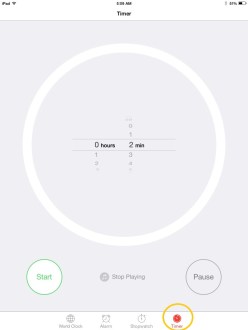
2. Go to the Clock Timer tool. Scroll to set the time. Recommended screen time for children over 2 years of age is 1-2 hours/day. Under 2 years of age screen time is not recommended.
Apple Timer pic3

3. Click the music symbol (between the Start and Pause button)

Apple timer music symbol pic
4. Scroll down to the bottom of the sound choices for “When Timer Ends” to Stop Playing. Select Stop Playing option and Set.
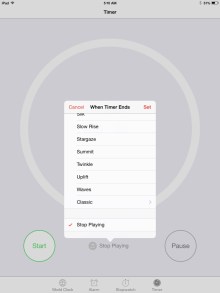
Apple timer pic1

5. Select Start when you are ready to begin using the timer. When the timer time is done, the device locks (again, must have Restrictions on and a Passcode set) and returns you to the screen to enter a Passcode.

Easy and free. You may need to change your passcode often if the user has good visual memory when using your passcode! A sturdy case may also be a prudent choice, especially if being locked out causes some frustration.

For how to decrease screen time visit the National Institute of Health website for suggested activities.

Reference:

1 Retrieved on June 7, 2014 from: http://www.nlm.nih.gov/medlineplus/ency/patientinstructions/000355.htm

 

Posted in iOS, iPad, iPad Management, iPhone, iPod, Mobile Device Use, Pediatrics | 4 Comments

Community Lost & Found – Tiles are Shipping!

Tile pic1

An earlier blog post presented the SelfStarter project called Tiles, a small chip developed to help locate misplaced items using a smartphone app.  Considering this as a tool for those with organization challenges (where did I put that??), the Tile offers a few advantages over others I have used as it doesn’t run on a battery which can be yet another obstacle with use of locating tools.

Tileapp icon2Using the  Tile app, and a Tile device you can track where items are located within a 150 ft range. Options for community locate and find are also being developed with the device.  Now in production and being shipped, here is a recent update on the Tile which appears easy to use, requires no battery to assist with locating those items that somehow seem to walk away…


With the possibility of a community lost and found feature, the Tile offers possibilities for individuals who are challenged with material management!

Interested in more about the Tile? Check out The Tile App.com for more information and special pricing for early buyers! I am looking forward to my Tiles arriving soon!

More for those that are organizationally impaired or perhaps consider it a cognitive support?

More for your personal or OT mTool Kit!

Carol

Posted in Accessories, Adults with LD, App Reviews, iADL's, iOS, iPad, iPhone, iPod/iPad Accessory, Occupational Therapy, Organization | Leave a comment

AllAccess app

Technology Options for Special Needs reviews this free, AllAcess app that supports VoiceOver for access.
Thank you to Technology Options for Special Needs for reviewing this app.
Carol

Technology options for special needs's avatarTechnology Options for Special Needs

I often use Siri to locate some restaurants nearby when I visit different locations. However, I was always wondering if there is a better app for VoiceOver users.

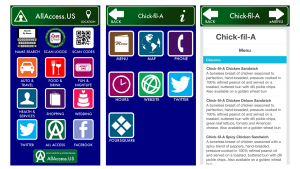
The app called All Access offers the information about not only Food & Drink but also different categories such as Health & Services, Auto & Travel, Shopping, Scan codes, and more. So I tried this app using the VoiceOver. It is very easy to navigate. For example, from the Food/Drink button, when you select restaurants’ types (i.e. Asian, American, All Types, etc.) and select your choice of a restaurant, you can access the information from separate buttons such as the restaurant’s Menu, Maps, phone, specials, and hours, all of which can be read aloud. This is helpful for everyone because you sometimes cannot read the Menu easily from their website.

AllAccess An example of using the Food & Drink selection (AllAccess App)

I also…

View original post 92 more words

Posted in Uncategorized | Leave a comment

Summer Fun- Paper Critters Lite

Paper critter lite icon

Paper Critter Lite app

Looking for some summer tech & visual motor fun for kids?

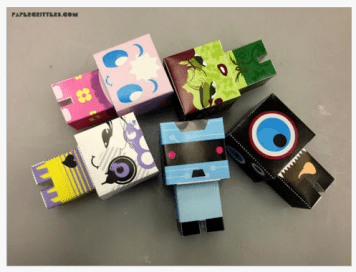
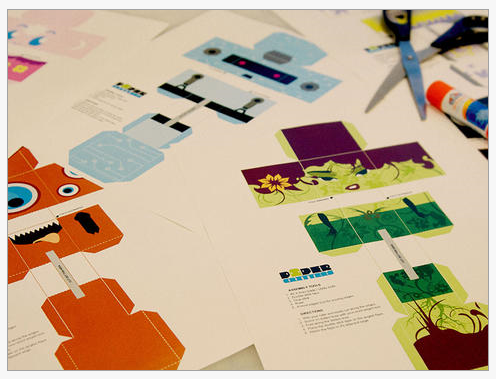
Paper critter lite iconPaper Critters Lite is the free version (full version is 1.99) of this app which features creating your own digital creature on the iPad, then printing the creation, cutting and assembling it into a 3D creature! This app is based on the online digital creation tool – Paper Critters  , an online tool which allows 3D creature creation, printing and assembly. Most appropriate for elementary aged students (8 year olds and older) with ability to create and navigate a variety of tools and features. Certainly parents or therapists can assist with creating or printing out templates or creations from the printer for students to cut out and assemble.

Here some images of the tools and products:

Paper critter pic1

Paper critter lite pic2

Paper critter pic3

Existing templates for the above pictured creatures are available within the app to print and assemble.

Here is a video with step by step instructions about the apps features:

Some fun paper cutting and assembling fun for the summer (don’t let them know it works on fine motor/visual motor and visual perceptual skills)!

Have fun creating this summer!

Carol


Posted in App Reviews, Apps for OT's, Elementary School, Fine Motor Development, iPad, iPhone, Just for Fun, Leisure apps, Occupational Therapy, Uncategorized, Visual Motor, Visual Perception | 2 Comments

Toca Mini – Gone Free

free

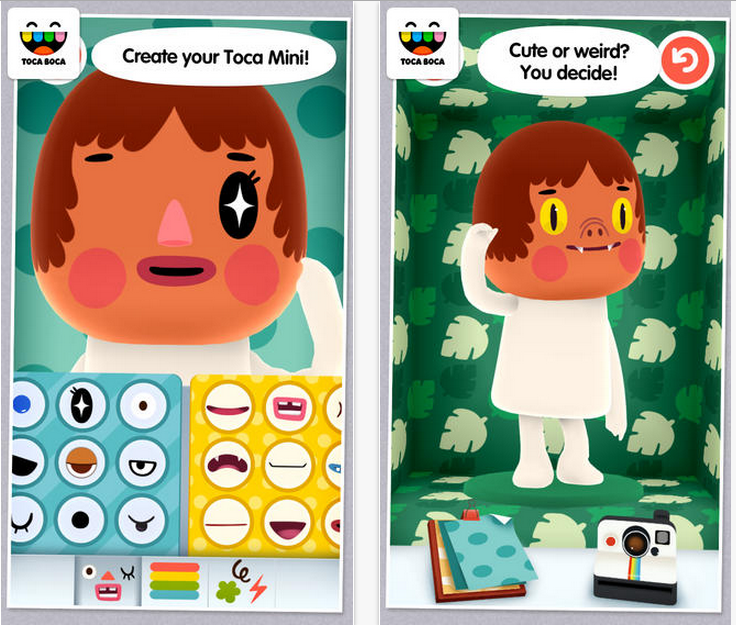
Toca Mini iconToca Mini , a relatively new app for iPad and iPhone developed by the folks at Toca Boca is currently free (regularly 2.99). Developed for 6-8 year olds, Toca Mini  app provides a tools to design a creature with facial parts (eyes, nose, mouth, etc.), hair and put designs on the clothes given pallets of parts and shapes. Users get a 3-D creature that is animated with entertaining gestures, expressions and simple actions.

Here are a few pictures of what’s included in the app:

Toca Mini pic1

As a creation app, the camera allows taking a picture of the creation to share or print.

A fun app for young children and a great way to work on body parts!  Free today!

More for your OT mTool Kit.

Posted in Apps for OT's, Early Childhood, iPad, iPhone, Occupational Therapy, Pediatrics | 2 Comments

Tetramouse: Another Mouse for Your Mouth and Beyond!

As Scooped from – ND Assistive Technology – Tetramouse – Another Mouse for your Mouth and Beyond

Don’t you just love having choices? Thanks to the TetraLite Company, we have one more in the mouth joystick arena for people with quadriplegia, MS, or other physical disabilities.  The TetraMouse i…

Carol Leynse Harpold‘s insight:

Jeannie Krull from IPAT shares a new mouth control mouse for access for individuals with mobility impairment.

Great choices!

Carol Leynse Harpold, MS AdEd, OTR.L, ATP

OT’s with Apps

Adaptivetr.com

As scooped from  Scoop.itOT @ Work

Posted in Accessibility | Leave a comment

Sentence Builder for Special Needs Children App from Abitalk – Gone Free!

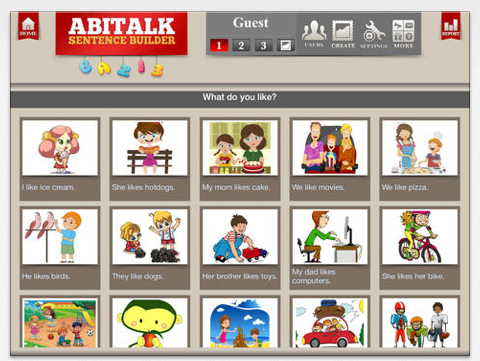
Sentence Builder for special needs icon Here is a weekend deal – Sentence Builder for Special Needs Children app  – regularly 4.99 Gone Free! This app features tools to create sentences with word tiles given pictures and the ability to customize. Suggested for 4-9 years of age.

Sentence Builder for special needs pic1

Three different levels are provided:

  • Sentences with simple structures
  • Sentences with more complex structures
  • Sentences with advanced structures including grammar, vocabulary and spelling

Sentence builder for special needs pic2

Sentence builder for special needs pic3

This app provides unlimited user accounts and the ability to track user progress.

More for your teaching or OT mTool Kit!

Carol


Posted in Apps for OT's, Apps for Special Needs, Early Childhood, Elementary School, Emergent Literacy, iPad, Occupational Therapy, Special education, Writing | Leave a comment

CALL Scotland Blog: Sharing Learning Resources in Word Between Windows and iPad

As scooped from CALL Scotland Blog

CALL Scotland – Provides specialist expertise in technology for children who have speech, communication and/or writing difficulties, in schools across Scotland.

Carol Leynse Harpold‘s insight:

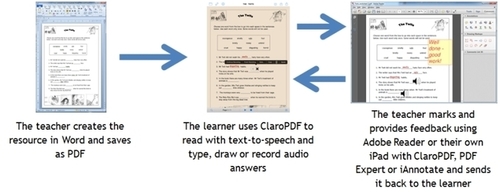
Paul Nisbet from Call Scotland provides workflow solutions when using Word documents for students on the iPad. Recommended apps with annotation and text to speech are offered by Paul Nisbet.

Check out the post on the Call Scotland Blog.

Carol

See on www.callscotland.org.uk

See on Scoop.itAT 4 Education

Carol

Posted in Activity Worksheets on Your iPad, Apps for OT's, iPad, Text to Speech, Therapist/Teacher Tools, Work Flow, Writing | Leave a comment