Free Technology for Teachers: Organize Your Thoughts With Google Keep

Source: www.freetech4teachers.com

Richard Byrne from freetech4teachers.com give a quick overview of Google Keep app for iOS, Android and web based. Another option for organizing ideas, bookmarks and notes that can be accessed on many devices with Internet connection.

So many great options!

Carol

As scoop with  Scoop.itOT mTool Kit from: http://goo.gl/O21D0m  on October 22, 2014.

Posted in Android, iOS, Organization, Web based | Tagged , , , , | Leave a comment

inPromptu App – A Free Video Modeling App

inPromptu icon

inPromptu App

Video modeling has strong evidence based practice behind its use. If you haven’t experienced the power of video modeling first hand, let the research behind it encourage you to use videos and self-modeling in your practice.

A previous post on Word Toob app (iPad; 19.99) briefly reviewed use for organizing videos, visual schedules and as an AAC app. It is a great app if you have the funds.

On the cheap, there are a few more apps on the low cost – no cost that can also provide organization of videos for your students or clients. Although they may not have all the bells and whistles, they provide an organized method of accessing videos to students or clients.

inPromptu iconinPromptu app (iPad/iPhone; free) – developed by the Ohio State University Department of Education with a grant from the US Department of Education, this app provides categories of activities of daily living videos and options of creating your own category or tasks. The goal of this app as stated on their website is to ” The overarching goal of the inPromptu project is to provide individuals with severe intellectual disabilities with a tool to be able to prompt themselves—to incite them to greater action by increasing their competence with daily living skills, to assist them with learning and maintaining new daily living skills, and by supplying them with an easily accessible video system to increase their self-reliance with daily living skills.”

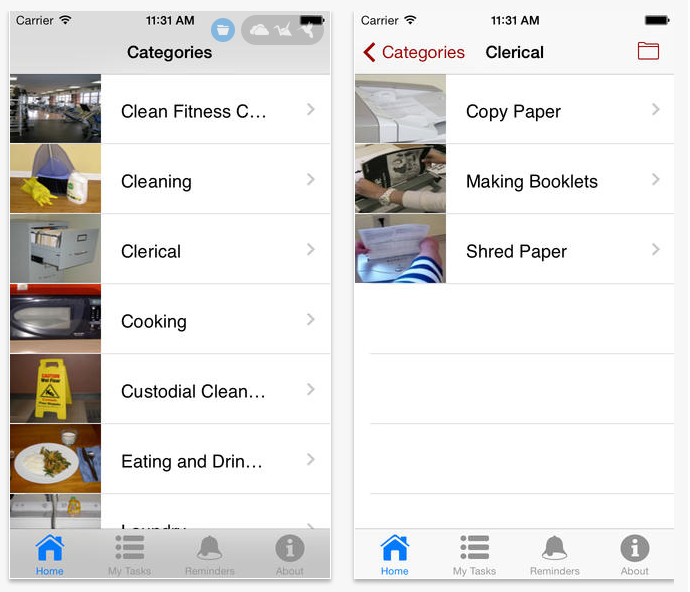
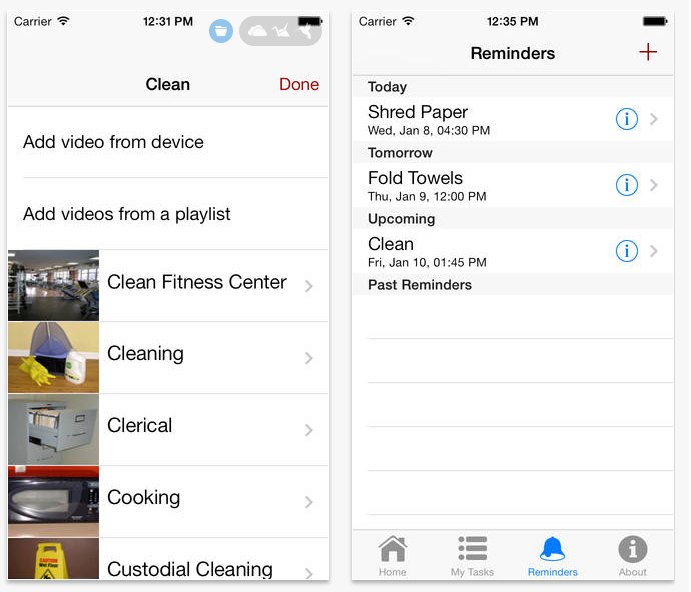
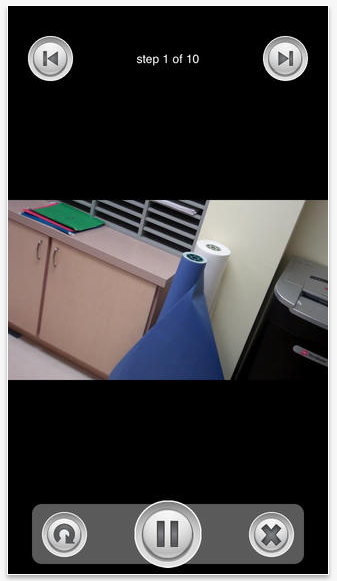
inPromptu app provides a series of created video prompts for categories of cleaning, cooking, eating and drinking, laundry and personal hygiene as a model. My Tasks tool provides the option of adding your own playlist of tasks. A reminder tool allows setting alarms by a date and time that prompts a message at the time set for the task selected.

Here are a few screen shots of the app set up and tools:


inPromptu pic1
inPromptu pic2 inPromptu pic3

The Ohio State University provides instructions with the use of the app including:

  • Instructions for creating videos to share with the OSU for the app as well as tips and tricks for video tasks for video prompting and modeling. Even if you are not sending them videos, their instructions provide helpful reminders on task analysis and tips and tricks for videos : http://inpromptu.ehe.osu.edu/preparing-videos-for-ip2/
  • Instructions for setting up the app: http://inpromptu.ehe.osu.edu/using-ip2/
  • A data collection sheet with directions is also provided through the Ohio State University website  to assist with progress monitoring:  http://inpromptu.ehe.osu.edu/files/2012/03/Data-Sheet.pdf
  • Instructions on teaching sessions for video prompting :  http://inpromptu.ehe.osu.edu/teaching-sessions/

Free is always good. This app also is compatible with iPad and iPhone allowing it to be portable for use by those in supported employment using an iPod Touch.

More for your teaching or OT mTool Kit.

Carol

References:

“InPromptu.” Ohio State University. N.p., n.d. Web. 22 Oct. 2014.

“Video Modeling | Autismpdc.fpg.unc.edu.” Video Modeling | Autismpdc.fpg.unc.edu. N.p., n.d. Web. 22 Oct. 2014.

Roberts, Jessica. N.p.: Booksurge, 2008. Print.


Posted in Uncategorized | 4 Comments

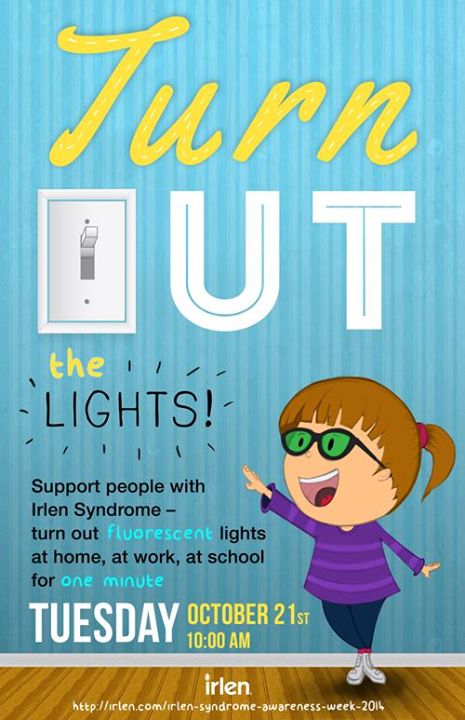
Irlen Awareness Week Oct 20-24

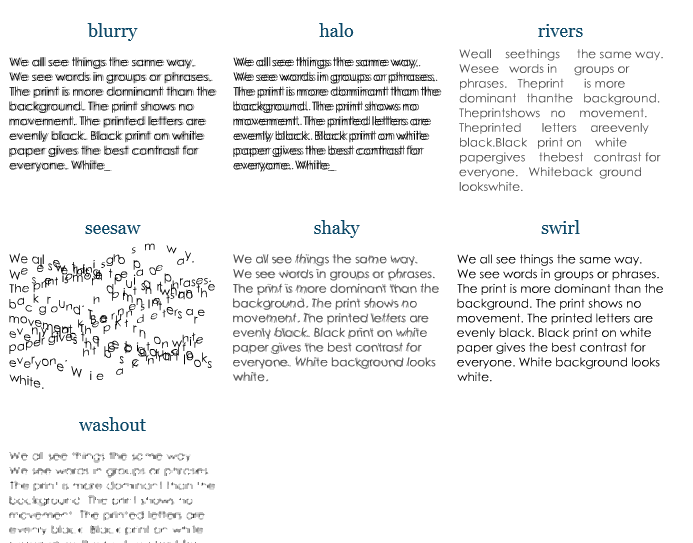
Do you become distress with bright lights, black print on white paper, experience visual fatigue or experience print that does not remain stable?

Irlen distorsions

These are just a few of the symptoms of Irlen Syndrome. Find out more during the Irlen Syndrome Awareness week…

Irlen Awareness week1959539_10152856696849923_8882178089764219642_n


For more information visit Irlen Website.  More information to come this week.

And yes, there are some apps that can help with that!

Carol Leynse Harpold, MS AdEd, OTR/L, ATP , Irlen Screener

otswithapps@gmail.com or Carol@adaptivetr.com

Posted in Irlen Syndrome, Vision, Visual Perception | Tagged , , | Leave a comment

Abilipad App Price Reduction!

Abilipad icon

Abilipad App

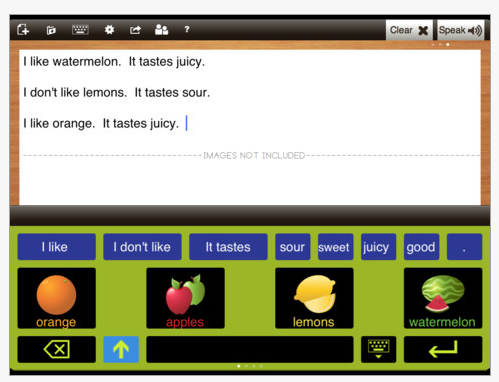
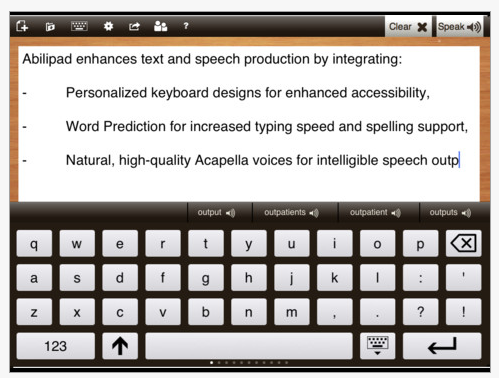
Abilipad app  (iPad; regularly 19.99) is reduced to 9.99 today (always a mystery how long this reduced price will be!). This app provides tools to customization the keyboard layout with pictures, text, key size and color. Other options available to support reading and writing includes word prediction, text to speech and ability to create a writing environment with those features. It is a great app for customizing the writing environment.

Abilipad pic 2

Abilipad pic

Great app to have in your app arsenal to support writing!

More for your OT mTool kit!

Carol


Posted in Apps for OT's, Word Prediction, Writing | Tagged , , , , , , | 3 Comments

WordToob App

light bulb-29050_640 - Pixabay

Do you ever stumble upon an app and think ” that is really cool” but the light bulb just doesn’t go on for application of it (or may be you don’t have an immediate application) ??

Wordtoob iconWordToob app (iPad; 19.99 for iOS 5.1 or later) was one of those apps. I have had it on my iPad for quite sometime but just didn’t quite see the application – maybe I was blinded by the light????

I have the opportunity of working with a great school team supporting a student with special needs. The team created videos of the many activities the student participates (dozens! Kudos to Erin and Jodi and the rest of the team!). This has helped guide the student with the activity. It has worked well to feed forward the expectations of the activity. A significant amount of research supports use of video modeling as  evidence based practice  intervention for a wide variety of individuals. Using WordToob app provides the vehicle for displaying all those video models in an organized method for easy access for the student or staff.

Wordtoob pic 1 Wordtoob pic2

John Halloran, developer of WordToob app, provides an overview of the many uses of WordToob. Although a lengthy video, the video below gives you ideas of the many applications of its use.

Video modeling ideas with use of WordToob, as described on iTunes:

• Learning social skills
• Recognizing emotions
• Visual schedules
• Learning adaptive skills
• Show and tell, storytelling

There are many more ways to use WordToob:

  • Learning new words
  • Recognizing words you hear
  • Improving articulation
  • ELL

For more information check out WordToob on their website. A number of videos in YouTube are available for ideas and instruction in its use.

Creating albums of videos certainly works on the iPad, however, WordToob app provides an easy method of titling videos and access for both student and staff. Although a bit expensive, WordToob has multiple uses beyond just presenting and organizing videos. Games, word work and visual schedules are just a few methods WordToob can be used.

As I now see the light, I am glad its on a little brighter! I am looking forward to adding this to the arsenal of apps used to support individuals with disabilities – whether at school or in work settings!

More for your teaching, PT or OT mTool Kit!

Carol

Reference:

National Professional Development Center, on Autism Spectrum Disorders. “Evidence Base for Video Model.” Evidence Base for Video Modeling (n.d.): n. pag. National Professional Development Center on Autism Spectrum Disorder. Web. 17 Oct. 2014.http://autismpdc.fpg.unc.edu/sites/autismpdc.fpg.unc.edu/files/VideoModeling_EvidenceBase_0.pdf

Posted in App Reviews, Apps for OT's, Assistive Technology, Augmentative Communication, Autism, Choice Making app, Communicaton, Customizable app, Education, iOS, iPad, Occupational Therapy, School Based Interventions, Self Care, Special Education Teacher, Special Needs, Story Telling, Therapist/Teacher Tools, Video Modeling | Leave a comment

Ten Chrome Extensions for Accessibility and Universal Design for Learning

Luis Perez shares his insight on the ever-growing extensions available for Chrome. Extensions shared are helpful for a wide variety of individuals with disability including Blind, Low Vision, LD and more.
Luis’s expertise is always worth checking out!
Carol

Luis Pérez, Ph. D.'s avatarThe Website of Luis Perez

Although I am primarily a Safari user, I have been very impressed with the variety of extensions you can add to customize the Chrome web browser from Google. I have been experimenting with a number of these extensions, and here are the ones I have found helpful and currently have installed:

  • ChromeVox: Google’s screen reader that is built into Chrome OS on Chromebooks or can be installed as an extension for the Chrome browser on Windows or Mac. A really nice interactive tutorial is available from Google to help new users get started with ChromeVox.
  • ChromeSpeak: This extension provides the same functionality that is available through a Speech service on the Mac but should be helpful to  Chrome OS users. You can select text on any web page, right-click and choose Speak to have the text read aloud using the text to speech engine built into the respective OS.

View original post 600 more words

Posted in Uncategorized | Leave a comment

Flip Writer AAC | Two Displays

Flip Writer lets you type a message on the keyboard, and this message is displayed on two displays,


Source: As Scooped from: http://attraining.org/atdaily/2014/09/30/two-displays/

AT Daily reviews Flip Writer app. Free, with in-app purchase for word prediction, provides a flipped display for a communication partner. Wow, I remember when these types of devices were specialized and quite expensive .  Flip Writer AAC is developed by the creators of Spell Better.

If you need a text based communication device, check this out.

Carol

See on Scoop.itOT mTool Kit

Posted in Apps for Special Needs, Assistive Technology, Communicaton, Word Prediction | Leave a comment

Third Party Keyboards

Luis Perez keeps us all up to date with iOS accessibility options. In this blog post, re-blogged from the Website of Luis Perez, he shares step by step how to use third party keyboards. It is really easy, and his quick video guides you through the process of using and customizing the keyboards. Many thanks to Luis Perez for sharing his expertise!
Carol

Luis Pérez, Ph. D.'s avatarThe Website of Luis Perez

One of the most anticipated features in iOS 8 was the redesigned on-screen keyboard. Recently, I did a video on my YouTube channel on the new QuickType feature that now provides smart word prediction with the iOS onscreen keyboard. That video also discussed two other additions: the Dictation feature now has almost real-time feedback, and you can customize the on-screen keyboard by adding a number of third-party keyboards to your iOS device. In the video I featured two of my favorite third-party keyboards: Swype and Fleksy (both $.99 on the App Store).

With Fleksy,  I like the extra feedback I get as I type (the letters appear to jump out) and the fact that you can customize the keyboard by choosing large keys and adjusting the colors to a combination that works well for you. Typing is also very quick with this keyboard. Whenever you need to enter a space, just do a…

View original post 302 more words

Posted in Apps for Special Needs, Assistive Technology, iOS, iPad, iPhone, iPod, Keyboarding | Leave a comment

Quick Tip: Siri and Speak Screen

Luis Perez is an expert at iOS accessibility. He provides some suggestions for the new iOS 8 , Siri and Speak Screen as re-blogged from his blog post.

Luis Pérez, Ph. D.'s avatarThe Website of Luis Perez

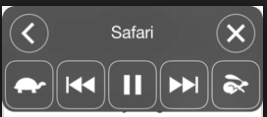
New in iOS 8, Speak Screen allows you to hear not only text but also interface elements such as buttons and other controls read aloud. Speak Screen is a handy feature to use on websites, ebooks and anywhere you need to have the text read aloud to you, or if you need to familiarize yourself with a layout of an app due to a vision difficulty.  The nice thing about this feature is that you don’t have to make a selection first. Speak Screen begins reading at the top of the page automatically after you activate it but you can use onscreen controls to advance the selection or to rewind, and you can also adjust the speaking speed. Also, Speak Screen will work with any of the voices you have installed on your device, including the advanced Alex voice Apple has now ported from the Mac to iOS with iOS 8.

Speak screen popover menu with options for navigation and controlling the speaking rate.

To…

View original post 154 more words

Posted in Uncategorized | Leave a comment

Ed Emberley’s Shake & Make App – Gone Free

Ed Emberley's Shake & Make icon

Back in the day when working one on one with students, I loved using Ed Emberley’s books, providing step by step instructions for how to draw all kinds of animals, objects and seasonal themes with students as a visual motor, visual perceptual/ spatial relationship intervention. Ed Emberley’s numerous books remain available, providing many step by step drawing choices.

Ed Emberley's Shake & Make iconThe app, Ed Emberley”s Shake & Make  app (iPhone/iPad; requires iOS 4.3; regularly .99 with in – app purchases) is also available and currently free. Not a drawing app but puzzle activity (similar to a tangram but with fun pictures), this app provides visual perceptual tasks that may be suited as an intervention activity therapy or as a recommended intervention for for home or classroom. Recommended for ages 8 – 108. Not available on Android.

Ed Emberley's Shake & Make app pic1

So, how does it work? Find a picture, shake the device to break it apart and reassemble it. Need help with reassembling, tap the hint button and the model of the pictures is available.

Ed Emberley's Shake & Make pic2

A few options are available in the app including sound, timer, twirly and music, all which can be turned off.

The 8 years and above appears appropriate for the activities which requires assembly of 6 plus puzzle pieces from memory, a tough task.  A hint option is available which displays the assembled picture providing a visual model to work from. Use the app to create the picture then take a screen shot and draw it and reassemble it might be an option for therapy use.

The Ed Emberley books are great books for working with students in and out of the classroom for step by step drawing. I have supported students in and out of  the art room or classroom during projects that use of a concrete model to produce an age appropriate drawing might be helpful. It also is a great visual motor, visual perceptual activity that is very OT oriented, producing something with the student. Not only are objects, people  and animals available in his books, he also has theme related pictures for Halloween and other seasonal events.

Interested in more about the Ed Emberley books? Check your school library – they usually have these popular, tattered, well worn books available.

Here are just a few of the Ed Emberley books that are available:


Here is a listing of more Ed Emberley drawing books:

Ed Emberley’s Books in OT’s with Apps Amazon Store

Check it out. Will this be a tool for your OT mTool Kit?

Carol

 

Posted in App Rubric, Drawing, iPad, iPhone, Occupational Therapy, Uncategorized, Visual Memory, Visual Motor, Visual Perception | Leave a comment