Nike Unveils Shoes For People With Special Needs

Thanks to a plea from a teen with cerebral palsy seeking shoes he could put on his feet independently, Nike is introducing sneakers designed specifically for people with disabilities.

Sourced through Scoop.it from: www.disabilityscoop.com

With a plea from a teen with a disability, Nike creates shoes for individuals with mobility impairment. Kudos to the teen for being a self advocate!

As scooped on 7/21/2015 from http://www.disabilityscoop.com/2015/07/15/nike-unveils-shoes/20440/

See on Scoop.itOT @ Work

Posted in Uncategorized | Leave a comment

Nike Unveils Shoes For People With Special Needs

Thanks to a plea from a teen with cerebral palsy seeking shoes he could put on his feet independently, Nike is introducing sneakers designed specifically for people with disabilities.

Sourced through Scoop.it from: www.disabilityscoop.com

This isn’t an app and not quite the type of AT we typically think about. But if you stretch the concept just a bit… if adaptive shoe laces are assistive technology, then a special shoe could be assistive technology, right.

I thought this was a great news post about a teen with strong determination and self advocacy skills. Kudos to the teen!


Looking forward to seeing these shoes on store shelves or web based stores!

As scooped on 7/21/2015 from http://www.disabilityscoop.com/2015/07/15/nike-unveils-shoes/20440/

Carol

See on Scoop.itOT mTool Kit

Posted in Uncategorized | Leave a comment

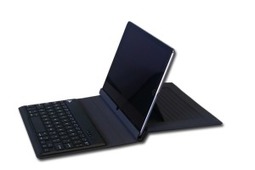
Review: Flipwrite iPad Keyboard

I’ve read several nonscientific studies that concluded students type equally well whether they use iPads or traditional keyboards (click here; scroll to ‘Keyboarding: iPad vs. Traditional’). These …


As scooped with Scoop.it from: http://askatechteacher.com/2015/06/22/review-felix-flipbrand-ipad-keyboard/

Jacqui Murray at Ask a Tech Teacher reviews the Flipwrite iPad Keyboard. This keyboard provides multiple options with the use of the iPad. Check out her review on Ask a Tech Teacher where Jacqui provides her expertise in the area of keyboarding and technology tools.

Carol


See on Scoop.itOT mTool Kit

Posted in Uncategorized | 1 Comment

Apps for ADL Training

                           I Do Hygiene, Getting Dressed, Chores, Food Apps 

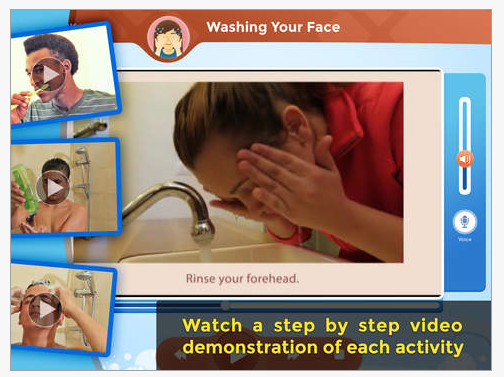
I Do apps       The Center for Educational Technology, dedicates it’s services to education for the 21st Century. Among their projects are special needs apps,  with  “I Do” apps focusing on step by step instruction for self care tasks. Their apps provide video modeling, an evidence based practice¹ for individuals with autism to assist with learning the sequences of self care tasks.

IDO hygiene iconIDo Hygiene app (free; 9.99 for all tasks) was their first self care app which included tasks of brushing teeth, shampooing hair, washing face, taking a shower and many more personal self care activities. Video modeling and a picture sequence is provided for each skill with the tools to create your own video or picture sequence for each task. Audio and text instruction is provided within the videos.

IDO pic1

IDO hygiene pic2

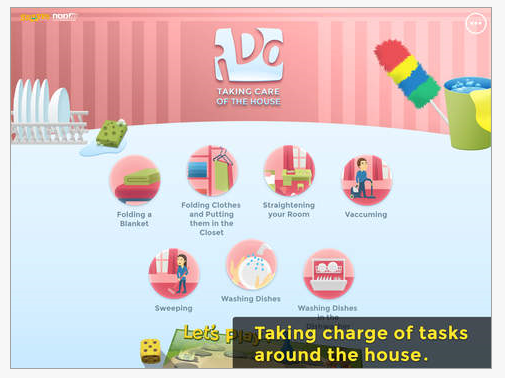
The I DO series now provides I Do Getting Dressed, I Do Chores and I Do Cooking apps each regularly 8.99. Currently, the I Do Getting Dressed is 4.99 for a short period of time. Here are a few snap shots of the other I Do apps:

I Do Chores iconI Do Chores  (8.99 full version; iPad) contains folding blanket, clothes, vacuuming, washing dishes, straightening room.

I Do chores pic1

I Do getting dressed iconI Do Dressing (4.99; regularly 8.99 for full version; iPad) provides numerous dressing tasks: putting on socks and shoes, donning coat, dressing for boys and for girls, undressing, dressing for bed among others.

I Do getting dressed pic1 I Do getting dressed pic2I Do food iconI Do Food app (8.99; iPad) provides images and video on food preparation tasks including making a sandwich, chocolate milk and salad as well as related tasks. Washing hands, using a microwave, setting the table and eating with knife and fork are other food preparation instructions provided with image sequences or video modeling.

I Do food pic1

The I Do self care apps provides both premade and customizable video modeling instruction for children. What is your favorite app for implementing video modeling at home or school?

References:

¹Evidence Base for Video Modeling (http://autismpdc.fpg.unc.edu/sites/autismpdc.fpg.unc.edu/files/imce/documents/VideoModeling_Complete.pdf )

More for your OT iTool Kit

Carol

Posted in Uncategorized | 1 Comment

Gray Matter App Assists with Dementia Care

GrayMatters icon

GrayMatters App

Although dementia is not my specialty, prior work in long term care settings and recent personal experience with my late mother has given me many opportunities with individuals who were in different stages of the disease.

The recent experience with my mother, afforded me options of using my iPad with her. The iPad interface was intuitive to her, easily  accessed and viewed  even with diminishing vision. Memory, joke or tongue twister apps, taking pictures of her and displaying current family pictures aided communication at times, showing that more could be retrieved given time and additional cues. As the disease progressed her long term memory regressed to earlier days and events. I now wish I had used a story telling app such as GrayMatter app  to facilitate her recall.

Gray Matter – Reaching Beyond Dementia app (free with in-app purchases) is described as an interactive life storybook, paired with music & games. The app aids patients and families preserve past memories, as well as today’s moments. The developers believe ” that people with dementia are “still here,” as Grey Matters taps into the abilities that remain to keep individuals engaged and connected.”

The app allows you to do the following:

• Create a Personalized Life Storybook:
Customize “My Life” story pages for your loved one, filled with long-term memories from his/her life. Upload your own family photos, accompanied by simple text and voice narration to evoke memories from younger years & foster communication.

GrayMatters pic2• Record & Share New Memories:
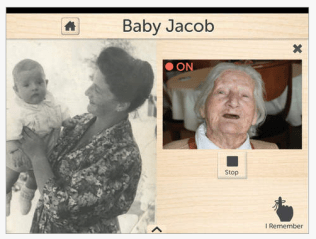
Instantly capture special moments that occur while using the app together – whether a sparked memory or a smile. Share these “I Remember” videos with family members on the spot.

• Reflect on the World:
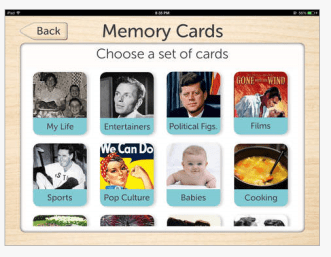
Look through pre-loaded “My World” story pages filled with universal content that appeals to your loved one’s interests based on generation–such as entertainers, films, history & pop culture from the 1930s, 40s & 50s. Enjoy 6 free content packs – more content is available for purchase within the app.
GrayMatters4

• Create a Custom Reminder:
This audiovisual reminder, containing photos, text and voice narration, can reassure your loved one about his/her surroundings. The reminder can be tailored to questions most often asked by an individual, helping to avoid embarrassment and quell anxiety.
GrayMatters pic3

• Listen to Music & Play Games:
Create custom playlists from your iTunes library for your loved one to enjoy while viewing story pages. Music can be an incredibly powerful tool in drawing out long-term memories. In addition, play a game of memory cards together featuring familiar content from your loved one’s life.

GrayMatters pic1

• Create Multiple Profiles:
Grey Matters works very well in both a private, home setting or a larger care facility because you can upload individual profiles for each person in your care. Each user’s personalized story pages, music playlist, profile and My World content will be saved for later use.

GrayMatters5 pic

There are many story telling apps that have recording, video, picture and text features, however this app appears specially suited for individuals with dementia.

The Huffington Post ” GrayMatter App Aims to Help People Connect to Love Ones Suffering from Dementia” provides more background information and resources on dementia that is worth reading.

Another app mentioned to support individuals with dementia is the free app Alzheimer’s & Other Dementias Daily Companion providing strategies and resources for caretakers.

More for your OT mTool Kit.

Carol

 

Posted in Adults, Aging in Place | Leave a comment

Monitoring System Takes Stigma And Stress Out Of Aging Independently

For any senior who has cringed at the infamous “Help! I’ve fallen and I can’t get up” ads, there’s a new product in store that can take the stigma out of aging, far more discreetly

Sourced through Scoop.it from: Huffington Post

Wearable technology has around for a long time for aging in place.  Alert pendants used for falls and emergencies have been around for a long time providing assistance for falls or emergencies for individuals who live alone.

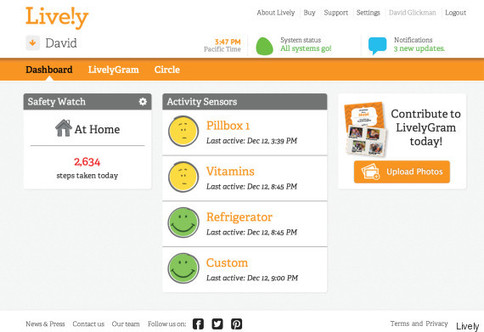
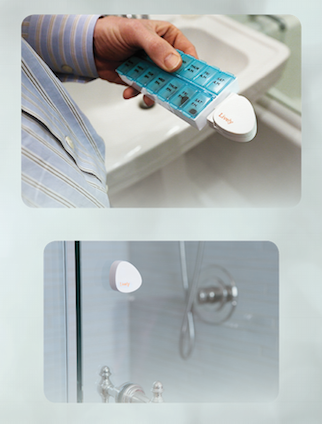
New movement sensing technologies such as  the Lively system, provides sensors that can be attached to doors, medication containers, TV’s, stove doors and monitored through a service that shows activation of the sensors. The information retrieved from online or an app provides information to caretakers on activity received from the sensors.

Lively sensors

The Lively system includes online service, app, sensors or a watch. Starter kits cost about 5$50 and a monthly subscription. This appears to be appropriate from some individuals with mild mobility or cognitive challenges who remain in their home. Check out more about the devices and application at Huffington Post. More information about the system can also be found at Lively.com.

See on Scoop.itOT mTool Kit

OT’s with Apps

Posted in Activities of Daily Living, Adults, Aging in Place, Wearable technology | Leave a comment

Proloquo2Go for Apple Watch! Use the app as a single switch on iPhone

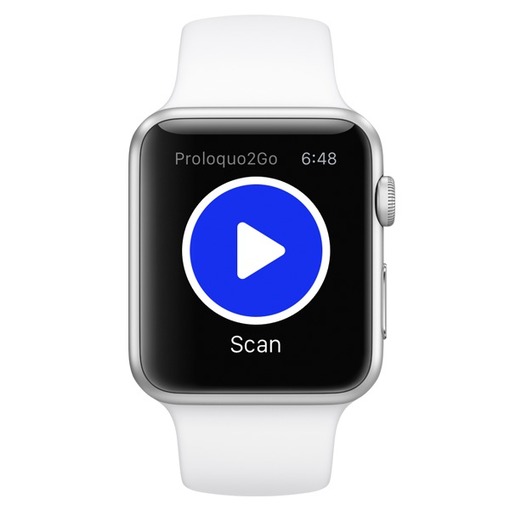
Right after we released the first AAC app for Apple Watch, Proloquo4Text, we now release the first Apple Watch app that allows users with fine motor impairments to use the Apple Watch as a switch to access an iPhone: Proloquo2Go! Version 4.0.1 serves as a single switch for Proloquo2Go on the iPhone.

As scooped from : http://www.assistiveware.com/proloquo2go-apple-watch-use-app-single-switch-iphone

Wearables as AT are here! AssistiveWare syncs the Apple Watch with Proloquo2Go using the Apple Watch as a switch.

Wow!

Check it out at AssistiveWare (http://www.assistiveware.com/proloquo2go-apple-watch-use-app-single-switch-iphone).

Carol

See on Scoop.itOT mTool Kit

Posted in Accessibility, Accessories, Apps for Special Needs, Assistive Technology, Communicaton, iOS, iPhone, Switch Access, Wearable technology | Leave a comment

5 Must-have tools for Ed Conferences from Ask a Tech Teacher

It’s summer, time for teachers to recharge their cerebral batteries. That could mean reading, going on field trips, spending time with online PLNs, or taking calls from family members who usually e…


As scooped from: http://askatechteacher.com/2015/05/20/5-must-have-tools-for-ed-conferences-2-2/ on Scoopit!

Jacqui Murray provides a great list of tech tools to help you organize information gleaned during workshops, conferences or even webinars viewed from your workstation or mobile device. My favorite is Notability app for iOS which provides me a method of organizing by broad topics and topics. An audio record tool is also available and ability to take a picture within your notes of  slides or devices presented.

My other favs include OneNote, Google Docs and Evernote, all free. Being consistent in using one is most important for later retrieval (where did I save that???).

Thank you to Jacqui for sharing her expertise for PLN tools!

Carol

See on Scoop.itOT mTool Kit

Posted in Android, App Reviews, Continuing Education, iPad, iPhone | Leave a comment

MusicGlove Helps Stroke Patients Use Their Hands Again – The Assistive Technology Daily

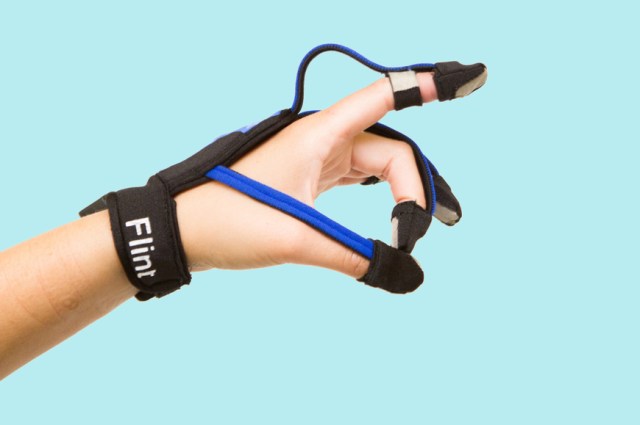
Friedman hopes to change that with MusicGlove, a wearable computing device designed to help patients improve their fine motor skills. The glove is outfitted with tiny sensors that track the user’s hand movements. Patients use it to play a Guitar Hero-style game that involves pinching and gripping notes on the screen of a tablet.

Original source: http://attraining.org/atdaily/2015/05/08/musicglove/

As scooped from AT Daily on Scoopit!

OT’s have you seen this new wearable tech device? The MusicGlove  was designed to improve fine motor skills and is being tested in rehabilitation. One of many new wearable tech and rehab devices.  What are your thoughts? Any experience with this device?

HT to AT Daily for sharing great tech tools for individuals with disabilities!

Carol

See on Scoop.itOT mTool Kit

Posted in Assistive Technology, Finger Isolation, Occupational Therapy, Rehabilitation, Wearable technology | Leave a comment

Reference Apps Free or Reduced

Skeleton Premium icon iOS

Here are some anatomy apps that are currently free or significantly reduced that might be helpful to understand anatomy or medical conditions for clinician or patients:

Exploring essential Anatomy iconExploring Essential Anatomy  for iPad (free). Provides images of clinically applicable anatomy.


Shoulder Pro 111 iconShoulder Pro III with Animations (.99; iPhone) regularly 1.99. Provides anatomy of the shoulder with animations. Optimized for iPhone but compatible with iPad.

iMuscle 2 iconiMuscle 2 for iPad2 (.99; iPad2). Provides musculoskeletal anatomy and kinesiology in 3D for exercises and rehab.


Hand and Wrist Pro III iconHand and Wrist Pro III app (.99; regularly 7.99; iPhone/iPad) provides 3D images of the hand and wrist.


Brain and Nervous System Anatomy icon iOSBrain and Nervous System Anatomy (.99; regularly 9.99; iPhone/iPad by Visible Body provides 3D images and animations.

Skeleton Premium icon iOSSkeleton Premium  (.99; regularly 19.99; iPhone and iPad) by Visible Body provides 3D images of the skeletal system.

What medical reference apps for anatomy do you find helpful?

More for your OT mTool Kit.

Carol


Posted in Apps for OT's, iPad, iPhone, Medical, Occupational Therapy | 1 Comment