ScribblePress App

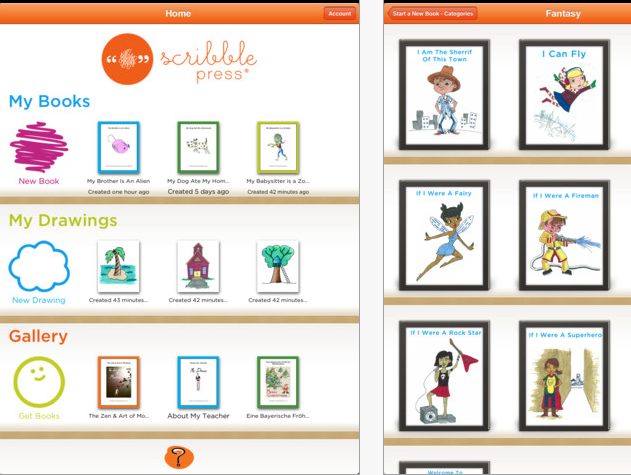
ScribblePress is a drawing and publishing app for the iPad that currently is free and I believe may have some possibilities for OT’s.

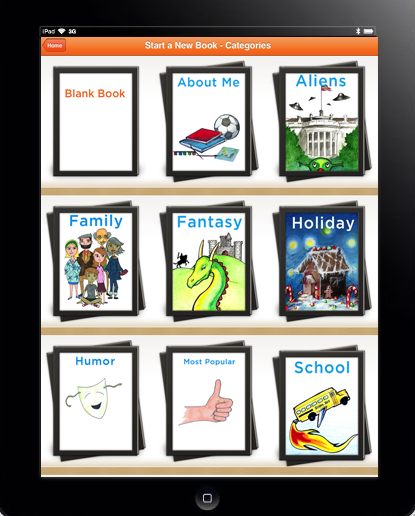
Features of the app include using 50 templates to create a story as well as features to draw on blank pages or import pictures to make your own. Finished publications can be emailed or published to iBook library. See ScribblePress website for more information and ideas of its use. IT is easy to use and publishe with its clean and simple tools.

ScribblePress does not have an audio recording feature but it does allow text entry for a text story line.

So how might an OT you use ScribblePress?

All kids like to publish and show their work. If you have been working on specific handwriting skills,  letters, numbers, writing their name or drawing pictures, shapes or designs in therapy creating a final project showing their skill might be motivating for your student. The book can be created and emailed or published to iBooks if desired. No audio is present, but creating a simple story with a story line is easy to complete.

Check out ScribblePress. It may not be an app you use all the time but it has possibilities for final projects to show case your best student productions or handwriting samples.

Another OT iTool kit possibility. Any ideas on how you might use it?

Carol

Posted in App Reviews, Apps for OT's, Apps for Special Needs, iPad, iPhone, iPod, Occupational Therapy | Tagged , , | Leave a comment

Shape Up App has Gone Free!

Looking for a visual motor integration app focusing on basic shapes?

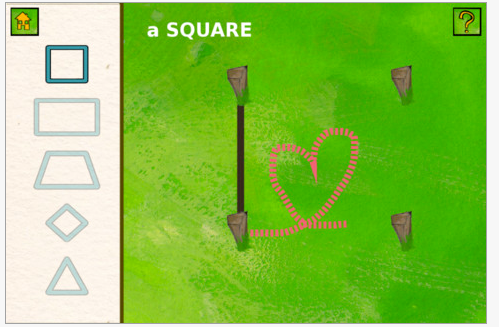
Shape Up is a recently developed app that provides a cute story with activities that focus on creating geometric shapes. Appropriate for preschool to early elementary aged students, Shape Up focuses on drawing shapes with 3-4 straight sides (trapeziod, square, rectangle, triangle, diamond) with targeted posts to draw on.

Along with a cute story that goes with the concepts of shapes there also is a simple “find the difference” activity. Simple, but nicely presented, this app provides an opportunity to work on visual motor integration.

Gone Free, this app is compatible with iPad, iPhone/iPod. A nice little app to add to your OT iTool Kit.

Carol

Posted in App Reviews, Apps for OT's, Early Childhood, Fine Motor Development, iPad, iPhone, iPod, Occupational Therapy, Uncategorized, Visual Motor | Tagged , , , , , , | 2 Comments

Adding Apples – Gone Free Today

Adding Apples is solely an addition operations app currently gone free today. Compatible with iPad, iPhone/iPod Touch. Provides ability for rational counting with items displayed and a choice of answers for students to choose from. Unlike many other apps you are able to enter students names to collect basic accuracy data.  Settings allows turning some features on and off including highest adden (up to 9) lock a set of addens to practice, turning music on and off and  automatic plus and clear feature.

Appropriate app for elementary school students practicing addition facts but require visuals rather than mental math. Kid friendly interface. Has been rated well in 2011. Free today.

Share with your special ed teachers to add to their iTool Kit!

Carol

Posted in App Reviews, Apps for Special Needs, iPad, iPhone, iPod, Math, Special education, Uncategorized | Tagged , , , , , | Leave a comment

Injini Child Development Game Suite App

Thanks to Molly Shannon for mentioning this app in the Lite version in one of her comments. I had seen this app but shied away from it due to the cost (49.99) not realizing that it came in a Lite-free version. Thank you Molly!

Injini Child Development Game Suite is an app available only for iPad (Lite/49.99) for early childhood aged students with or without special needs. Skills focused on in the app include:

  • Fine motor/visual motor
  • Cause and effect
  • Spatial awareness
  • Memory
  • Visual discrimination and matching
  • Response inhibition
  • Visual processing
  • Sequencing
  • And more….

Watch a video demonstrating Injini’s app activities:

Tasks presented are at a very basic level. It has some option settings including chosing darker colored layout for greater contrast, male or female voice and a count down from 3 to start the activity presented. Many of the activities are leveled providing a method  to grade or track skill of the student. It provides positive reinforcement after successful completion of the activity.  Tutorials are also provided with in the app demonstrating how the tasks works.

The app also provides the model of show me and then do within the activities to help children understand how to perform activity.  Although expensive, it does provide a wide variety of early childhood visual motor, visual memory, sequencing activities for students in a clean and easy to use format. The Lite Injini version provides partial access to the activities (3 out of the 9 leveled activities) for you to trial or use. Letters are not provided in the Lite version

Check it out or trial the Lite version. Will this be one of the apps in your OT iTool kit?

Share what you think!

Carol

Posted in App Reviews, Apps for OT's, Apps for Special Needs, Developmental Delay, Early Childhood, Fine Motor Development, iPad, Occupational Therapy, Visual Motor, Visual Perception | Tagged , , , , , , , , | Leave a comment

Tanagram Apps

Visual perceptual skills are another area OT’s provide intervention. As a OT I had my favorite parquetry or tanagram activities that ranged from simple to more complex as the student or client required. It was always interested to watch the visual perceptual processing of individuals who were challenged in spatial relationships and then scaffold the task using verbal problem solving or simplifying the presentation visually.

So what tanagram or parquetry apps are available on the iPad or iPhone/iPod Touch for your OT iTool kit ? Here are a few suggestions:

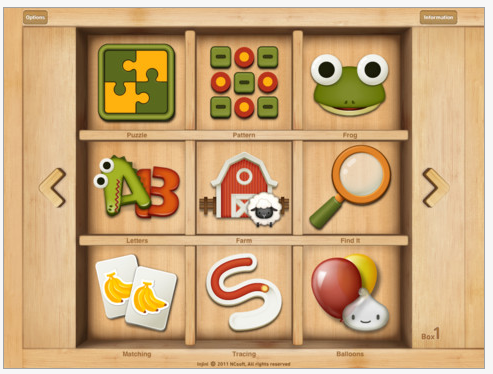
My First Tanagram is made by Alexandre Minard who has developed a who series of puzzle apps for young children. Presented cleanly and easily, the pieces are presented in the right orientation, color coded and basic so that the user only needs to match the shape and slide the piece to the appropriate area. Although this app has relatively basic designs I would want even easier designs for some of the students I have worked with. This can be done however by inserting some of the pieces into the design for them to finish the remaining to grade the activity.  I used the lite version which did not provide any options for exploration of how this could be customized if needed.

 Available for the iPad for 1.99, it is also available in a lite version for trial and for Android. Review on YouTube is available here.

For older students PopAppFactory has a beautiful but what appears to be more complex Tanagram Puzzle app. Available for iPad (.99) this app provides templates to recreate designs and a make your own gallery. Integration with an online gallery from others provides more tanagram creations.

Without having trialed this app, it appears as though you can create and save tanagrams customized to students level in the app.

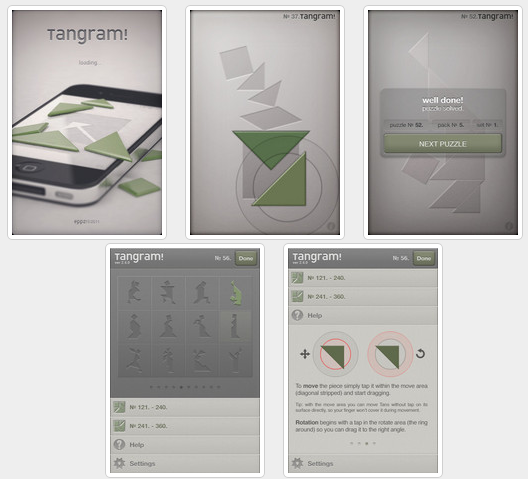
Tangram! app is another app providing the same activities however are not for the significantly perceptually challenged. Available for iPad, iPhone/iPod Touch (Lite and .99 to purchase), Tanagrams! provides a pieces requiring orientation to insert into the tanagram puzzle. Instructions for how to manipulate the pieces are provided but it was pretty intuitive to me.

There are more tanagram apps however find them too complex for most of the clients or students I have worked with. The Tanagram Puzzle appears promising as long as designs can be created at different levels for emergent learners to use.

Have a good tanagram app you use? Please share your experience and your favorite tanagram app!

More tools for your OT iTool Kit!

Carol

Posted in App Reviews, Apps for OT's, Apps for Special Needs, iPad, iPhone, iPod, Visual Perception | Tagged , , , , , , | Leave a comment

EZ Tunes app

Do you have a student who likes to listen to music but has difficulty accessing the controls on their iPod or iPad?  EZ Tunes is your answer!

EZ  Tunes is created  and shared by Gweetle UnLtd for free (thank you!). Compatible with iPhone/iPod and iPad, this is a great, simple access method to music on an iDevice. It’s simple, bright buttons activate single songs, albums and play or stop functions. The buttons are clearly presented on the screen along with the picture of the album cover of the song.  Songs from your iTunes library are automatically loaded into the app to be played. Pressing the Album or Songs button scrolls through the songs or the album covers to select another song.

Listed as an app made for children or individuals with an developmental or intellectual disability, it is also great for accessibility for individuals with physical disability or some types of visual impairments. Very easy to use and takes no set up at all as it accesses the music and the set up you have in your iTunes library.

Thank you Gweetle for this accessibility tool for special needs, it is a great (and free) addition to an OT’s iTool kit!

Enjoy!

Carol

Posted in Accessibility, App Reviews, Apps for OT's, Apps for Special Needs, Developmental Delay, iPad, iPhone, iPod, Leisure apps, Mobility Impairment, Music app, Occupational Therapy, Special education, Uncategorized | Tagged , , , , , , , | 2 Comments

Tapikeo App for Storytelling

There are many different storytelling apps out there in a range of prices and features. A previous post  listed several different storytelling/ book making apps and resources.  I am a big believer in you get what you pay for, but sometimes the free or cheap app just does what you need it to do!

I had been using StoryRobe (free) app – great for some students – but not so great with other students who tend to explore functions on the iPad. I created a book for one of my students who likes to tap on the screen to explore only to find she had deleted the story I just made right before my eyes within a few minutes of its publishing (easy come, easy go)! Not quite the right storytelling app for this student! What I needed was an app that had menu protection for this student!

After bit of exploring and trial I found…

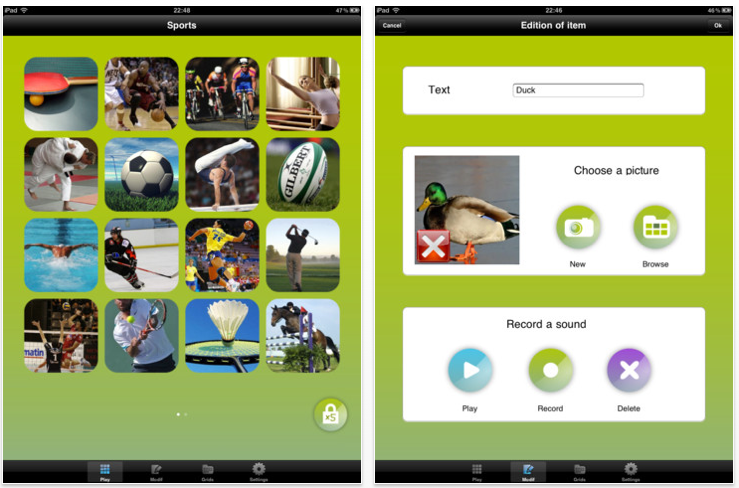
Tapikeo –  is a very simple app to play and create. Available for iPad (2.99) and for the iPod Touch/iPhone (.99). What suited my needs for several of my students were features of an edit and play mode. In Tapikeo you have to tap 5 x’s in rapid succession (left picture below shows lock function) to put it in edit mode, a skill that would be unlikely for students using it to perform. Tapikeo allows you to take a picture or access the pictures from your photo library/album.
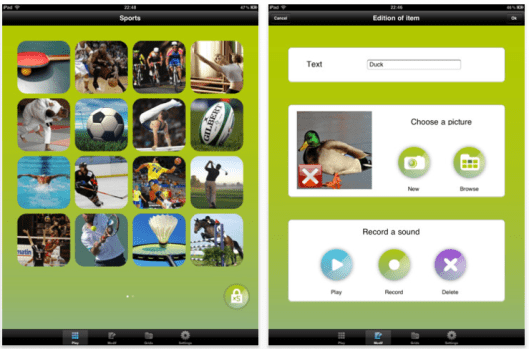
It has an easy way to record your voice and type in text for a title for each picture or page and then you are done! I would like the text to be a bit larger with font and size, but I can live with what it provides as most of the students I am using it with access the images and audio more than print.
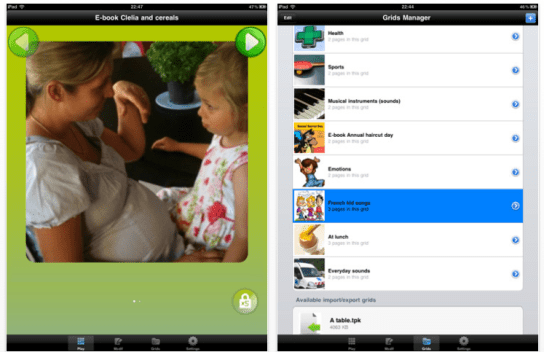
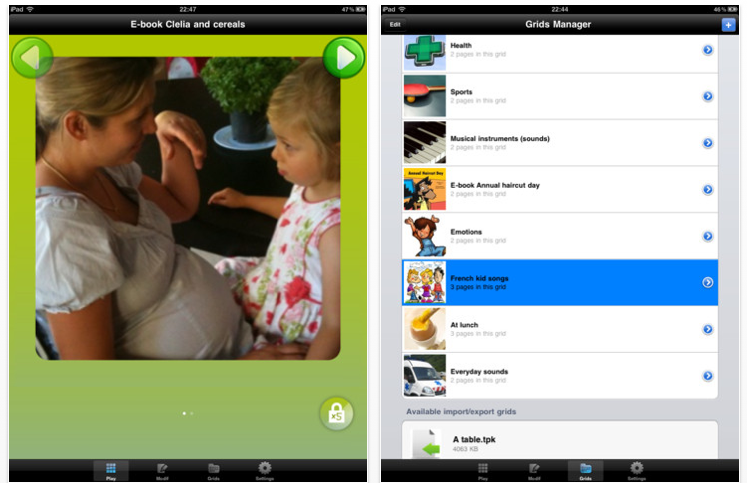
The above left picture shows your end product when in a locked or “play” mode (text under the picture can be added although small font size). The pictures for your book populate by grids and then play like a slide show one picture after another. What I really like are the large green forward and back arrows at the top of the page when e-book mode is selected. Although the swiping can be intuitive for some students on the iPad, others are familiar with arrows to navigate from page to page (years of practice with Intellitools books or activities). Some students have difficulty swiping or are practicing a single tap, so these medium sized arrows are just right for access for most of my students.

Tapikeo has few bells and whistles or customization features but provides what I need for storytelling for select student needs. I have used it to make stories on favorite subjects, classroom curriculum topics appropriate to integrated students (Pets of Ancient Eypgt, Vertebrates). Easy to use, I am hoping that regular ed students can be recruited to make stories for my special need students as a class project!

Used not only for storytelling or book creating on modified curriculum subjects, Tapikeo can also be used for vocabulary, flash cards or a simple presentations. The app has the capabilities to email your stories.

If you have a favorite storytelling or book making app please share it! We’ll all have more apps for our OT iTool kit!

Appy Storytelling!!

Carol

Posted in App Reviews, Apps for OT's, Apps for Special Needs, eBook Creating, iPad, iPhone, iPod, Occupational Therapy, Special education, Story Telling | Tagged , , , , , , , | Leave a comment

A Spectrum of Apps for Students on the Autism Spectrum – January 2012

There are many lists of apps available including those for special needs and ASD. While looking on the Ohio Center for Autism and Low Incidence (OCALI) for resources and references for a recent evaluation, I found their January 2012 PDF listing on “A Spectrum of Apps for Students on the Autism Spectrum“.

A quick review of the many topic areas and apps on the list found many familiar but many new apps worth exploring.  The Social Challenges category had a number of unfamiliar and intriguing apps such as the Urinal Game app ! The OCALI Autism Spectrum list categorizes apps by topic areas and provides many other links and resources for finding apps for students with disabilities.

An OCALI app is now available (free) for iPad, iPhone and iPod Touch featuring podcasts and videos of webinars and presentations hosted by OCALI in a wide variety of areas that relate to students with disabilities. This is great way to listen to professional topics on the go on you iPhone.  I have found OCALI’s ASD resources outstanding and trust that their list and apps is compiled with wonderful, recommended apps and resources!

If you work with students with ASD or low incidence students OCALI resources are worth checking out as a resource for parents as well as professional resources. They have a wonderful handout available for transition to adulthood guidelines if you work with secondary students and beyond available on their website (along with much more!).

Resources for your OT professional development!

Carol


Posted in App Reviews, Apps for Special Needs, Autism, iPad, iPhone, iPod, Sensory Apps for ASD, Social Skills, Special education | Tagged , , , , , , | 6 Comments

Little Finder app – Gone Free

Innovative Mobile apps has a new app gone free called Little Finder.

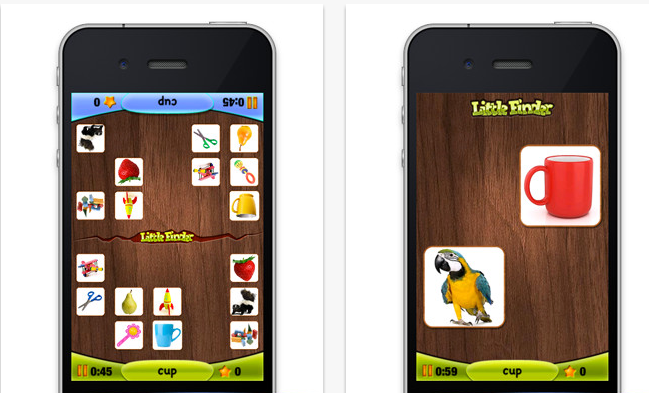
Little Finder is available for iPhone and iPad and provides a one or more player game to visually search for objects. It provides  audio and visual matching supports making it more accessible for emergent readers to independently play.

Check it out to see if it can be part of your OT iTool kit!

Carol

Posted in App Reviews, Apps for OT's, Early Childhood, iPad, iPhone, iPod, Visual Perception | Tagged , , , , , , | 1 Comment

Visual Timer Apps

With my iPad a part of my tool kit on a daily basis, one of the necessities on my iPad is a visual timer. There are a number of choices currently available, but here are a few favorite visual timers:

Kiddie Countdown Timer – Suited to younger students, the Kiddie Countdown Timer has options of using stop sign like visuals in its timer. Available as a free app and also $.99 to remove the ads. This was previously reviewed –  a great find by my colleague, Gail (thank you!).

Time Timer – This app is the electronic version of the 3″ and 8″ Time Timers compatible with iPad, iPhone and iPod Touch (1.99). It has three modes of timers- 60 minute, custom and a clock mode.  Time timer also provides settings to allow it to be audible, visual or vibrate (on the iPhone).

This is another great timer with many features.

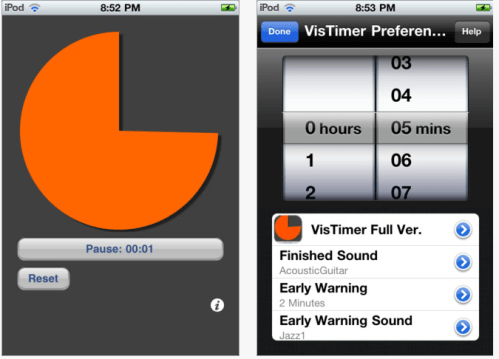
VisTimer – Available  free and for purchase (1.99) for iPod, iPhone and iPad this timer does not have as choices of timers but does allow choices of colors for the clock, different sounds for warning and completion and features elapsing time. Limitations with the free version is it can only time up to 5 minutes and lowest warning time is at 1 minute. I work with older students and this free clock works well for my current purposes. We have many Time Timer clocks that are also readily available for use if a longer period of time is needed.

Waitstrip – A different, linear concept of a visual timer is the Waitstrip app. Available for iPod, iPad and iPhone for $.99, it features a concrete visual representation of time, amount of steps to be completed, number of minutes to work, math problems to be completed using a series of dots as a visual guide.

If you are interested in additional choices check out the Autism App’s  (free app) category of Visual Timer for more choices.

Appropriate for all ages, a wide variety of disabilities and as an portable OT iTool kit.

Carol

Posted in Apps for OT's, Apps for Special Needs, iPad, iPhone, iPod, iPod/iPad Accessory, Occupational Therapy, Sensory Apps for ASD, Special education, Visual Communication | Tagged , , , , | 1 Comment