My Story – Book Maker for Kids – Gone Free

My Story Book Maker app, typically 1.99, is now free for a limited time. Although I have not had a chance to use this app, it is hard to resist a free story telling or book making app. My Story Book Maker allows drawing, taking and importing pictures, inserting text and audio and with  an unlimited number of books. Stories created can be emailed or transferred to iBooks for additional publishing options.

Story telling/book making apps provide so many ways to create classroom content for students and by students. Kids can create a story and record it and be an author – how powerful.  Teachers or therapists can create all kinds of stories, modified curriculum text books, vocabulary books, dictionaries, alphabet activities, produce your own letter formation book when your student has successfully learned a new letter group (is your handwriting ready for publishing? – what an incentive!). Storytelling can be used for  creative stories, stories of events, situations, social stories or rules, sensory strategies, how to tie your shoe with images – the list is endless!  How great to have a student’s iPad filled with stories and books individualized to their IEP or curriculum.

For one of our students last year we created stories for his social studies and science curriculum on his iPad. Adding sound, pictures and text at his level provided him with a modified book on the topics of some curriculum content.  Other topics were supplied to him in converted  videos,  apps and hands on activities as appropriate. It was one more tool and method of modifying the curriculum content to his level, provide exposure to vocabulary and engagement within his classroom.

Certainly there are many more storytelling apps but not all are free! Back to school savings!

Check out My Story Book Making app out before it goes back up in price to see if it will go into your OT iTool Kit!

Carol

Posted in App Reviews, Apps for OT's, Apps for Special Needs, Book, eBook Creating, iPad, Occupational Therapy, Story Telling | Tagged , , , , , | 2 Comments

New Access App from Panther Technology

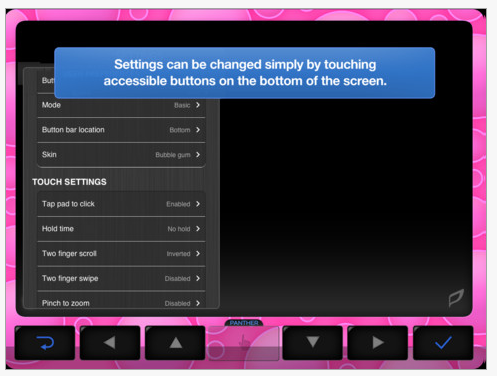
Panther Technology has created a new access app for individuals with mobility challenges called Panther Connect.

Panther Connect app compatible with iPad is currently on sale (50%) for 29.99 for a limit time (thru August 17?). This app provides alternative direct access to the iPad for individuals with mobility challenges. iTunes describes its key features as:
– Five Innovative Access Modes
– Baseline Technology for consistent access
– Editing Capability
– Control iTunes

I am anxious to see how Panther Connect app works. Will this assist with such tasks as zooming (requires two fingers) or performing other tasks not easily performed by individuals with significant mobility impairment but who can direct access the touch screen?

Panther Connect app appears to be developing other adaptive access app for the iPad that will support reading, writing, math and games and also bundles of their apps for individuals with Autism and CP. Check out their website for more information. If you are in the market for an access app, it might be a good time to buy!

Carol

Posted in Accessibility, App Reviews, Apps for OT's, Apps for Special Needs, Computer Utilities, iPad, iPad Management, Mobility Impairment, Occupational Therapy, Special Needs | Tagged , , , , , | Leave a comment

Getting Your OT iTool Kit Ready for School #1

It’s that time again, whether you are a therapist, teacher or parent it’s time to start thinking about getting ready to head back to school. So, what are some of the things you’ll need for your OT iTool Kit??

Here’s just a few for starters:

1. One of the first things that I think of when deploying devices that have to be mobile and have parts such as cords, ear buds and chargers revolve around keeping all the stuff together and reducing the snarly mess of cords that ear buds can create – ooh, I hate that!

Cord organizers to the rescue. Here are just a few cord organizer you can buy and a life saving trick to know:

AppleCore Cable Organizer – Comes in three sizes that can handle ear bud cords, charging cords or standard appliance cords. They typically come in multi-packs, although my love at first sight experience found them sold singly.  Applecores keep my cords and my blood pressure in check.Gear Tie – I also found these cord organizers/ties at Amazon. They hold firmly and were inexpensive. I do suspect these cord ties could easily be misplaced – but they work!

Here is a life saving cord trick as found on Lauren Enders Pinterest and originally posted on B-Laude-de. This should probably be a part of life skills curriculum! Cool, eh? Works too!

Life hack: Anti-chaos-cable

2. Second thing needed would be a place to keep all of the cords, ear buds, charger, cleaning clothes, styluses or other small accessories. In my cheap, penny-pinching mindset, I headed to the Dollar Tree to find pencil cases to keep all the small stuff for the iPads (and other equipment) together. Not fancy but doable, I purchased these $1.00 pencil pouches with two zippered pockets.  This has worked great for not only the iPad but use them for Echo Pens and ear buds, Sansa MP3 players, iPods  and ear buds or styluses. Works great!

3. Third is a cleaning cloth. Found at The Dollar Tree, Target, Menards for around 1.00/piece, these microfiber clothes are washable and work great to get those smuggy finger prints off your tablet screen. Cleaners are also available for iDevices, such as Anti bacterial cleaners  from Zagg ZAGGFOAM  or Klear Screen iKlear  for under $10.00 for a bottle.

These items are for both iDevices and Android and will help you get your OT iTool Kit and you ready for school.

Carol

Posted in Accessories, Android, iPad, iPhone, iPod, iPod/iPad Accessory | Tagged , , , , , | Leave a comment

My Brain on Apps

This infographic reaffirms how difficult it can be to “sift and winnow” apps when there are more than 67,000 educational iPad apps. Finding the right one to support individuals with special needs can be a challenge and take time!

Courtesy of: AvatarGeneration

Here are some suggestions to “sift and winnow for apps:

App review websites that cover the age or topic/curriculum areas that you are searching for provide a good starting place for content specific apps. There are many app review websites and here are a few of my go to resources:

  • Appitic – Apple Educators website with apps categorized by Bloom’s Taxonomy, Topic, Preschool, Multiple Intelligence, NETS, SPED, Tools, Teachers and more. Expert advise and reviews of the curated apps.
  • AppAble – Link to their blogspot with listing of daily free apps and app reviews.
  • Bridging Apps – (formerly SNAPPS4SN website)Website developed by Easter Seals allows searching by parent, therapist, teacher, doctor, institution for apps to support individuals with disability.
  • A4cwsn (Apps for Children with Special Needs) – Website providing categorized lists of apps with reviews and some videos
  • Edudemic’s searchable app data base for all educational needs and subjects.
  • AppAdvice – General app review website. Provides apps categorized by topics.

There are also more and more apps created by website that provide app reviews. Here are just a few I use:

KinderTown app – Reviews apps for ages 3-7 years. KinderTown website provides great review information. Their educational blog has practical app and hands on lesson ideas.

Autism Apps – App with apps for autism categorized and searchable.

AppAdvice app  (1.99) – From AppAdvice website which provides an app guide, app reviews. App Applists, App Guides, AppNews in categories. Extensive lists both in app and on the website.

Checking on apps in iTunes can also provide more information on the app and its worth of even downloading:

  • What are the ratings of the apps?
  • How many people have rated it and what are their comments? Just a quick review can be helpful. Three stars or under – you might want to check more before downloading.
  • Has the app be updated lately. If not recently supported or updated, I think twice about downloading it.
  • Check out other apps at the bottom of iTunes app screen to see what others have bought. You might want to take a look at those apps if they are a similar topic area (watch out this can go on forever, right?).
  • In the App Store turn on Genius located at the bottom menu. iTunes Genius will supply you with suggestions of other apps that you have recently down loaded.

Use an app rubric to think about the quality and the application of the app you are considering purchasing or downloading.

Jeanette Van Houten’s iEvaluate App Rubric  and worksheet: http://www.otap-oregon.org/Documents/iapp%20evaluation%20Rubric.pdf

Evaluation Rubric for iPod Apps from Learning in Hand, created by Harry Walker –http://learninginhand.com/blog/evaluation-rubric-for-educational-apps.html

I also find looking at what the possibilities of what you can do with finished products, such as publishing books, documents multimedia on the iPad are almost as important as the app. What are the Wi-Fi capabilities? Where can you send/move it to? Do you have email, print capabilities? Does the app have email, print or cloud based storage to share or store?

Finding the right app to match IEP needs can take time, but can be mobile learning and achievement for your student.

What are your favorite review sites? Where go Android users go to find app reviews?

Carol

Posted in App Reviews, App Rubric, Apps for Special Needs, iOS, iPad, iPhone, iPod, Occupational Therapy, Special education, Special Needs | Tagged , , , , , | 1 Comment

Another Recommended Stylus From an Experienced Therapist

Jamie Klund-Kujawski, MS OTR in her comment shared …

“Another great stylus. SK TOUCHPENCIL1 ”

“This stylus is made of electro conductive rubber, is soft with no metal, chunky pencil shape makes it easy for small hands to hold, works with both capacitive or resistive touch screens. Sold at Amazon for $12.00! I have used it with my therapy kids for 6 month now, and it works with a head pointer as well.” (Jamie Klund- Kujawski, MS, OTR)

It appears as though it is now $8.00 at Amazon – SK TOUCHPENCIL1.

Thank you Jamie for your recommendation!
Carol

Posted in Accessories, Occupational Therapy, School Based Interventions, Stylus | Tagged , , , , , | 2 Comments

iapp%20evaluation%20Rubric.pdf

Look for a way to sift and winnow all those apps to support the IEP goal(s) for your students? Here is  the iEvaluate App Rubric , developed by Jeannette Van Houten, providing an app evaluation rubric and worksheet to help with deciding on apps for students with special needs.

http://www.otap-oregon.org/Documents/iapp%20evaluation%20Rubric.pdf

( Also See on Scoop.itSFSD iPad Scoop )

Carol


Posted in Uncategorized | 3 Comments

Apps & Education

The use of mobile devices and apps continue to increase exponentially not only for the typical learner or user but also to support special needs children, students and adults.  This infographic provides some statistics about mobile device use, apps in general education :

Connecting Apps & Education
Provided By: OnlineColleges.net

Many of the statements “why mobile devices work” are the very reasons for the use of the iPad with children/student and clients with a disability:

  • They are ultra portable and supply resources on demand
  • They are flexible – they can be used anywhere to study, access the curriculum, communicate,  access or produce information and provide assistance
  • Engaging (I have witnessed melt-down defused with mobile devices and students participating in tasks they might not have otherwise performed or for as long)

And a few more for individuals with disabilities (not only students!):

  • They are also ubiquitous and for individuals with special, these mobile devices (as appropriate) blend into the environment as a “typical” (and cool) device.
  • They can reduce the stigma associated with other kinds of adaptive or assistive equipment
  • Provide endless solutions due to their flexibility, plethora of apps and connectivity (for most tasks – there still are some tasks requiring accessibility that are not as robust as a computer)

Mobile devices generally provide huge possibilities for typical as well as special needs individuals.  It is important however to consider individual needs, tasks to be performed, where they will be performed when choosing a tool.  Mobile devices have many, many applications for many individual but not for everyone!

I wonder what the statistics would be for individuals with special needs? A search on the topics thus far did not yield any results. It would be very interesting to see those statistics. I would also wonder, what would be in the list for great apps for special needs?

What would the app list be for individuals with Autism, high functioning ASD, PDD, those with communicative challenges, motor changes, learning or organizational challenges?

What do you think?

Carol

Posted in Uncategorized | Leave a comment

How to connect a USB Keyboard to your Apple iPad without Jailbreak.

See on Scoop.itSFSD iPad Scoop

All you will need to connect a usb keyboard to your ipad is the following: 1) Apple iPad 2) Usb Keyboard 3) Apple Camera Connection kit (USB) www.tech-shed.c...

See on www.youtube.com

Posted in Uncategorized | Leave a comment

How to pair your Logitech Tablet Keyboard for iPad 2

See on Scoop.itSFSD iPad Scoop

How to pair your Logitech Tablet Keyboard for iPad 2. For more information please go to the following URLs. Tablet Accessories products: http://www.logitech….

See on www.youtube.com

Posted in Uncategorized | Leave a comment

Assistive Technology – App Review and Special Education Curated App Lists

See on Scoop.itSFSD iPad Scoop

App Review Websites, Special Education Curated App Lists and Resources

See on www.sheboyganfalls.k12.wi.us

Posted in Uncategorized | Leave a comment