RAM Mount iPad Stand

RAM mount iPad stand

RAM Mount Stand

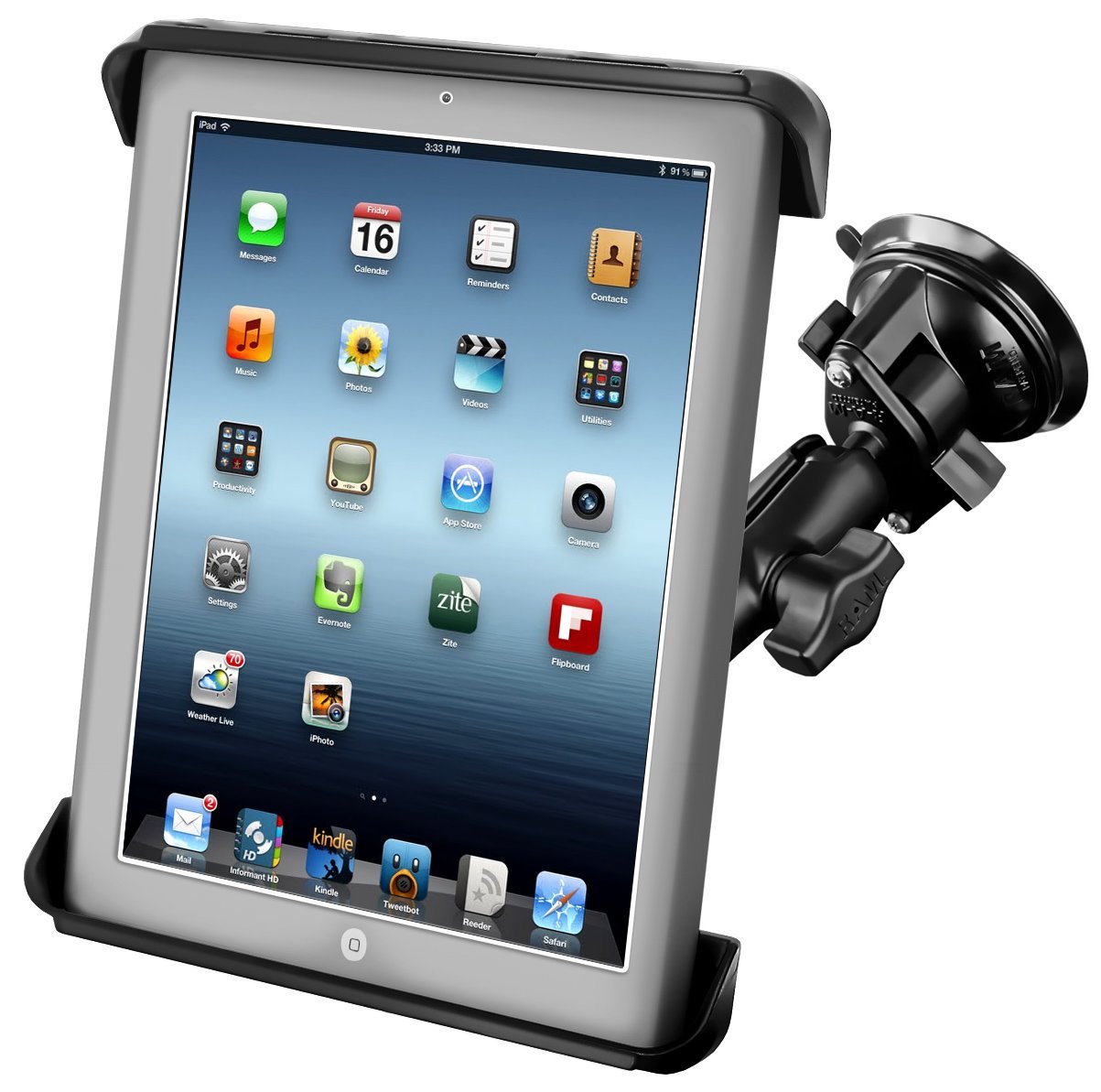
RAM mounts come in many designs for mobile devices. Primarily created for vehicles, RAM mount components allow them to be configured in many ways. I was interested in exploring stable iPad stands, so trialing a RAM mount seemed like a cost-effective and good choice given the products overall positive reviews.

I purchased a RAM Suction Cup Twist Lock Mount ( Ram Tab-Tite ™ as shown above) from Amazon for about $53. to see how it might work for students needing a stable but easily moveable stand. Here are some of the features and findings about the stand:

1. It was easy assemble requiring a Philips screw driver and pliers but took little time.

2. The stands cradle holds the iPad using a spring-loaded mechanism that adjusts to fit iPads 1, 2, 3 and 4 (I did not try the new Air iPad). It fit securely in the cradle with no play allowed. This RAM mount stand fits an iPad with a Otterbox case.

RAm Tab Tite pic3.5

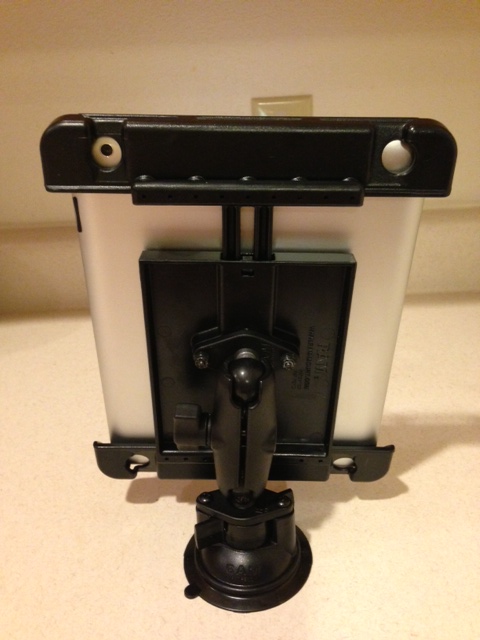
3. The stand has an easy to manipulate arm knob that tightens one of the sockets for positioning the cradle and iPad in multiple positions. The suction base has a twist to lock lever that also was easy to handle allowing secure positioning and stability on a flat countertop.

RAm Tab Tite mount iPad pic 2

The stand accommodates the iPad’s back camera to take pictures or perform scanning a nice feature.

The RAM Suction Cup Twist Lock Mount stand was easy to assemble and felt secure when applied to a flat countertop.  The arm socket and base socket provides multiple positioning including portrait and landscape. No height adjustment is provided with this stand. With weight at  1.4 pounds and dimensions of 8″ x 10″ including the base, this stand could be a portable solution. Although it is slightly too large to hold an iPad Mini with out a case, it did hold a iPad Mini in a case securely.

I have not trialed this with a student yet, however it appeared to be a sturdy and secure stand when mounting to a countertop or table top at a good price.

What stands have you used when needing an iPad securely mounted at a table top?

Carol

Posted in Accessories, iPad, Occupational Therapy, Physical Disability Tool, Rehabilitation, Special Needs | Leave a comment

More Black Friday App Deals

Black Friday more pic

Black Friday app deals continue through the weekend for the most part, although app deals differ and can be somewhat of a mystery when they begin and end. But here are a few more apps gone free or on sale that might be helpful for your OT mTool Kit…

Therapist or Teacher Tool:

Decide Now! iconDecide Now! is an iPhone/iPad app that provides a choice spinner with numerous labels. Although there are others out there like this, this choice app allows you to save an unlimited number of templates or spinner set ups which I have not seen in other like apps. The app only allows words and not pictures. Currently free (normally .99). A lite version is also available with ads. I have recently started using this app as a game method of practicing self-regulation strategies (I create descriptions of situations, student responds to what 5 point scale rating it might cause and what strategies they might use). This has helped engagement with creating a game activity.

Scanner Pro by Readdle iconScanner Pro by Readdle  is one of my favorite scanning apps for converting images to PDF files. Compatible with iPhone and iPad it currently is on sale for 2.99 (normally 6.99). Work flow to Google Drive, Dropbox and Evernote for ease of use. On sale for a limited time.

Annotation/Note Taking  Apps

EZ PDF Reader iconezPDF Reader app for iPad is currently free with in-app purchase for TTS voices (2.99). This PDF annotation app provides tools to annotation or type on a PDF file, draw or insert multimedia. The app also allows highlighting and bookmarking among other features.

PhatPad iconPhatPad app for iPad currently 1.99 (normally 4.99) is a note taking app with drawing, writing and typing tools. This app provides handwriting recognition and shape drawing recognition and automatically transfers it to digital text. Work flow allows transfer to Dropbox, Box, Google Drive and SkyDrive.

Preschool Skills

Cutie Monsters iconCutie Mini Monsters app for iPhone and iPad provides counting, puzzles, shape and patterning recognition for preschoolers. A fun format and activities for kids with no in app purchases or ads. Currently free.

Toca Builder iconToca Builders app by Toca Boca provides building tools for primary aged students on iPhone and iPad.  Choose from 6 different builder to draw, build/stack, paint and engage in 3D movements.

Felt Board Christmas iconFelt Board Christmas app for iPhone and iPad is currently .99 (normally 2.99). This app features felt board pieces and tools to decorate a snowman, cookies, tree and other holiday objects with backgrounds and different images. It is a fun app allowing many choices of settings, items and decorations to drag and drop for the non-drawing artist. Great winter creation activities. Good for preschool through elementary aged students or adults.

What kind of app deals have you grabbed?

Carol

Posted in App Reviews, Apps for OT's, Apps for Special Needs, AT for Handwriting, Choice Making app, Customizable app, Elementary School, iPad, iPhone, iPod, Learning Disability, Middle School, Mobile Device Use, Note Taking App, Occupational Therapy, Scanning, Writing | 3 Comments

Black Friday App Deals

Black friday pic

If you are a Black Friday Shopper and love deals, save a few $$ for the app deals offered this weekend. There are an incredible number of apps gone free or on sale, so checking some of your favorite sale app websites would be wise if you are looking for additional apps for your mTool Kit.

Here are just a few great apps found on sale this weekend:

Fine motor/visual motor skill apps:

DExteria jr iconDexteria Jr. – Fine Motor Development for Preschool and Toddlers app now .99 previously 2.99 for iPhone and iPad. This app has provides three different fine motor activities. Requires iOS 5.0 so this will work on an iPad 1 if it has been updated to its highest available system upgrade.

Puzzlingo Train iconPuzzingo Trains App – One of the Puzzingo series apps with a focus on all types of trains now free, previously 1.99 for iPhone and iPad. Great for those students with a propensity for trains.

Apps for individuals with learning challenges:

Voice Dream Reader iconVoice Dream Reader – Text to Speech app – Access web pages, Word docs, PDF files using this app. Currently 4.99 previously 9.99. This app is provides access to print resources on your iDevice and is well supported by the developer, with continual improvements to make print accessible.

Prizmo iconPrizmo – Scanning, OCR and Speech App – This app for iPhone and iPad provides great scanning and OCR recognition and text to speech features within the app. The developers also have had a wonderful commitment to improvements with features of this app. Currently 4.99, previously 9.99. This app is a great mobile tool individuals with a learning or low vision challenges.

Just a few apps available for Black Friday!

Carol

Posted in Apps for OT's, Apps for Special Needs, Early Childhood, Fine Motor Development, iPad, iPhone, Learning Disability, Occupational Therapy, OCR, Puzzles, School Based Interventions, Special education, Visual Motor | Leave a comment

Appy Thanksgiving! – Giving Thanks with ChatterPix Kids App

01f3ba31ea023ade8ba80d27bb4cdcea5a96c3af62

Appy Thanksgiving!

If we look hard enough, I believe it is easy to find things we are grateful for. My gratitude goes to individuals like you who visit, comment and share on this blog and also guest bloggers and colleagues who share their expertise. I am also grateful for ubiquitous devices and apps that provide opportunities for individuals with special needs additional tools that can increase independence and integration into mainstream activities to support their occupation. Mobile devices are not a panacea, but they do provide many new opportunities and tools for OT’s or Teacher’s mTool Kit. So here is a Thanksgiving greeting to all of you from OT’s with Apps…

Today an “appy thanks” also goes to Duck Duck Moose who recently created a new, free app that allows you to customize pictures that talk. This might be best suited to speech and language pathologists, parents and teachers for short video creations more than OT’s but it is easy and pretty fun!

ChatterPix Kids iconChatterPix Kids app (iPod Touch and iPad) provides simple tools using pictures, recording, stamps, text and boarders to create a video message. ChatterPix apps could provide a method of easily creating a greeting card, message, basic direction or reminder, a speech sample/data or… just for fun! The production (video) can be saved in your Photo Album, shared via email, AirDrop or as the video above, uploaded to a YouTube account to create your own public or private video!

For more information about the free ChatterPix Kids apps check out Duck Duck Moose’s video or visit iTunes to down load the app.

Appy Thanksgiving! Watch for more posts in the next few days on the Black Friday weekend app sales!

Carol

Posted in App Reviews, Free apps, Holiday and Special Events, Just for Fun, Social Skills | Leave a comment

Wet Dry Try Suite App

Wet Dry Try Suite app icon

Handwriting Without Tears® is a handwriting program used by therapists and teachers providing a multisensory approach to learning letter formation for preschool and elementary aged students. The complete program components include many hands on tools making it a concrete, perceptual and developmental approach to learning to construct and learn letter formation and the alphabet.

Use of the HWT wooden letter pieces to build letters and physically understand directionality of strokes of letters as well as the Wet Dry Try method of learning letter formation on a chalkboard were favorites of mine and students. The tools provided a hands on approach to constructing letters, repetition and structured sequence to for acquisition.

The Wet Dry Try Suite App for iPad (6.99), reconfigured from its earlier debut, now provides numbers, upper and lower case practice to the iPad to supplement use of the Handwriting Without Tears® curriculum.

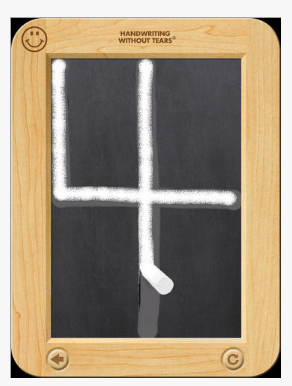
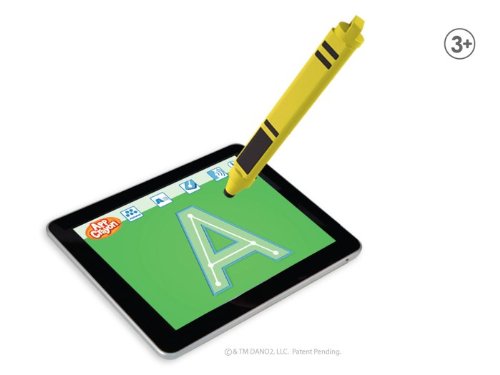
WEt dry try suit pic2 The Wet Dry Try Suite App provides upper case practice like the original method of using the slate. Video demonstration with verbal instructions on where to start the letter and formation is provided to the student for the sequence of each letter. Three trials are provided for each letter or number with reduced supports allowing the student to acquire independence with production.

The following description of the reducing level of supports are provided within the app tutorial:

wet dry try suite 3 levels pic

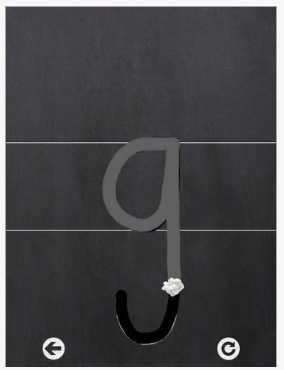
Examples of lower case and number formation from app screens:

Wet dry try suite pic4

Wet dry try suite pic3

I found the app to provide the repetition, visual and auditory instruction to be great. Verbal feedback and automatic restart is provided when student move off the chalk or erase pathway. The accuracy required is quite demanding and may be frustrating for some students whose visual motor or motor coordination may be challenged. No options are available to change the accuracy required. Practice using a real live slate may be necessary to gain accuracy prior to consideration in using the app to reduce frustration.

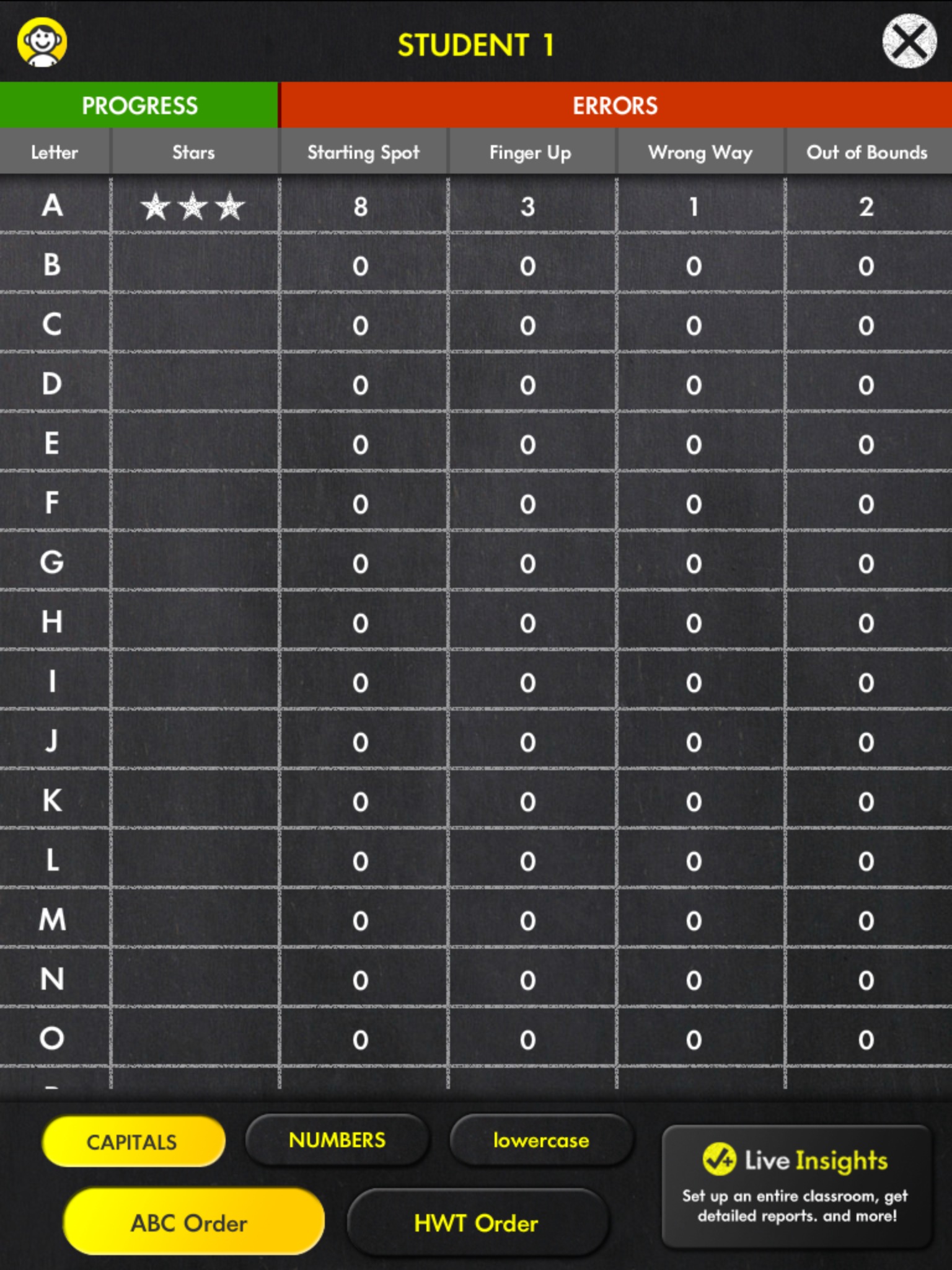
The app for 6.99 allows use for just one student. In-app purchasing is required if enrolling more than one student, which can get somewhat expensive (3.99 for extra single student up to three for 11.99. See pricing on iTunes or at HWT ). A strong component of the app is not only its multisensory method of instruction, but for the teacher or therapist is the assessment tool provided within the app making this not only an intervention but also, progress monitoring and assessment tool. The following image shows the progress of my trial. The buttons at the bottom of the screen allow views of the lower case and number progress.

01e14fb4503bde0e43b149083a241d307800f82c21In the Wet Dry Try app only ABC Order is provided. the HWT Order button shows only a trial of one letter with all other letters or numbers locked. I believe this is only offered when signing up with the Get Set for School Curriculum offered by HWT. A Live Insights app is also provided for report review.

Handwriting Without Tears® and elementary students. Certainly there is nothing like practicing handwriting for the tactile and kinesthetic feedback using slates, paper and different types of writing tools (chalk, pencils, crayons, etc.), however apps can also provide motivation, reinforcement of skills or ease of access to students. Positioning of the iPad and use of styluses to promote a more mature grasp and upper extremity is also important to consider when using a mobile device for acquisition of handwriting. Here are just a few tools you might consider when working on handwriting on a mobile device:

  1. Use of an easel or sturdy stand to promote wrist extension. On the cheap side – you can use a 3 or 4″ binder under your mobile device. Apply a nonskid material (dycem or place mat material) under the device.
  2. Trial use of styluses for creating the letter if the student is ready:
  • elago Stylus Grip  – Provides a triangular shape and replaceable tips.
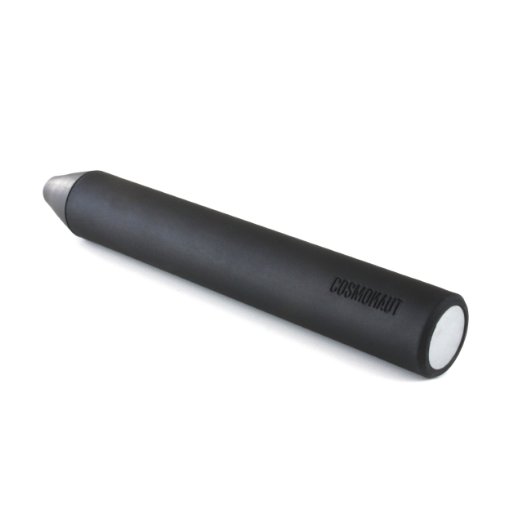
  • Elago stylusCosmonaut: Wide-Grip Stylus  – Durable and chunky. This stylus provides a solid tip that is durable and is somewhat heavy for more feedback when writing.

cosmonaut stylus

Chunky Stylus

The Pencil Grip ERgo StylusHave you used the Wet Dry Try Suite App? Please share with others your experience.

More for your teaching or OT mTool Kit!

Carol


Posted in Accessories, App Reviews, Apps for OT's, Apps for Special Needs, AT for Handwriting, Data Collection, Formative Assessment, Handwriting, iPad, Letter Formation, Mobile Device Use, Occupational Therapy, Stylus, Writing | 2 Comments

Free online iPad basics course

Rehabgadgets2go provides a great free resource for learning iPad basics from the GCFLearnFree.org website. Thanks to the folks at Rehabgadget2go for sharing this free resource.

Carol

adl2go's avatarrehabgadgets2go

I was developing a “hands-on” iPad basics course for therapists when I found this great resource:

gcf home page

GCFLearnFree.org is a program of the Goodwill Industries of Eastern NC, Inc.  Their free-online courses are funded from the proceeds from Goodwill Stores and donations to the Goodwill Community Foundation.

gcf ipad basics top of page

The iPad Basics course is clearly written and uses screenshots, interactive pages and instructional videos.  The videos require a flash player which means they will not play on your iPad but will play on your computer if it has a flash player.  The course is written at a level that is easily understood by individuals who have had little experience with mobile technology.

gcf iPad basics outline

The course provides enough information to start using the iPad. I found this course easier to follow than trying to use the Apple user manual, because it uses more visual formats to show “how-to-do” things on your iPad.  The course…

View original post 97 more words

Posted in Continuing Education, Education, iOS, iPad, iPad Management, iPhone, iPod, Occupational Therapy | Leave a comment

iOT Session App

iOT Session icon

iOT Session App

iOT Session is a new iPad app (2.99) developed by Dr. Frederick Covington OTD. It addresses fine motor/dexterity, visual perceptual, visual scanning, visual tracking and handwriting/letter formation skills. Tasks are measured, timed or scored with data  saved for each user for comparison over time. An unlimited number of users can be entered.

Here is a video providing an overview of the tasks included in the app:

Have you used this app? I have not had a chance yet, however appears to be for primary aged students  in Kindergarten thru 1st grade from the content presented. I hope to have a chance to test this out and explore the type of levels it might have.

Share if you have had any experience with the app.

Carol from OT’s with Apps


Posted in Apps for OT's, Assessment, Fine Motor Development, Finger Isolation, Formative Assessment, iPad, Letter Formation, Occupational Therapy, Pediatrics, Primary Grades, School Based Interventions, Visual Perception | 4 Comments

Schizophrenia: If a Disease Falls in a No-App World, Does It Exist?

On Candidaabrahamson’ blog, insight on the prevalence of mental health apps is shared with one despairing fact on a diagnosis lacking support from a mobile device tools. Read and enjoy her blog post.

Wouldn’t you love to see this experts app list?
Enjoy the post as well as her thought provoking blog.
Carol

Unknown's avatar

On Candidaabrahamson’ blog, insight on the prevalence of mental health apps is shared with one despairing fact on a diagnosis lacking support from a mobile device tools. Read and enjoy her blog post. Wouldn’t you love to see this experts app list? … Continue reading

View original post

Posted in Mental Health | Leave a comment

Doodling for Relaxation with Kaleidoscope Doodle Apps

Doodles pic3

Finally, Don’t Forget Art!

Activities that relax come in many forms and are individual for everyone.  I have students who doodle or draw for relaxation at school, as long as it does not distract from learning – or occlude all of the work on their paper, as a way to relax.

The Calm Clinic in their online article “Fool Proof Anxiety Relaxation Techniques” , defines a variety of different strategies including breathing, progressive muscle relaxation, aromatherapy, positive affirmations as well as using art as a form of relaxation. They describe art as a method that helps refocus mental energies. Not always do you have access to paper and pencil to draw or you may not exactly have the drawing skills to allow you to doodle (I would resemble that!). Using a mobile device might just be the tool for some who is not exactly artistically inclined, but still like to be creative, like symmetrical visualizations which can be relaxing.

Here are a couple of apps, one new and one shared (Thank you, Cindi P. ) that would fit as an electronic doodle providing visual and sounds/music for adults and students:
Kaleidoscope Doodle Pad icon

Kaleidoscope Doodle Pad (free w ad, .99) for iPhone/iPad is a new app that creates a kaleidoscope drawing with a variety of colors, backgrounds and stamp features. It is easy to create the drawings, requiring only basic swipes to create a kaleidoscope design. Sounds and visual effects when drawing are added in the mix of the kaleidoscope creation. When completed, you can replay a video of your kaleidoscope drawing providing a visual sensory treat. The creation can also be saved as an image to your Photo Library.

Kaleidoscope doodle pad pic1

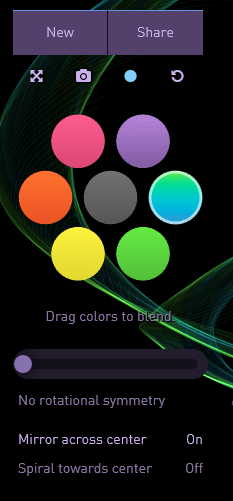
Silk iconSilk app (2.99) for iPhone/iPad is another drawing app that creates interesting drawings with a few tools to create symmetrical or asymmetrical drawings with different colors that can be blended. Silk app also provides music (not customizable) for a calming effect for those that relax when creating visual designs and music.

Silk pic1 Designs can be shared and saved. If you are interested in testing the app features out, the tools are available to doodle with on the developers website, Silk-Interactive .
Silk pic2

Don’t have a mobile device you would give to your student? There are many calming and relaxation activities available. Kim Peterson, Licensed Professional Counselor, provides practical suggestions on Creating a Calm Down Box on her Kim’s Counseling Corner website. She provides practical, simple suggestions for calming and relaxation activities for children.

Another method of drawing for relaxation is with a mandala. The University Health Center at University of Georgia on their website page Managing Stress: A Guide for Students, lists relaxation techniques and also “Drawing and Coloring” as a method for stress management. They identify mandala as a relaxing and calming activity:
“Mandala is Sanskrit for circle, polygon, community and connection. The circle       concept exists in nature, is found in many religious symbols and represents       wholeness. Mandalas are intricate designs that can be a part of the meditating       experience. When you color a mandala, your goal is to focus on the process       of coloring, and be mindful of how it feels to color. It is very relaxing       and calming. When you have finished, you have created a lovely picture.  Download a mandala for coloring .” Retrieved on 11/16/2013 from: http://www.uhs.uga.edu/stress/relax.html . Coloring mandalas is not only for college students, I have provided mandala coloring sheets for the class room of behaviorally challenged students to color as a calming activity. It is one of many things they like to color or draw. Paper, colored pencils, markers and crayons are always available and frequently used by the middle school students in their resource rooms.

Duck taping a small pocket made of sturdy material on the inside and underside of the top of a student desk has also been a strategy for easy access to doodle pad paper when appropriately used for calming in the classroom.

Looking for iPad mandala apps or more suggestions? Here is a link to some more ideas about apps and mandala creations: “Marvelous Mandalas – Art App Lesson Idea”

Relaxation apps and activities for your OT Tool Kit!

References:

Fool Proof Anxiety Relaxation Techniques retrieved on 11/16/2013 from : http://www.calmclinic.com/anxiety/treatment/relaxation

Creating a Calm Down Box, retrieved on 11/16/2013 from: http://www.kimscounselingcorner.com/2012/05/09/creating-a-calm-down-box/

Managing Stress: A Guide for Students retrieved on 11/16/2013 from: http://www.uhs.uga.edu/stress/relax.html

Marvelous Mandalas retrieved on 11/17/2013 from:  http://www.ipadartroom.com/marvellous-mandlas-art-app-lesson-idea/

Post revised on 11/17/2013.

Carol

Posted in Adults, Apps for OT's, Apps for Special Needs, Cause and Effect apps, Drawing, iPad, iPhone, Mental Health, Occupational Therapy, Rest and Sleep, Sensory Apps, Special education | 2 Comments

How iPad App Therapy is Changing Lives of Children with Disabilities

Scooped from:  Mommy Tech Bytes : how-ipad-app-therapy-is-changing-lives-of-children-with-disabilities/

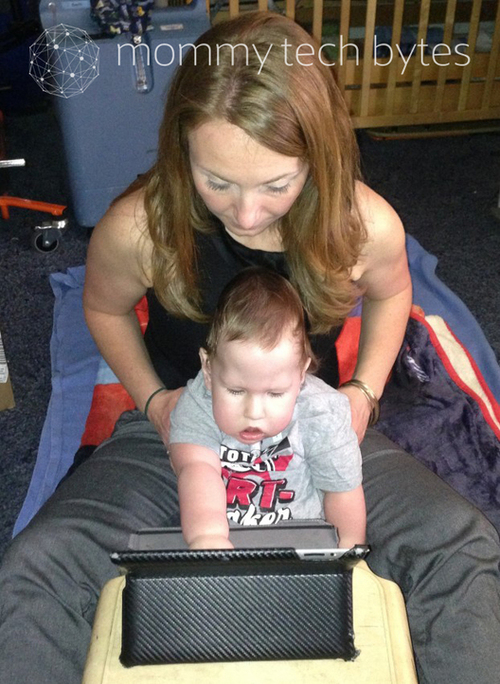
Interview with Pediatric OT Amy B. VanCamp Aiden Singleton has Muscular Dystrophy. He is 18 months old. And app therapy is changing his life, thanks to the iPad and the…

Carol Leynse Harpold‘s insight:

This is a great article on intervention with the iPad and apps as a modality. Pediatric OT Amy B. VanCamp shares a variety of apps she uses for the 0-3 population.

Thanks to Mommy Tech Bytes for featuring this interview with an OT!

Carol

As scooped from Scoop.itOT mTool Kit

Posted in Uncategorized | 2 Comments