iOS Apps Gone Free for your OT mTool Kit!

free

Here are a couple of apps gone free (on 12/13/2014) that might support visual perceptual intervention for younger students:

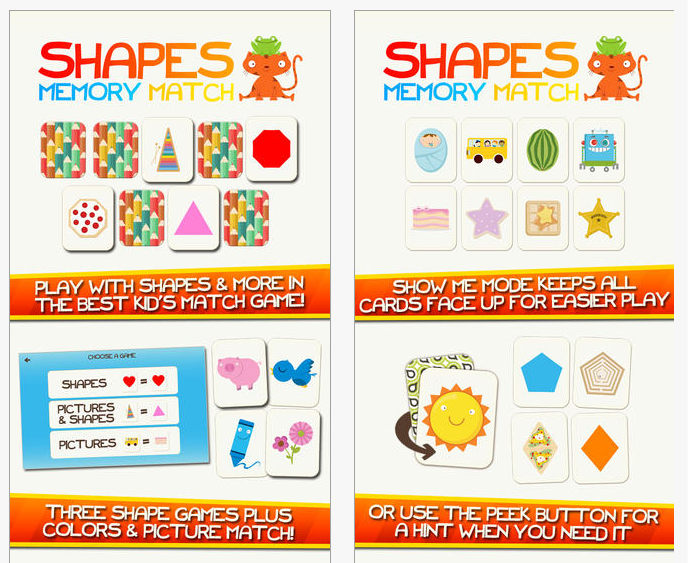
Shapes memory match iconShapes Memory Match (iPhone/iPad, originally 3.99) is currently free. The app provides preschool activities of shape identification and recognition in a memory matching activity.


Shapes Memory Match pic1

Sharing with Duckie Dec iconSharing with Duckie Deck app  (iPhone/iPad, originally 2.99) promotes sharing with visual matching and memory activities for 2-5 year olds.


Sharing with Duckie Deck pic1

Just a reminder – apps gone free are typically only for a mysterious period of time!

Free apps to consider for your mobile tool kit!
Carol

Posted in Early Childhood, Free apps, iPad, iPhone, Occupational Therapy, Visual Memory, Visual Motor, Visual Perception | Tagged , , , , , , | Leave a comment

ViaOptaDaily App from Novartis Pharmaceutical

ViaOptaDaily icon

ViaOptaDaily app

ViaOptaDaily app, optimized for iPhone (compatible on iPad iOS 6) and Android is a free app created by Novartis Pharmaceutical Corporation. As a free app it provides the following six tools for individuals with visual impairment in their daily life:

  • Weather – (Current and three day forecast)
  • Magnifying glass
  • Timer
  • Contacts
  • Color recognizer
  • Money recognizer (US Dollars and Euros)
  • Provides seven languages built in (English, German, Spanish, French, Chinese, Arabic, Japanese)

ViaOpta Daily app icon

ViaOptaDaily app for iOS and Android provides a voice guide and audible tutorial in each section. It offers different contrast modes or a blind mode and reportedly has its own text to speech that runs along with Voiceover in iOS.

Viaoptadaily pic2 for Android

Images of tools for Android app

AppleVis, a website dedicated to finding and reviewing iOS /Mac apps for blind and low vision users, reported ViaOptaDaily as fully accessible with Voiceover and  reported it to contain useful features. AppleVis review stated “For being FREE, it is not a bad little Swiss army knife of tools that one can use on a daily basis ” (retrieved on 12/7/2014 from: http://www.applevis.com/apps/ios/health-and-fitness/viaoptadaily).

Free is always good when it provides functional tools! For students or adults with visual impairment, this might be a free tools that will support greater independence in daily living tasks. This might be an app that could support individuals with reading challenges have access to weather or accessing contacts. Check out or share this app with others that might have a need for magnification, contrast, identification of money and colors or easy access to weather and contacts.

More for your OT mTool Kit… or share !

Carol

Posted in Accessibility, Android, App Reviews, Apps for Special Needs, Assistive Technology, Free apps, iADL's, iOS, iPad, iPhone, iPod, Low Vision/ Blindness, Money | Leave a comment

Switch Access now available in Android

Luis Perez offers his expertise and expands options for switch access to the Android platform. More and more Android options are available these days!
Thanks to Luis for sharing his expertise!
Carol

Luis Pérez, Ph. D.'s avatarThe Website of Luis Perez

After waiting a couple of weeks for the elusive Android 5.0 Lollipop update for my 2013 Nexus tablet, I  decided to do things the hard way using Google’s instructions for loading a factory image. If you know how to open a Terminal window and issue a few commands, you should not find it too difficult to load the factory image, though I did run into a few roadblocks that I was able to address with quick Google searches. Since I am on a Mac, I had to modify some of the commands a bit, but that was not too hard to do and after a couple of tries I was able to get the 5.0 image loaded on my device.

According to this article and video on Android Central, most of the accessibility features for Lollipop (Android 5.0) have been carried over from 4.4 KitKat. However, the article glosses over a significant…

View original post 644 more words

Posted in Uncategorized | Leave a comment

Black Friday Android App Deals 2014

Black Friday pic Amazon

Black Friday Apps for Android!

I am really enjoying learning about my new Samsung Galaxy Tab S 10.5-Inch Tablet (16 GB, Titanium Bronze). Although not all of the iOS apps are available for Android, there certainly is a growing number of apps making it an alternative device for individuals with special needs. It also may be a device that families or individuals own as a resource for apps that support your students or clients. Here are some free apps I found for Black Friday 2014 I downloaded:

Photo Editor iconPhoto Editor app for Android is currently free.


Sago Mini Explorer icon DroidSago Mini Explorer App for Android is a interactive app for preschoolers, currently free.


Docs 2Go prem Droid iconDoc to Go Premium app for Android, normally 9.99 now free. Provides ability to create and edit Word, Excel and PowerPoint documents on your tablet.


Farley Dictionary icon DroidFarley Dictionary app for Android currently free (normally 3.99).  Provides text to speech for look up word and additional reference tools including pictures and links to additional resources. Dictionary available off line.

Merriam Webster icon DroidMerriam Webster Dictionary app currently free (regularly 24.00).


I am sure there are many more Black Friday Deals! What have you found or use for individuals with disabilities for Android devices? My list is growing…

Carol

Posted in Android, Free apps | Tagged , | Leave a comment

Black Friday Weekend Deals

Black friday pic

I have a little guilt for not posting Black Friday Deals yesterday, so here’s a few iOS deals available for Black Friday Weekend you might be interested in:

Merry cube app iconMerry Cubes app for iPad is a puzzle app gone free for 4-7 year olds. Adds a 3-D dimension to puzzle assembly.


Thesaurus Editor iconThesaurus Editor app for iPad is a word processing app with a major thesaurus dictionary,  spell checker and dictionary app. Regularly 3.99, currently free. For middle school aged and up.


Touch and Write Cursive iconShapes Touch and Write iconBrainFuzz apps, Touch and Shapes, Touch and Write, Cursive Touch and Write , Touch and Write Phonics for iPad are (each)  on sale for .99.

Skill Game Arcade iconSkill Game Arcade for iPad/iPhone is currently free. A visual motor,  motor planning and spatial reasoning app for upper elementary to adults.


XReminder iconXReminder app currently free, provides persistent reminders for dates and events.


iStudez iconiStudiez Pro app for iPad/ iPhone is currently on sale for .99. A excellent and frequently used iOS app geared to student classes, assignments with alerts and reminders, this is a great deal.

Pepi Tree iconPepi Tree – a iOS game app for younger children, is a fun, learning app currently free.


Any other great Black Friday deals you want to share?

Carol

Posted in App Reviews, Apps for OT's, Apps for Special Needs, AT for Handwriting, Free apps, iPad, iPhone, iPod | Leave a comment

Keeble App from AssistiveWare – Another 3rd Party Keyboard Option!

Keeble icon

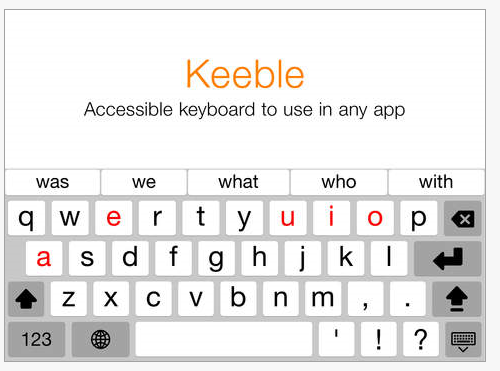
Keeble Keyboard App

The option of iOS 8 predictive keyboard and 3rd Party Keyboard apps provides additional support to writers with larger keys, more customization and word prediction integrated into the standard iOS 8 keyboard.  This brings another level of support to struggling writers using iDevices with iOS8 and changes access to many other apps.

Assistiveware, developers of Keedogo and Keedogo Plus keyboard apps offer another assistive keyboard, the Keeble app  (iPad) providing more keyboard options for writers.

What are the options in Keeble keyboard app?

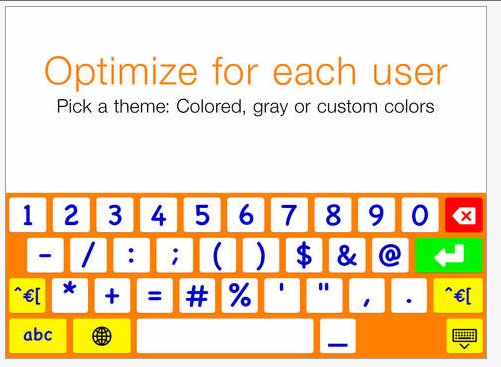
  • Options of colored, gray or customized theme
  • Alternative access options (select on release, hold duration, repeat delay and rate)
  • Text to speech for letter, word, sentence
  • Word prediction (choose number of predicted words, learn words, word completion, next word, multiple words predicted
  • Primary font
  • ABC, QWERTY upper and lower case keyboards

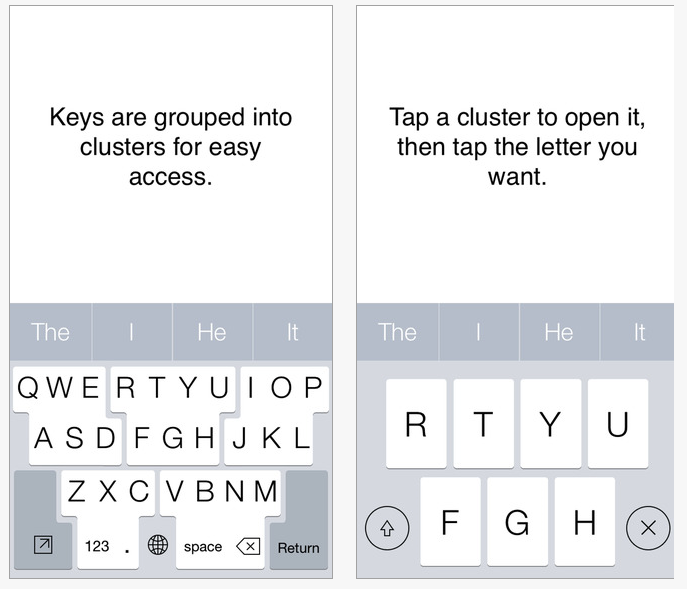
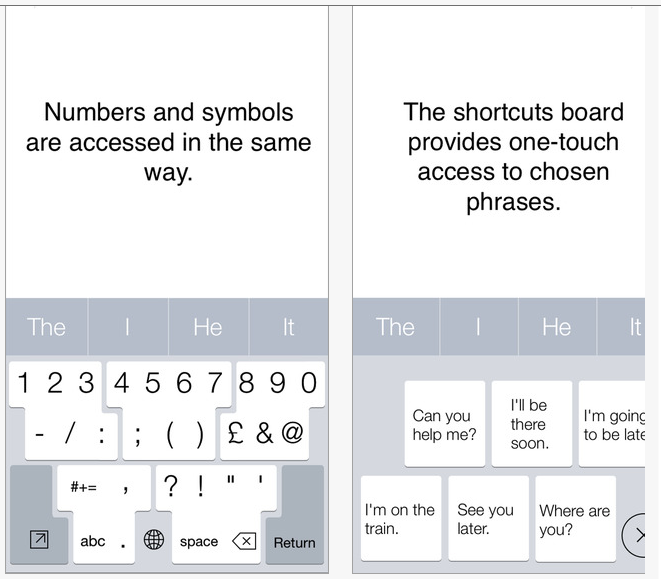
Keeble pic1 Keeble pic2 Keeble pic3

Here is an image of the options available within the app:

Keeble pic4

The installed Keeble app settings provides instructions on activating it and the custom settings options. Make sure you read the instructions for activating the app in your iOS Settings – it requires you to turn on Allow Full Access in the iPad Settings>General>Keyboard>Keyboards>Keeble for the text to speech to work! I needed a bit of help from the kind folks at AssistiveWare to turn the Allow Full Access on to get the text to speech to work. Had I read the directions, I would have had that feature working right away!

I trialed Keeble with several apps such as Pages and story telling apps Pictello and My Story. Keeble assistive keyboard worked smoothly in both apps, providing word prediction and text to speech with the words, letters and sentences. What a great value and support the Keeble keyboard is for emergent writers or for individuals with motor challenges, providing tools with other writing apps.

So, now what’s the difference between Keedogo, Keedogo Plus and Keeble keyboard apps ?

Simply, Keedogo provides a simplified keyboard for emergent writers, Keedogo Plus adds word prediction to those simplified keyboards. For a review and comparison of the Keedogo apps visit the post Keedogo Keyboard for iOS 8. Keeble keyboard app, provides all the options of Keedogo and Keedogo Plus as well as customizing the settings of word prediction, color of the layout, dwell functions, repeat key options, speak keys and more. For primary writers or individuals with motor control challenges, Keeble provides many accessibility keyboard supports when using other writing apps.

And what’s the cost? Currently 9.99 is the introductory price of Keeble Keyboard app, regularly 14.99. It is a value, realizing it can be integrated in most of your favorite writing   or drawing apps!

Thank you to AssistiveWare for supplying me with a code to review the app.

Another keyboarding app to increase access to writing for your teaching or OT mTool Kit!

Carol

Posted in Accessibility, App Reviews, Apps for OT's, Apps for Special Needs, Assistive Technology, AT for Handwriting, Customizable app, Dysgraphia, Dyslexia, Emergent Literacy, iPad, Mobility Impairment, Occupational Therapy, School Based Interventions, Text to Speech, Word Prediction, Writing | 8 Comments

Sign Language Recognition for a Tablet

This sign language recognition for a tablet known as UNI, the case uses gesture recognition technology developed by Leap Motion to translate sign language into audible speech

Source: As scooped from Assistive Technology Daily

Assistive Technology Daily always digs up great AT – Here is another one of their awesome finds – technology that translates sign language into audible speech! Sometimes there are assistive technology that just make you tear up – in a good way, for the awesome potential it can offer individuals with disabilities. This was one of those that made me tear – so incredible – the UNI, a sign language recognition tablet and text to speech!

Oh my, think of the possibilities – what an incredible tool developed by Ryan Campbell at Leap Motion. Watch this video and read the interview and you’ll want to help fund the IndieGoGo campaign for UNI production –  http://www.wired.com/2014/10/motionsavvy/

And then think of the possibilities!

Thanks to Assistive Technology Daily for sharing!

Carol

See on Scoop.itOT mTool Kit

Posted in Accessibility, Apps for Special Needs, Language recognition, Text to Speech | Leave a comment

SuperKeys App from Crick – Another Assistive 3rd Party Keyboard

SuperKeys Assistive Keyboard icon - Crick

SuperKeys Assistive Keyboard by Crick Software

With the added feature of iOS 8 comes the possibility of using 3rd party keyboards on the iPad. Android had an up on iPads previously with the ability to purchase and use an assistive keyboard. The iPad has stepped up their game with the new choices of 3rd party keyboards.One such iOS 8 assistive keyboards, is the SuperKeys Assistive Keyboard developed by Crick Software .

SuperKeys Assistive Keyboard icon - CrickSuperKeys provides new options for access, word prediction and short cuts (abbreviations) when typing on the iPad or iPhone. Currently, SuperKeys Assistive Keyboard is available at an introductory price of $3.99 (regular price of 9.99).  Here are some screen shots of the features of the SuperKeys Assistive Keyboard app:

SuperKeys Assistive keyboard pic1

SuperKeys Assistive Keyboard pic2

Here is a quick video of the keyboard features:

I trialed the SuperKeys Assistive Keyboard app with the iOS Pages, Google Docs, iOS Email and Write About This apps. The keyboard integrated with ease in each of the apps offering a larger key cluster, larger individual cluster keys, word prediction and access to individualized short cuts. At onset, it took using specific topic vocabulary for it to be offered in the word prediction menu, but once used, recency offered with greater frequency reducing the keystrokes required to write.  It did take a while to get used to the style of word prediction, requiring tapping the keyboard cluster, then again to choose one the 7 larger keys offered. As with most word prediction, it did reduce keystrokes the more I used it and offered my unique vocabulary. For individuals with difficulty accessing small areas or keys, the use of the key cluster offers greater ease of access with the larger cluster areas. For individuals with motor challenges (tremors, incoordination e.g.) or large fingers, the cluster method offers larger keys without consuming limited space on the tablet or phone.

Features of the word prediction includes Crick’s Intelligent Word prediction, which appeared to choose words by context and individual use. An additional benefit is access to up to 36 of your customized short cut phrases offered in the short cut key. The word prediction also offers groups of words frequently used together (e.g. going to, it is, it was) to assist writing.

As aforementioned I used SuperKeys with standard productivity iOS apps and another app used to support emergent writers without difficulty. Using 3rd party apps such as SuperKeys provides new options for writers not previously possible. Integrating  SuperKeys Assistive Keyboard  is also reportedly possible with Crick’s Clicker Doc and Clicker Connect apps, offering other supports during the writing process.

Use of 3rd party keyboards such as SuperKeys, provides writing supports to struggling writers when used with other standard word processing apps. Wouldn’t it be great if text to speech embedded within 3rd party keyboards such as SuperKeys in the future?

Thank you to Crick Software for providing the app for review.

More for your teaching or OT mTool Kit!

Carol

Posted in Apps for OT's, Apps for Special Needs, iPad, iPhone, iPod, School Based Interventions, Special education, Special Education Teacher, Special Needs, Therapist/Teacher Tools, Word Prediction, Writing | Tagged , , , , , , , , , | Leave a comment

Apps Gone Free!

freeHere are a few apps gone free for this weekend. Just a reminder that the mystery still stands on how long free might be!

Cutie Monsters icon picCute Mini Monsters – iOS ; free – Puzzle app with math concepts 1-10 for preschoolers.

Cutie Monsters pic1

Sago Mini swim iconSago Mini Ocean Swim – for iOS; free (regularly 2.99). Interactive app for preschool children with over 30 activities.

Sago mini swim pic1

More for your OT mTool Kit.
Carol

Posted in Free apps | Leave a comment

I Forgot to Remember…

reminder-23771__180

I Forgot to Remember….

I had the opportunity to journey and present at the 2014 AT Across the Lifespan Conference, in Wisconsin Dells this past week. As an ATR staff member , I presented on the topic, “I Forgot to Remember…” ,  providing an basic overview of low to medium AT resources for memory and organization challenges. Although not inclusive (that could take hours!) my review and categorized list of low tech to high-tech organization AT tools targeted school aged to post-secondary students and adults. At ATR we get many different combination of challenges  with the clients we evaluate as an OT and ATP.

One method of identifying specific organization challenges with high school aged and older students I use is  the ” Organization Problems Inventory”  created by Judi Sweeney , from Onion Mountain Tech.com. The Organization Problems Inventory  identifies strengths and weaknesses using six organization categories. From an AT stand point, the categories help identify and quantify areas of academic organization strengths and challenges and help target specific areas of organizational need. AT solutions can then be identified in the area or areas of greatest need.

Certainly, this is only one of many tools for evaluation of organization or executive function of students or clients serviced (not limited to TBI, ASD, LD, stroke, pain, cognitive impairment or mental health challenges).  Other important evaluation components needed during the evaluation includes information about the clients environment, tasks and resources/supports (SETT Format*) related to the concerns being assessed.

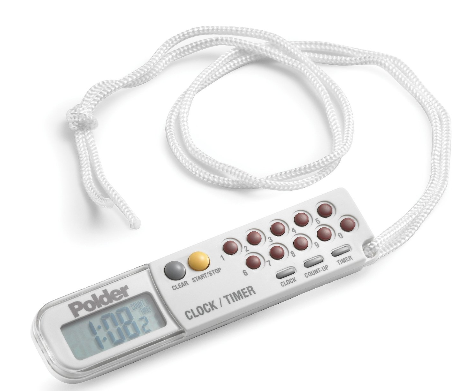
One of the categories of the “Organization Problems Inventory is temporal organization or time management. Just a few of the medium temporal/ time management tools reviewed were:

Polder timer

  • Cadex Watch – 8 alarms (sound and or vibration) with long duration. Easy to set.
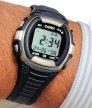
Cadex alarm watch

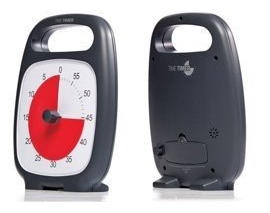
  • TimeTimer – Visual timer with handle, protective lens and volume control.
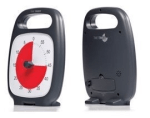
time timer plus

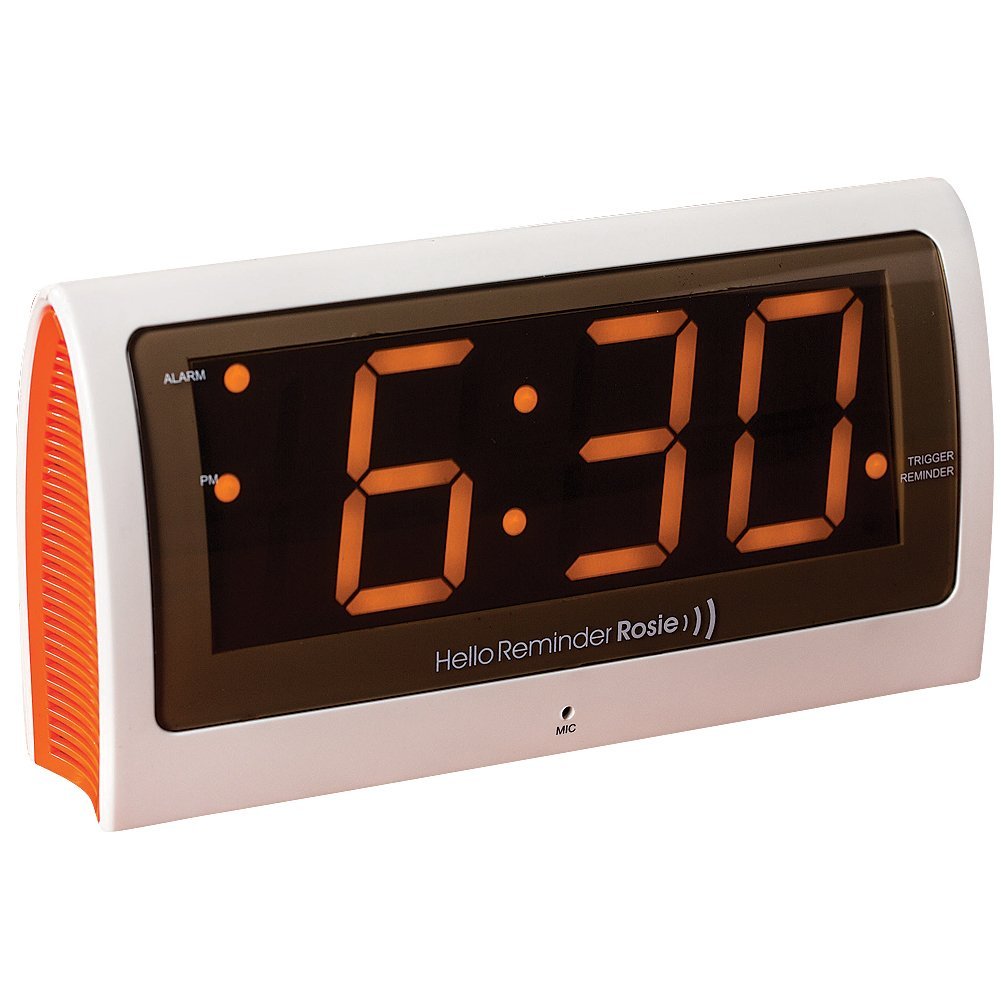
Rosie reminder clock pic

Here are a few high-tech apps to assist with time management with reminders:

  • Alarmed! app – free for iOS provides options of setting pre-set alarms with persistent reminders on iPhones, iPod Touch, iPad.

Alarmed! icon

  • Audio Reminder Pro – free for Android provides options of setting pre-set alarms with reminders.

Audio Reminder Pro Android icon

  • TimeTimer app – iOS; 2.99 – Visual timer for iOS and Android.

Another option is your iOS or Android mobile device or phone’s native clock app. Both the iOS clock on my iDevices and the clock in my Samsung Galaxy Tab S provide the ability to pre-set alarms, choose sounds and reocurring alarms by date/days, time and for a programmed number of days or forever! The clock can be set with one or  numerous reminders, a countdown timer or stop watch. A handy utility tool for therapy!

Certainly there are many more apps and tools reviewed during the “I Forgot to Remember” presentation, but too many to mention here.

I expect that other who use iOS or Android devices have their own favorite reminder or time management apps or tools. What do you use or recommend for your clients with time management challenges?

More for your OT mTool Kit!

References:

Zabala, J., 2005. SETT Format. Retrieved on November 15, 2014 from: http://www.joyzabala.com/uploads/Zabala_SETT_Scaffold_Data_Gathering.pdf .O

Organization Problems Inventory (2006): n. pag. Onion Mountain Tech, 2006. Web. 15 Nov. 2014.

Carol

Posted in Activities of Daily Living, Adults, Android, App Reviews, Apps for OT's, Apps for Special Needs, Assistive Technology, Elementary School, iPad, iPad Management, iPhone, iPod, Mobile Device Use, Occupational Therapy, Organization, Special education, Special Education Teacher, Special Needs, Therapist/Teacher Tools | Tagged , , , , , , , , | 6 Comments