National Occupational Therapy Month – Share Your Favorite OT Resources

Occupational therapy month wordle

April is National Occupational Therapy Month! As OT’s I think we have a lot to celebrate. Growth in jobs continues to expand and as an OT we have many venues that we can specialize in – and all so interesting, in my opinion. Resources are readily at our finger tips, whether in apps on a mobile device, online materials from AOTA, webinars for free or purchase from your computer, OT resources such as Pinterests  and blogs with amazing resources!  My, how times have changed!

For Occupational Therapy Month here are a few great OT website that provide you with wonderful digital resources (you probably are well aware of them already). We have so many resources that are readily available on almost anything!  Here are just a few that are geared to OT’s working in pediatrics:

Your Therapy Source – Provides free and purchase pediatric OT/PT related activities. The Your Therapy Blog is also another great resource of OT and PT information, short articles and research information. I always find some interesting blog post.

Therapy Fun Zone – has amazing resources for pediatric therapists. Activities, forms, games, equipment, recipes and much more is found in this organized, and resourceful blog. A wealth of information for pediatric therapists!

OT Plan – another fabulous site for occupational therapy resources categorized by Skill, Materials and Plan.  Great resources and ideas for therapy.

Therapy Street for Kids – Website with activities for home programming for families, teachers and occupational therapists.

Pediatric Occupational Therapy Tips – Written by Dr. Anne Zachry, this pediatric website provides a wide variety of OT activities and topics. Certainly is well worth checking out.

Mama OT – A pediatric OT blog with tips and trick for those who care for children.

Of course there are many more. Hopefully there will be time to post more!

Suggested pediatric websites you want to share? Please share in a comment.

Carol

Posted in Occupational Therapy, Pediatrics, School Based Interventions | Tagged , | 1 Comment

Apps Gone Free !

freeHere are a few more apps gone free (not sure for how long) that might be useful in your OT mTool Kit. I have not had an opportunity to try them out but they look worthy, plus they are FREE…

urTalker liteurTalker Lite app (free; normally 6.99; Pro 9.99, normally 24.99) for iPhone and iPad. Affordable communication app designed with the individual and their unique needs in mind. urTalker comes with default categories and images and provides the ability to create any number of additional categories, load any type of image and most importantly record your voice for use with those images and words. The UrTalker Pro version on sale for 9.99 provides symbols in categories and the option to schedule categories to appear at a certain time.

Eureka iconEureka app (free; normally .99) provides a simple to do list. An alternative to do list.

Calendar and Reminder Alarm Helper iconCalendar & Reminder Alarm Helper app (free; normally 1.99) for iPhone and iPad provides reminders and task lists. A nagging reminder feature is available (this is my kind of reminder app!). Some people just need a persistent, repeated reminder to be effective. Sounds worth trialing .

123 Kids Fun Paper Puzzle Game icon123 Kids Fun Paper Puzzle Game app (free; normally .99) for iPhone and iPad is a puzzle game for preschooler with over 60 puzzles. Add a new puzzle app to your collection for free.

Word Search for Kids 2 iconWord Search for Kids 2 app (free; normally .99) for iPhone and iPad provides large print letter grid for word searching. Ten words to search present for a simpler visual task. Suggested for kindergarten, 1 and 2 grade, however appears content appropriate for adults with exception of the name.

iRehab Back pain iconiRehab Back Pain app (free: normally 9.99) for iPhone and iPad provides questions and suggestions for treating back pain.

Voice Keyboard Pro iconVoice Keyboard Pro app for iPhone and iPad ( free; normally 9.99) is a 3rd party keyboard with voice and translation capabilities. Uses Google translate for the voice engine. I can’t wait to test this out!

More for your OT mTool Kit.

Carol


Posted in Accessibility, Apps for OT's, Apps for PT's, Apps for Special Needs, Assistive Technology, Augmentative Communication, Early Childhood, Free apps, iPad, iPhone, iPod, Memory, Third Party Keyboards | Tagged , , , , | 1 Comment

Autism Month Free Apps

Apps freeAutism Awareness Month always brings a host of free apps in addition to other apps gone free! Here are a few apps gone free on 4/3/2015 that you might want to consider for your teaching, parent or OT mTool Kit:

This for That Visual Schedule iconThis for That: Visual Schedule app (iOS; free) is a simple visual schedule app developed by the Center for Autism and Related Disorders. Create step by step visual schedules using pictures from you photo album or camera. No audio recording options are available. Very easy to use.

This for That Token Store iconThis for That: Token Store (iOS; free) is a simple token, reward system app developed by the Center for Autism and Related Disorders. Earn token and purchase rewards from the store. Simple and easy to use.

Word Flex Touch Dictionary iconWord Flex Touch Dictionary (iOS free; normally 11.99) is a visual dictionary that mind maps synonyms, antonyms, slang usage and definitions to a word. Appropriate for secondary and post secondary students.

Recorder pro iconRecorder Pro app (iOS free; normally 1.99) recording app with file management, saving/renaming, emailing and more capabilities.


Thinking Time Pro iconThinking Time Pro – Cognitive Skills for Early Learning (iOS free; normally 4.99) provides concentration, memory and reasoning activities in a game based app.

Quick Math Jr iconQuick Math app by Shiny Things (iOS free; normally 2.99) provides math concepts for 3-7 year olds including counting addition and  subtraction requiring visual motor skills.

Know of any other apps gone free? Share!

Carol


Posted in Apps for OT's, Apps for Special Needs, Assistive Technology, iOS, iPad, iPhone, iPod | Tagged , , , , , | Leave a comment

Autism Awareness Month 2015

Autism awareness month 2

April is Autism Awareness Month and there are always many initiatives occurring to raise awareness. Along with the initiative amazing resources are available on the topic of Autism. Autism Speaks.org is one organization that provides information on ASD including free Tool Kits for families and stakeholders.  Among their free Tool Kits are several guides on  self-care skills and strategies. The kits provide practical information, visual communication materials, step by step visuals of the self care task, resources and video modeling of the task. Here are just a few of their Tool Kits that feature self-care tasks:

Tips for Successful Hair Cuts Training Guide

haircutting_cover

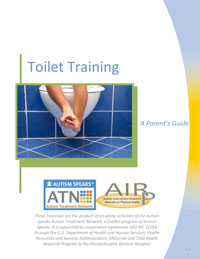
Parents Guide to Toilet Training in Autism

toilet-training-cover

ATN/AIR-P Sleep Tool Kit for Teens and Young Children

sleep-booklet-200px

teen_sleeping

Dental Tool Kit – Offers suggestions for dental care and dentist office visits including visual communication checklists. Information is also provided for Dental Professionals to help understand the unique needs of individuals with ASD. Numerous other resources are also available at this link on the subject.

Dental guide
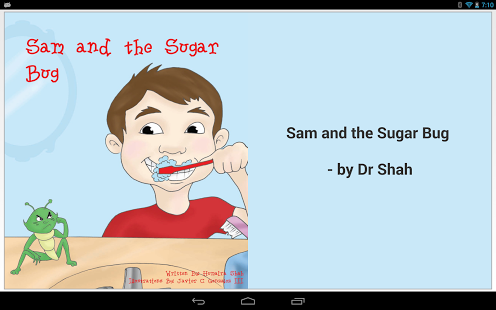
My Healthy Smile iconMy Healthy Smile (iOS; 1.99) is an app that teaches oral health and eases anxiety recommended on the website. Recommendations of electronic books on the subject of dental care,  such as Sam the Sugar Bug (Android free; iOS free ) are also available.

Same and the Sugar Bug pic1 Android

Autism Speaks.org provides many other Tool Kit topics that are well worth checking out as resources to share with families and others supporting individuals with ASD.

More for your OT Tool Kit and Autism Awareness Month.

Carol
Posted in Activities of Daily Living, Android, Autism, iOS, Self Care | Tagged , , , , | Leave a comment

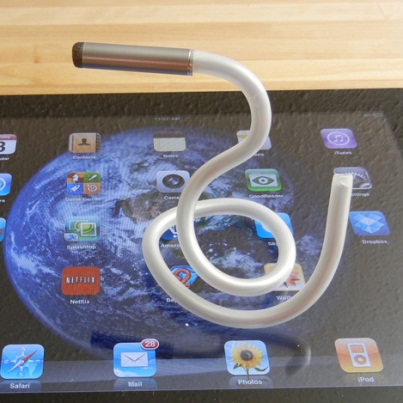
Caduceus with a SALT Tip – a Highly Adaptable Stylus

caduceus 8

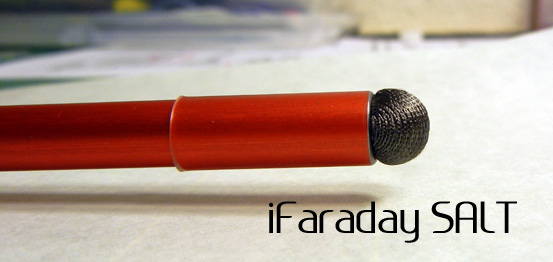
iFaraday Caduceus Stylus with SALT Tip

I was very excited to receive my order of the SALT stylus tip, a new interchangeable tip for the Caduceus Stylus , made by iFaraday.  The Caduceus Stylus is an appealing stylus featuring a bendable shaft and very light making it well suited for individuals with grasp and motor control challenges. Made with a flexible core (but yet rigid enough to maintain positioning when used) and plastic coating, this stylus can be bent to almost any configuration. Total length of the Caduceus is 15″. It  weighs 20 grams, so light you can hardly feel this stylus when applied.

Caduceus stylus

Prior trials of the Caduceus stylus with its original flat, found activation was very challenging for the clients I trialed.  The tip  of the Caduceus had to be vertical to the surface and directly on the target for activation. Although a great concept, use was frustrating and effortful with the clients trialed due to the difficulty with the specific contact required for activation on a capacitive screen.

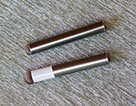
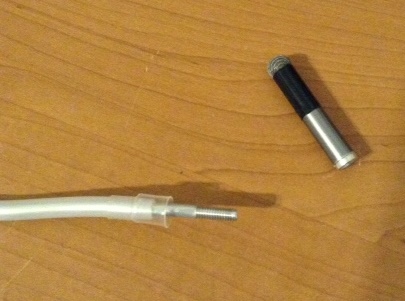
iFaraday now offers an alternative tip, the SALT tip, which offers a highly sensitive tip resulting in easy activation from many angles with minimal pressure. After purchasing the SALT tip it was easily exchanged with unscrewing and screwing the original and new SALT tips (SALT tip below has the rounded tip).

iFaraday replaceable tips

caduceus 5

Here is a video of the SALT tip showing use when held in a variety of angles:

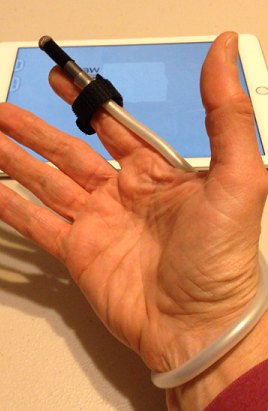
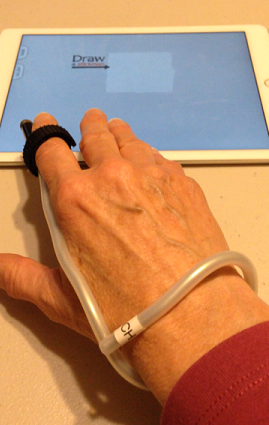
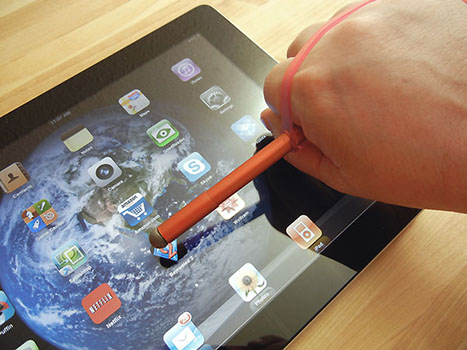
Trials of the Caduceus stylus with SALT tip with iOS visual motor apps found the stylus   sensitive, accurate and easy to use. With recent interest in a finger stylus,  I added a Velcro strap to secure the stylus to my index finger which allowed me to see the screens contents when drawing. Repositioning the stylus can easily be done for ease of viewing contents or placement on a finger.

caduceus pic2

Other modifications that might be necessary if tone interferes with positioning of fingers might include using a magic glove with the index finger cut out to reduce accidental touches of the hand or fingers. Positioning of the tablet also may be helpful.

Here is a quick video of the Caduceus stylus with SALT tip in action:

With the addition of the SALT tip, the Caduceus stylus can be adapted for many clients with motor challenges. Just using the SALT tip as a finger stylus might work!

More for your OT mTool Kit.

Carol


Posted in Accessibility, Accessories, Assistive Technology, iPad, iPhone, iPod, Occupational Therapy, Physical Disability Tool, Rehabilitation, Stylus | Tagged , , , , , | 5 Comments

Audio Notetaker Version 4 Launched: Integration with Dragon NaturallySpeaking and more! | Adaptive Technology Resources Blog

Sonocsent audio notetaker image

As scooped from : Adaptive Technology Resources Blog


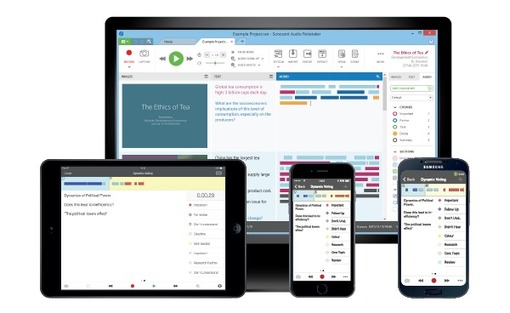
Audio Notetaker is a great note taking tool for Windows PC. It has a synchronizing iOS app for recording and importing audio recordings to the Audio Notetaker software. The features of the software include recording audio tagged with presentation slides imported (such as PPT) into the software, audio recording separated by speakers chunks of messages, typing notes during the recording or at a later time and color coding the audio recorded are just a few of the tools offered.

The latest version has just gotten mightier – new features of integrating DNS recorded audio to the software and transcription to text is now available. in Audio Notetaker.

Sonnocent Audio Note taker app iconA free Sonnocent Audio Notetaker app is available for iPhone and iPad for recording, then synchronization to the computer based software for organizing with handouts, review, additional note taking, and color coding .

Wow, what an amazing note taking tool for secondary and postsecondary students. Application as a workplace tool for creating reports using audio and organizing recorded meeting notes could definitely be helpful tool.

Check it out at Adaptive Technology Resources , supplier and trainer of Audio Notetaker.

Great note taking tool!

Carol

See on Scoop.itOT mTool Kit

Posted in Learning Disability, Note Taking | Leave a comment

Step by Step Drawing App Gone Free (March 27, 2015)!

Labo Drawing Lessons icon

Labo Drawing Lessons App

Labo Drawing Lessons iconFree is always fun. Here is another app for young children that is free today (gone free timeline is always a bit of a mystery):

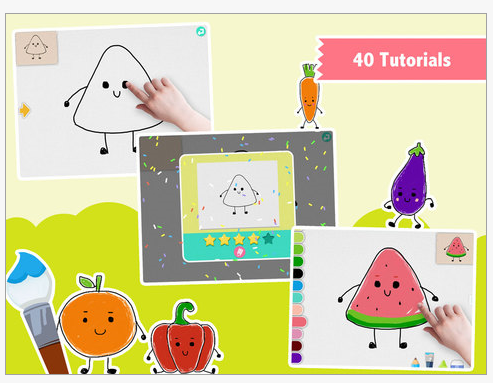
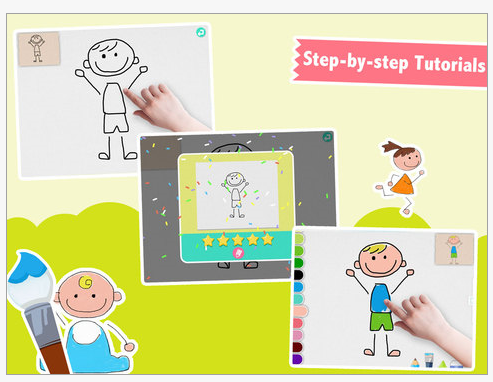
Labo Drawing Lesson for iPad (free ) provides step by step lessons on drawing animals, vehicles, people, fruit and monsters. Recommended for 3-5 year olds (typical learners), this app is suited to children well beyond 5 year olds. Drawings are provided in a step by step method with each step drawn then faded for the user. Lines can be traced while they remain for a short period on the screen. The fruit drawings provide some simple shape practice for young children.

Labo Drawing lesson pic1 Labo Drawing lesson pic2

Fun drawings that are appealing to kids, it also provides a rating on the accuracy of the drawing. The ratings are presented only after drawing and not recorded for later review. Finished products can be saved and shared by email or other social media.

This is a fun app and intuitive when drawing, but I found navigating in back to different screens not as clear. Drawings are appealing for primary aged students but do have deals that may be difficult for 3-5 year olds. As a free app this might be a fun home programming app for parents of children needing practice with visual motor skill development.

Have you tried this app?

Looking for more step by step drawing app? Check out the following step by step drawing app reviews on OT’s with Apps:

How to Draw App

More Step by Step Drawing Apps

Searching step by step drawing on OT’s with Apps will also provide additional app posts.

Carol
Posted in Apps for OT's, Drawing, Elementary School, Visual Motor, Visual Perception | Tagged , , , | Leave a comment

My Story App Gone Free!

My Story Book Maker for Kids icon

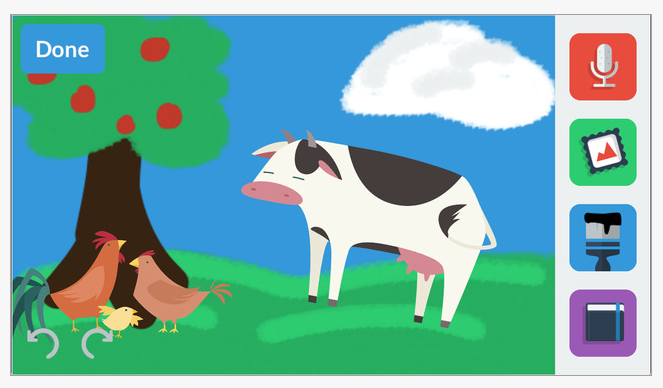
My Story App (iPhone/iPad; regularly 4.99) has gone free today (3/27/2015). This storytelling, book app provides many tools for creating books, writing projects, sensory or social stories for young students.

My Story pic 1.

Here are some of the features of the app:

* Create and share ebooks and stories by adding drawings, photos, and stickers.
* Record your voice on every page and share your story with friends, family and classmates!
* Choose from dozens of fun stickers already included in the app, no extra downloads needed.
* No in-app purchases, hidden ads, or additional costs.
* Share your storybooks to the web, on Facebook and Twitter, and standard ePub format to be viewed in 3rd party apps or edited in iBooks Author. Or export as a movie to Mp4 format straight to YouTube!
* Teacher friendly: allows for multiple authors and syncing across multiple iPhones and iPads through Dropbox!

Great app for emergent and beginning writers to draw, handwrite add stamps and pictures to a story.

More for your OT mTool Kit.

Carol

Posted in Apps for Special Needs, Early Childhood, eBook Creating, Elementary School, Emergent Literacy, iPad, iPhone, iPod, Story Telling, Writing | Leave a comment

SnapType Update & SnapType Pro App

snaptype icon

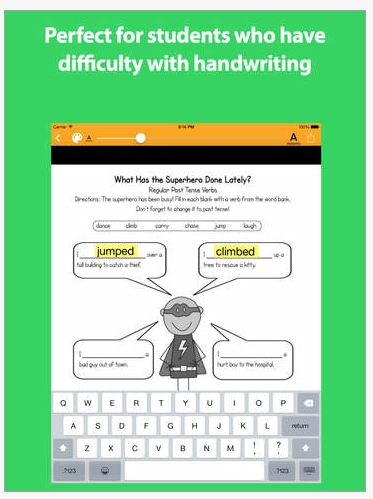
Familiar with SnapType app for iPad and iPhone? If you have students with dysgraphia, you might want to take note of this easy to use, worksheet filling/ annotation app. One of the many annotation apps available, SnapType app is free and created by an OT student. Recent upgrade gives it a brand new look and new features of sharing,  printing and folder system tools.

What’s new?

Quite a bit. The initial SnapType app provided basic tools to take a picture , create text boxes and type. Work flow for production or printing included taking a screen shot and sending it from your photo album.

Complete worksheets using annotation tools:

SnapType2 pic1 SnapType2 pic2 SnapType2 pic3

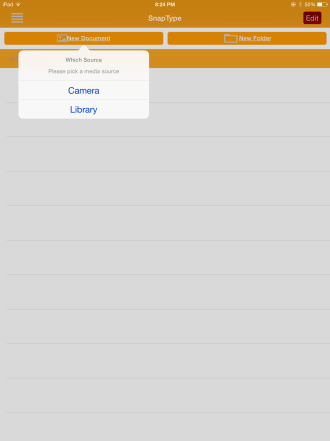
New tools and options available for importing images of a worksheet: IMG_1287Ability to organize files into folders:

IMG_1288 SnapType Pro iconSnapType Pro (2.99) is an in app purchase. Pro provides a Whiteboard feature to filter the paper color to appear more like a sheet of paper. The Pro version allows storing more than 3 documents.

Another tool for your OT mTool Kit!

Carol


Posted in Activity Worksheets on Your iPad, App Reviews, Apps for OT's, Apps for Special Needs, Assistive Technology, AT for Handwriting, Dysgraphia, Elementary School, Middle School, Occupational Therapy, Writing | 7 Comments

iDo Hygiene App

iDo Hygiene pic1

iDo Hygiene App

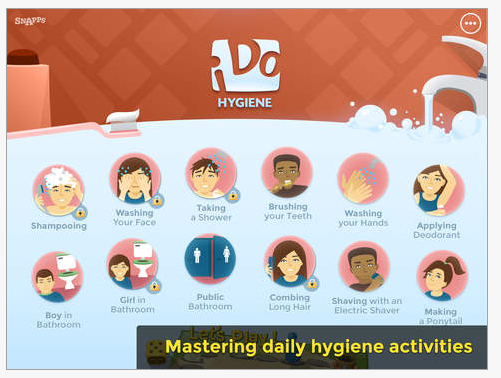
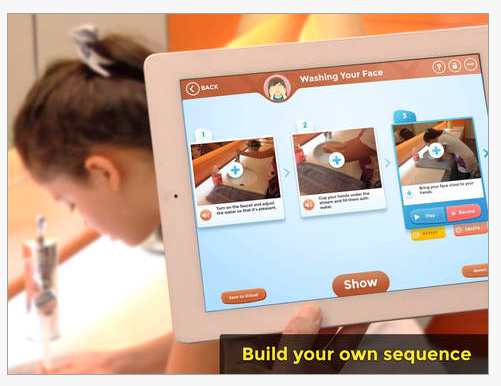
iDo Hygiene appiDo Hygiene is a new app providing instruction, video and games to learn personal hygiene. Included is an option to create your own images in the 12 hygiene areas. Created by the Center for Educational Technology for individuals with cognitive impairment, autism and other special needs, it features the following 12 self-care tasks:
1. Shampooing– free
2. Washing your Face– free
3. Washing your Hands
4. Taking a Shower
5. Brushing your Teeth
6. Applying deodorant
7. Shaving with an Electric Shaver
8. Combing long hair
9. Making a Ponytail
10. Boy in Bathroom
11. Girl in Bathroom
12. Public Bathroom

The app is free for installation with shampooing and washing your face tasks free. The additional 10 skills are an in -app purchase for 1.99 each or all units for 9.99.

What’s in each unit:
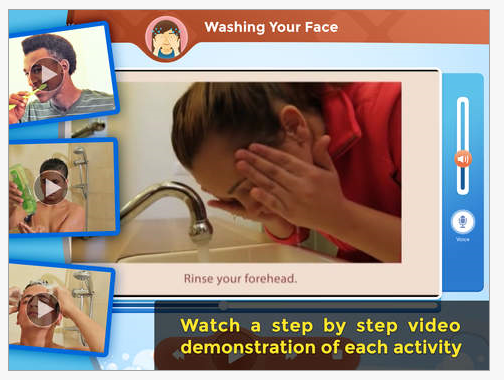
– A video presenting a teenager demonstrating the activity, step by step.
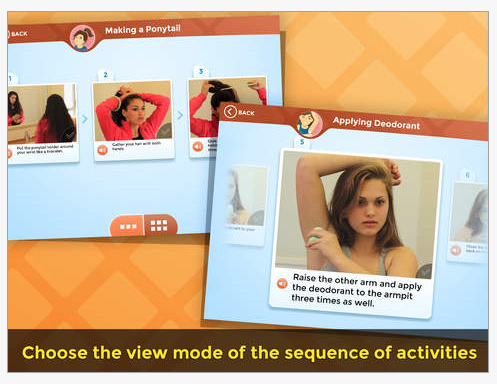
– A sequence of the task’s steps in images, accompanied by narrated text for each stage, and the option to mark the completion of each step with a V.
– A unique tool to create a personal sequence of the task’s steps, by photographing directly from the application.
– A tool to create a personal video of the task, directly from the application.
– Learning games to practice understanding of the sequence – what is the next step, what doesn’t belong, and so on.

Here are some photos of the app content:

iDo Hygiene pic1 iDo Hygiene pic2 iDo Hygiene pic3 iDo Hygiene pic4 iDo Hygiene pic5

Made for children and teenagers. This app would also be appropriate for individuals with cognitive impairment at any age. Each unite provides a video (model of the task), a picture sequence and game of the task. The option to create your own video and picture sequence is available within each task.

A video overview of the app provides more information on the app:

iDo Hygiene  provides the tools for video modeling and self-video modeling, both evidence based practices for student with autism and cognitive disabilities. Images and presentation of the app allows it appropriate for young and old individuals. This app would be appropriate as a home program support or classroom support for individuals benefiting from visual communication.

The Center for Educational Technology also developed iDo Getting Dressed app, offering visual sequences of dressing tasks.

Thank you to Dana and Kim for the heads up for the iDo Hygiene app! Great addition to an OT’s or individual mTool Kit!

Carol


Posted in Activities of Daily Living, App Reviews, Apps for OT's, Apps for Special Needs, Cognitive Impairment, Developmental Delay, iADL's, iPad, Life Skills, Occupational Therapy, Pediatrics, Self Care, Special education, Special Needs, Visual Communication | Tagged , , , | Leave a comment