Free Technology for Teachers: How to Use VideoNot.es With Google Drive


videonote icon

Sourced through Scoop.it from: www.freetech4teachers.com

Speaking of note taking, Richard Byrne blogger of Free Technology for Teachers shares an interesting tool that connects with  Google Drive allowing viewing a view source (Coursea, YouTube, Khan, etc.) while type notes on a document using VideoNot.es, an open source tool. Check out this tools on Free Technology for Teachers or directly at VideoNot.es.

More  note taking options!

Carol

See on Scoop.itOT mTool Kit

Posted in Assistive Technology, Note Taking, Note Taking App, Uncategorized | Leave a comment

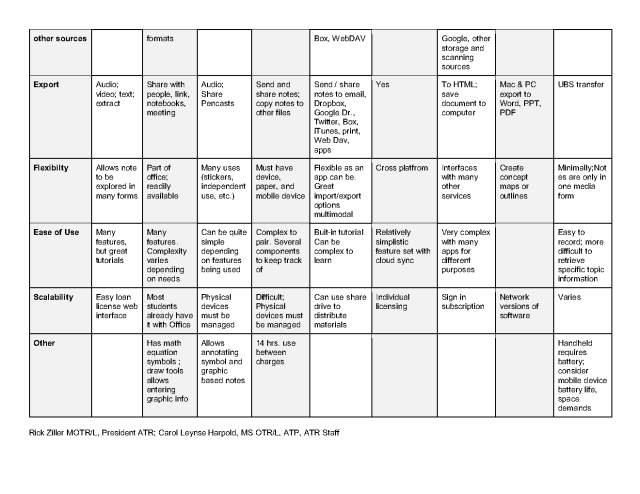
Note Taking Tools & Feature Matrix

write-593333_1280

Taking Tools for Students

Note taking is a subject frequently addressed during AT assessment of students. Along with peer note taking accommodations, as eligible through a college’s students with disability center, or special education department there are many electronic tools available to support note taking using mobile devices, recording devices or software choices. As with many tools these days, choices are many and requires research on the features of each of these tools.

Standard Note Taking Tools

Along with researching the type of note taking tools, the question of the best method of note taking should be identified. Review of the literature on note taking yields differing opinions on the best tools. When considering handwriting, typing, recording information as frequent methods of note taking, a Scientific American article (May, 2014)suggests handwriting is a better method of note taking as it is slower and requires individuals to summary information in their own words. Typing, a faster method of producing written information resulted in reduced retention by students of lecture information.

Another article (Friedman, M. N.D.)  identifies typing which is a faster method of written production, allows greater availability of cognitive resources for understanding lecture content. Individual factors of speed and proficiency with typing or writing require consideration when choosing a method of note taking.

Many students identify maintaining pace when note taking, spelling and the multi-tasking demands of listening, processing, writing and summarizing a challenge. Note taking is a multi-faceted task with many demands on the note taking simultaneously which can break down at any one of the task components.

Note Taking Tool Choices

There are many include standard paper and pencil, word processing on a computer as cited above or use of handheld digital recorders. Other hybrid tools, using electronic devices use multiple features often including taking or importing images, digital recording, handwriting or typing using software, apps or smart pens. Consideration of learning preferences, electronic resources or device platforms, costs, sensory  and motor skills should be considered when considering a note taking tool. Using a feature matrix to  compare individual components of note taking tools, can be a helpful tool when considering preferred note taking tools.

Note Taking Feature Matrix

Evaluating the features of the tools  considered takes the guessing out of selecting appropriate tools. I love feature matrixes, too many times I have searched for similar apps and unable to recall the slight differences and features of one versus another. Feature matrixes I find, provide a systematic method of comparing all those features needed for an individual client.

The following Note Taking Feature Matrix created by ATR’s AT specialists , Rick Ziller MOTR/L and myself help compare note taking features of a few of the major note taking apps, software, hardware and services available:
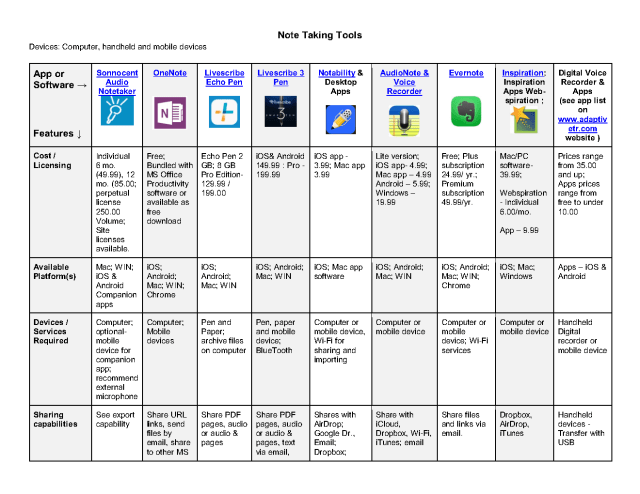
Note Taking Software Device AppFeatureMatch4-2016- 5 bpng_Page1Note Taking Software Device AppFeatureMatch4-2016- 5 bpng_Page2

Note Taking Software Device AppFeatureMatch4-2016- 5 bpng_Page3

The following list includes links to the  software and devices above mentioned available online :

Voice Recorder Apps

The following  list contain a few select digital recording apps by platform for consideration:

Basic Voice Recorder App List¹

Chrome:

  • MicNote – MicNote is a great tool that allows you to both record audio and take notes at the same time. It is perfect for brainstorming ideas, taking quick notes, and planning meetings.
  • Voice Recorder – Voice Recorder ( free) is a simple app which records sound from your microphone. After recording, you can trim the sound and save it to your computer.
  • AudioRecorder App – Record audio, and then save as a wav file. Works off line.

Windows:

  • Windows voice recorder tool is available in the Start Menu > Windows Accessories> Steps Recorder (Windows 10 OS) or as Recorder in Windows 7 or 8. Simple recording application that can be saved for later review.
  • Pocket Recorder (free on Windows Store) for Android or Windows. Pocket Recorder for Android
  • Easy Voice Recorder (free; Pro version 3.99 for additional features): Simple to use voice recorder for Android devices. Save and share files. Pro version features additional file organization tools.
  • Audio Recorder (free): Sony recording app with easy to use interface and several levels of sound quality levels to choose from. iOS:

 iOS

  • SimpleMic (free; 2.99 for upgrade features)- Voice recording app compatible with VoiceOver. Syncs with iCloud for storage and easy review. Sound activation feature. Label and tag for easy retrieval. Transfer directly with email, Dropbox and SoundCloud. Share with Google Drive, Evernote, MS OneDrive.
  • QuickVoice Recorder (free; Pro 2.99 removes ads, allows recording more than 5 min.): Easy to use voice recorder, name files, send, share voice files, create voice memo for emails. Transfer files to Gdrive, other apps and services.

Summary – Note Taking Tools

Many features can be considered when choosing a note taking tool for a student along with the other supports available from special education services or students with disabilities or tutors. The above note taking feature matrix compares features of some of the major devices, apps and software considered for the task. The above list of apps is limited, however recommended for ease of use.

What is your favorite note taking tool? What are your students with special needs using to support note taking?

References:

May, C. 2014. Retrieved on 4/24/2016 from: http://www.scientificamerican.com/article/a-learning-secret-don-t-take-notes-with-a-laptop/

Friedman, Michael. ND. Retrieved on 4/24/2016 from: http://hilt.harvard.edu/files/hilt/files/notetaking_0.pdf

¹Created by C.Leynse Harpold, 4-2016

Carol – OT’s with Apps



Posted in Apps for Special Needs, Assistive Technology, Dysgraphia, Google Chrome, Note Taking, Note Taking App, Universal Design for Learning, Writing | Leave a comment

Ready to Print App on Sale

Ready to Print icon

Ready to Print App

Ready to Print App, available for iOS, Android and Kindle is currently on sale this weekend (April 22-24, 2016) for 50% off.  Occupational therapist and developer Diane Reid, OTR/L provides this sale in honor of OT Month.

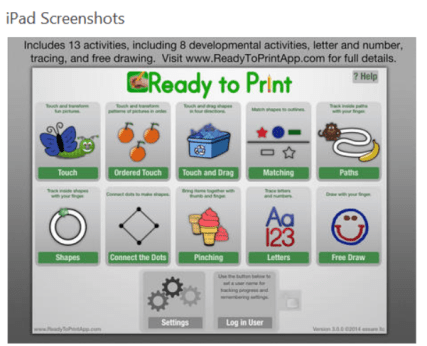
Ready to Print app is an outstanding app providing pre-writing and handwriting activities for pre-school and elementary aged children. The app offers creation of multiple users, grades the level of difficulty within activities  and collects data by user for pre and post evaluation of user skills.

Ready to Print app pic1

Ready to Print app is a staple for school based OT’s in my opinion. I use this regularly with my students and find the data collection and variety of activities and options valuable and motivating in therapy.  Ready to Print now provides  downloadable companion worksheets on their new website .

Thank you Diane and Scott for your continued development of Ready to Print  app and honoring OT month with the great price for Ready to Print apps:

Ready to Print for Android (on sale 3.49)

Ready to Print for iOS (iPad only) – (on sale 4.99)

Ready to Print for Kindle – (on sale 3.49)

Enjoy! More for your OT eTool Kit!

Carol


Posted in Uncategorized | 9 Comments

Tech Toolbox™

The Arc Tech Toolbox pic1

Thanks to the The Assistive Technology Daily blog for offers the latest tech resources for individuals with disability. One of their recent posts features The Arc’s Tech Toolbox™ , an online resource to find, share, rate and review technology for people with intellectual or developmental disabilities (I/DD). This is a welcome addition to other online technology websites or apps dedicated to searching the myriad of apps or software available to support the specific needs of an individual! Searching for the right  app is overwhelming due to magnitude of numbers of apps on each platform!

The search format  of the Tech Toolbox™ is easy to use with multiple advanced search features specific to the needs for individuals with intellectual disabilities. Here an image of the basic search features which provides additional options in each of the drop down boxes:

Arc Tech toolbox image

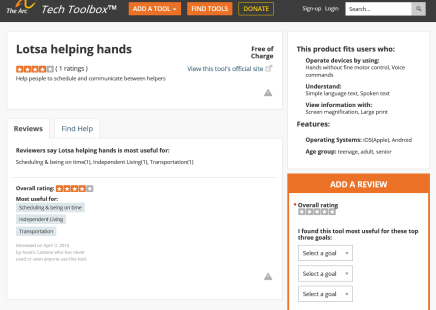
Results of the search provide a rating, description, cost and identifies if it is from a website, software or hardware.  Results features “More”I like the features of newest to oldest, providing a method to keep up with recently created software that have emerged  on the market and reviewed.Arc Tech toolbox result pic2

Not only are apps, but software and devices featured in the Tech Toolbox. Users can add additional  reviews as well as offer a device, software/app or hardware for review.

This new Tech Toolkit is a welcome addition to the other technology search tools available on the web! Share your expertise with apps, software, websites or devices that support individuals with intellectual disabilities with Arc’s Tech Toolkit to aid others decision-making for assistive tools!

H/T to The Assistive Technology Daily for their curation of great AT tools!

More for your OT eTool Kit!

Carol – otswithapps.com

Posted in Accessibility, Activities of Daily Living, App Reviews, App Search Engine, Apps for OT's, Apps for PT's, Apps for Special Needs, Assistive Technology, Augmentative Communication, Cognitive Impairment, Developmental Delay, Intellectual Disability | Leave a comment

Proloquo2Go and Proloquo4 Text – 50% off

Proloquo2 go on sale 4-2016

For OT’s who are involved with assistive technology service, two popular AAC apps from AssistiveWare, Proloquo2Go and Proloquo4Text are on sale for Autism Acceptance Month (limited time – April 2, 3, 4, 2016) at 50% off, a significant savings!

Proloquo2go

Proloquo2Go app (iPad, iPhone; originally 249.99 now 124.99). A symbol based AAC app.

Proloquo4Text icon   Proloquo4Text app (iPad, iPhone; originally 119.99 , now 59.99). A text based AAC app.

Share the word!

Carol


Posted in Apps for Special Needs, Assistive Technology, Augmentative Communication, Autism, Communicaton, Uncategorized | Tagged , , , , | Leave a comment

Autism Acceptance Day – April 2, 2016 – Wearing Blue?

Light it up blue

National Autism Acceptance Day, April 2, 2016!

Today is the 8th annual Autism Acceptance Day, so Light it up Blue with your clothing, lighting or sharing information about autism. Autism Speaks.org has great information including tool kits, research and resources about autism to learn or share.

In a recent update from the CDC , statistics show that the incidence of autism has remained stable, with 1 in every 68 children  diagnosed with autism. The incidence of boys with autism continues to remain higher  than that of girls.  While that is good news there is still much more to be done to ensure children with autism are being identified and receiving needed services. Here are five facts identified by the CDC regarding current statistics (as gathered from http://www.cdc.gov/features/new-autism-data/index.html ):

Five Important Facts to Know

1. The estimated percentage of children with ASD remains high.

About 1 in 68 or 1.5% of children were identified with ASD based on tracking in 11 communities across the United States in 2012.

  • According to previous reports, the percentage of children identified with ASD increased between 2002 and 2010.
  • The new report shows no change between 2010 and 2012 in the percentage of children identified with ASD.

2. It is too soon to tell if the percentage of children identified with ASD is still increasing or has stabilized.

Here are two reasons why it is too soon to tell:

  • While the average percentage of children identified with ASD in all 11 communities stayed the sad with ASD increased significantly between 2010 and 2012.
  • The percentage of children identified with ASD ranged widely by community— in communities where both health and special education records were reviewed, estimates ranged from a low of 1.2% in parts of South Carolina to a high of 2.4% in parts of New Jersey.

CDC will continue to track ASD over time so as to better understand if the percentage of children identified with ASD is staying the same or continuing to increase.

3. Children identified with ASD are not receiving comprehensive developmental evaluations1 as early as they could be.

Most children identified with ASD had concerns about their development noted in their health and/or special education records by age 3 years. Yet, less than half of children with ASD received a comprehensive developmental evaluation by this same age. A lag between first concern and first comprehensive developmental evaluation may affect when children are being diagnosed and connected to the services they need.

4. Black and Hispanic children are less likely to be identified with ASD. Those that are identified with ASD receive comprehensive developmental evaluations later than white children who are identified with ASD.

Previous research has not shown that black or Hispanic children have a lower risk than white children to develop ASD. However, since ADDM data showed that black and Hispanic children were less likely to be identified with ASD, it is possible that these children face socioeconomic or other barriers resulting in a lack of or delayed access to evaluation, diagnosis, and services.

5. Schools play a vital role in evaluating and serving children with ASD.

The percentage of children identified with ASD was highest in all communities combined where both health and special education records were reviewed compared to all communities combined where only health records were reviewed.

What can we do?

Awareness, education, and intervention are important at early ages. Many resources are available to assist with awareness and education:

  • Learn the Signs. Act Early. A free handout from the CDC provides basic information on Autism Spectrum Disorder to help with awareness.
  • The CDC also provides additional information on topics related to Autism Spectrum Disorder ,   such as statistics, research articles and interventions.
  • Autism Speaks.org  also has extensive resources on the topic of autism for identification, intervention, transition, employment, research, programs and toolkits.
  • Autism Society provides resources and research information.
  • Ohio Center for Autism and Low Incidence provides outstanding information and resources through online learning modules, assessment,  best practices and implementation of best practices on the topic of autism.

So Light It Up Blue! –  create an awareness and acceptance of autism today!

Light it up blue bulb

Carol – OT’s with Apps and Technology


Posted in Autism, Uncategorized | Tagged | Leave a comment

Entrepreneurs Design Backpack For Kids On The Spectrum

ds160321_backpack-668x418

It may look like a typical book bag, but a backpack designed by a group of college students to meet the sensory needs of kids with autism is far from ordinary.

Sourced through Scoop.it from: www.disabilityscoop.com

Not high tech, but this low tech adaptive pack is a great idea generated by business students…

The Disability Scoop.com shared a new backpack design for students on the spectrum. The Nestle Pack provides sensory input as well as attachment of oral and tactile fidgets. Read on about the innovative pack.

HT to Disability Scoop for sharing this post.

Hmm, I wonder if an optional belly strap would also help???

Carol

See on Scoop.itOT @ Work

Posted in Uncategorized | Leave a comment

Dear Otto: How do I set the default font on MS Word

Thanks to Jacqui Murray for her quick answer to a question asked often about setting default fonts in MS Word. As an OT and ATP working with a variety of individuals with disabilities on the computer often requires addressing and exploring font types, sizes as well as contrast when using the computer. Many individuals continue to use MS Word and for those with presbyopia , dyslexia or low vision / visual impairment conditionsmodifying  the font size and type and spacing  may improve  visual comfort and access.

Jacqui provides this quick solution to setting a default in MS Word…

Dear Otto is an occasional column where I answer questions I get      from readers about teaching tech. If you have a question, please contact me at askatechteacher at gmail dot com and I’ll answe…

Source: Dear Otto: How do I set the default font on MS Word

HT to Jacqui Murray at Ask a Tech Teacher for her helpful blog posts! Check out her website for more great solutions and resources.

Carol

Posted in Accessibility, Dyslexia, Low Vision/ Blindness | 2 Comments

The White House and Michelle Obama Release $250M ‘Open eBooks’ App for Title I and Special Education Teachers (EdSurge News)

Want to learn more? Check out our additional article with five more facts on the Open eBooks app!
Do you remember how it felt when you first read what would eventually become your favorite book? For many students, that’s a feeling that’s hard to come by—books aren’t always cheap or easily accessib

Want to learn more? Check out our additional article with five more facts on the Open eBooks app!
Do you remember how it felt when you first read what would eventually become your favorite book? For many students, that’s a feeling that’s hard to come by—books aren’t always cheap or easily accessib

1

Sourced through Scoop.it from: www.edsurge.com

D
W
C
Do you work with Title 1 students or students with special needs? Check out the Open eBook app and First Book eligibily and book library to gain access to these digital books for your students, children or those you service. 

Whether you are eligible or not – pass this valuable information on as a support for literacy learning!
Carol 
 

See on Scoop.itOT mTool Kit

Posted in Uncategorized | Leave a comment

Hearing Loss – Tips, Tools and Facts

Hearing Impaired symbol

Hearing Loss Quick Facts

As an Assistive Technology Practitioner, referrals for evaluation can include pediatric to geriatric clients. Their unique disability needs can be focused or multi-faceted, especially when age is a factor. When multiple disabilities exist, referring individuals to other specialists is important for expert advise. One of those areas of expertise often referred or seeking consultation are those with hearing loss.

Reviewing statistics on the prevalence of hearing impairment, here are a few basic facts about hearing loss¹:

  • At age 65, one out of three people has a hearing loss.
  • 60 percent of the people with hearing loss are either in the work force or in educational settings.
  • While people in the workplace with the mildest hearing losses show little or no drop in income compared to their normal hearing peers, as the hearing loss increases, so does the reduction in compensation.
  • About 2-3 of every 1,000 children are hard of hearing or deaf
  • Estimated that 30 school children per 1,000 have a hearing loss.


Did you  know the incidence of hearing impairment in adults over 65 years was this high? One in three adults over the age of 65 have a hearing impairment. For OT’s or ATP’s working with older adults (LTC, Home Health, Acute Care, Veterans, etc.) that could mean a third of your clients have difficulty hearing and using good disability etiquette for hearing impairment would be employed during every work day most likely!  Certainly, as OT’s we are good at evaluating our clients needs and adapting to their needs by positioning of ourselves, talking to them so they can see our face and lips, speaking slowly and concisely with adequate volume.  Below, however, are tips from the Hearing Loss.org  to remind us of good communication when working with individuals with hearing loss. Checking to see if they have hearing aids and are turned on may be need to be explored.

Basic Communication Tips

Tips for Hearing Person to Communicate with Person who has a Hearing Loss (from the Hearing Loss.org website)²:

Set Your Stage

  • Face person directly.
  • Spotlight your face (no backlighting).
  • Avoid noisy backgrounds.
  • Get attention first.
  • Ask how you can facilitate communication.
  • When audio and acoustics are poor, emphasize the visual.

Get the Point Across

  • Don’t shout.
  • Speak clearly, at moderate pace, not over-emphasizing words.
  • Don’t hide your mouth, chew food, gum, or smoke while talking.
  • Re-phrase if you are not understood.
  • Use facial expressions, gestures.
  • Give clues when changing subjects or say “new subject.”

Establish Empathy with Your Audience

  • Be patient if response seems slow.
  • Talk to a hard of hearing person, not about him or her to another person.
  • Show respect to help build confidence and have a constructive conversation.
  • Maintain a sense of humor, stay positive and relaxed

Assistive Technology for Hearing (HAT)

What other tools or assistive technology might be considered when working with individuals with hearing loss?

More HAT Tools to Consider

As OT’s, we don’t always readily have immediate access to equipment or tools for individual with hearing impairment. Certainly paper and pencil is a low tech method for clients that can  write. If you have access to a mobile device here are a few other basic tools that can help with communicating with individuals with hearing loss:

  • HearYouNow app for iOS (free; iPhone/iPad) provides amplification with options of volume, near/far and low, medium or high frequency challenges. A earphone is required. Recent trial with a client found this easy to use, works in the background on both iPhone and iPad. This worked well as an inexpensive option for occasional need for a clients’ high frequency hearing loss at work. If needed on a regular basis, a compatible device that pairs with the clients hearing aids was identified, however cost was also significant. This app provided a low cost/no cost option using his work based iPad Mini when needed. Earphones are required.
  • HearingAmp Lite app for iOS (free/1.99; iPhone/iPad) also provided basic amplification tools, runs in the background and provides the ability to create individual profiles for different situations or environments. Earphones are required (dependent on the users head aids).
  • The FlipWriter AAC app provides separate keyboards for both communication partners to create text based messages for individuals who can write and type.
  • Using an iPad or Android tablet with a general note app (Notes  app – the native app in iOS) or Color Notepad Notes app (free; Android) to type text messages.
  • The UbiDou2 is a communication device for individuals who are deaf or hard of hearing. This device offering two communicating word processing units that will relay/share information typed up to 300 feet using its own proprietary wireless network system. Many medical or work situations use this portable technology as an accommodation for a employer or for clients, when Sign language interpreters or personal listening devices are not available. Users must be able to type and have fair spelling skills to use this text based communication system.

Summary

If working with older adults, their is a 1 in 3 chance that the individual may have a hearing impairment. Accommodating them with use of their dedicated listening devices, environmental modifications and tips for communication can support communication. A variety of assistive technology devices also exist for individuals with a hearing loss. In some situations, apps on a mobile device can aid communication when a more significant hearing loss is present.

Many web based resources on hearing loss are available. One excellent website with information and many resources is the Hearing Loss Association of America, a helpful resource if you want to learn more about HAT or other supports for individuals with hearing loss.

More for your OT eTool Kit!

Carol

References:

¹Retrieved on 3/13/2016 from: http://www.hearingloss.org/content/basic-facts-about-hearing-loss

²Retrieved on 3/13/2016 from: http://www.hearingloss.org/content/living-hearing-loss

Posted in Uncategorized | Leave a comment